1
 →
→
[CVPR 2026] PromptEnhancer is a prompt-rewriting tool, refining prompts into clearer, structured versions for better image generation.
Hunyuan-PromptEnhancer/PromptEnhancer is an open-source project on GitHub, mainly written in Python. [CVPR 2026] PromptEnhancer is a prompt-rewriting tool, refining prompts into clearer, structured versions for better image generation. It currently holds 3,773 stars and 326 forks with 0 open issues, and was last pushed on an unknown date (repository created unknown).
AI Homed tracks it on the AI Image Projects board and on the AI AI Image Projects list.
Linqing Wang †· Ximing Xing · Zhiyong Xu · Yiji Cheng · Zhiyuan Zhao · Donghao Li · Tiankai Hang · Zhenxi Li · Jiale Tao · QiXun Wang · Ruihuang Li · Comi Chen · Xin Li · Mingrui Wu · Xinchi Deng · Shuyang Gu · Chunyu Wang* · Qinglin Lu
Tencent Hunyuan
†Project Lead · *Corresponding Author
---
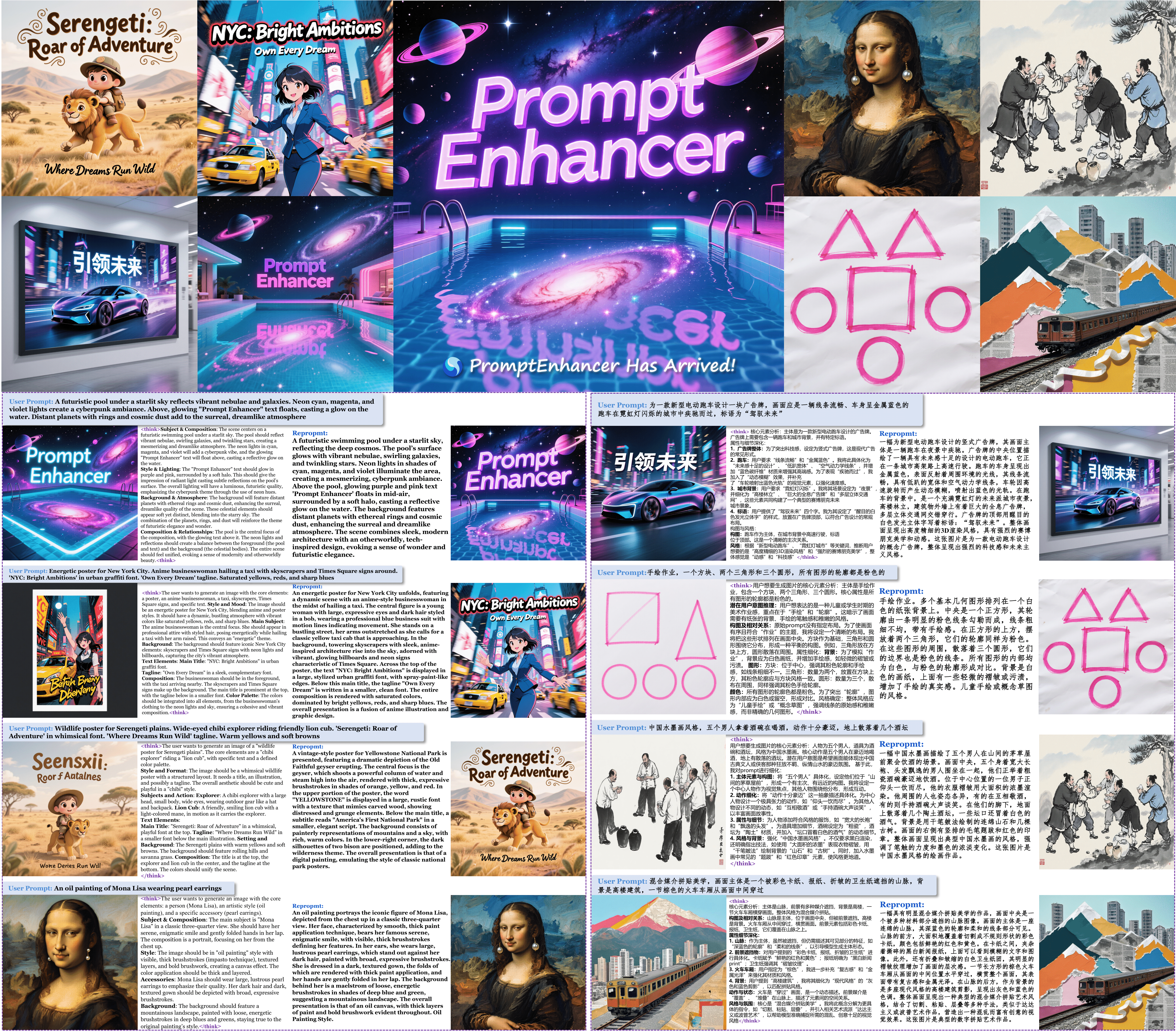
Hunyuan-PromptEnhancer is a prompt rewriting utility that supports both Text-to-Image generation and Image-to-Image editing. It restructures input prompts while preserving original intent, producing clearer, structured prompts for downstream image generation tasks.
Key Features:
pip install -r requirements.txt
chmod +x script/install_gguf.sh && ./script/install_gguf.sh
💡 Tip: Choose GGUF installation if you want faster inference with lower memory usage, especially for the 32B model.
For most users, we recommend starting with the PromptEnhancer-7B model:
# Download PromptEnhancer-7B (13GB) - Best balance of quality and efficiency
huggingface-cli download tencent/HunyuanImage-2.1/reprompt --local-dir ./models/promptenhancer-7b
| Model | Size | Quality | Memory | Best For | |-------|------|---------|--------|----------| | PromptEnhancer-7B | 13GB | High | 8GB+ | Most users, balanced performance | | PromptEnhancer-32B | 64GB | Highest | 32GB+ | Research, highest quality needs | | 32B-Q8_0 (GGUF) | 35GB | Highest | 35GB+ | High-end GPUs (H100, A100) | | 32B-Q6_K (GGUF) | 27GB | Excellent | 27GB+ | RTX 4090, RTX 5090 | | 32B-Q4_K_M (GGUF) | 20GB | Good | 20GB+ | RTX 3090, RTX 4080 |
# PromptEnhancer-7B (recommended for most users)
huggingface-cli download tencent/HunyuanImage-2.1/reprompt --local-dir ./models/promptenhancer-7b
PromptEnhancer-32B (for highest quality)
huggingface-cli download PromptEnhancer/PromptEnhancer-32B --local-dir ./models/promptenhancer-32b
PromptEnhancer-Img2Img-Edit (for image editing tasks)
huggingface-cli download PromptEnhancer/PromptEnhancer-Img2img-Edit --local-dir ./models/promptenhancer-img2img-edit
Choose one based on your GPU memory:
# Q8_0: Highest quality (35GB)
huggingface-cli download mradermacher/PromptEnhancer-32B-GGUF PromptEnhancer-32B.Q8_0.gguf --local-dir ./models
Q6_K: Excellent quality (27GB) - Recommended for RTX 4090
huggingface-cli download mradermacher/PromptEnhancer-32B-GGUF PromptEnhancer-32B.Q6_K.gguf --local-dir ./models
Q4_K_M: Good quality (20GB) - Recommended for RTX 3090/4080
huggingface-cli download mradermacher/PromptEnhancer-32B-GGUF PromptEnhancer-32B.Q4_K_M.gguf --local-dir ./models
🚀 Performance Tip: GGUF models offer 50-75% memory reduction with minimal quality loss. Use Q6_K for the best quality/memory trade-off.
from inference.prompt_enhancer import HunyuanPromptEnhancer
models_root_path = "./models/promptenhancer-7b"
enhancer = HunyuanPromptEnhancer(models_root_path=models_root_path, device_map="auto")
Enhance a prompt (Chinese or English)
user_prompt = "Third-person view, a race car speeding on a city track..."
new_prompt = enhancer.predict(
    prompt_cot=user_prompt,
    # Default system prompt is tailored for image prompt rewriting; override if needed
    temperature=0.7,   # >0 enables sampling; 0 uses deterministic generation
    top_p=0.9,
    max_new_tokens=256,
)
print("Enhanced:", new_prompt)
For image editing tasks where you want to enhance editing instructions based on input images:
from inference.prompt_enhancer_img2img import PromptEnhancerImg2Img
Initialize the image-to-image prompt enhancer
enhancer = PromptEnhancerImg2Img(
    model_path="./models/your-model",
    device_map="auto"
)
Enhance an editing instruction with image context
edit_instruction = "Remove the watermark from the bottom"
image_path = "./examples/sample_image.png"
enhanced_prompt = enhancer.predict(
    edit_instruction=edit_instruction,
    image_path=image_path,
    temperature=0.1,
    top_p=0.9,
    max_new_tokens=2048
)
print("Enhanced editing prompt:", enhanced_prompt)
from inference.prompt_enhancer_gguf import PromptEnhancerGGUF
Auto-detects Q8_0 model in models/ folder
enhancer = PromptEnhancerGGUF(
    model_path="./models/PromptEnhancer-32B.Q8_0.gguf",  # Optional: auto-detected
    n_ctx=1024,        # Context window size
    n_gpu_layers=-1,   # Use all GPU layers
)
Enhance a prompt
user_prompt = "woman in jungle"
enhanced_prompt = enhancer.predict(
    user_prompt,
    temperature=0.3,
    top_p=0.9,
    max_new_tokens=512,
)
print("Enhanced:", enhanced_prompt)
# Simple usage - auto-detects model in models/ folder
python inference/prompt_enhancer_gguf.py
Or specify model path
GGUF_MODEL_PATH="./models/PromptEnhancer-32B.Q8_0.gguf" python inference/prompt_enhancer_gguf.py
🚀 Why use GGUF models?
| Model | Input Type | Use Case | Model Backend | |-------|------------|----------|---------------| | HunyuanPromptEnhancer | Text only | Text-to-Image generation | Transformers (7B/32B) | | PromptEnhancerImg2Img | Text + Image | Image editing tasks | Transformers (32B) | | PromptEnhancerGGUF | Text only | Memory-efficient T2I | llama.cpp (quantized) |
models_root_path: Local path or repo id; supports trust_remote_code models.device_map: Device mapping (default auto).predict(...):prompt_cot (str): Input prompt to rewrite.sys_prompt (str): Optional system prompt; a default is provided for image prompt rewriting.temperature (float): >0 enables sampling; 0 for deterministic generation.top_p (float): Nucleus sampling threshold (effective when sampling).max_new_tokens (int): Maximum number of new tokens to generate.model_path (str): Path to GGUF model file (auto-detected if in models/ folder).n_ctx (int): Context window size (default: 8192, recommended: 1024 for short prompts).n_gpu_layers (int): Number of layers to offload to GPU (-1 for all layers).verbose (bool): Enable verbose logging from llama.cpp.model_path (str): Path to the pretrained Qwen2.5-VL model.device_map (str): Device mapping for model loading (default: auto).predict(...):edit_instruction (str): Original editing instruction.image_path (str): Path to the input image file.sys_prompt (str): Optional system prompt (uses default if None).temperature (float): Sampling temperature (default: 0.1).top_p (float): Nucleus sampling threshold (default: 0.9).max_new_tokens (int): Maximum tokens to generate (default: 2048).If you find this project useful, please consider citing:
@article{promptenhancer,
  title={PromptEnhancer: A Simple Approach to Enhance Text-to-Image Models via Chain-of-Thought Prompt Rewriting},
  author={Wang, Linqing and Xing, Ximing and Cheng, Yiji and Zhao, Zhiyuan and Donghao, Li and Tiankai, Hang and Zhenxi, Li and Tao, Jiale and Wang, QiXun and Li, Ruihuang and Chen, Comi and Li, Xin and Wu, Mingrui and Deng, Xinchi and Gu, Shuyang and Wang, Chunyu and Lu, Qinglin},
  journal={arXiv preprint arXiv:2509.04545},
  year={2025}
}
We would like to thank the following open-source projects and communities for their contributions to open research and exploration: Transformers and HuggingFace.
If you would like to leave a message for our R&D and product teams, Welcome to contact our open-source team. You can also contact us via email (hunyuan_opensource@tencent.com).
→→ →
→ →
→ →
→ →
→ →
→ →
→