1
 →
→
[EMNLP2025] LightRAG: Simple and Fast Retrieval-Augmented Generation
HKUDS/LightRAG is an open-source project on GitHub, mainly written in Python. [EMNLP2025] LightRAG: Simple and Fast Retrieval-Augmented Generation It currently holds 39,686 stars and 0 forks with 0 open issues, and was last pushed on an unknown date (repository created unknown).
AI Homed tracks it on the AI Models & LLM Tools board.




---

|
|
---
Fix, Recursive, Vector, and Paragraph.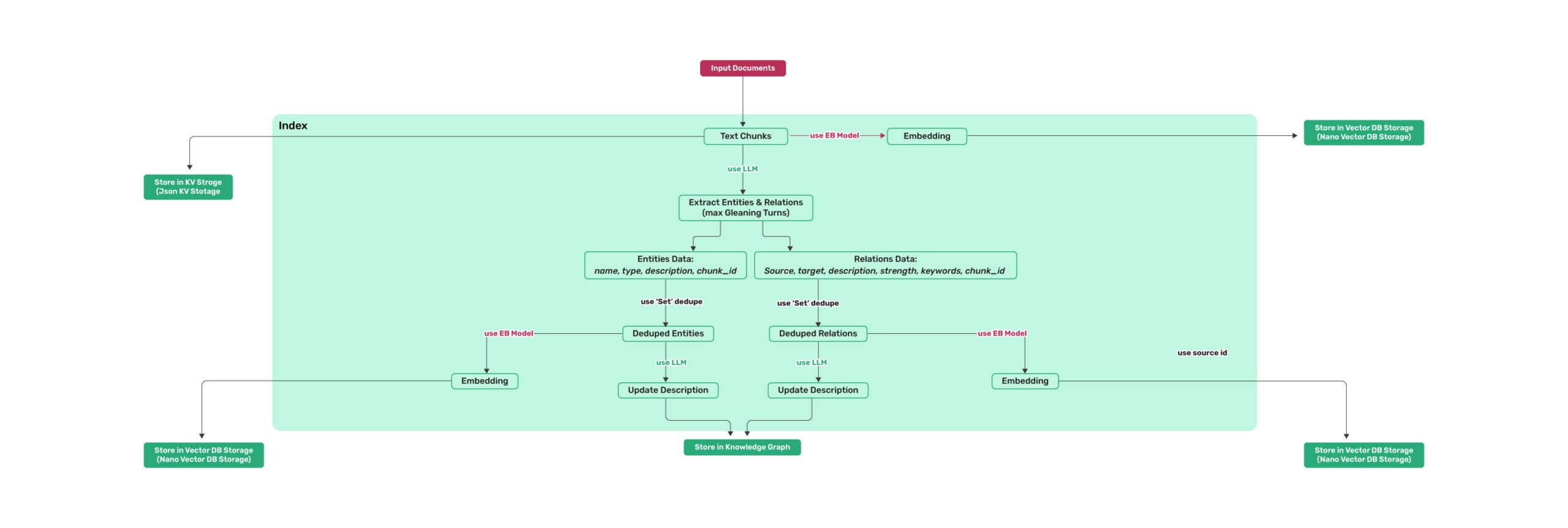 Figure 1: LightRAG Indexing Flowchart - Img Caption : Source
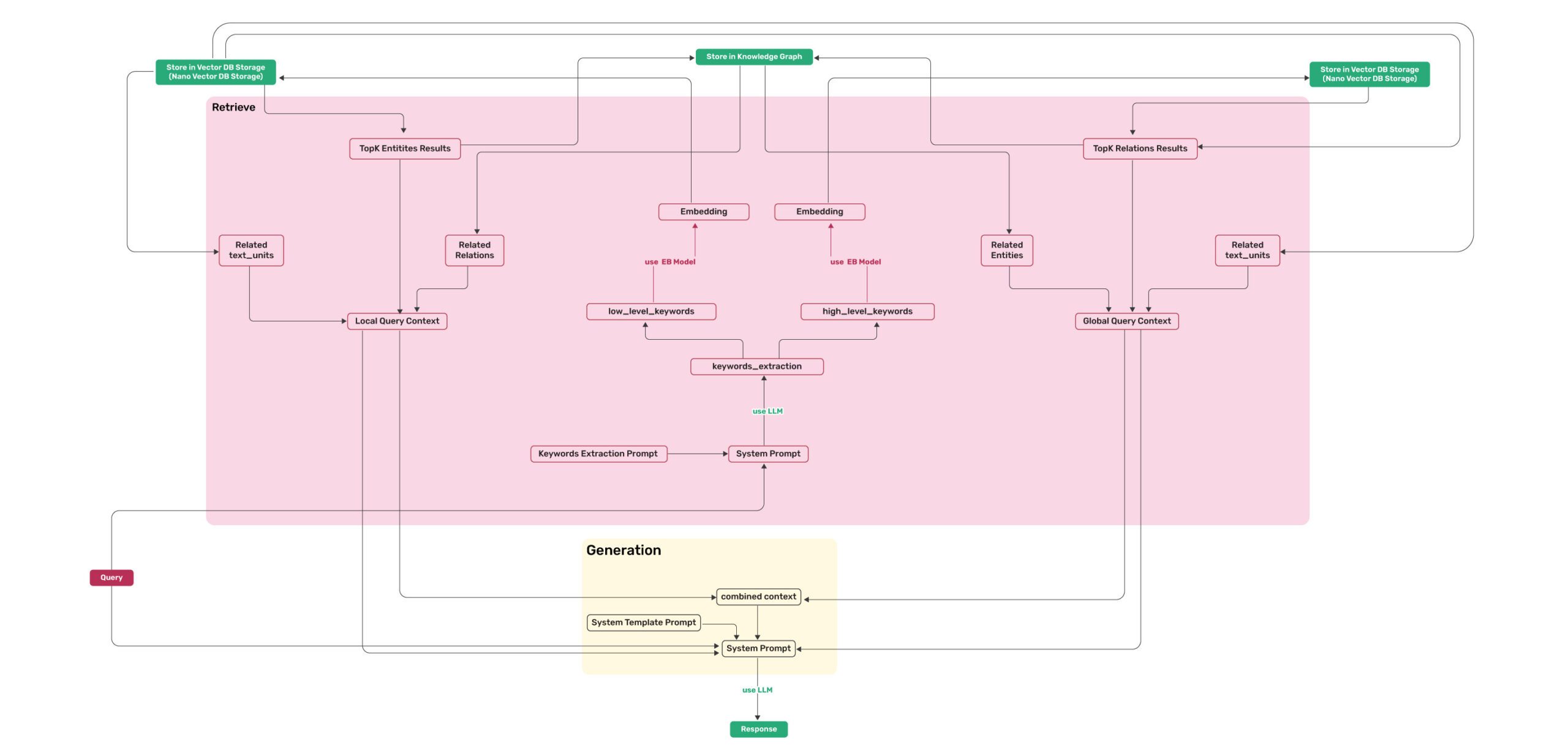 Figure 2: LightRAG Retrieval and Querying Flowchart - Img Caption : Source
💡 Using uv for Package Management: This project uses uv for fast and reliable Python package management. Install uv first: curl -LsSf https://astral.sh/uv/install.sh | sh (Unix/macOS) or powershell -c "irm https://astral.sh/uv/install.ps1 | iex" (Windows)
Note: You can also use pip if you prefer, but uv is recommended for better performance and more reliable dependency management.
> 📦 Offline Deployment: For offline or air-gapped environments, see the Offline Deployment Guide for instructions on pre-installing all dependencies and cache files.
### Install LightRAG Server as tool using uv (recommended)
uv tool install "lightrag-hku[api]"
Or using pip
python -m venv .venv
source .venv/bin/activate  # Windows: .venv\Scripts\activate
pip install "lightrag-hku[api]"
Setup env file
Obtain the env.example file by downloading it from the GitHub repository root
or by copying it from a local source checkout.
cp env.example .env  # Update the .env with your LLM and embedding configurations
Launch the server. It binds to all interfaces (0.0.0.0) by default.
SECURITY: before exposing it on a network, configure authentication in .env
(LIGHTRAG_API_KEY, or AUTH_ACCOUNTS together with TOKEN_SECRET), or bind to
127.0.0.1 for local-only access; without auth every endpoint is public.
Note: the Ollama-compatible /api/* routes stay open by default for client
compatibility; set WHITELIST_PATHS=/health to require auth on them too.
lightrag-server
git clone https://github.com/HKUDS/LightRAG.git
cd LightRAG
Bootstrap the development environment (recommended)
make dev
source .venv/bin/activate  # Activate the virtual environment (Linux/macOS)
Or on Windows: .venv\Scripts\activate
make dev installs the test toolchain plus the full offline stack
(API, storage backends, and provider integrations), then builds the frontend.
Run make env-base or copy env.example to .env before starting the server.
Equivalent manual steps with uv
Note: uv sync automatically creates a virtual environment in .venv/
uv sync --extra test --extra offline
source .venv/bin/activate  # Activate the virtual environment (Linux/macOS)
Or on Windows: .venv\Scripts\activate
Or using pip with virtual environment
python -m venv .venv
source .venv/bin/activate  # Windows: .venv\Scripts\activate
pip install -e ".[test,offline]"
Build front-end artifacts
cd lightrag_webui
bun install --frozen-lockfile
bun run build
cd ..
setup env file
make env-base  # Or: cp env.example .env and update it manually
Launch API-WebUI server
lightrag-server
git clone https://github.com/HKUDS/LightRAG.git
cd LightRAG
cp env.example .env  # Update the .env with your LLM and embedding configurations
modify LLM and Embedding settings in .env
docker compose up
Historical versions of LightRAG docker images can be found here: [LightRAG Docker Images]( https://github.com/HKUDS/LightRAG/pkgs/container/lightrag)
> Official GHCR images published by GitHub Actions are signed with Sigstore Cosign using GitHub OIDC. See docs/DockerDeployment.md for verification commands.
> On Apple Silicon (macOS 26) without Docker Desktop, you can run the same Postgres/Neo4j/Milvus storage stack on Apple's native container runtime — see docs/AppleContainerSetup.md.
Instead of editing env.example by hand, use the interactive setup wizard to generate a configured .env and, when needed, docker-compose.final.yml:
make env-base           # Required first step: LLM, embedding, reranker
make env-storage        # Optional: storage backends and database services
make env-server         # Optional: server port, auth, and SSL
make env-base-rewrite   # Optional: force-regenerate wizard-managed compose services
make env-storage-rewrite # Optional: force-regenerate wizard-managed compose services
make env-security-check # Optional: audit the current .env for security risks
For full description of every target see docs/InteractiveSetup.md.
The native docx parser's opt-in smart_heading engine parameter uses spaCy for sentence/NER heuristics. The spaCy runtime is already included in the api extra — only the two pinned language models (zh_core_web_sm / en_core_web_sm 3.8.0, GitHub release wheels not published on PyPI) need one extra step:
lightrag-download-cache --spacy-install
Enable smart_heading per file/rule (e.g. LIGHTRAG_PARSER=docx:native(smart_heading=true)), or globally in .env:
# .docx files routed to the native engine get smart_heading by default;
opt a file back out with an explicit native(smart_heading=false) rule/hint.
DOCX_SMART_HEADING=true
When the global switch is on (or a LIGHTRAG_PARSER rule carries native(smart_heading=true)), the server verifies the models at startup and fails fast with install guidance if they are missing. Deployments that never enable smart_heading need no models. The main Docker image ships the models pre-installed (the lite image does not); for air-gapped hosts see the Offline Deployment Guide.
The native markdown/textpack parser rasterizes embedded SVG images to PNG via cairosvg. cairosvg is a cffi binding: pip install cairosvg (pulled in by the api extra) always succeeds, but rendering only works if the native libcairo shared library is also present on the host — pip/uv cannot install system libraries. Without it, rasterization fails at runtime and the affected SVG is skipped (the rest of the document is unaffected); the server logs a warning at startup so the gap is visible before it shows up as a per-document warning later.
Install the system package for your platform:
# Debian / Ubuntu (the official Docker image already includes this)
sudo apt-get install -y libcairo2
RHEL / Fedora
sudo dnf install -y cairo
macOS (Homebrew)
brew install cairo
Windows: install the GTK3 runtime, which bundles libcairo-2.dll
Deployments that never process markdown/textpack documents with embedded SVGs can ignore the startup warning.
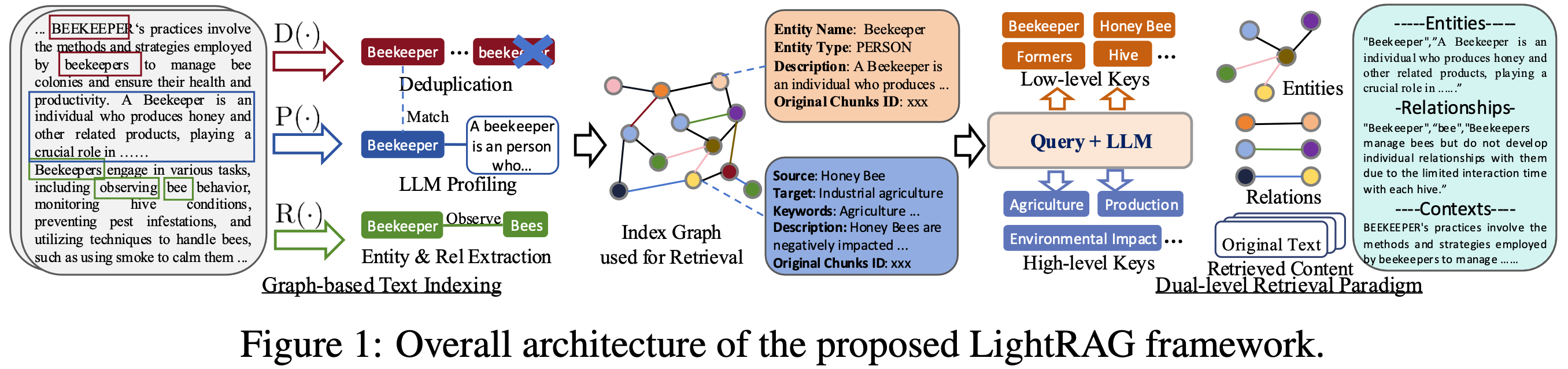
LightRAG is a lightweight knowledge-graph RAG framework and an efficient alternative to Microsoft GraphRAG. It adopts a dual-layer architecture to manage both knowledge graphs (KGs) and vector embeddings, effectively bridging the gap between traditional vector-based RAG and graph-based RAG approaches. Designed for high scalability, LightRAG addresses key challenges in large-scale graph indexing and retrieval, including heavy computational overhead, slow response times, and the high cost of incremental updates. While supporting large datasets, LightRAG can still deliver exceptionally high RAG quality, even when paired with a 30B open-source large language model (LLM).
Fixed-length (F), Recursive character (R), Vector semantic (V), and Paragraph semantic (P). The LightRAG-native Paragraph semantic (P) strategy aligns chunk boundaries with the document's native semantic boundaries—headings, paragraphs, and tables—as closely as possible. This reduces problems such as mismatched headings and content or missing header rows when long tables are split.Traditional RAG systems lack an effective way to process multimodal content such as images, formulas, and tables in documents. Starting with v1.5, LightRAG seamlessly integrates multimodal processing into its document pipeline and query flow. Through the knowledge graph, LightRAG connects multimodal content with the body text and can use that information when answering queries to produce more accurate and reliable responses. This capability can substantially improve RAG quality for documents rich in multimodal content, such as operation manuals and academic papers.
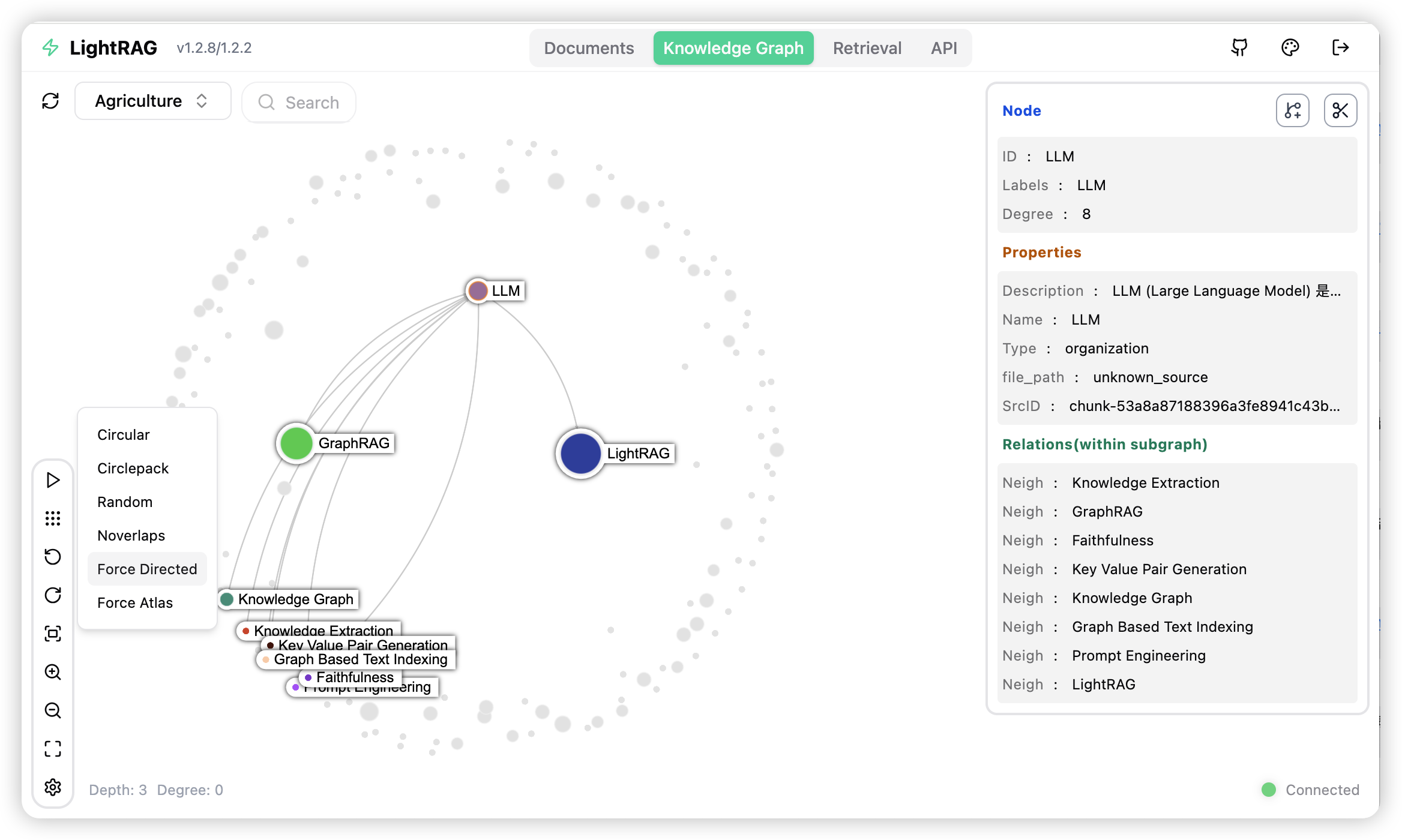
The LightRAG server offers not only a web-based UI for exploring LightRAG functionalities but also a comprehensive REST API. For more information about the LightRAG server, please refer to LightRAG Server.
LightRAG requires LLM/VLMs of four different roles during its workflow. You should configure models with different capabilities and speeds for different roles to strike a balance between performance and processing speed. LightRAG has higher capability requirements for Large Language Models (LLMs) than traditional RAG because it requires LLMs to perform complex entity-relation extraction tasks from documents. During the query phase, the LLM needs to process a large volume of retrieved information, including entities, relationships, and text chunks. This requires the model to have the capability of generating high-quality responses in long, noisy contexts.
Recommended models by role:
EXTRACT): Entity-relation extraction runs on every text chunk, so a fast, cost-effective mainstream model is enough — a non-thinking model (reasoning/thinking mode disabled) is strongly recommended to avoid slow, expensive extraction. Good hosted options include GPT-5.6-luna, Claude Haiku, or Gemini-mini internationally, and DeepSeek-V4-lite or Kimi in China. For local deployment, Qwen3-30B-A3B-Instruct is a reasonable minimum.QUERY): This model writes the final answer from long, noisy retrieved context, so it should be stronger than the extraction model in order to maximize answer quality. Choose a higher-tier model from the same families; a thinking-capable model is fine here.KEYWORD): A lightweight, latency-sensitive step that must use a non-thinking model to keep query latency low; a fast model comparable to the extraction one is sufficient.VLM): Any mainstream multimodal model with image-input support works. For local deployment, consider Qwen3.6-35B-A3B.LightRAG supports five query modes:
mix. Using mix mode generally yields the most ideal query results. The mix mode takes slightly longer than naive, while other query modes are roughly comparable in latency.
When choosing an Embedding model, pay attention to its multilingual support capabilities. Since LightRAG's retrieval quality has limited dependency on the Embedding model, it is recommended to choose low-dimensional and fast models. Any mainstream, up-to-date embedding model works well; for local deployment, BAAI/bge-m3 is a solid choice. We highly recommend deploying the Embedding model locally to achieve the best performance.
Important Note: The Embedding model must be determined before document indexing, and the same model must be used in the query phase. Once selected, embedding models generally cannot be changed. If changed, you will need to re-embed all text chunks, entities, and
→ →
→ →
→ →
→ →
→ →
→ →
→ →
→