1
 →
→
[CVPR 2026] PersonaLive! : Expressive Portrait Image Animation for Live Streaming
GVCLab/PersonaLive is an open-source project on GitHub, mainly written in Python. [CVPR 2026] PersonaLive! : Expressive Portrait Image Animation for Live Streaming It currently holds 3,863 stars and 568 forks with 35 open issues, and was last pushed on 2026-08-28 (repository created 2025-11-25).
AI Homed tracks it on the AI Video Projects board and on the AI AI Video Projects list.


training code.paper!inference code, config, and pretrained weights!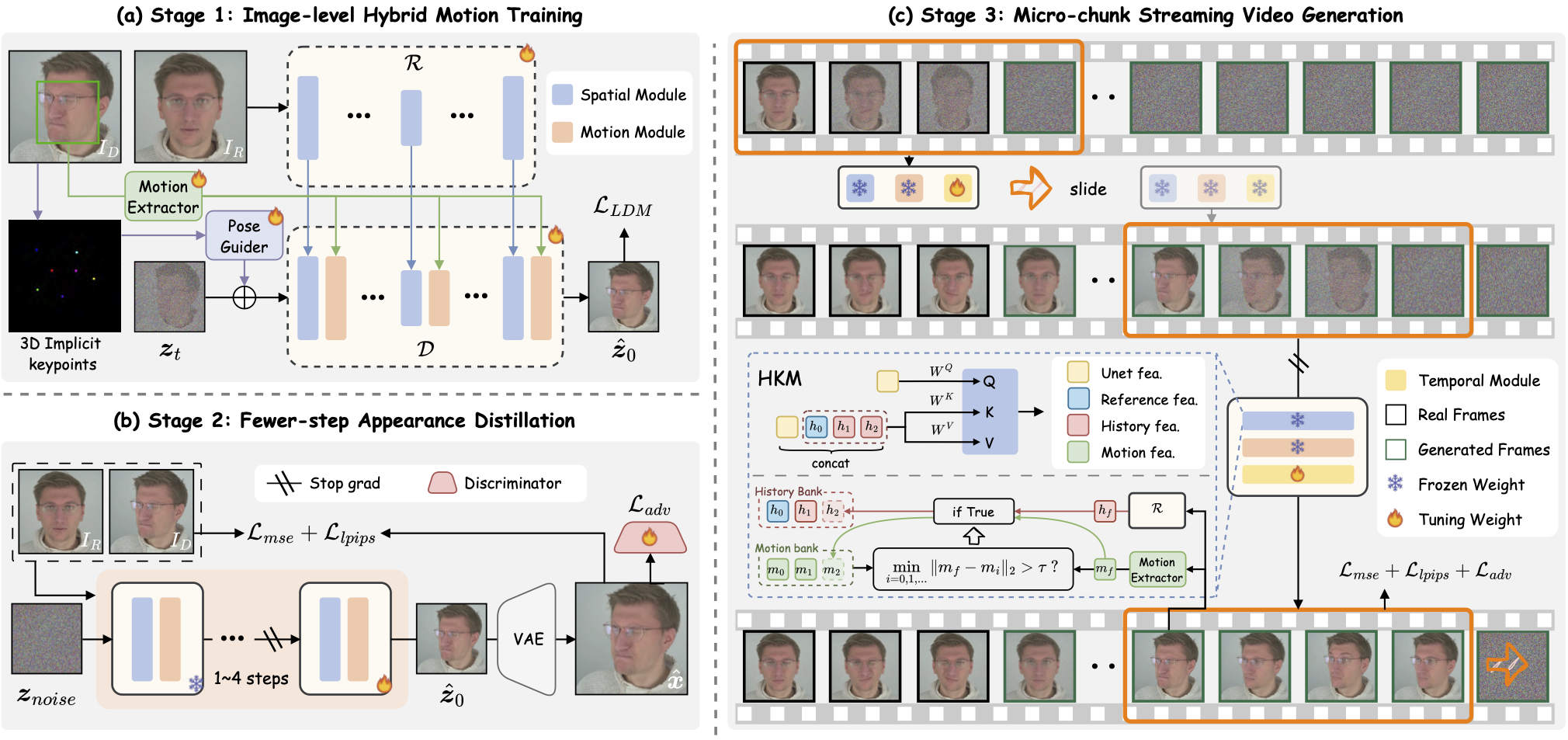
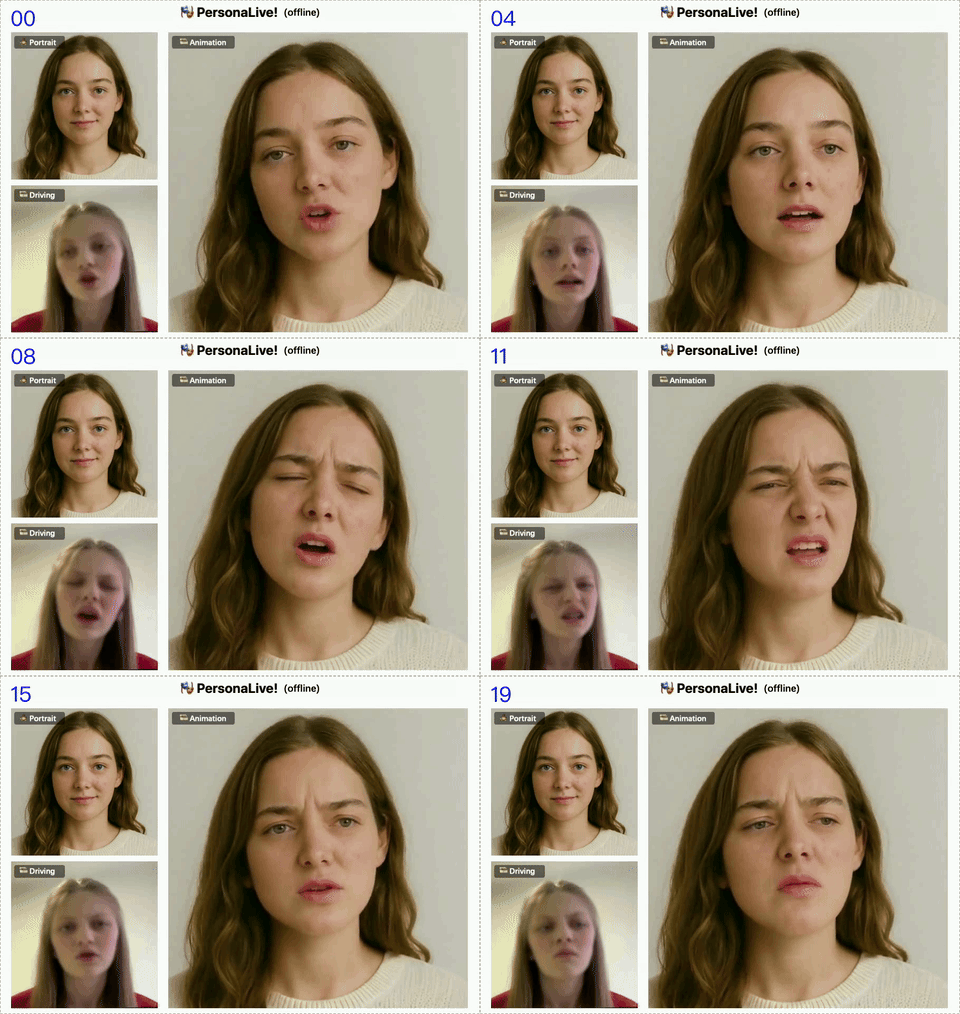
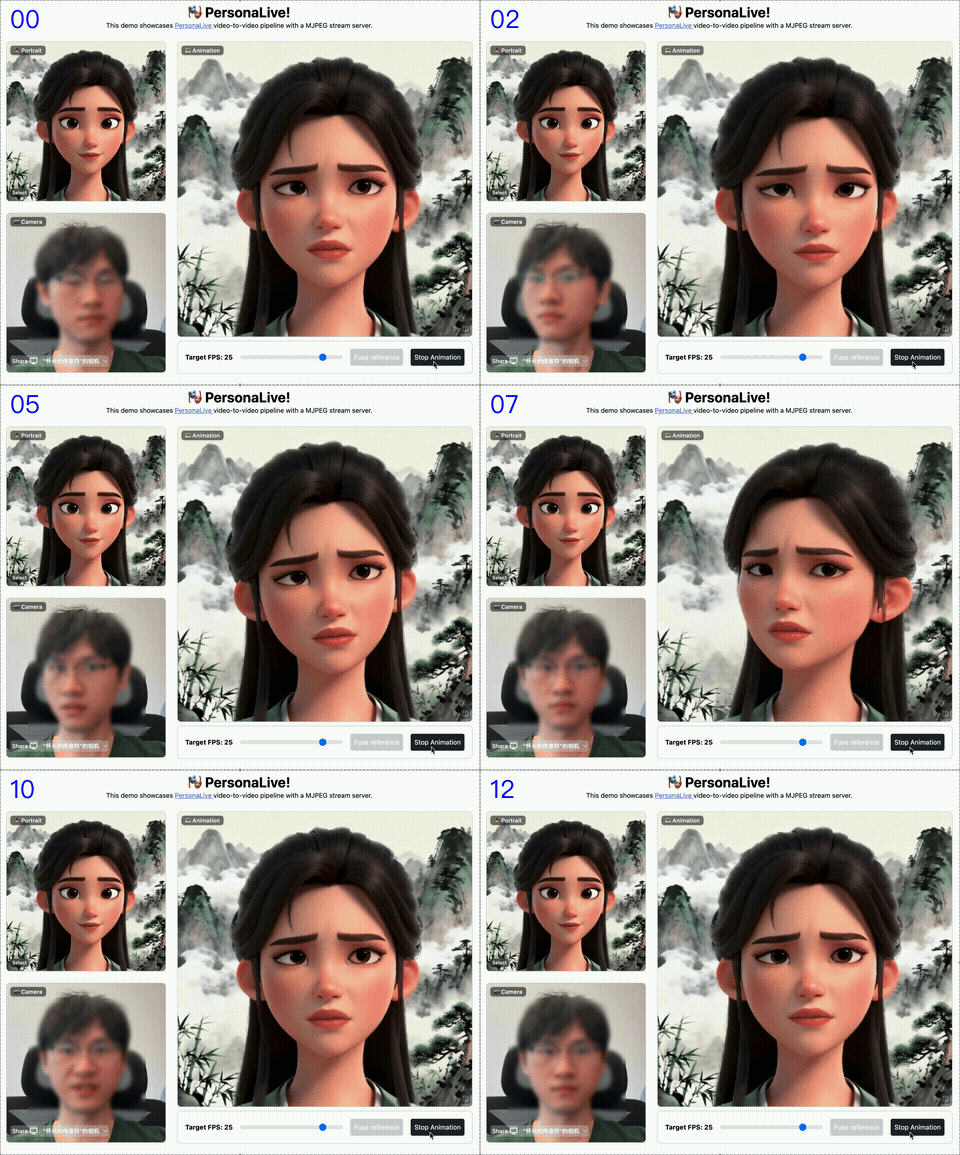
We present PersonaLive, a real-time and streamable diffusion framework capable of generating infinite-length portrait animations.
# clone this repo
git clone https://github.com/GVCLab/PersonaLive
cd PersonaLive
Create conda environment
conda create -n personalive python=3.10
conda activate personalive
Install packages with pip
pip install -r requirements_base.txt
python tools/download_weights.py
Option 2: Download pre-trained weights into the ./pretrained_weights folder from one of the below URLs:
Finally, these weights should be organized as follows:
pretrained_weights
├── onnx
│   ├── unet_opt
│   │   ├── unet_opt.onnx
│   │   └── unet_opt.onnx.data
│   └── unet
├── personalive
│   ├── denoising_unet.pth
│   ├── motion_encoder.pth
│   ├── motion_extractor.pth
│   ├── pose_guider.pth
│   ├── reference_unet.pth
│   └── temporal_module.pth
├── sd-vae-ft-mse
│   ├── diffusion_pytorch_model.bin
│   └── config.json
├── sd-image-variations-diffusers
│   ├── image_encoder
│   │   ├── pytorch_model.bin
│   │   └── config.json
│   ├── unet
│   │   ├── diffusion_pytorch_model.bin
│   │   └── config.json
│   └── model_index.json
└── tensorrt
    └── unet_work.engine
python inference_offline.py
-L: Max number of frames to generate. (Default: 100)--use_xformers: Enable xFormers memory efficient attention. (Default: True)--stream_gen: Enable streaming generation strategy. (Default: True)--reference_image: Path to a specific reference image. Overrides settings in config.--driving_video: Path to a specific driving video. Overrides settings in config.python inference_offline.py --use_xformers False
# install Node.js 18+
curl -o- https://raw.githubusercontent.com/nvm-sh/nvm/v0.39.1/install.sh | bash
nvm install 18
source web_start.sh
20 minutes depending on your device. Note that TensorRT optimizations may lead to slight variations or a small drop in output quality.
# Install packages with pip
pip install -r requirements_trt.txt
src/models/motion_encoder/FAN_temporal_feature_extractor.py
self.pos_embed.pos_embed.requires_grad = False
Converting the model to TensorRT
python torch2trt.py
# Install PyCUDA manually using Conda (avoids compilation issues):
conda install -c conda-forge pycuda "numpy<2.0"
Open requirements_trt.txt and comment out or remove the line "pycuda==2024.1.2"
Install other packages with pip
pip install -r requirements_trt.txt
Converting the model to TensorRT
python torch2trt.py
H100. We recommend ALL users (including H100 users) re-run python torch2trt.py locally to ensure best compatibility.
python inference_online.py --acceleration none (for RTX 50-Series) or xformers or tensorrt
http://0.0.0.0:7860 in your browser. (*If http://0.0.0.0:7860 does not work well, try http://localhost:7860)
How to use: Upload Image ➡️ Fuse Reference ➡️ Start Animation ➡️ Enjoy! 🎉
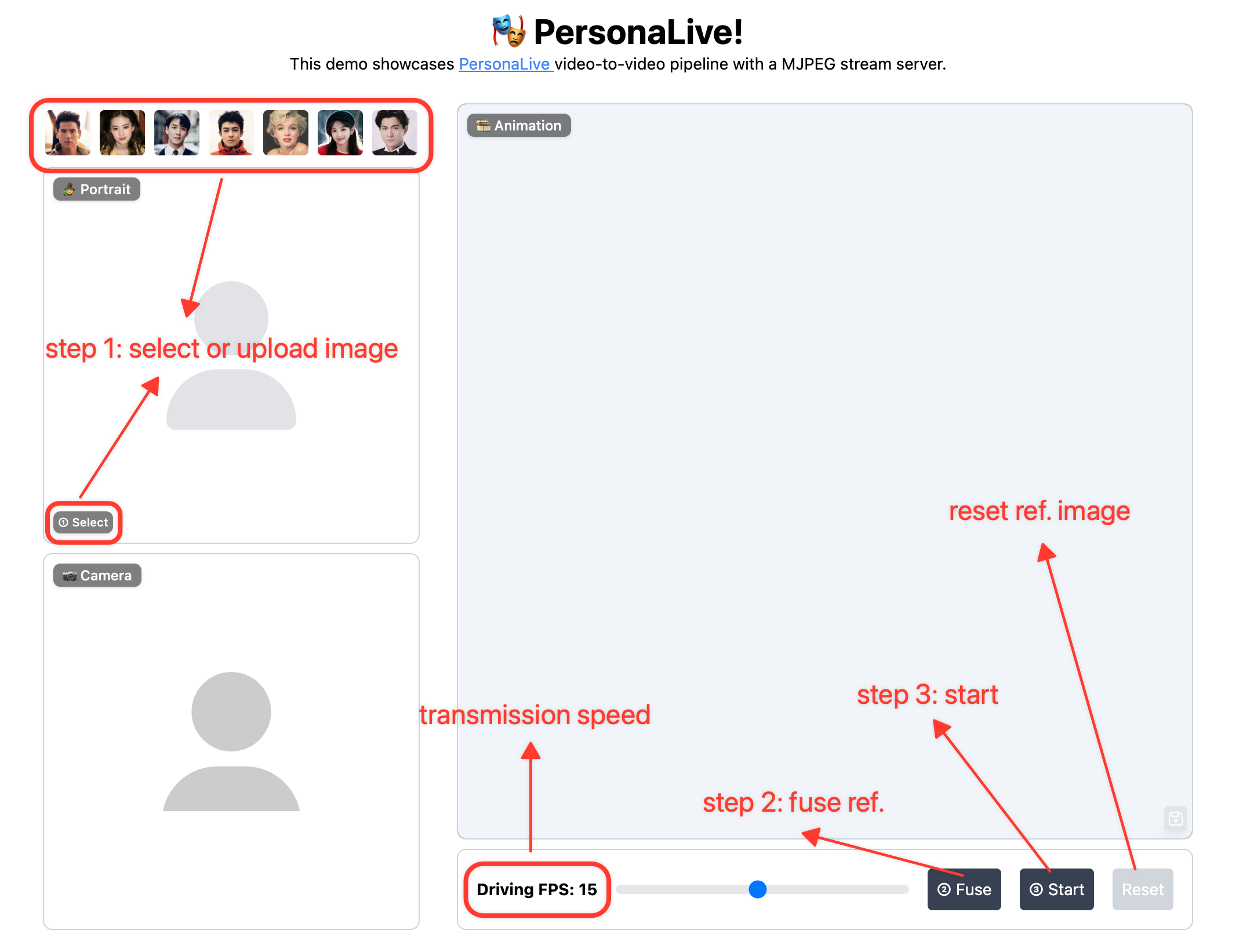
Regarding Latency: Latency varies depending on your device's computing power. You can try the following methods to optimize it:
1. Lower the "Driving FPS" setting in the WebUI to reduce the computational workload.
2. You can increase the multiplier (e.g., set to num_frames_needed * 4 or higher) to better match your device's inference speed. https://github.com/GVCLab/PersonaLive/blob/6953d1a8b409f360a3ee1d7325093622b29f1e22/webcam/util.py#L73
PersonaLive training is organized into three stages. Approximate training time on 8x H100 with default configs: Stage 1 ~13h, Stage 2 ~15h, Stage 3 ~20h.
pip install -r requirements_train.txt
If you use multi-GPU or multi-node training, configure Accelerate once before launching training:
accelerate config
videos directory and a matching boxes directory:
Datasets
├── VFHQ
│   ├── videos
│   │   ├── example1.mp4
│   │   ├── example2.mp4
│   │   └── ...
│   └── boxes
│       ├── example1.pt
│       ├── example2.pt
│       └── ...
└── ...
Preprocessing example:
# 1) Extract face / eye / mouth boxes from each frame
python tools/get_boxes.py --video_dir ./Datasets/VFHQ/videos --save_dir ./Datasets/VFHQ/boxes --workers 8
2) Generate meta json: [{"video_path": ".../videos/xxx.mp4"}, ...]
python tools/extract_meta_info.py --root_path ./Datasets/VFHQ --dataset_name VFHQ
Then set data.meta_paths in each training config:
data:
meta_paths:
- "./data/VFHQ_meta.json"
- "./data/OtherDataset_meta.json"
pretrained_weights
├── xnemo
│   ├── xnemo_motion_encoder.pth
│   ├── xnemo_denoising_unet.pth
│   ├── xnemo_reference_unet.pth
│   └── xnemo_temporal_module.pth
├── sd-vae-ft-mse
│   ├── diffusion_pytorch_model.bin
│   └── config.json
├── sd-image-variations-diffusers
│   ├── image_encoder
│   │   ├── pytorch_model.bin
│   │   └── config.json
│   ├── unet
│   │   ├── diffusion_pytorch_model.bin
│   │   └── config.json
│   └── model_index.json
├── pose_guider.pth
└── stylegan2_discriminator_ffhq512.pth
accelerate launch train_stage1.py --config ./configs/train/personalive_stage1.yaml
Default output folder: ./exp_output/personalive_stage1/
Update configs/train/personalive_stage2.yaml to point to Stage 1 outputs:
motion_encoder_path: './exp_output/personalive_stage1/motion_encoder-xxxxx.pth'
denoising_unet_path: './exp_output/personalive_stage1/denoising_unet-xxxxx.pth'
reference_unet_path: './exp_output/personalive_stage1/reference_unet-xxxxx.pth'
pose_guider_path: './exp_output/personalive_stage1/pose_guider-xxxxx.pth'
Run:
accelerate launch train_stage2.py --config ./configs/train/personalive_stage2.yaml
Default output folder: ./exp_output/personalive_stage2/
Update configs/train/personalive_stage3.yaml to point to Stage 2 outputs:
motion_encoder_path: './exp_output/personalive_stage2/motion_encoder-xxxxx.pth'
denoising_unet_path: './exp_output/personalive_stage2/denoising_unet-xxxxx.pth'
reference_unet_path: './exp_output/personalive_stage2/reference_unet-xxxxx.pth'
pose_guider_path: './exp_output/personalive_stage2/pose_guider-xxxxx.pth'
discriminator_path: './exp_output/personalive_stage2/discriminator-xxxxx.pth'
Run:
accelerate launch train_stage3.py --config ./configs/train/personalive_stage3.yaml
Default output folder: ./exp_output/personalive_stage3/
Special thanks to the community for providing helpful setups! 🥂
download_weights.py, and to @andchir for adding audio merging functionality.@article{li2025personalive,
title={PersonaLive! Expressive Portrait Image Animation for Live Streaming},
author={Li, Zhiyuan and Pun, Chi-Man and Fang, Chen and Wang, Jue and Cun, Xiaodong},
journal={arXiv preprint arXiv:2512.11253},
year={2025}
}
 →
→ →
→ →
→ →
→ →
→ →
→ →
→