1
 →

Turn Amazon Echos (Echo Dot 3, Echo Dot 2, Echo 2) into local Home Assistant voice satellites. Keeps Amazon's mic processing and wake word engine
Gamer92000/echo-dot-assist is an open-source project on GitHub, mainly written in C. Turn Amazon Echos (Echo Dot 3, Echo Dot 2, Echo 2) into local Home Assistant voice satellites. It currently holds 1,438 stars and 124 forks with 55 open issues, and was last pushed on 2026-11-19 (repository created 2026-09-21).
AI Homed tracks it on the Today's Trending board.
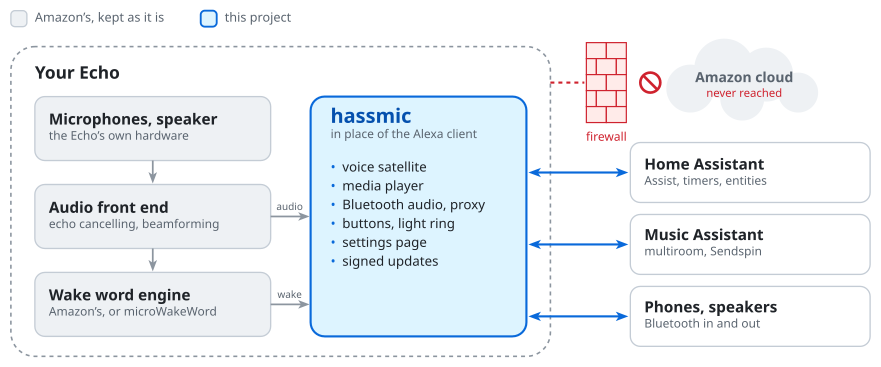
Turn an old Amazon Echo into a Home Assistant voice satellite that never talks to Amazon.
The Echo keeps what it is good at: Amazon's microphone processing and wake word engine, so it still hears you across
the room and over its own music. Only Alexa goes. In its place runs hassmic, a small daemon that Home Assistant finds
as an ESPHome device, with no YAML and no add-on.
[!CAUTION]
Vibecoded, unaudited, your risk. Code, notes and docs were written by an AI (Claude) in conversation with the
author, and tried on one Echo of each model. The install unlocks the bootloader and writes the system partition: it
can brick the Echo. A mistake in the firewall or the updates could leave it online or open on your network. Read
what you run. No warranty, no support.
| | Echo | Model | Codename | Way in |
|----|------------------------------|--------|------------------------------------------|--------------------------------------------------|
| ✅ | Echo Dot 3rd gen (2018) | D9N29T | donut | open the case, wires on test pads |
| ✅ | Echo Dot 2nd gen (2016) | RS03QR | biscuit | micro-USB, no soldering |
| ✅ | Echo 2nd gen (2017) | XC56PY | radar | open the case, solder USB to the amplifier board |
| ✅ | Echo Show 5 1st gen (2019) | H23K37 | checkers | micro-USB, no soldering; the ring as a band on screen |
| ✅ | Echo Show 8 1st gen (2019) | C7H6N3 | crown | micro-USB, no soldering; as checkers |
| ✅ | Echo Show 5 2nd gen (2021) | C76N8S | cronos | micro-USB, no soldering; as checkers |
| ✅ | Echo Show 8 2nd gen (2021) | A8H3N2 | athena | micro-USB, no soldering (a serial-port unlock); the ring as a band on screen |
| ✅ | Echo Input (2018) | C1125P | cupcake | micro-USB, no soldering; no speaker (jack or Bluetooth), one LED |
| 🚧 | Echo Dot 5th gen (2022) | C2N6L4 | cannoli | open the case, solder USB to test pads; manual install only, no guided setup yet |
Each model needs exactly the firmware its page names (donut: Fire OS 6574.1 only). A Dot 3 from 2019–2020 (C78MP8) or
with a clock (36EBT3) is another model, and not supported. Every other Echo, and which are being worked on:
all models; how to add one: devices/.
✅ works, tried on one Echo of that model · 🧪 untested: builds and installs on paper, never run on a device · 🚧 works, but manual install only (no guided setup)
[!IMPORTANT]
Getting into the Echo is R0rt1z2's work, not this project's. Every model above
unlocks with their exploits for MediaTek's chips (amonet,
kamakiri, saiyaku), their bootloader payload
kaeru and TWRP as they ported it to each model, and their XDA threads walk
through the unlock and root. Without them none of this would run on an Echo.
The unlock and boot-root you do by hand, as the model's thread says: R0rt1z2 asks that they are never run from an
installer or a script, so the setup sends you to the thread, waits, and checks the Echo before it goes on.
| | Stock Alexa | With hassmic | |-----------------------------------------|--------------------------------|-------------------------------------------------------| | Voice assistant | Alexa, in Amazon's cloud | Home Assistant Assist | | Hears you across the room, over music | ✅ | ✅ the same front end | | Wake words | Alexa, Echo, Computer, … | the same, or any microWakeWord or openWakeWord model | | Only the nearest Echo answers | ✅ decided in the cloud | ✅ decided on your network | | Timers, announcements, follow-ups | ✅ | ✅ | | Drop In between Echos | ✅ through Amazon | ✅ on your network | | Multiroom music | Amazon speaker groups | Music Assistant (Sendspin) | | Bluetooth speaker for your phone | SBC | SBC, AAC, aptX, aptX HD | | Plays on a Bluetooth speaker | ✅ | ✅ | | Bluetooth proxy for Home Assistant | – | ✅ | | Do not disturb, equalizer, ring brightness | Alexa app | entities in Home Assistant | | Buttons and light ring in automations | – | an event and a light in Home Assistant | | Light ring animations of your own | – | drawn on the settings page, for each of the Echo's | | Echo Show: your words, the reply and timers on screen | Alexa's screens | large letters over the screen, experimental | | Louder speaker (Echo Dot 2, Echo 2, Echo Dot 3) | – | up to +12 dB on the settings page (Echo Dot 3: +2 dB) | | Sound detection (smoke alarm, glass, …) | Alexa Guard, checked in the cloud | on the Echo, less reliable | | Whisper detection | answers in a whisper | a sensor for your conversation agent | | Motion sensor | – | from the Wi-Fi signal, experimental | | Wi-Fi setup from a phone | Alexa app | Home Assistant app | | Talks to Amazon | always | never (firewalled) | | Updates | from Amazon, automatic | signed: from your PC, or from Home Assistant |
The table is for the ESPHome mode (the default). The Echo can be a Wyoming satellite instead: voice, wake word, buttons and Music Assistant work, most of the rest does not (details).
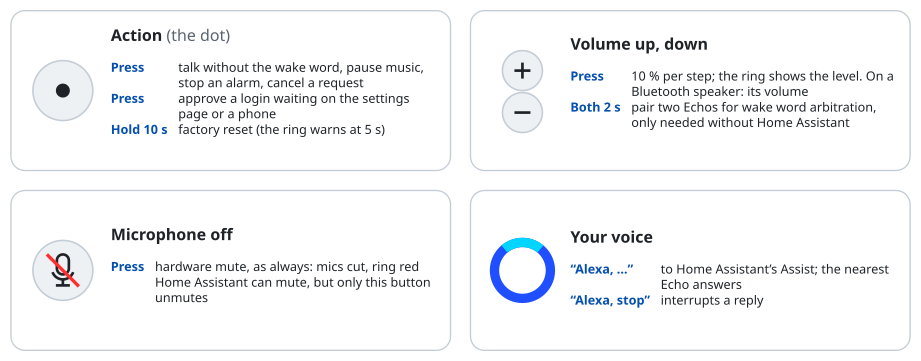
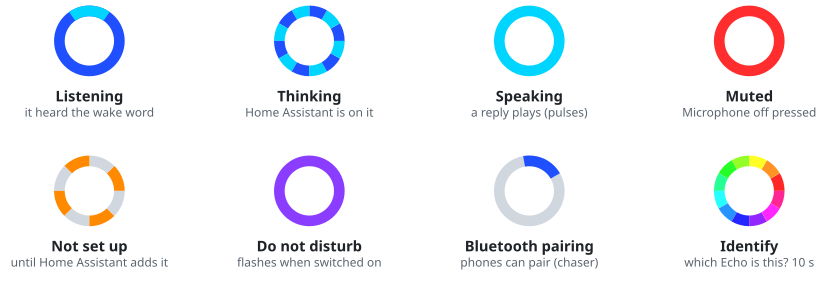
The light ring speaks stock Alexa's language, unless you draw your own:
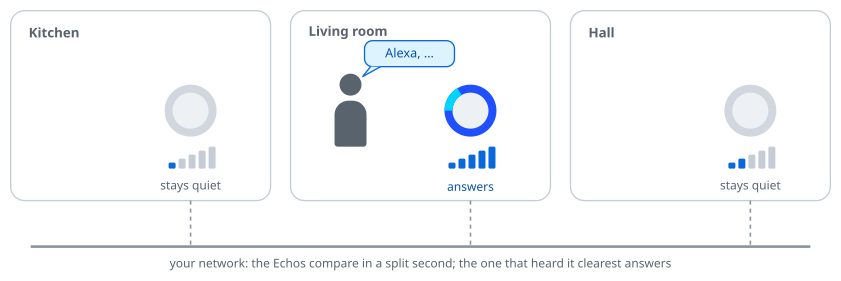
With several Echos, all of them hear you, but only one answers. They settle it among themselves, without Home Assistant and without a cloud; nothing to set up (how).
Everything else is set on the Echo's own settings page, http://:28931/ ("Visit" on its device page in
Home Assistant): every setting with what it does, the features to switch on and the entities each adds, your Echos side
by side to copy settings and wake words between them, the log. A press of the action button lets your browser in. More.
adb, fastboot, python3, make, unzip, debugfs (e2fsprogs), and free disk:
about 7 GB for an Echo Show (a 16 GB stick), under 1 GB for the others, 5 GB more to build here instead of taking
GitHub's build (8 for an Echo Input) — and about 35 GB for an Echo Dot 5, whose manual install builds the recovery
from a 26 GB source tree (its page breaks it down). On a live USB stick
the session's own disk is RAM: keep the repository on a drive.
The setup offers to install what is missing. An Echo that is unlocked already (by hand, as its XDA thread
says) can also be set up from Windows: Git Bash (Git for Windows, with its unzip and curl), adb
(platform-tools) and python3.
scripts/setup.sh

One guided run for every supported model. It does everything itself but the unlock, which you do by hand as the
model's XDA thread says (it shows you the thread and checks the Echo afterwards), and stops only when you have to act:
download a file (it picks it up from ~/Downloads), plug a cable or solder, unlock, type the Wi-Fi password. It wipes the
Echo, so it asks for a typed yes first.
build//setup.log).
main and release): the setup takes that build,scripts/setup.sh in Git Bash, with GitHub's build of a published commit. It takes an Echo--restart starts over for the next one, --preset hassmic-settings.conf gives it the settings--dry-run shows every command without running one; --from skips ahead.secrets/update.key, made by the setup: it signs your updates and opens adb over Wi-Fi without HomeThe steps by hand, and what to solder: each model's page in Supported Echos.
Once the Echo is on your network, Home Assistant discovers it: add it, pick an Assist pipeline, say "Alexa". The Echo names itself after its model and MAC address ("Echo Dot 3 5695c4"); give it your name in Home Assistant.

release gets releases (therelease branch), beta also every build of main that changes the Echo's software, off (the default) nothing.
The Echo's firmware entity then shows new versions and installs them. ESPHome mode only. The Echo downloads them
itself, so it needs internet access to GitHub; the page checks that before it takes a channel.
git pull, then scripts/ota-push.sh (it remembers the address). It builds, or takessecrets/update.key and pushes over Wi-Fi
(TCP 28929).
Either way a broken update cannot strand the Echo: until a new version has passed its self test, the Echo falls back to the last one that worked. What changed: CHANGELOG.md. What online updates trust: security.
The settings page's Log (System page) shows what the Echo did; over adb it is
adb shell tail -30 /data/local/hassmic/boot.log. Lines start with UTC once the Echo has the time from Home Assistant
(the page shows your time zone), boot+ before that: behind the firewall only Home Assistant sets the clock,
on connecting and every 6 hours.
Most likely no connection to Home Assistant; the Echo does not show that yet. In the log, wake: ALEXA type=2 means it
heard you, client connected / voice assistant: subscribed means Home Assistant is there. Nothing after the last
client disconnected: check the Echo's address (adb shell ifconfig wlan0), that Home Assistant reaches it (TCP
26053) and the Echo reaches Home Assistant (8123). Keep exactly one Wi-Fi profile on the Echo.
The Echo fetches every reply, announcement and play_media from the URL Home Assistant or Music Assistant gives it.
Home Assistant builds it from its internal URL (Settings › System › Network), or its LAN IP. The Echo must resolve
that name (DNS from DHCP; .local works) and reach the address: on a network without internet, a URL inside it. The log says what
failed (net: cannot ...). No button sounds either? Check the volume.
After a reset of the Echo, or when something else set a key first:
scripts/adb-wifi.sh , then adb shell rm /data/local/hassmic/state/api_key, reboot the Echo, delete the
device in Home Assistant and add it again.
Open issues and measurements: PLAN.md.
adb shell rm /data/local/hassmic/hassmic.conf, reboot. A stock, unregistered Echo, which updates itselfscripts/install-system.sh --uninstall. On the Echo Shows this also wipes the Echo's data, whichNo cloud: the firewall lets Amazon's programs reach only your local network, and firmware updates never get out. The link to Home Assistant is encrypted with a key Home Assistant sets; until you add the Echo, anyone on the network can connect. The settings page lets in only browsers you approved with the action button. adb is closed over Wi-Fi. Updates install only with a valid signature. The whole model, including what it does not protect against: docs/SECURITY.md.
MIT, for everything written here. src/third_party/ keeps its own licences, stated in each file: monocypher
(BSD-2-Clause OR CC0-1.0), dr_flac.h (public domain or MIT-0), minimp3.h (CC0-1.0), rnnoise/ (BSD-3-Clause,
COPYING beside it), freeaptx.c/.h (LGPL-2.1-or-later; linked statically, and everything needed to rebuild and
relink it is in this repository). wakealign/ is CC BY 4.0 (its README); geo/ is made from Natural Earth's public
domain borders.
Nothing of Amazon's is in this repository or covered by this licence: firmware, libraries and wake word models come from your own device and stay Amazon's. Not affiliated with or endorsed by Amazon, Home Assistant or Music Assistant; "Alexa" and "Echo" are Amazon's trademarks.
→ →
 →
 →
 →
 →
 →
 →