1
 →
→
A straightforward method for training your LLM, from downloading data to generating text.
FareedKhan-dev/train-llm-from-scratch is an open-source project on GitHub, mainly written in Python. A straightforward method for training your LLM, from downloading data to generating text. It currently holds 10,007 stars and 1,389 forks with 7 open issues, and was last pushed on 2026-08-17 (repository created 2025-01-12).
AI Homed tracks it on the Today's Trending board, currently at rank #11 with 265 new stars today.
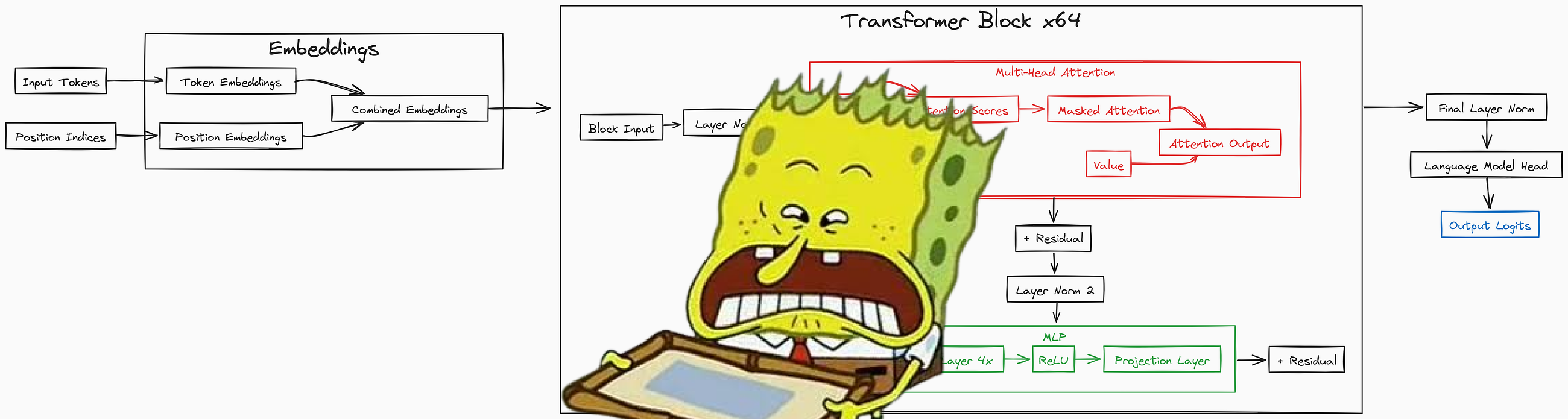
I implemented a transformer model from scratch using PyTorch, based on the paper Attention is All You Need. You can use my scripts to train your own billion or million parameter LLM using a single GPU.
This started as a pretraining tutorial. It now goes all the way from raw text to an aligned, reasoning style model, with every algorithm hand written in plain PyTorch (no trl, no peft, no transformers). The whole journey is one idea repeated: turn text into numbers, predict the next token, then keep changing the data and the loss until the model does what we want.

Here is the path we will walk, end to end:
raw text  ->  tokens  ->  a Transformer  ->  next-token loss  ->  a base model
base model  ->  SFT  ->  Reward Model  ->  {PPO, DPO}  ->  GRPO  ->  evaluation and chat
Below is the output of a trained 13 million parameter LLM, just so you can see where the small end of this starts:
In *1978, The park was returned to the factory-plate that
the public share to the lower of the electronic fence that
follow from the Station's cities. The Canal of ancient Western
nations were confined to the city spot. The villages were directly
linked to cities in China that revolt that the US budget and in
Odambinais is uncertain and fortune established in rural areas.
I tried to write this so one page works for very different readers:
You need a basic understanding of object oriented programming, neural networks, and PyTorch. Below are some resources to help you get started:
| Topic | Video Link | |---------------------|-----------------------------------------------------------| | OOP | OOP Video | | Neural Network | Neural Network Video | | Pytorch | Pytorch Video |
You will need a GPU to train. A free Colab or Kaggle T4 is enough for the 13 million parameter model, but it will not fit a billion parameter model. Here is a rough guide:
| GPU Name | Memory | 2B LLM Training | 13M LLM Training | Max Practical LLM Size (Training) | |--------------------------|--------|-----------------|------------------|-----------------------------------| | NVIDIA A100 | 40 GB | ✔ | ✔ | ~6B to 8B | | NVIDIA V100 | 16 GB | ✘ | ✔ | ~2B | | NVIDIA RTX 4090 | 24 GB | ✔ | ✔ | ~4B | | NVIDIA RTX 5090 | 32 GB | ✔ | ✔ | 13M verified, larger configs TBD | | NVIDIA RTX 3090 | 24 GB | ✔ | ✔ | ~3.5B to 4B | | NVIDIA RTX 4080 | 16 GB | ✘ | ✔ | ~2B | | NVIDIA RTX 4060 | 8 GB | ✘ | ✔ | ~1B | | Tesla T4 | 16 GB | ✘ | ✔ | ~1.5B to 2B |
If a large config runs out of memory, the pretraining script has opt-in flags (--amp, --grad-checkpointing, --grad-accum) that bring the memory down a lot. More on those later.
Clone the repository and install it in editable mode. The editable install puts config, src, data_loader, and ui on your import path, so you do not need to set PYTHONPATH by hand anymore:
git clone https://github.com/FareedKhan-dev/train-llm-from-scratch.git
cd train-llm-from-scratch
pip install -e .
There are optional extras for the parts you want:
pip install -e ".[train]"   # datasets + wandb, for downloading data and logging
pip install -e ".[ui]"      # streamlit + pandas + altair, for the control panel
pip install -e ".[docs]"    # mkdocs, for the documentation site
pip install -e ".[all]"     # everything
There are two config systems, and it helps to know which is which from the start:
config/config.py is the original, simple config for the legacy pretraining script scripts/train_transformer.py. It is plain Python constants.config/post_training_config.py plus the JSON files in configs/ drive everything else (pretraining the bigger base, SFT, reward, DPO, PPO, GRPO). You edit a small JSON file per stage, and any field can also be overridden on the command line, for example --lr 2e-5 --batch_size 16.configs/smoke/ variant of every stage that shrinks the model so a full run finishes in seconds on a CPU or a single GPU.
train-llm-from-scratch/
├── src/
│   ├── models/                  # the Transformer, built from small pieces
│   │   ├── mlp.py               # the feed-forward block
│   │   ├── attention.py         # single head and multi head attention
│   │   ├── transformer_block.py # one block: attention + MLP + residuals
│   │   └── transformer.py       # the full model: embeddings + blocks + lm_head
│   └── post_training/           # SFT, reward model, PPO, DPO, GRPO, eval, inference
├── config/
│   ├── config.py                # legacy pretraining config (plain constants)
│   ├── post_training_config.py  # dataclasses for every post-training stage
│   └── loader.py                # merges defaults < base.json < stage.json < CLI
├── configs/                     # editable JSON, one file per stage (+ smoke/)
├── data_loader/                 # batch iterators for each kind of data
├── scripts/                     # every runnable step lives here
├── ui/                          # the Streamlit control panel
├── docs/                        # the MkDocs site (theory + diagrams)
├── images/                      # the diagrams in this README (+ the generator)
└── pyproject.toml               # pip install -e .
A model only ever sees integers. So the first job is always the same: take text, turn it into token ids, and store those ids on disk in a format that is fast to read during training. We do this four times, once for each kind of training we will do later.
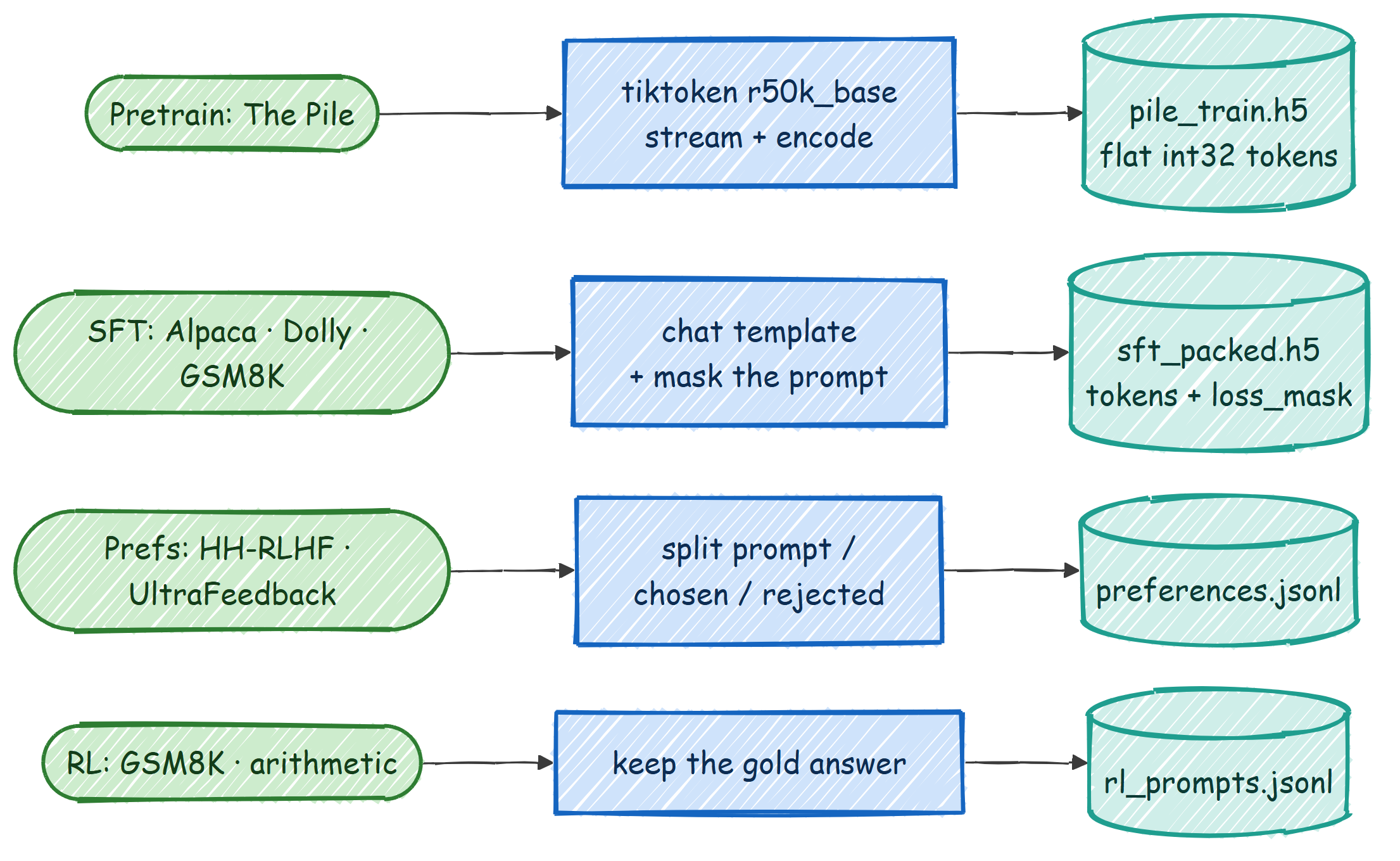
The four streams are:
1. Pretraining text from The Pile, stored as a flat array of token ids in an HDF5 file.
2. Instruction data (Alpaca, Dolly, GSM8K) for SFT, packed into fixed length rows with a mask that says which tokens are the assistant's answer.
3. Preference pairs (Anthropic HH-RLHF, UltraFeedback) for the reward model and DPO, stored as {prompt, chosen, rejected}.
4. RL prompts (GSM8K and a small arithmetic warm-up) for PPO and GRPO, stored as {prompt, gold}.
We use the r50k_base tokenizer from OpenAI's tiktoken, the same one GPT-3 used. Text becomes a list of integers, and we append a special <|endoftext|> token (id 50256) at the end of every document so the model learns where one piece of text stops and the next begins.

For the legacy path, download a slice of The Pile and tokenize it into HDF5:
python scripts/data_download.py            # downloads the validation file + 1 training shard
python scripts/data_preprocess.py          # tokenizes to data/train/pile_train.h5 and data/val/pile_dev.h5
The newer, faster path streams and batch-encodes the same data straight into a flat token array:
python scripts/prepare_pretrain_data.py --split val   --out data/pile_dev.h5
python scripts/prepare_pretrain_data.py --split train --num_shards 1 --out data/pile_train.h5
Once tokenized, the data is just a long line of integers. Here is a real peek at the validation file I prepared for this README (8.76 million tokens), the first ten ids, and what they decode back to:
#### OUTPUT ####
dtype: int32 | shape: (8762951,) | total tokens: 8762951
first 10 token ids: [18610, 286, 3993, 3081, 319, 4088, 11, 4640, 2163, 11]
decoded back to text:
'Effect of sleep quality on memory, executive function, and language
 performance in patients with refractory focal epilepsy ...'
That is the whole idea of tokenization in one output: text in, a flat array of integers out, and the integers decode straight back to the original words.
For everything after pretraining the model has to know who is talking. The r50k_base tokenizer has only one special token, so instead of inventing new ones we use plain text role markers that the model simply learns during SFT. A single turn looks like this (see src/post_training/chat_template.py):
<|user|>
{user content}<|endoftext|><|assistant|>
{assistant content}<|endoftext|>
For math and reasoning we ask the assistant to show its work in a fixed structure, because the reinforcement learning reward later checks the number inside the answer tags:
step by step reasoning ...42
The important trick is the loss mask**. When we encode a conversation we also build a 0/1 mask that is 1 only on the assistant tokens (and the <|endoftext|> that ends the turn). That way SFT trains the model to write answers, not to parrot the prompt back. Here is the exact code that builds the ids and the aligned mask:
def encode_chat(messages, add_generation_prompt=False):
    ids, mask = [], []
    for m in messages:
        role = m["role"]
        # Role header is always masked out (we never train the model to emit it).
        header_ids = _encode_ordinary(_header_for(role))
        ids.extend(header_ids)
        mask.extend([0] * len(header_ids))
content_ids = _encode_ordinary(m["content"])
        is_completion = role == "assistant"
        ids.extend(content_ids)
        mask.extend([1 if is_completion else 0] * len(content_ids))   # train on assistant only
ids.append(EOT_ID)                                            # turn terminator
        mask.append(1 if is_completion else 0)                        # learn to stop
    return ids, mask
Here is a real rendered conversation and the verifier reward in action, printed from this repo:
#### OUTPUT ####
rendered chat:
<|user|>
What is 13 + 29?<|endoftext|><|assistant|>
13 + 29 = 4242<|endoftext|>
extract_answer("42")        -> 42.0
reward_gsm8k("42", 42.0)    -> 1.2    # correct AND well formatted
reward_gsm8k("7",  42.0)    -> 0.2    # wrong, but it used the format
And here is one real packed SFT row, showing how only the assistant tokens are trained (the mask is 1 on 48 of the 512 tokens in this row):
#### OUTPUT ####
tokens shape: (2131, 512) | loss_mask shape: (2131, 512)
row 0: trained (mask=1) tokens = 48 / 512
row 0 decoded:
  <|user|>
  What is the world's oldest annual marathon based on the reference text below? ...
  <|assistant|>
  The Boston Marathon is the world's oldest annual marathon, beginning on April 19th 1897.
The data prep scripts for these stages are:
python scripts/prepare_sft_data.py          # Alpaca + Dolly + GSM8K  -> sft_packed.h5
python scripts/prepare_preference_data.py   # HH-RLHF + UltraFeedback -> preferences.jsonl
python scripts/prepare_rl_prompts.py        # GSM8K + arithmetic      -> rl_prompts.jsonl
A Transformer looks scary as one block of code, so we build it from four small pieces and then stack them. Each piece is a tiny nn.Module. We start at the bottom.
The MLP is the part of each block that does the per-token "thinking". It takes each token vector, expands it to four times its size, applies a ReLU, and squeezes it back down. The expansion gives the layer room to mix features before projecting back.

class MLP(nn.Module):
    """A simple Multi-Layer Perceptron with one hidden layer."""
    def __init__(self, n_embed):
        super().__init__()
        self.hidden = nn.Linear(n_embed, 4 * n_embed)   # expand to 4x
        self.relu = nn.ReLU()                           # non-linearity
        self.proj = nn.Linear(4 * n_embed, n_embed)     # project back down
def forward(self, x):
        x = self.relu(self.hidden(x))
        x = self.proj(x)
        return x
The __init__ sets up the two linear layers and the activation. The forward runs them in order. Input and output shapes are the same, (B, T, n_embed), so blocks can be stacked without any reshaping. The code is in src/models/mlp.py.
Attention is the part that lets a token look at other tokens. Each head builds three views of the input: a query (what am I looking for), a key (what do I contain), and a value (what I will pass on if chosen). We score every query against every key, scale the scores, hide the future with a causal mask, turn the scores into weights with a softmax, and take a weighted sum of the values.

class Head(nn.Module):
    """A single attention head with causal masking."""
    def __init__(self, head_size, n_embed, context_length):
        super().__init__()
        self.key   = nn.Linear(n_embed, head_size, bias=False)
        self.query = nn.Linear(n_embed, head_size, bias=False)
        self.value = nn.Linear(n_embed, head_size, bias=False)
        # a lower-triangular matrix used to mask out future positions
        self.register_buffer('tril', torch.tril(torch.ones(context_length, context_length)))
def forward(self, x):
        B, T, C = x.shape
        k = self.key(x)
        q = self.query(x)
        scale_factor = 1 / math.sqrt(C)
        attn_weights = q @ k.transpose(-2, -1) * scale_factor          # (B, T, T) scores
        attn_weights = attn_weights.masked_fill(self.tril[:T, :T] == 0, float('-inf'))  # no peeking ahead
        attn_weights = F.softmax(attn_weights, dim=-1)
        v = self.value(x)
        out = attn_weights @ v                                         # weighted sum of values
        return out
The causal mask is what makes this a language model: position t can only attend to positions 0..t, never to the future it is trying to predict. The code is in src/models/attention.py.
One head learns one kind of relationship. We want many, running in parallel, so the model can track several patterns at once (for example, a pronoun and the noun it refers to). We run n_head heads, concatenate their outputs, and pass the result through one more linear layer.
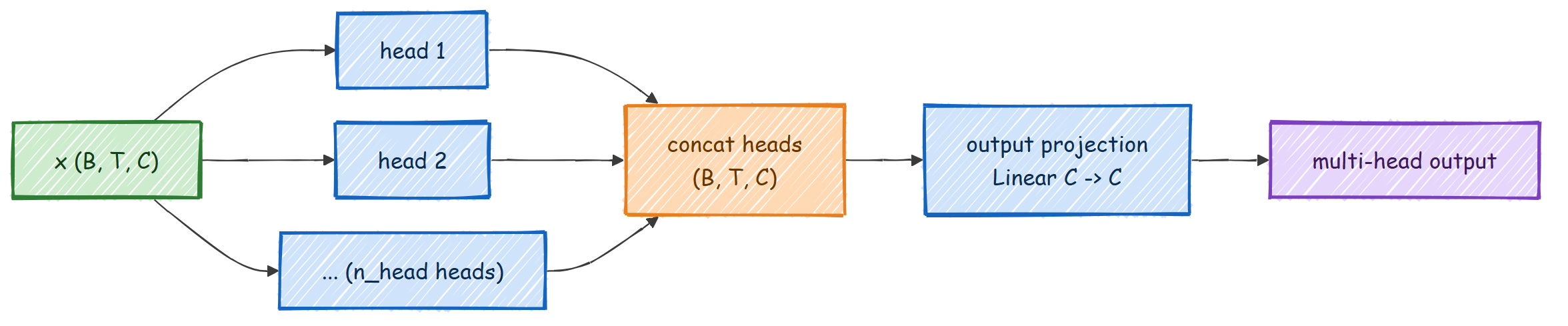
class MultiHeadAttention(nn.Module):
    def __init__(self, n_head, n_embed, context_length):
        super().__init__()
        self.heads = nn.ModuleList(
            [Head(n_embed // n_head, n_embed, context_length) for _ in range(n_head)]
        )
        self.proj = nn.Linear(n_embed, n_embed)   # mixes the heads back together
def forward(self, x):
        x = torch.cat([h(x) for h in self.heads], dim=-1)   # concat along the feature dim
        x = self.proj(x)
        return x
Each head works in a smaller subspace of size n_embed // n_head, so the concatenation lands right back at n_embed. The final projection lets the heads talk to each other.
Now we combine attention and the MLP into one block. The block uses pre-norm residual connections: we normalize, run a sub-layer, and add the result back to the input. The "add back" (the residual) is what lets gradients flow through a deep stack without vanishing.

class Block(nn.Module):
    def __init__(self, n_head, n_embed, context_length):
        super().__init__()
        self.ln1 = nn.LayerNorm(n_embed)
        self.attn = MultiHeadAttention(n_head, n_embed, context_length)
        self.ln2 = nn.LayerNorm(n_embed)
        self.mlp = MLP(n_embed)
def forward(self, x):
        x = x + self.attn(self.ln1(x))   # attention sub-layer + residual
        x = x + self.mlp(self.ln2(x))    # MLP sub-layer + residual
        return x
Read x = x + self.attn(self.ln1(x)) as "look at the other tokens, then add what you learned back onto yourself". The MLP line is the same idea for the per-token thinking. The code is in src/models/transformer_block.py.
Finally we wrap everything. Token ids become vectors through an embedding table, we add a position embedding so the model knows token order, we run the stack of blocks, normalize one last time, and project to vocabulary-sized scores called logits. If we pass targets, the model also returns the cross-entropy loss.

class Transformer(nn.Module):
    def __init__(self, n_head, n_embed, context_length, vocab_size, N_BLOCKS):
        super().__init__()
        self.token_embed = nn.Embedding(vocab_size, n_embed)
        self.position_embed = nn.Embedding(context_length, n_embed)
        self.attn_blocks = nn.ModuleList(
            [Block(n_head, n_embed, context_length) for _ in range(N_BLOCKS)]
        )
        self.layer_norm = nn.LayerNorm(n_embed)
        self.lm_head = nn.Linear(n_embed, vocab_size)
        self.register_buffer('pos_idxs', torch.arange(context_length))
def forward(self, idx, targets=None):
        x = self.forward_hidden(idx)        # token + position embeddings, then the blocks + final norm
        logits = self.lm_head(x)            # (B, T, vocab_size)
        loss = None
        if targets is not None:
            B, T, C = logits.shape
            # reshape (not view): the target slice is not contiguous, so .view() fails on CPU
            flat_logits = logits.reshape(B * T, C)
            targets = targets.reshape(B * T).long()
            loss = F.cross_entropy(flat_logits, targets)
        return logits, loss
One small detail worth pointing out: we use .reshape and not .view on the targets. The target batch is a non-contiguous slice of the data, and .view refuses to work on that on CPU. .reshape handles both cases and is identical in every other way. The full model, including forward_hidden (which the reward and value heads reuse later) and generate, lives in src/models/transformer.py.
When we build the model it prints its parameter count. Here are the three sizes used in this repo:
#### OUTPUT ####
13M small config (n_embed=128, n_head=8, n_blocks=1):      13,142,656 params
this tutorial's base (n_embed=512, n_head=8, n_blocks=8):  77,031,552 params
post-training default (n_embed=1024, n_head=16, n_blocks=24): 406,359,168 params
Pretraining is the long pole. We read random windows of tokens, ask the model to predict the next token at every position, measure how wrong it was with cross-entropy, and nudge the weights. We repeat that a few thousand times.

The simplest version is the original scripts/train_transformer.py, which reads config/config.py and trains on one GPU. To train the 13 million parameter model, set these values in config/config.py:
VOCAB_SIZE = 50304
CONTEXT_LENGTH = 128
N_EMBED = 128
N_HEAD = 8
N_BLOCKS = 1
then run:
python scripts/train_transformer.py
For long runs you can save periodic checkpoints and resume after an interruption:
python scripts/train_transformer.py --checkpoint-every 1000 --keep-last 3
python scripts/train_transformer.py --resume latest
If a bigger config does not fit in memory, turn on the opt-in memory savers (all off by default, so default behavior never changes):
python scripts/train_transformer.py --amp --grad-checkpointing --grad-accum 8
The bigger, modern path is scripts/pretrain_base.py. It is the same recipe with the things you need to train a mid-size base: DistributedDataParallel across GPUs, bf16 autocast, gradient accumulation, a cosine learning-rate schedule with warmup, and periodic checkpoints. One GPU or many, same command shape:
# one GPU
python scripts/pretrain_base.py
both GPUs
torchrun --standalone --nproc_per_node=2 scripts/pretrain_base.py
The core of the loop is small. Each step pulls a batch, runs the forward pass under bf16, scales the loss for gradient accumulation, backpropagates, clips the gradient, and steps the optimizer:
```python for micro in range(cfg.grad_accum): xb, yb = next(batch_iter) with amp_autocast(cfg.amp_dtype, ctx.device): _, loss = model(xb, yb) loss = loss / cfg.grad_accum # so
→ →
→ →
→ →
→ →
→ →
→ →
→ →
→