1
 →
→
[CVPR 2025] Official PyTorch implementation of "EdgeTAM: On-Device Track Anything Model"
facebookresearch/EdgeTAM is an open-source project on GitHub, mainly written in Jupyter Notebook. [CVPR 2025] Official PyTorch implementation of "EdgeTAM: On-Device Track Anything Model" It currently holds 980 stars and 85 forks with 0 open issues, and was last pushed on an unknown date (repository created unknown).
AI Homed tracks it on the Local & On-Device AI board.
Chong Zhou1,2*, Chenchen Zhu1, Yunyang Xiong1, Saksham Suri1, Fanyi Xiao1, Lemeng Wu1, Raghuraman Krishnamoorthi1, Bo Dai3,4, Chen Change Loy2, Vikas Chandra1, Bilge Soran1
1Meta Reality Labs, 2S-Lab, Nanyang Technological University, 3University of Hong Kong, 4Feeling AI
(*) Work done during the internship at Meta Reality Labs.
EdgeTAM is an on-device executable variant of the SAM 2 for promptable segmentation and tracking in videos. It runs 22× faster than SAM 2 and achieves 16 FPS on iPhone 15 Pro Max without quantization.
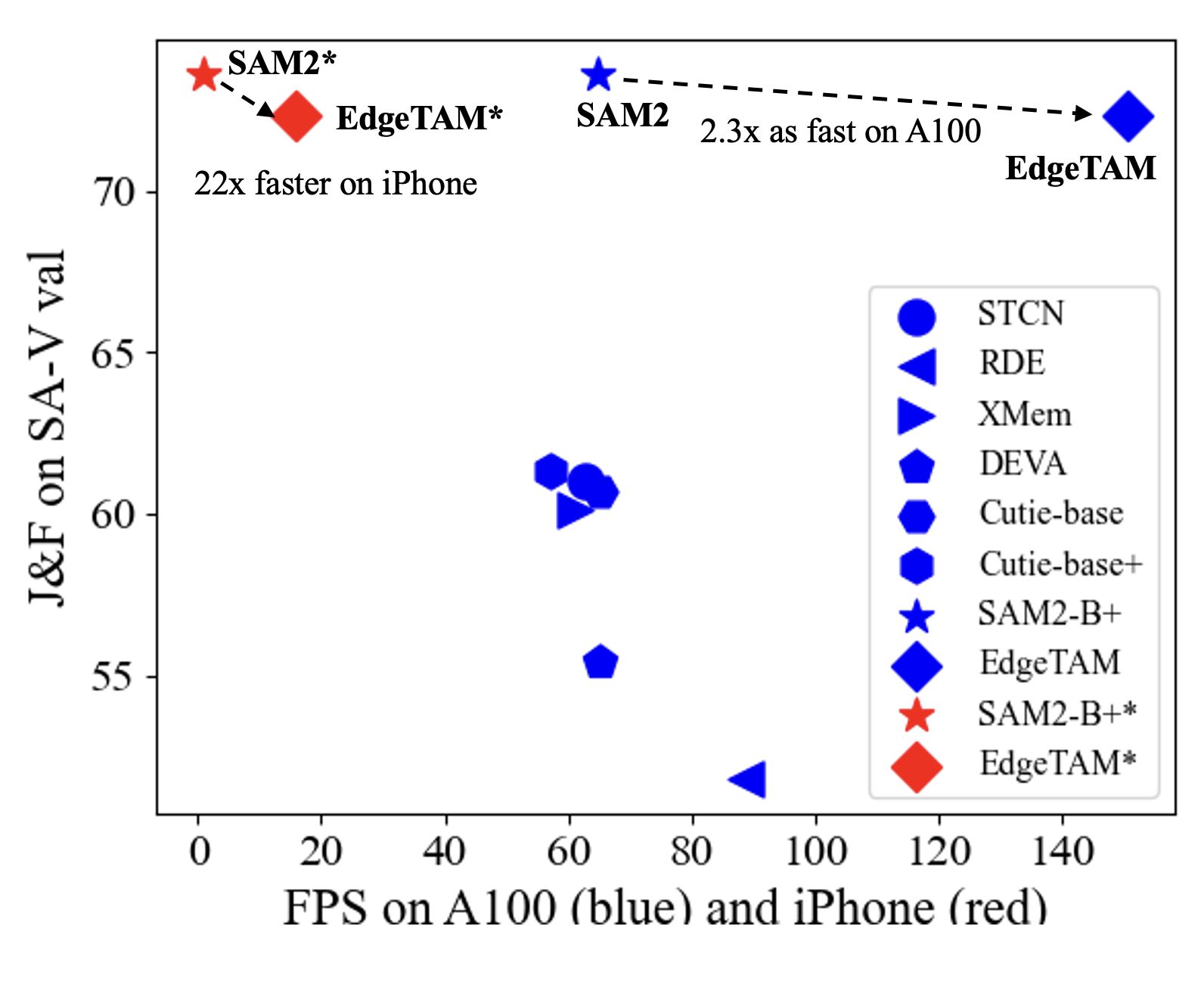
In this figure, we show the speed-performance trade-offs of EdgeTAM and other models on iPhone 15 Pro Max (red) and NVIDIA A100 (blue). We report the J&F on the SA-V val dataset as the evaluation metric.
EdgeTAM needs to be installed first before use. The code requires python>=3.10, as well as torch>=2.3.1 and torchvision>=0.18.1. Please follow the instructions here to install both PyTorch and TorchVision dependencies. You can install EdgeTAM on a GPU machine using:
git clone https://github.com/facebookresearch/EdgeTAM.git && cd EdgeTAM
pip install -e .
To use the EdgeTAM predictor and run the example notebooks, jupyter and matplotlib are required and can be installed by:
pip install -e ".[notebooks]"
For CoreML export to deploy EdgeTAM on iOS/macOS devices, install the CoreML dependencies:
pip install -e ".[coreml]"
Note:
1. It's recommended to create a new Python environment via Anaconda for this installation and install PyTorch 2.3.1 (or higher) via pip following https://pytorch.org/. If you have a PyTorch version lower than 2.3.1 in your current environment, the installation command above will try to upgrade it to the latest PyTorch version using pip.
2. The step above requires compiling a custom CUDA kernel with the nvcc compiler. If it isn't already available on your machine, please install the CUDA toolkits with a version that matches your PyTorch CUDA version.
3. If you see a message like Failed to build the SAM 2 CUDA extension during installation, you can ignore it and still use EdgeTAM (some post-processing functionality may be limited, but it doesn't affect the results in most cases).
Model is available here.
Install the dependencies for the Gradio demo:
pip install -e ".[gradio]"
Run the demo:
python gradio_app.py
The demo will be available at http://127.0.0.1:7860/ by default. You can change the port by setting the --port argument.
EdgeTAM has all the capabilities of SAM on static images, and we provide image prediction APIs that closely resemble SAM for image use cases. The SAM2ImagePredictor class has an easy interface for image prompting.
import torch
from sam2.build_sam import build_sam2
from sam2.sam2_image_predictor import SAM2ImagePredictor
checkpoint = "./checkpoints/edgetam.pt"
model_cfg = "configs/edgetam.yaml"
predictor = SAM2ImagePredictor(build_sam2(model_cfg, checkpoint))
with torch.inference_mode(), torch.autocast("cuda", dtype=torch.bfloat16):
    predictor.set_image(<your_image>)
    masks, _, _ = predictor.predict(<input_prompts>)
Please refer to the examples in image_predictor_example.ipynb for static image use cases.
EdgeTAM also supports automatic mask generation on images just like SAM. Please see automatic_mask_generator_example.ipynb for automatic mask generation in images.
For promptable segmentation and tracking in videos, we provide a video predictor with APIs for example to add prompts and propagate masklets throughout a video. EdgeTAM supports video inference on multiple objects and uses an inference state to keep track of the interactions in each video.
import torch
from sam2.build_sam import build_sam2_video_predictor
checkpoint = "./checkpoints/edgetam.pt"
model_cfg = "configs/edgetam.yaml"
predictor = build_sam2_video_predictor(model_cfg, checkpoint)
with torch.inference_mode(), torch.autocast("cuda", dtype=torch.bfloat16):
    state = predictor.init_state(<your_video>)
# add new prompts and instantly get the output on the same frame
    frame_idx, object_ids, masks = predictor.add_new_points_or_box(state, <your_prompts>):
# propagate the prompts to get masklets throughout the video
    for frame_idx, object_ids, masks in predictor.propagate_in_video(state):
        ...
Please refer to the examples in video_predictor_example.ipynb for details on how to add click or box prompts, make refinements, and track multiple objects in videos.
EdgeTAM can be exported to CoreML format for deployment on iOS and macOS devices, enabling on-device inference with hardware acceleration.
# Export EdgeTAM to CoreML format
python ./coreml/export_to_coreml.py \
  --sam2_cfg ./sam2/configs/edgetam.yaml \
  --sam2_checkpoint ./checkpoints/edgetam.pt \
  --output_dir ./coreml_models
This creates three optimized CoreML models:
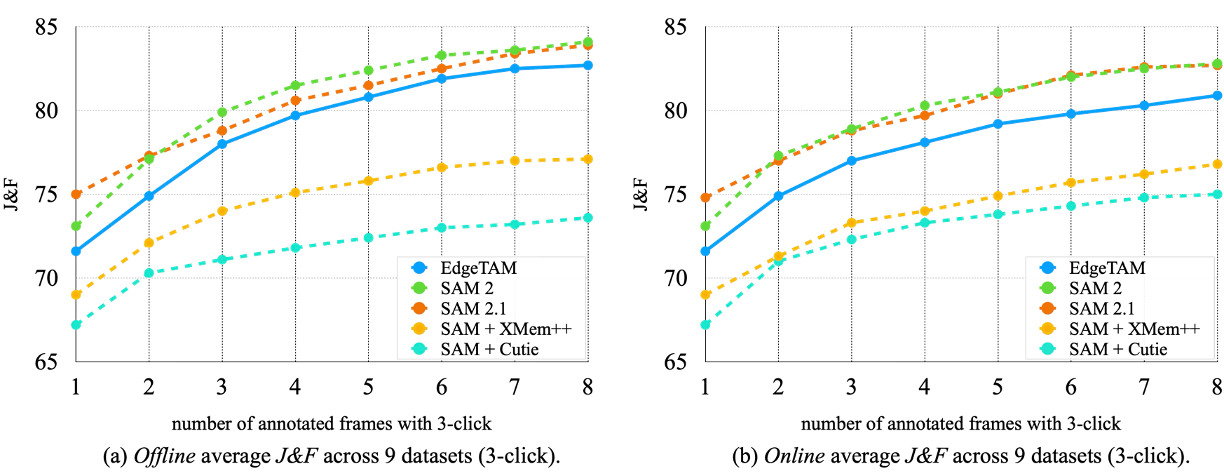
Zero-shot PVS accuracy across 9 datasets in offline and online settings.
We report the G for YTVOS and J&F for other datasets. The FPS on A100 is obtained with torch compile. Nota that, for SAM 2, SAM 2.1, and EdgeTAM, we evaluate all the datasets with the same model.
We report 1 (5) click mIoU results. FPS is measured on iPhone 15 Pro Max. Our mix does not contain the internal datasets that SAM 2 uses.
The EdgeTAM model checkpoints and code are licensed under Apache 2.0.
If you use EdgeTAM in your research, please use the following BibTeX entry.
@article{zhou2025edgetam,
  title={EdgeTAM: On-Device Track Anything Model},
  author={Zhou, Chong and Zhu, Chenchen and Xiong, Yunyang and Suri, Saksham and Xiao, Fanyi and Wu, Lemeng and Krishnamoorthi, Raghuraman and Dai, Bo and Loy, Chen Change and Chandra, Vikas and Soran, Bilge},
  journal={arXiv preprint arXiv:2501.07256},
  year={2025}
}
 →
→ →
→ →
→ →
→ →
→ →
→ →
→