
1
 →
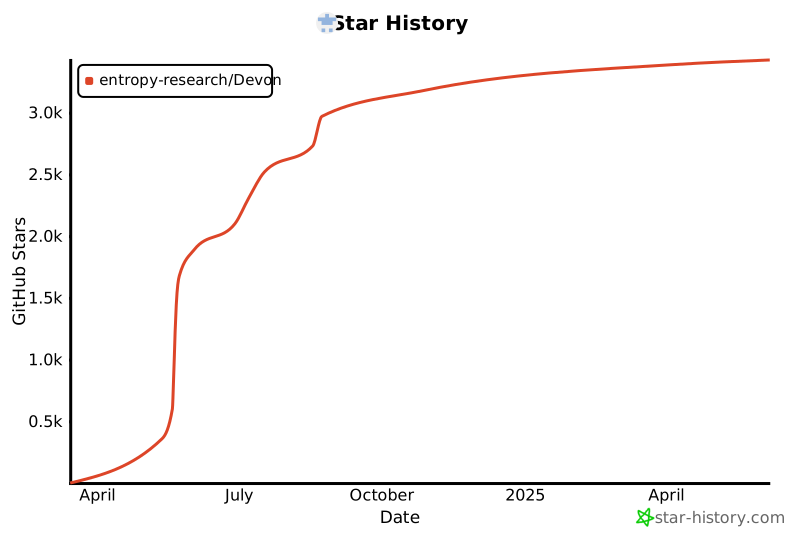
→entropy-research/Devon is an open-source project on GitHub, mainly written in Python. Devon: An open-source pair programmer It currently holds 3,457 stars and 282 forks with 0 open issues, and was last pushed on an unknown date (repository created unknown).
AI Homed tracks it on the Local & On-Device AI board.
https://github.com/entropy-research/Devon/assets/61808204/f3197a56-3d6d-479f-bc0e-9cffe69f159b
1. node.js and npm
2. pipx, if you don't have this go here
3. API Key (just one is required)
We're currently working on supporting Windows! (Let us know if you can help)
To install using pipx + npm:
# Step 1: Ensure directory where pipx stores apps is in your PATH environment variable
pipx ensurepath
Step 2: For the backend
pipx install devon_agent
Step 3: For the main UI (install and run)
npx devon-ui
If you already have devon_agent installed, update it by running:
```pipx install --force devon_agent
Then to run the main ui, the command is: bash npx devon-ui
It's that simple.
Terminal UI
If you'd like to use the terminal interface, follow these steps:
Install
1. Make sure you have the backend installed
2. Install the tui
> [!NOTE]
If you already have devon-tui installed, update it by running:
Run
1. Navigate to your project folder and open the terminal.
2. Set your Anthropic API or OpenAI API key as an environment variable:
export OPENAI_API_KEY=sk-xxxxxxxxxxxxxxxxxxxxxxxxxxxxxxxxxxxxxxxx
export GROQ_API_KEY=sk-xxxxxxxxxxxxxxxxxxxxxxxxxxxxxxxxxxxxxxxx
3. Then to run the terminal-ui, the command is:
It's as easy as that.
[!NOTE]
Don't worry, the agent will be able to only access files and folders in the directory you started it from. You can also correct it while it's performing actions.
---
To run in debug mode, the command is:
---
To run in local mode:
[!WARNING]
The current version of local model support is not mature, proceed with caution, and expect the performance to degrade significantly compared to the other options.
1. Get deepseek running with ollama
2. Start the local ollama server by running
4. Then configure devon to use the model
Configuring Devon CLI... ? Select the model name: claude-opus gpt4-o llama-3-70b ❯ ollama/deepseek-coder:6.7b
4. And finally, run it with:
---
For a list of all commands available:
Features
- Multi-file editing
- Codebase exploration
- Config writing
- Test writing
- Bug fixing
- Architecture exploration
- Local model support
Limitations
- Minimal functionality for non-Python languages
- Sometimes have to specify the file where you want the change to happen
- Local mode is not good right now. Please try to avoid using it.
Progress
This project is still super early and we would love your help to make it great!
Current goals
- Multi-model support
- [x] Claude 3.5 Sonnet
- [x] GPT4-o
- [x] Groq llama3-70b
- [x] Ollama deepseek-6.7b
- [ ] Google Gemini 1.5 Pro
- Launch plugin system for tool and agent builders
- Improve our self-hostable Electron app
- Set SOTA on SWE-bench Lite
View our current thoughts on next steps here
Star history
Past milestones
- [x] June 28, 2024 - File and code referencing, improve steerability, Claude Sonnet support v0.0.16
- [x] June 14, 2024 - Launch Electron UI v0.0.13
- [x] June 1, 2024 - Devon V2 Beta Electron UI
- [x] May 19, 2024 - GPT4o support + better interface support v0.1.7
- [x] May 12, 2024 - Complete interactive agent v0.1.0
- [x] May 10, 2024 - Add steerability features
- [x] May 8, 2024 - Beat AutoCodeRover on SWE-Bench Lite
- [x] Mid April, 2024 - Add repo level code search tooling
- [x] April 2, 2024 - Begin development of v0.1.0 interactive agent
- [x] March 17, 2024 - Launch non-interactive agent v0.0.1
[!NOTE]
If you already have the tui installed, run a clean reinstall:
Current development priorities
1. Improve context gathering and code indexing abilities ex:
- Adding memory modules
- Improved code indexing
2. Add alternative models and agents to:
- a) Reduce end user cost and
- b) Reduce end user latency
3. Electron app
- Save and load in project overviews for agent context
- Revert & "step back" timeline interface
- Better code diff view
- Send user file events/changes to Devon
How can I contribute?
Devon and the entropy-research org are community-driven, and we welcome contributions from everyone!
From tackling issues to building features to creating datasets, there are many ways to get involved:
- Core functionality: Help us develop the core agents, user experience, tool integrations, plugins, etc.
- Research: Help us research agent performance (including benchmarks!), build data pipelines, and finetune models.
- Feedback and Testing: Use Devon, report bugs, suggest features, or provide feedback on usability.
For details, please check CONTRIBUTING.md.
If you would like to contribute to the project, please join the discord: Discord
Feedback
We would love feedback! Feel free to drop us a note on our Discord in the #feedback channel, or create issues!
We collect basic event type (i.e. "tool call") and failure telemetry to solve bugs and improve the user experience, but if you want to reach out, we would love to hear from you!
To disable telemetry, set the environment variable DEVON_TELEMETRY_DISABLED to true
Join our Discord server and say hi! Discord
Distributed under the AGPL License. See LICENSE for more information.
→ →
→ →
→ →
→ →
→ →
→ →
→ →
→