
1
 →
→dottxt-ai/outlines is an open-source project on GitHub, mainly written in Python. Structured Outputs It currently holds 15,843 stars and 882 forks with 0 open issues, and was last pushed on an unknown date (repository created unknown).
AI Homed tracks it on the AI Prompt Engineering board.


🗒️ Structured outputs for LLMs 🗒️
Made with ❤👷️ by the team at .txt
Trusted by NVIDIA, Cohere, HuggingFace, vLLM, etc.
[![PyPI Version][pypi-version-badge]][pypi] [![Downloads][downloads-badge]][pypistats] [![Stars][stars-badge]][stars]
[![Discord][discord-badge]][discord] [![Blog][dottxt-blog-badge]][dottxt-blog] [![Twitter][twitter-badge]][twitter]
The .txt API is currently in early access. Request access here →
We're working with select partners to develop new interfaces to structured generation.
Need XML, FHIR, custom schemas or grammars? Let's talk.
Audit your schema: share one schema, we show you what breaks under generation, the constraints that fix it, and compliance rates before and after. Sign up here.
LLMs are powerful but their outputs are unpredictable. Most solutions attempt to fix bad outputs after generation using parsing, regex, or fragile code that breaks easily.
Outlines guarantees structured outputs during generation — directly from any LLM.
model(prompt, output_type)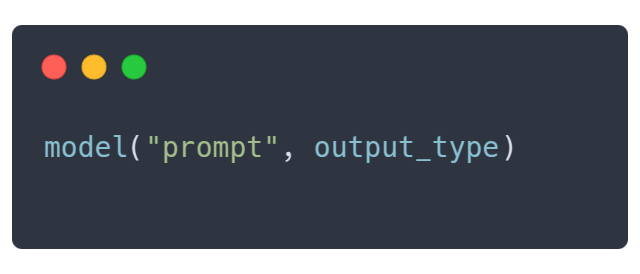
Outlines follows a simple pattern that mirrors Python's own type system. Simply specify the desired output type, and Outlines will ensure your data matches that structure exactly:
Literal["Yes", "No"]intGetting started with outlines is simple:
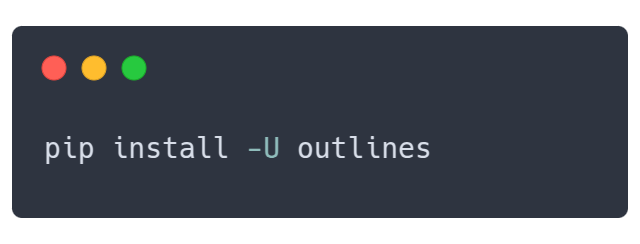
``` shell pip install outlines
2. Connect to your preferred model
MODEL_NAME = "microsoft/Phi-3-mini-4k-instruct" model = outlines.from_transformers( AutoModelForCausalLM.from_pretrained(MODEL_NAME, device_map="auto"), AutoTokenizer.from_pretrained(MODEL_NAME) )
3. Start with simple structured outputs
4. Create complex structures
class Rating(Enum): poor = 1 fair = 2 good = 3 excellent = 4
class ProductReview(BaseModel): rating: Rating pros: list[str] cons: list[str] summary: str
review = model( "Review: The XPS 13 has great battery life and a stunning display, but it runs hot and the webcam is poor quality.", ProductReview, max_new_tokens=200, )
review = ProductReview.model_validate_json(review) print(f"Rating: {review.rating.name}") # "Rating: good" print(f"Pros: {review.pros}") # "Pros: ['great battery life', 'stunning display']" print(f"Summary: {review.summary}") # "Summary: Good laptop with great display but thermal issues"
Real-world examples
Here are production-ready examples showing how Outlines solves common problems:
🙋♂️ Customer Support Triage
This example shows how to convert a free-form customer email into a structured service ticket. By parsing attributes like priority, category, and escalation flags, the code enables automated routing and handling of support issues.
MODEL_NAME = "microsoft/Phi-3-mini-4k-instruct" model = outlines.from_transformers( AutoModelForCausalLM.from_pretrained(MODEL_NAME, device_map="auto"), AutoTokenizer.from_pretrained(MODEL_NAME) )
def alert_manager(ticket): print("Alert!", ticket)
class TicketPriority(str, Enum): low = "low" medium = "medium" high = "high" urgent = "urgent"
class ServiceTicket(BaseModel): priority: TicketPriority category: str requires_manager: bool summary: str action_items: List[str]
customer_email = """ Subject: URGENT - Cannot access my account after payment
I paid for the premium plan 3 hours ago and still can't access any features. I've tried logging out and back in multiple times. This is unacceptable as I have a client presentation in an hour and need the analytics dashboard. Please fix this immediately or refund my payment. """
prompt = f""" <|im_start|>user Analyze this customer email:
{customer_email} <|im_end|> <|im_start|>assistant """
ticket = model( prompt, ServiceTicket, max_new_tokens=500 )
📦 E-commerce product categorization

This use case demonstrates how outlines can transform product descriptions into structured categorization data (e.g., main category, sub-category, and attributes) to streamline tasks such as inventory management. Each product description is processed automatically, reducing manual categorization overhead.
MODEL_NAME = "microsoft/Phi-3-mini-4k-instruct" model = outlines.from_transformers( AutoModelForCausalLM.from_pretrained(MODEL_NAME, device_map="auto"), AutoTokenizer.from_pretrained(MODEL_NAME) )
def update_inventory(product, category, sub_category): print(f"Updated {product.split(',')[0]} in category {category}/{sub_category}")
class ProductCategory(BaseModel): main_category: str sub_category: str attributes: List[str] brand_match: Optional[str]
template = outlines.Template.from_string(""" <|im_start|>user Categorize this product:
{{ description }} <|im_end|> <|im_start|>assistant """)
📊 Parse event details with incomplete data

This example uses outlines to parse event descriptions into structured information (like event name, date, location, type, and topics), even handling cases where the data is incomplete. It leverages union types to return either structured event data or a fallback “I don’t know” answer, ensuring robust extraction in varying scenarios.
MODEL_NAME = "microsoft/Phi-3-mini-4k-instruct" model = outlines.from_transformers( AutoModelForCausalLM.from_pretrained(MODEL_NAME, device_map="auto"), AutoTokenizer.from_pretrained(MODEL_NAME) )
class EventType(str, Enum): conference = "conference" webinar = "webinar" workshop = "workshop" meetup = "meetup" other = "other"
class EventInfo(BaseModel): """Structured information about a tech event""" name: str date: str location: str event_type: EventType topics: List[str] registration_required: bool
# Insufficient information """ Tech event next week. More details coming soon! """ ]
{description}
If there is enough information, return a JSON object with the following fields:
🗂️ Categorize documents into predefined types

In this case, outlines classifies documents into predefined categories (e.g., “Financial Report,” “Legal Contract”) using a literal type specification. The resulting classifications are displayed in both a table format and through a category distribution summary, illustrating how structured outputs can simplify content management.
MODEL_NAME = "microsoft/Phi-3-mini-4k-instruct" model = outlines.from_transformers( AutoModelForCausalLM.from_pretrained(MODEL_NAME, device_map="auto"), AutoTokenizer.from_pretrained(MODEL_NAME) )
"This agreement is made between Party A and Party B, hereinafter referred to as 'the Parties', on this day of...",
"The API accepts POST requests with JSON payloads. Required parameters include 'user_id' and 'transaction_type'. The endpoint returns a 200 status code on success." ]
template = outlines.Template.from_string(""" <|im_start|>user Classify the following document into exactly one category among the following categories:
for text in texts: prompt = template(document=text) # The model must return one of the predefined categories category = model(prompt, DocumentCategory, max_new_tokens=200) results.append(category)
return results
print(results_df)
📅 Schedule a meeting from requests with Function Calling

This example demonstrates how outlines can interpret a natural language meeting request and translate it into a structured format matching a predefined function’s parameters. Once the meeting details are extracted (e.g., title, date, duration, attendees), they are used to automatically schedule the meeting.
MODEL_NAME = "microsoft/phi-4" model = outlines.from_transformers( AutoModelForCausalLM.from_pretrained(MODEL_NAME, device_map="auto"), AutoTokenizer.from_pretrained(MODEL_NAME) )
{user_request} <|im_end|> <|im_start|>assistant """ meeting_params = model(prompt, schedule_meeting, max_new_tokens=200)
📝 Dynamically generate prompts with re-usable templates

Using Jinja-based templates, this example shows how to generate dynamic prompts for tasks like sentiment analysis. It illustrates how to easily re-use and customize prompts—including few-shot learning strategies—for different content types while ensuring the outputs remain structured.
MODEL_NAME = "microsoft/phi-4" model = outlines.from_transformers( AutoModelForCausalLM.from_pretrained(MODEL_NAME, device_map="auto"), AutoTokenizer.from_pretrained(MODEL_NAME) )
{{ text }}
Provide your analysis as either "Positive", "Negative", or "Neutral". <|im_end> <|im_start>assistant """)
They use outlines


Model Integrations
| Model type | Description | Documentation |
|---------|-------------|:-------------:|
|
| Feature | Description | Documentation | |---------|-------------|:-------------:| |
Multiple Choices | Constrain outputs to predefined options | Multiple Choices Guide → | | Function Calls | Infer structure from function signatures | Function Guide → | | JSON/Pydantic | Generate outputs matching JSON schemas | JSON Guide → | | Regular Expressions | Generate text following a regex pattern | Regex Guide → | | Grammars | Enforce complex output structures | Grammar Guide → || Feature | Description | Documentation | |---------|-------------|:-------------:| |
Prompt templates | Separate complex prompts from code | Template Guide → | | Custome types | Intuitive interface to build complex types | Python Types Guide → | | Applications | Encapsulate templates and types into functions | Application Guide → |

Outlines is developed and maintained by .txt, a company dedicated to making LLMs more reliable for production applications.
Our focus is on advancing structured generation technology through:
[![Contributors][contributors-badge]][contributors] [![Stars][stars-badge]][stars] [![Downloads][downloads-badge]][pypistats] [![Discord badge][discord-badge]][discord]
@article{willard2023efficient, title={Efficient Guided Generation for Large Language Models}, author={Willard, Brandon T and Louf, R{\'e}mi}, journal={arXiv preprint arXiv:2307.09702}, year={2023} } ```
[contributors]: https://github.com/dottxt-ai/outlines/graphs/contributors [contributors-badge]: https://img.shields.io/github/contributors/dottxt-ai/outlines?style=flat-square&logo=github&logoColor=white&color=ECEFF4 [dottxt-blog]: https://blog.dottxt.co/ [dottxt-blog-badge]: https://img.shields.io/badge/dottxt%20blog-a6b4a3 [dottxt-twitter]: https://twitter.com/dottxtai [dottxt-twitter-badge]: https://img.shields.io/twitter/follow/dottxtai?style=social [discord]: https://discord.gg/R9DSu34mGd [discord-badge]: https://img.shields.io/discord/1182316225284554793?color=ddb8ca&logo=discord&logoColor=white&style=flat-square [downloads-badge]: https://img.shields.io/pypi/dm/outlines?color=A6B4A3&logo=python&logoColor=white&style=flat-square [pypistats]: https://pypistats.org/packages/outlines [pypi-version-badge]: https://img.shields.io/pypi/v/o
→ →
→ →
→ →
→ →
→ →
→ →
→ →
→