1
 →
→
High-performance code intelligence MCP server. Indexes codebases into a persistent knowledge graph — average repo in milliseconds. 158 languages, sub-ms queries, 99% fewer tokens.
DeusData/codebase-memory-mcp is an open-source project on GitHub, mainly written in C. High-performance code intelligence MCP server. Indexes codebases into a persistent knowledge graph — average repo in milliseconds. It currently holds 43,452 stars and 3,537 forks with 590 open issues, and was last pushed on 2026-09-16 (repository created 2026-02-24).
AI Homed tracks it on the AI Agent Skills board and on the AI AI Agent Skills list.

Search your code, follow call graphs, and explore software architecture in your browser. codebase-memory-mcp is a local Model Context Protocol (MCP) server that gives Claude Code, Codex, and other coding agents a persistent code knowledge graph. It indexes functions, classes, imports, HTTP routes, and their relationships across 162 languages. Hybrid LSP adds semantic type resolution for Python, TypeScript, JavaScript, JSX/TSX, PHP, C#, Go, C, C++, Java, Kotlin, Rust, and Perl.
About 120× fewer tokens in the project's reported five-query comparison: ~3,400 vs ~412,000 with file-by-file exploration. Published backend benchmarks also report Linux kernel indexing in ~3 minutes (28M lines of code) and Cypher relationship queries under 1 ms on an Apple M3 Pro. Benchmark details.
CBM Lens Beta helps you understand unfamiliar code and stay in control as it grows. Use it to get up to speed in a new codebase, tackle rescue engineering on an inherited project, or make sense of 50,000 lines of AI-generated code from a single day. Its IDE-style source reader, local code chat, 3D architecture map, and Galaxy graph let you see how the code fits together and follow dependencies and call paths back to the source. Use that context to review changes, investigate fragile areas, and keep code quality high. Architecture decisions stay alongside the project's index.
The native C backend exposes 17 MCP tools and supports 45 automatic or conditional client integrations. Indexing and graph queries need no hosted service or API key.
CBM Lens Beta is new on main: it arrived with PR #2068 and is not part of the current v0.11.0 release, whose installer still ships the previous graph UI. To run the interface shown below now, build from source.
Quick start · Explore CBM Lens · Chat with your codebase locally · MCP tools · Build from source
Research: The preprint compares agents across 31 repositories, reporting 10× lower token use and 2.1× fewer tool calls, with answer-quality scores of 83% for CBM versus 92% for file-by-file exploration. These backend results are separate from the five-query comparison above and from CBM Lens.
Local processing: Source analysis and graph storage run on your machine. CBM Lens can optionally download a model for browser AI after you enable it; inference stays on the device. The installer writes agent configuration for the clients you select. See Security for release verification and SECURITY.md for reporting issues.
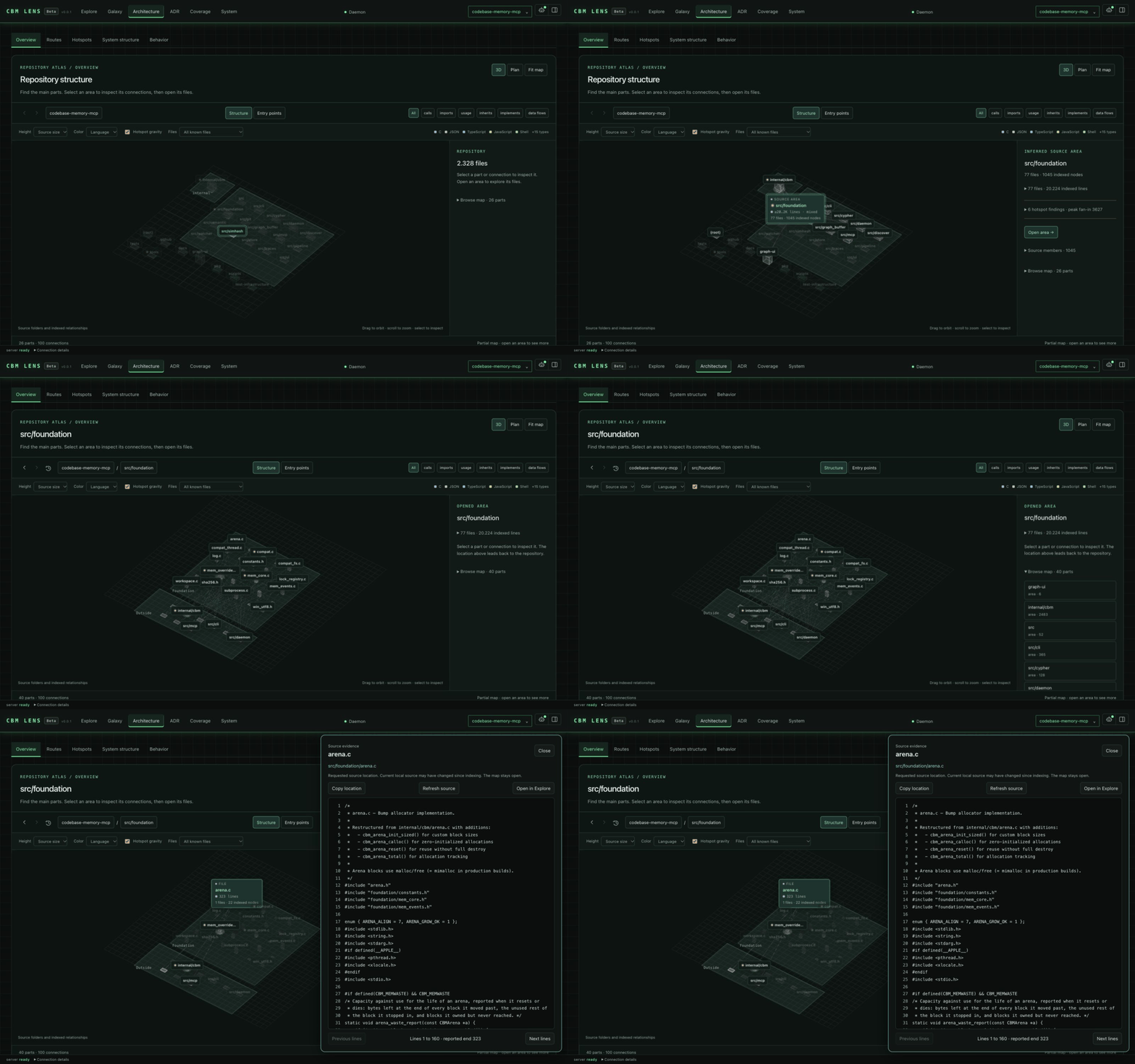
Architecture overview. Folders become nested platforms, files and symbols become selectable blocks, and arrows show indexed relationships. The recording zooms into the map of this repository, selects src/pipeline, opens the area, selects artifact.c and opens its source. Height can show source size; hotspot gravity reflects static fan-in. Still image.
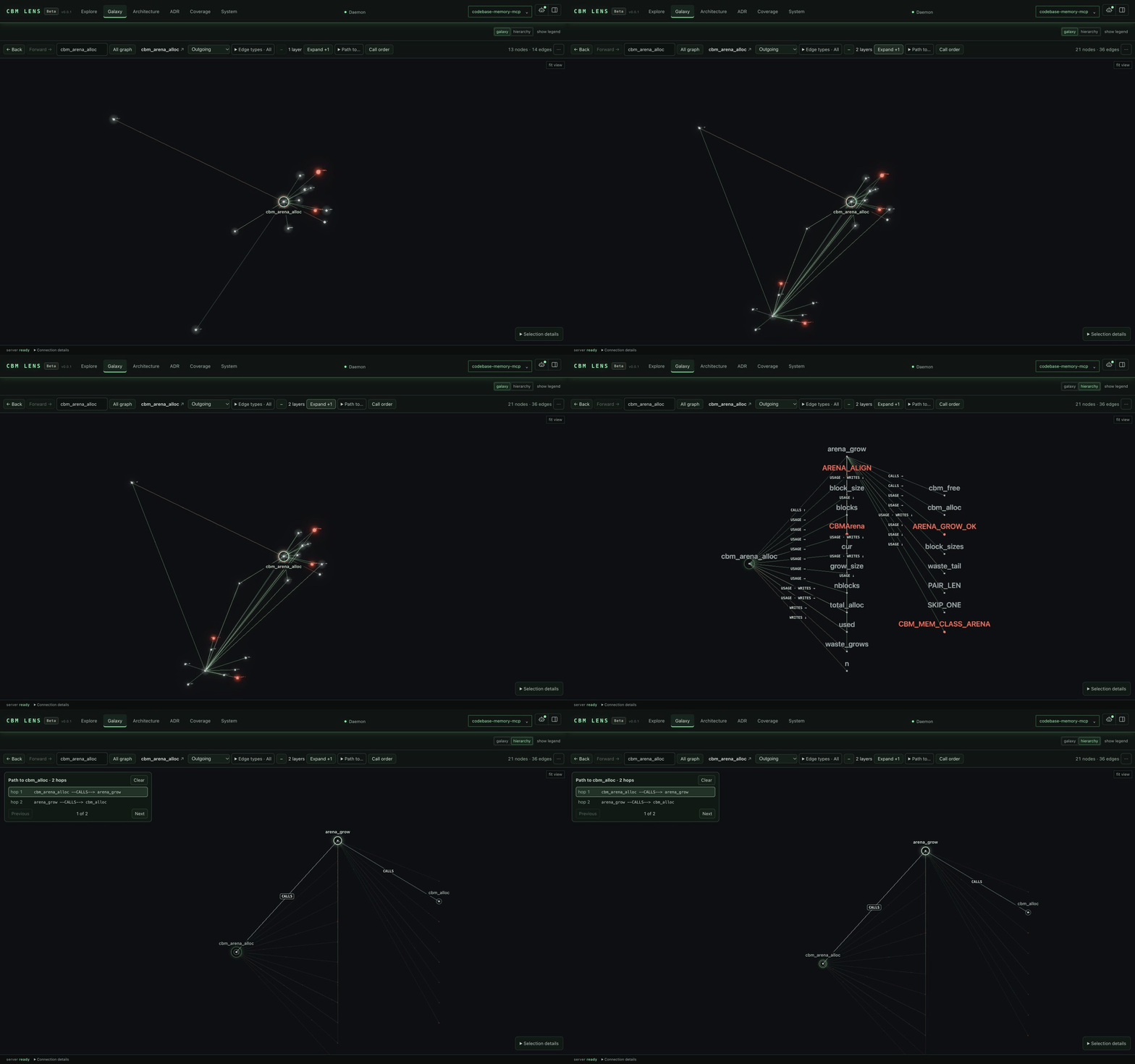
Galaxy. Explore the code knowledge graph in 3D. The recording searches cbm_pipeline_run, follows its outgoing calls one layer further, switches to the hierarchy and shows the path to cbm_store_check_integrity. Edge pulses show relationship direction; they do not represent live execution. Current still: two dependency layers around cbm_max_file_bytes.
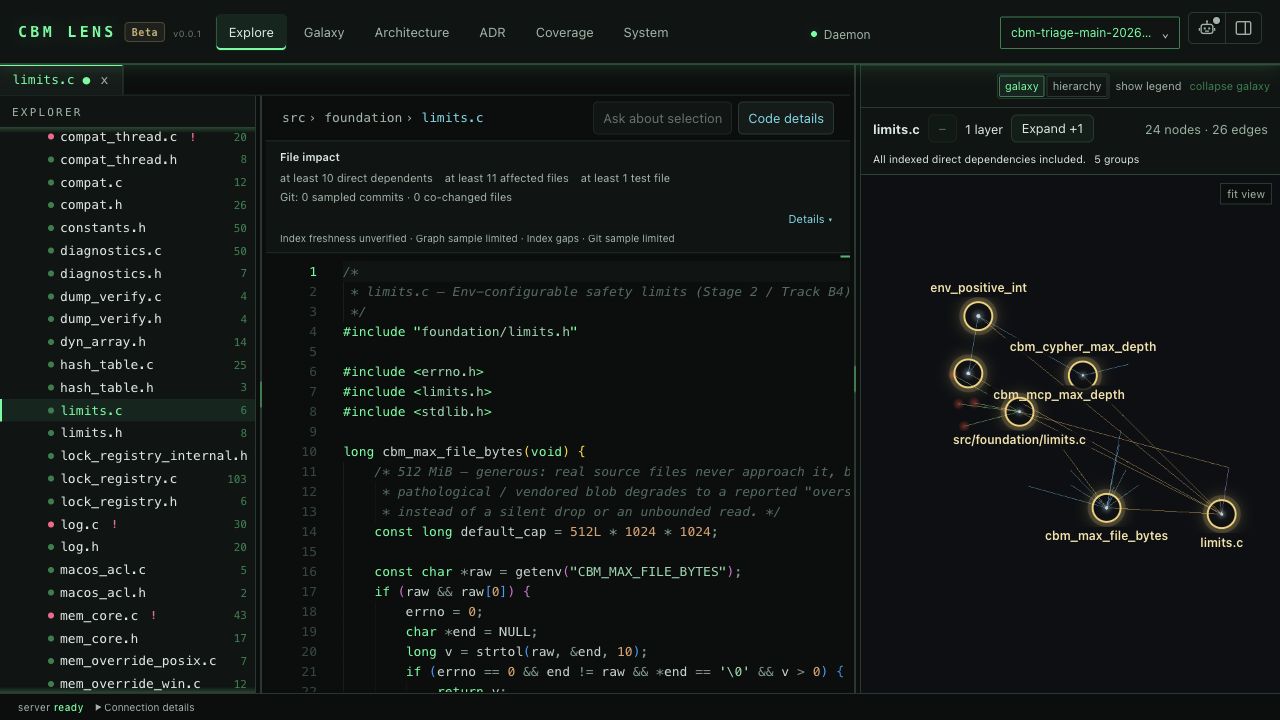
Explore. Browse files in an IDE-style workspace, read syntax-highlighted source in Monaco, and keep the code graph alongside it. File impact shows what depends on the open file, and Code details shows the callers and calls of the symbol under the caret. Select code to ask the local chat about it.
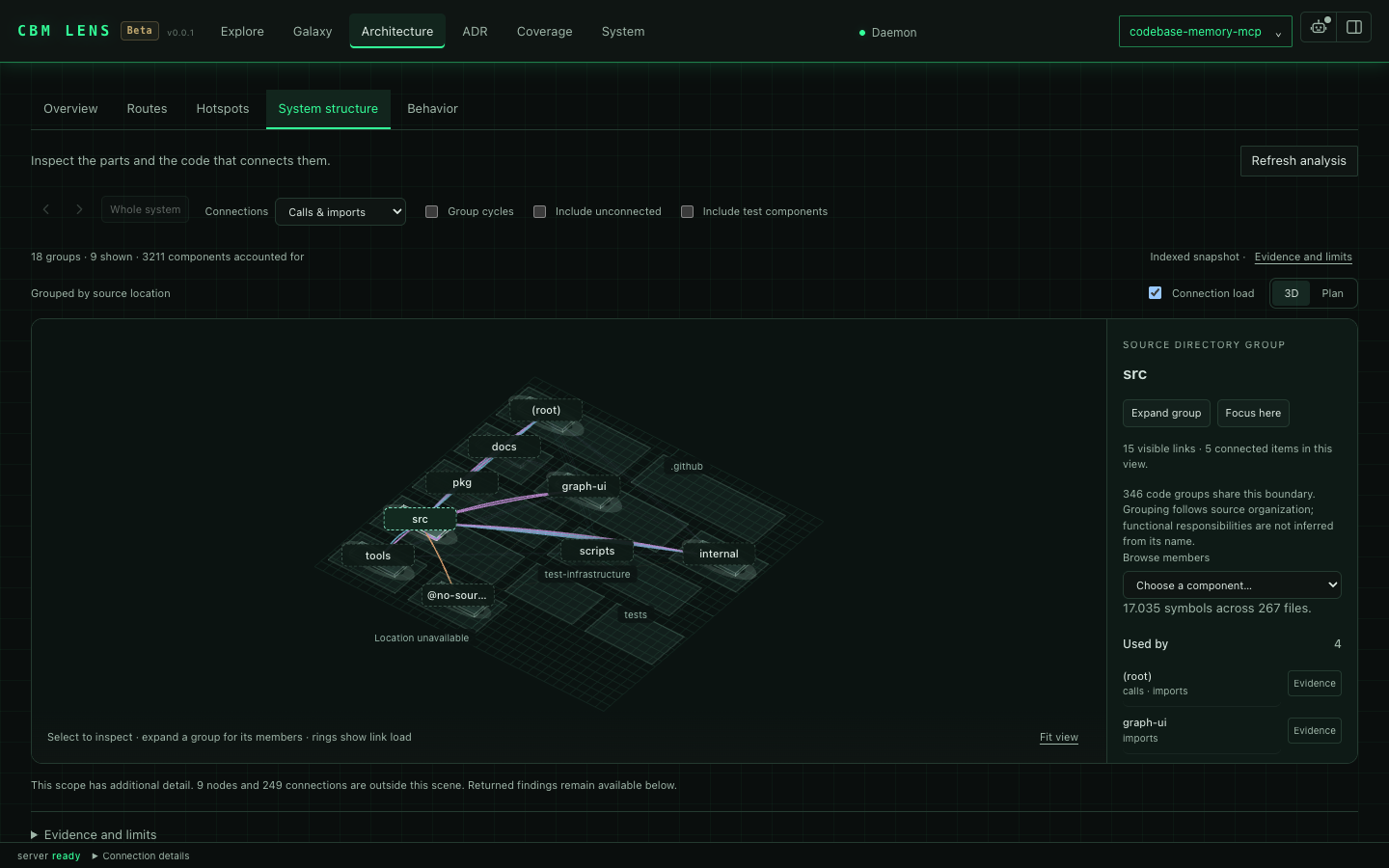
System structure groups symbols into components and lets you inspect their dependencies.
Behavior shows possible calls from a selected operation and the source evidence behind them.
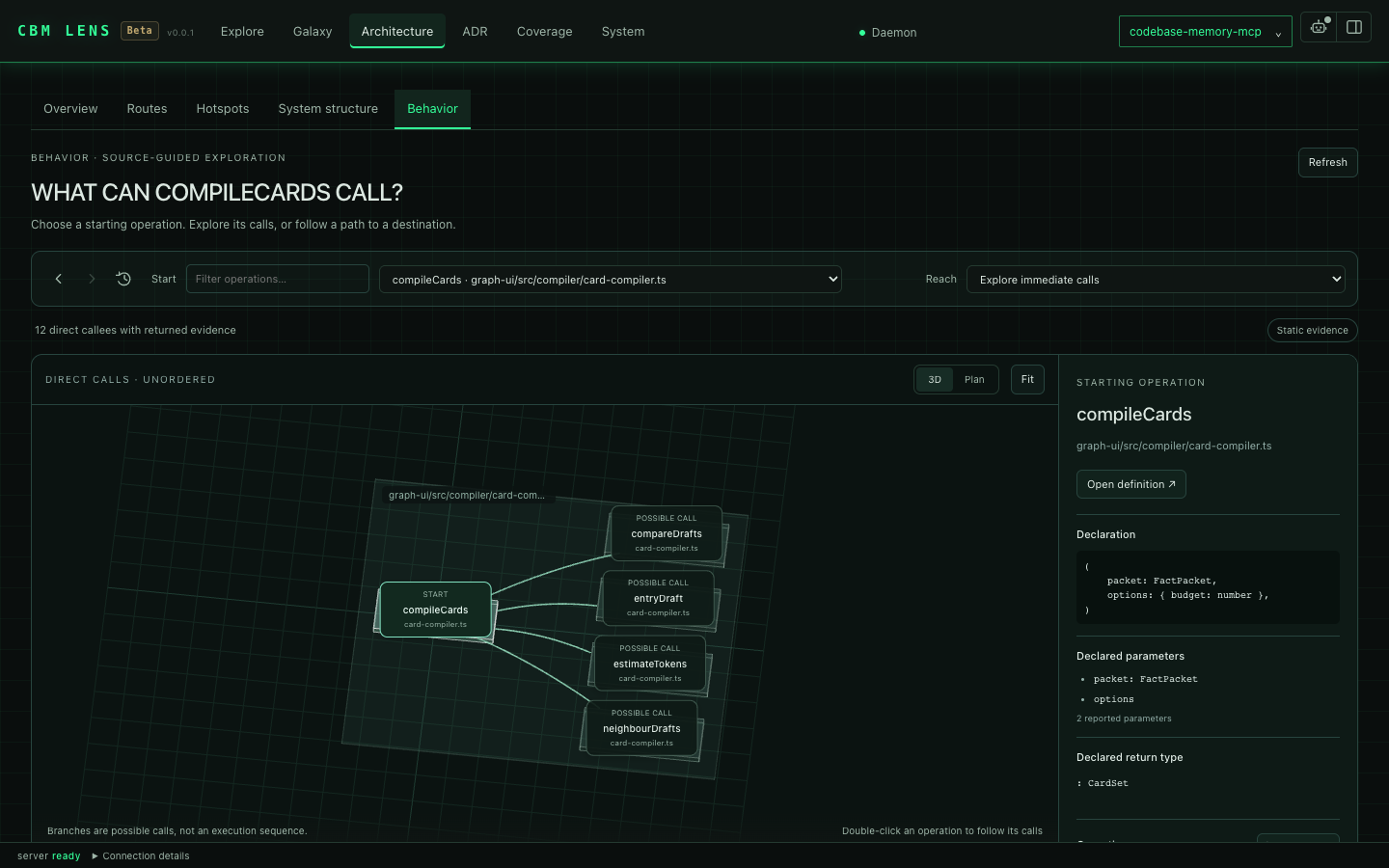
These captures show CBM Lens Beta on 12–13 October 2026, using public source from this repository. See capture details for each capture's build, indexed scope and recording setup.
install → restart agent → done.install configures detected clients and safely activates conditional clients only when their documented platform, marker, or explicit existing config path is present. See Multi-Agent Support for the complete matrix and manual/UI-only boundaries.Resource nodes for K8s kinds and compose services, Image nodes joining the images that are built and run, Module nodes for Kustomize overlays with IMPORTS edges to referenced resources; a Service walks to the program its container runs.Install the latest release (macOS / Linux). For CBM Lens Beta shown above, build from source until the next release.
curl -fsSL https://raw.githubusercontent.com/DeusData/codebase-memory-mcp/main/install.sh | bash
The released graph UI is included in the standard installer.
Windows (PowerShell):
# 1. Download the installer
Invoke-WebRequest -Uri https://raw.githubusercontent.com/DeusData/codebase-memory-mcp/main/install.ps1 -OutFile install.ps1
2. (Optional but recommended) Inspect the script
notepad install.ps1
3. Unblock the downloaded file (removes Mark-of-the-Web restriction added by browsers/Invoke-WebRequest)
Unblock-File .\install.ps1
4. Run it
.\install.ps1
Note: If you see a script execution policy error, runSet-ExecutionPolicy -Scope Process Bypassfirst, or invoke withPowerShell -ExecutionPolicy Bypass -File .\install.ps1.
Options: --skip-config (binary only, no agent setup), --dir= (custom location).
Antivirus note: Microsoft Defender may flag a release binary as
Trojan:Script/Wacatac.B!ml. This is a known false positive; typically 61 of~62 engines return clean, and the same detection family hits gh, llama.cpp,
Godot and Microsoft's own Go toolchain. See
Antivirus False Positives for the
evidence, how to verify the artifacts yourself, and how to report it if you
think we are wrong.
Restart your coding agent. Say "Index this project": done.
1. Download the archive for your platform from the latest release:
codebase-memory-mcp--.tar.gz (macOS/Linux) or .zip (Windows)install.sh or install.ps1):
macOS / Linux:
   tar xzf codebase-memory-mcp-*.tar.gz
   ./install.sh
Windows (PowerShell):
   Expand-Archive codebase-memory-mcp-windows-amd64.zip -DestinationPath .
   Unblock-File .\install.ps1
   .\install.ps1
3. Restart your coding agent.
The install command automatically strips macOS quarantine attributes and ad-hoc signs the binary; no manual xattr/codesign needed.
The install command auto-detects installed coding agents and configures their documented MCP entries plus durable instructions, skills, and lifecycle hooks where supported.
CBM automatically shares one per-account coordination daemon across Claude Code, Codex, OpenCode, and every other configured client. There is no opt-in setting for MCP servers or hook clients: the first daemon-backed CBM session starts it, each session registers its own work, and a session-managed daemon stops after the final session. A daemon started with daemon start remains running until stopped. The daemon owns long-lived background services such as watchers, shared indexing jobs, and the optional UI. Closing one session cancels work owned only by that session, while work still needed by another session continues.
The detached daemon does not depend on an MCP frontend's stderr. It keeps owner-only durable records under the canonical ${CBM_CACHE_DIR}/logs directory (default ~/.cache/codebase-memory-mcp/logs):
| File | Contents |
|------|----------|
| cbm-daemon.log | Daemon lifecycle, watcher/indexing, UI, resource, and error events. |
| daemon-conflicts.ndjson | Exact-build, coordination-ABI, and cache-root admission conflicts. |
| activation-events.ndjson | Install/update/uninstall activation progress and outcomes. |
Thin frontends still write immediate startup and session-specific errors to their own stderr; MCP JSON-RPC stdout remains clean.
All active CBM processes must run the exact same version, executable build, coordination ABI, and canonical cache root. Equivalent CBM_CACHE_DIR aliases resolve to the same root; a genuinely different root is rejected while any CBM process is active. MCP servers, hooks, one-shot CLI commands, temporary index workers, and the daemon share a crash-safe OS admission barrier; starting an ordinary conflicting process fails before doing work and records an explicit conflict in ${CBM_CACHE_DIR}/logs/daemon-conflicts.ndjson.
The native install, update, and uninstall commands are the deliberate exception to that conflict rule. Download, verification, and private same-filesystem staging happen first so a bad candidate never disrupts active work. Activation then publishes account-wide maintenance intent, asks the daemon and every temporary local operation to cancel, and waits to a finite deadline for all coordinated CBM processes to exit. It holds the admission and lifetime barriers exclusively while changing the active binary, configuration, PATH, or indexes. New CBM work cannot enter during this window. Activation progress and results are recorded in ${CBM_CACHE_DIR}/logs/activation-events.ndjson, and a successful command tells you to restart open coding-agent sessions so they launch the activated build.
Package-manager setup (npm, PyPI, or Go) verifies and caches the native executable for that package. It does not replace the active native installation and therefore does not stop running CBM sessions. When that cached binary is executed, it still enters the same exact-build admission barrier. The shell and PowerShell installers invoke the verified candidate's native install command, so they do receive the full account-wide activation guarantee.
The ordinary cli mode runs one command locally, but it is not disconnected from the daemon above: it connects to the shared coordination daemon (starting one if none is already running) for that same admission barrier plus per-project locks on graph mutations. Its connection is a cli_session: it never registers with the background watcher and never starts a UI, and it holds the admission lease only for the command's lifetime. If the command's own connection is what started the daemon, that daemon exits again once the command closes and no other session is attached; if a daemon was already running, the command simply joins and leaves it exactly as found. While the command is running, a temporary monitor separately lets activation cancel that operation and its supervised worker safely; the monitor exits with the command and never becomes a standing daemon. See CLI Mode for details.
CBM Lens Beta is the browser interface built into the binary. It builds on CodeAtlasWeb by Bernhard Jackiewicz (design and tracking in #1964). It runs on loopback; the only request that leaves your machine is the optional model download from Hugging Face, and only after you start it. Each panel names where its facts come from, and what the index did not record is shown as a gap. Start the local server:
./build/c/codebase-memory-mcp daemon start --open --port=9749
The browser opens at http://127.0.0.1:9749. A permanent daemon keeps the UI available after the command exits. Use daemon status to inspect it and daemon stop when you are finished. For an MCP session, --ui=true --port=9749 enables the same shared UI. Active clients must use the same executable build and cache directory.
Open your first repository
1. Open the project menu and choose Add project index. You can also use Alt+P.
2. Choose a local repository folder and name the index. Files stay in place.
3. Start indexing and follow its reported status. You can close the dialog while it runs and reopen its activity from the project menu.
4. Open the indexed project. Start with Architecture for an overview or Explore to read a file.
To bookmark a view, use ?project=&workspace=architecture. Other workspace values are explore, galaxy, adr, coverage, and system.
| Workspace | What you can do |
|-----------|-----------------|
| Explore | Navigate the indexed file tree and read source in Monaco. File impact shows what depends on the open file; Code details shows the callers, calls, references and related tests of the symbol under the caret. |
| Galaxy | Search and focus graph nodes, load their neighbors layer by layer, switch to hierarchy, follow a path, and open source. Back and Forward return to earlier views. The coverage shadow marks known gaps around the loaded graph. |
| Architecture | Explore the folder map, entry points, routes, hotspots, system structure, and behavior paths. Select a node or connection to inspect its evidence. |
| ADR | Read and edit the project's architecture decision record. Save explicitly; the document is stored with the index and shared with manage_adr. |
| Coverage | Check indexed, partially parsed, skipped, and excluded paths, together with available freshness information. |
| System | Inspect daemon activity, indexes, and logs. Filter logs by project, severity, or text. |
Architecture views
Open Chat with the panel button at the top right to ask about the code you are looking at. In Explore it uses the open file or the exact text you have selected; in Galaxy it uses the selected node and its loaded neighbors. You can also attach graph evidence through Add context.
1. Click the robot icon at the top right to open the agent configuration.
2. Choose a local model. The default Qwen2.5 Coder 0.5B downloads about 567 MB; Qwen3 0.6B, LFM2.5 1.2B and Qwen3.5 2B are larger options. All need WebGPU with shader-f16 support.
3. Click Download & load. Model files come from Hugging Face; inference runs in your browser, with no hosted chat API or API key. A model that is already in the browser cache loads with Load model (cached, no download).
4. Ask a question. The composer shows the file or selection that will accompany it. Select a smaller range when you want to focus the answer.
Questions about callers and callees, such as "Who calls cbm_pipeline_run?", are answered from the loaded graph without the model, and the answer says so. When you select a symbol, the chat lists its indexed facts and the lines of its code, and the model adds one sentence; that sentence is left out when it claims something the source does not show. Text written by the model is labelled as such.
The recording shows a question about callers answered from the indexed graph, next to the automatic explanation of the selected symbol. Still image.
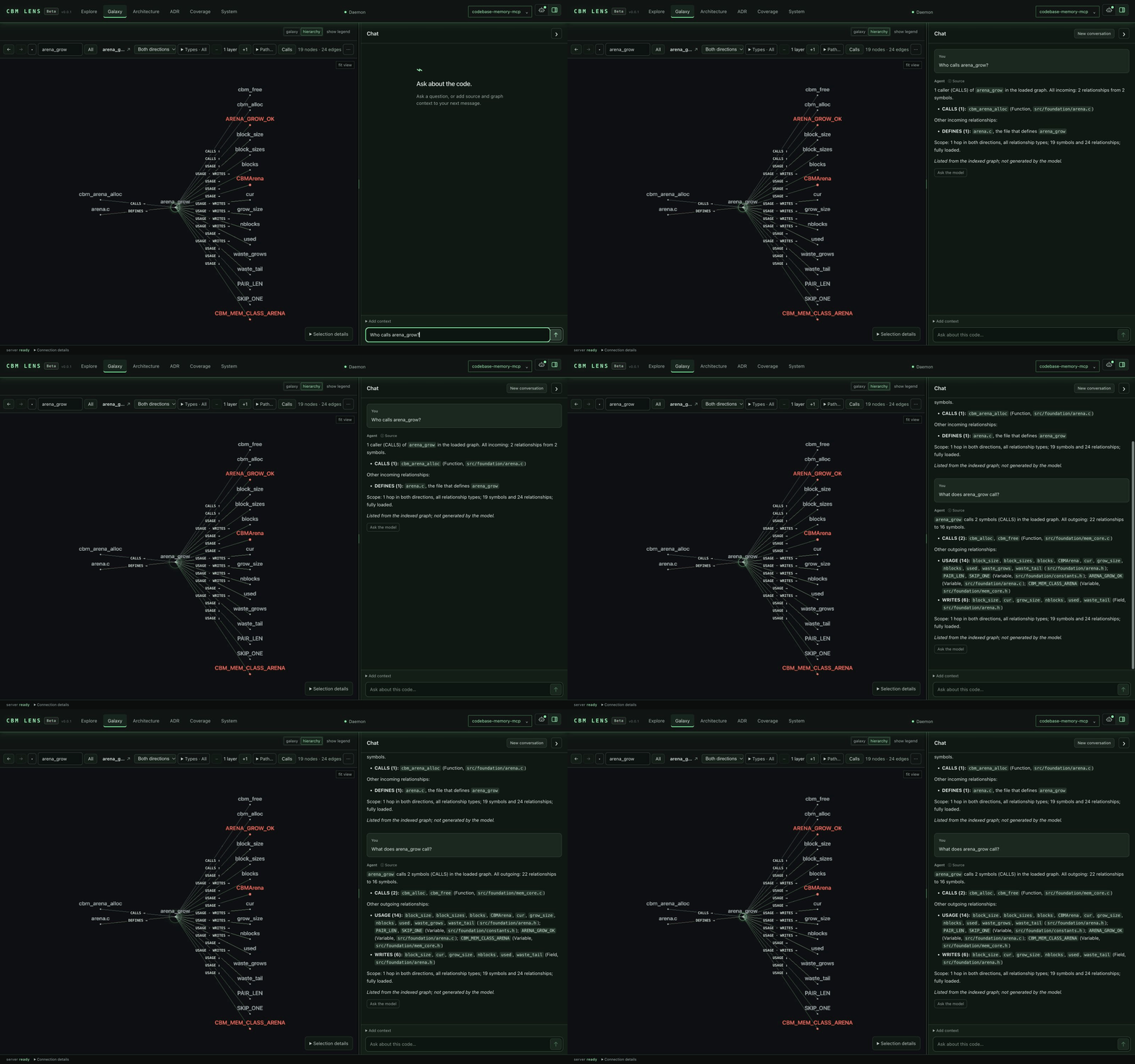
The chat history is kept for 24 hours in this browser, per project. Each new message uses the source currently open in the reader; earlier source snapshots are not silently accumulated, and messages about another file or selection are not sent along. If a prompt is too long for the model, older messages are left out first; if it still does not fit, CBM Lens asks you to select less code instead of cutting the code. This chat explains the context you give it; it cannot edit files or run tools. Check its answers against the source. The small default model words things loosely, especially in languages other than English.
Cmd+K or Ctrl+K opens the Galaxy search. It finds symbols, files and folders by name or path in the whole index, also nodes that are not loaded yet. For callers and callees, ask in the chat; the answer is listed from the graph.
Architecture decisions
The ADR workspace keeps an unsaved draft per project in this browser tab. It checks whether the stored document changed before saving, but the API does not provide an atomic document lock. The editor accepts up to 8,000 UTF-8 bytes. Saving changes the indexed decision document, not a file in your repository.
The Agents workspace and activity overlays are hidden in normal builds. To include them in a source build:
VITE_EXPERIMENTAL_AGENTS=true scripts/build.sh --with-ui
Activity comes from explicitly configured tool hooks. The bundled adapter supports Claude Code PostToolUse; other clients need their own adapter. Recorded events go to the local daemon, and the reader must enable activity before the browser polls them. This does not automatically observe every agent. See the frontend setup guide.
For troubleshooting, open System logs. Frontend errors and failed requests are recorded locally. GET /api/ui-log reads frontend entries from the daemon's SQLite journal; ${CBM_CACHE_DIR}/logs/ui.log is also retained as a rotating JSONL export. See the frontend README for log scope, model setup, and development details.
Enable automatic indexing on MCP session start:
codebase-memory-mcp config set auto_index true
When enabled, new projects are indexed automatically on first connection. Previously
→ →
→ →
→ →
→ →
→ →
→ →
→ →
→