1
 →
→
Native LLM inference server for Apple Silicon. OpenAI + Anthropic API compatible. No Python. Zig backend, Swift frontend macOS app with chat, music, voice, video generation.
ddalcu/mlx-serve is an open-source project on GitHub, mainly written in Zig. Native LLM inference server for Apple Silicon. OpenAI + Anthropic API compatible. No Python. It currently holds 1,665 stars and 0 forks with 0 open issues, and was last pushed on an unknown date (repository created unknown).
AI Homed tracks it on the AI Video Projects board and on the AI AI Video Projects list.
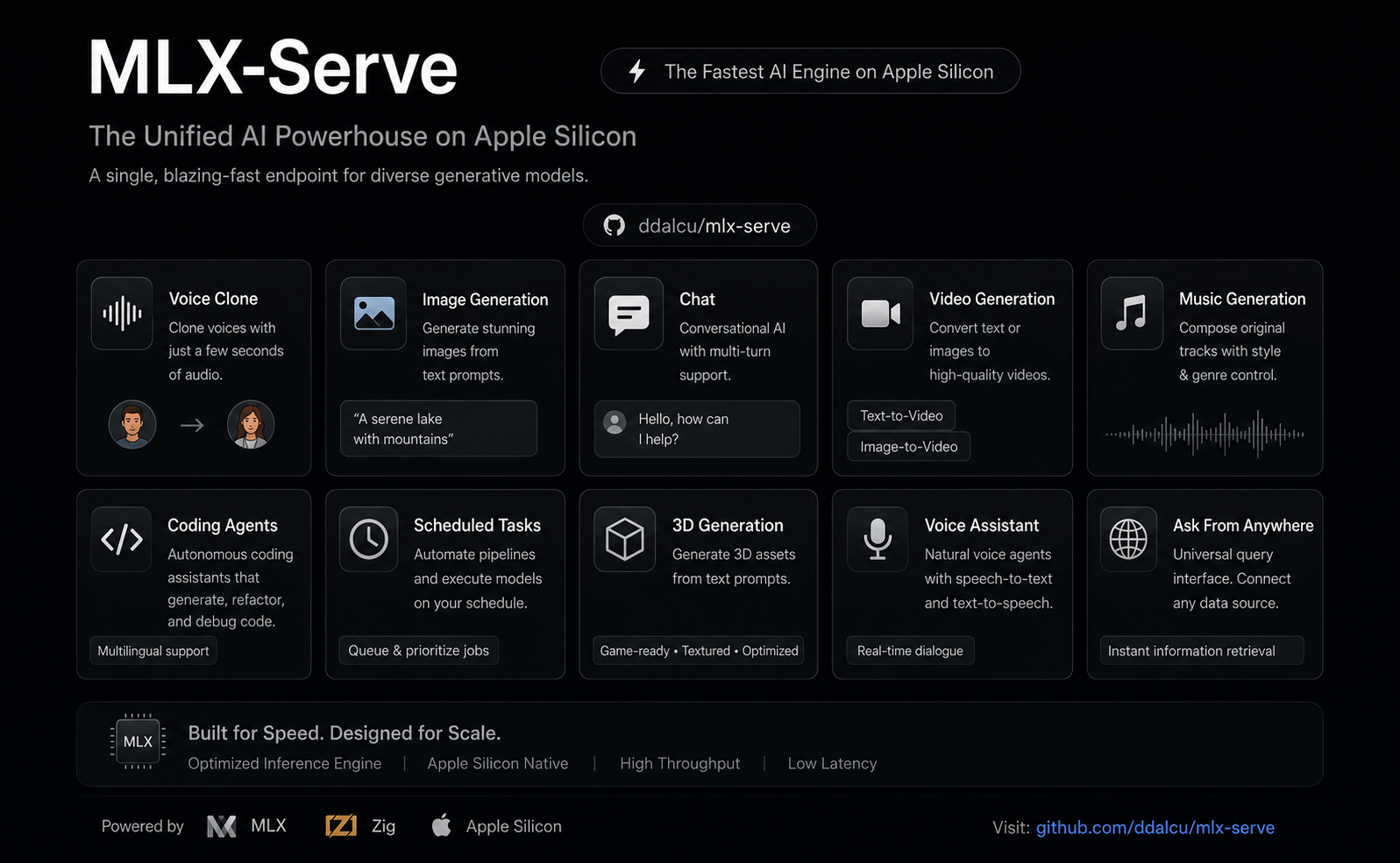
**OpenAI- and Anthropic-compatible local inference for Apple Silicon — MLX and GGUF — faster than LM Studio on identical MLX weights. No Python. No cloud. No Electron.
mlxserve.com · Download MLX-Serve.app · Docs · Changelog
mlx-serve is a native Zig server that runs any LLM on Apple Silicon** — MLX-format models and every GGUF on HuggingFace (Qwen, Llama, Mistral, Gemma, DeepSeek V4 Flash, thousands more). It exposes OpenAI-compatible and Anthropic-compatible HTTP APIs out of the box, so the same http://localhost:11234 works with Claude Code, the OpenAI SDK, Continue, Cursor, Open WebUI, and anything else that speaks one of those wires. Beyond text, the same server generates images, video, music, speech (with voice cloning), and 3D models — all natively on MLX. Ships with MLX Core, a macOS menu-bar app with chat, agent mode, MCP tool calling, and model management.
Needs macOS 26.2+ on Apple Silicon.
MLX-Serve is a signed, notarized macOS menu-bar app that bundles the server. Browse and download models with a progress UI, chat, run agent mode with MCP tools, generate images / video / music / speech / 3D, and tune every server flag from a Settings window. No terminal, nothing to configure. The server underneath is the same binary the CLI runs, on the same http://localhost:11234, so Claude Code and any OpenAI or Anthropic client can point at it while the app is running.
 Download MLX-Serve.app — latest release for macOS (Apple Silicon)
brew tap ddalcu/mlx-serve https://github.com/ddalcu/mlx-serve
brew install --cask mlx-core   # the app (recommended)
brew install mlx-serve         # CLI + server only, no GUI
Ollama-style, if that's your habit:
mlx-serve run gemma4        # downloads Gemma 4 E4B (4-bit), serves it, chats right in your terminal
mlx-serve pull qwen3.6:27b  # just download (resumable, straight from Hugging Face)
mlx-serve list              # what's on disk
mlx-serve serve             # serve everything you've pulled — models load on demand by name
Short names, org/repo HuggingFace ids, and name:tag all work. Direct --model/--model-dir invocations for scripts and headless Macs, plus every server flag, are in docs/cli.md.
And because mlx-serve speaks the Ollama API (/api/chat, /api/generate, /api/tags, /api/embed, /api/pull, …) alongside OpenAI and Anthropic, your existing Ollama-connected tools — Raycast, Obsidian, Enchanted, Open WebUI, ollama-python/js — work unchanged: point them at http://localhost:11234 and keep your workflow, on a faster engine.
Needs Xcode 26.2+ and Homebrew. The script downloads the Metal Toolchain component and installs the Brewfile (cmake + webp) when they are missing:
git clone --recurse-submodules https://github.com/ddalcu/mlx-serve && cd mlx-serve
./app/build.sh                        # app + server, ad-hoc signed
That's the whole list. Zig, mlx and llama.cpp are pinned and fetched or built by the script, and there's no Python anywhere in the build. Server-only builds are in docs/building.md.

If you're already on LM Studio, Ollama, or mlx-lm and wondering whether to switch — here's the short version, head-to-head:
| | mlx-serve | LM Studio | Ollama | mlx-lm |
|---|:---:|:---:|:---:|:---:|
| MLX models (native Apple) | ✅ | ✅ | 🟡 | ✅ |
| GGUF models (llama.cpp) | ✅ embedded | ✅ | ✅ | ❌ |
| OpenAI-compatible API | ✅ | ✅ | partial | ❌ |
| Anthropic Messages API | ✅ | 🟡 partial² | ❌ | ❌ |
| Ollama API (drop-in for Ollama clients) | ✅ | ❌ | ✅ native | ❌ |
| run CLI with auto-download + REPL | ✅ | ❌ | ✅ | ❌ |
| OpenAI Responses API + WebSockets | ✅ | 🟡 partial² | ❌ | ❌ |
| DeepSeek V4 Flash (284B) | ✅ via ds4 | ❌ | ❌ | ❌ |
| Typed decisions (Laya, Kev, POST /v1/decisions) | ✅ | ❌ | ❌ | ❌ |
| Speculative decoding (PLD + drafter + native MTP) | ✅ | ❌ | partial | drafter only |
| Decode speed (geomean vs LM Studio, identical weights) | +26% (MLX, shipping defaults) | baseline | ~−15% (GGUF, est.¹) | +11% (MLX) |
| KV-cache quantization (4/8-bit) | ✅ | ❌ | partial | ✅ |
| Continuous batching | ✅ | ❌ | ✅ | ❌ |
| Built-in agent loop + MCP client | ✅ 10 tools | ❌ | ❌ | ❌ |
| Sandboxed agent shell (isolated Linux VM) | ✅ | ❌ | ❌ | ❌ |
| LAN model sharing (use another Mac's models) | ✅ | ❌ | ❌ | ❌ |
| One-click launchers (Claude Code, OpenCode, Pi) | ✅ | ❌ | ❌ | ❌ |
| Python required at runtime | ❌ | ❌ | ❌ | ✅ |
| Native menu-bar app (no Electron) | ✅ | ❌ Electron | ❌ | ❌ |
| Image generation + photo editing | ✅ | ❌ | ❌ | ❌ |
| Video generation (text / image / audio → video) | ✅ | ❌ | ❌ | ❌ |
| Speech + voice cloning | ✅ | ❌ | ❌ | ❌ |
| Music generation | ✅ | ❌ | ❌ | ❌ |
| 3D generation (image → textured 3D model) | ✅ | ❌ | ❌ | ❌ |
| License | MIT | proprietary | MIT | MIT |
¹ Ollama can't run MLX except a handful of NVFP4 conversions, so the comparison is GGUF-vs-GGUF.
² Recent LM Studio builds ship Anthropic /v1/messages and OpenAI /v1/responses compatibility endpoints, with partial coverage of each surface — mlx-serve additionally implements e.g. the Responses WebSocket transport and /v1/responses/compact.
Numbers and charts in Performance.
reasoning_content.mlx-serve launch in the terminal, both preconfigured with the server's real context window. Setup for every tool in docs/integrations.md.http://localhost:11234 in a browser for a chat playground, live monitor, image and audio tools, and the API reference.localhost can run on the Studio's 27B.One server, five modalities. In the app they are tray panels (click, download, generate); over HTTP they are the /v1/images, /v1/audio, /v1/video and /v1/3d endpoints. You can also ask for media straight in chat: request an image, a spoken line, a track or a clip and it renders inline in the conversation.
| Feature | Default | Other options | Approx. RAM | |---|---|---|---| | Image | FLUX.2-klein 4B 4-bit (mflux, ~5 GB pre-quantized) | FLUX.2-klein 9B (10 GB), Krea-2-Turbo, Mage-Flow Turbo / Edit 8-bit (8.5 / 9.1 GB) | 8 / 12 / 16 GB | | Video | LTX-Video 2.5 4-bit (36 GB, bundled text encoder) | LTX-Video 2.5 8-bit (59 GB, sharper + diffusion decoder), LTX-Video 2.3, MiniMax-H3 (Hailuo 3.0) 4-bit / 8-bit, video and matching soundtrack in one pass | LTX 24 GB RAM; H3 26 GB (40 GB) or 44 GB (69 GB) | | Speech | Qwen3-TTS 1.7b (voice cloning) | Qwen3-TTS 0.6b, Kokoro-82M (54 voices, ~345 MB) | 8 GB RAM, ~3.5 GB first-run download | | Music | ACE-Step 1.5 XL Turbo 8-bit (fast, 8 steps) | MiniMax Music 3 8-bit (sings your lyrics, songs up to 6 min) | ACE 8 GB RAM, ~6.2 GB download; Music 3 ~20 GB RAM, 13.6 GB download | | 3D | Hunyuan3D-2.1 8-bit (shape + PBR texture) | — | 16 GB RAM |
It goes well beyond text-to-X: photo editing by instruction, image-to-image, animating your photos, talking characters synced to real audio, voice cloning from seconds of audio, full music tracks, photo-to-GLB 3D models, and stacked style LoRAs. The full tour is in docs/app.md.
Menu-bar app that wraps the server with a full UI:
Native MLX dispatch for Gemma 3/4, DiffusionGemma, Qwen 3 / 3.5 / 3.6 / 3.8 / 3-Next, Meta's Muse-Glimmer-30B, inclusionAI Ling 3.0, DeepSeek V4 Flash (284B), Tencent Hunyuan 3 (295B), Thinking Machines Inkling Small (276B), poolside Laguna, Llama 3.x, Mistral, Nemotron-H, LFM2/2.5 (including the VL vision builds), plus embedding models (BERT, EmbeddingGemma, Qwen3-Embedding) and Laya typed-decision models (POST /v1/decisions). Anything else runs as GGUF through the embedded llama.cpp, auto-routed by format. The full table with model_types, chat formats and vision support is in docs/models.md.
Apple M4 Max, identical weights per engine, every engine on its shipping defaults. benchmarks.md tracks decode tok/s release by release; methodology, speculative decoding details and the tuning guide are in docs/performance.md.
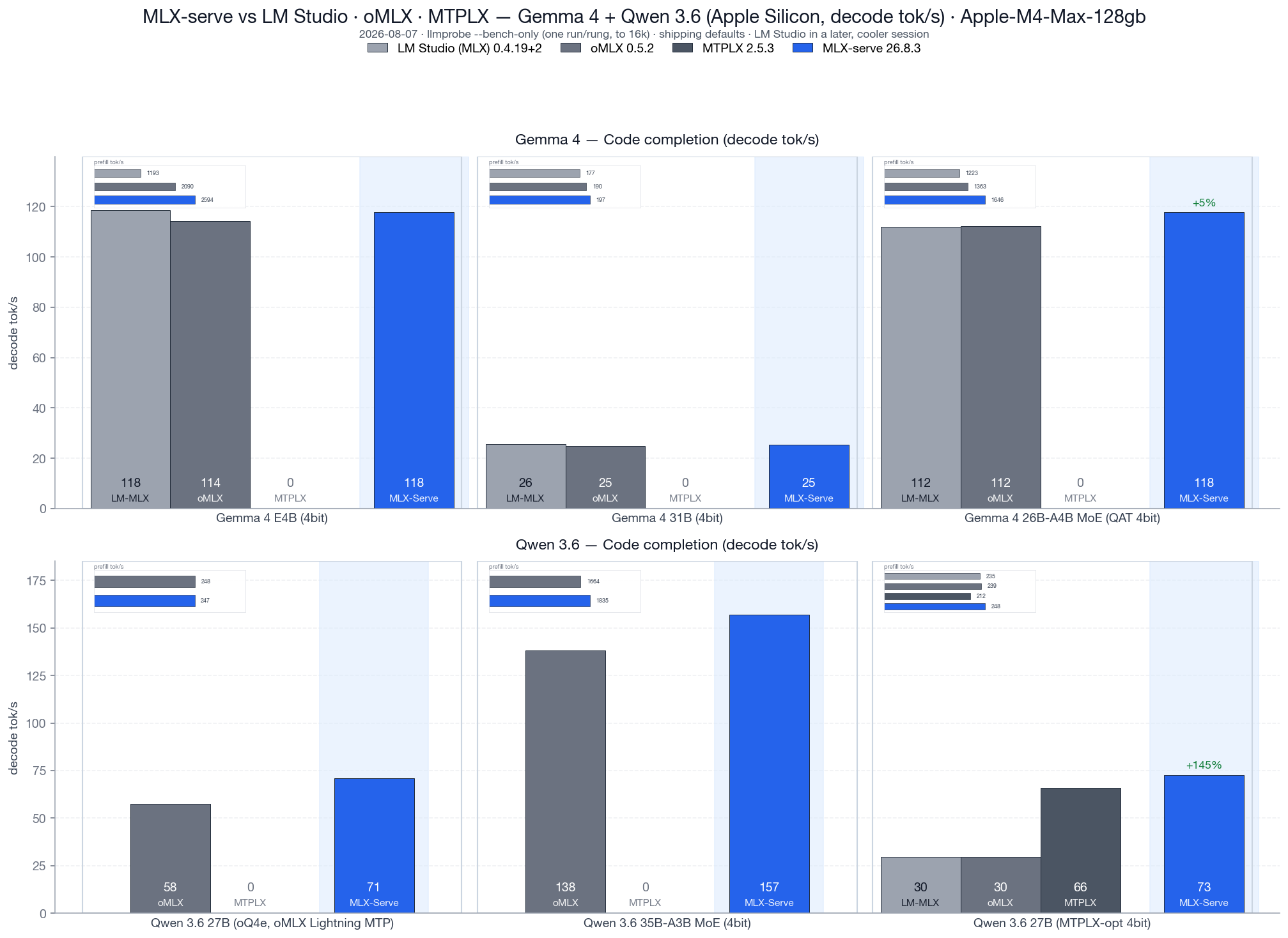
Code completion decode tok/s, v26.8.3, vs LM Studio 0.4.19+2, oMLX 0.5.2 and MTPLX 2.5.3, all four engines loading the identical MLX weight files. Geomean decode: +26% over LM Studio and +25% over oMLX, with prefill +36% and +10%. On the competitors' own checkpoints: +23% decode over oMLX on its oQ4e build, +10% decode / +17% prefill over MTPLX on its MTPLX-Optimized build.
Speculative decoding comes in four flavors (PLD, model-shipped draft companions, the Gemma 4 drafter, native Qwen MTP), all greedy-equivalent, with adaptive gates that keep novel-content workloads at parity. Details in docs/performance.md.
The short answers live in docs/faq.md. Most asked:
mlx-serve stands on a lot of open-source shoulders: MLX · mlx-c · mlx-lm · llama.cpp · antirez/ds4 · jinja.cpp · nlohmann/json · stb_image · libwebp · HuggingFace tokenizers · Zig · Homebrew, plus the model and media architectures from Google, Qwen, Meta, Mistral AI, NVIDIA, Liquid, DeepSeek, Tencent, poolside, Thinking Machines, Black Forest Labs and Lightricks, and the Anthropic and MCP Swift SDKs in the app.
Some of the fastest Metal paths in the engine started as someone else's work, and the source says so at every one of them:
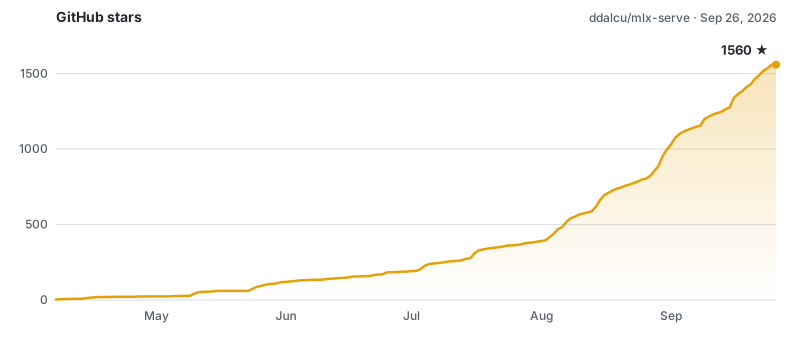
mlx-serve is built on a 16 GB M4 Mac mini and a 128 GB M4 Max, and lately the machines are the bottleneck rather than the code:
Progress: ▱▱▱▱▱▱▱▱▱▱ 2%
@jcprichard @skudinov @davidfekke @lojza3d @cpko @d-b @alinselea Johnny Dang @R0xr1te
Everyone who chips in gets a line here, with a link if they want one, or stays anonymous. (msg me) Thank you in advance.
Builds, benchmarks and teardowns of what's under the hood:
MIT, see LICENSE.
mlx-serve bundles third-party code that stays under its own license, including some Apache-2.0 Metal kernels and the Jinja engine that renders chat templates. NOTICE lists all of it with the required attributions, and LICENSE-APACHE-2.0 is the Apache License text.
---
★ Found this useful? Star the repo, subscribe on YouTube, follow on X. It really does help others discover it.
→ →
→ →
→ →
→ →
→ →
→ →
→ →
→