
1
 →
datalab-to/marker is an open-source project on GitHub, mainly written in Python. Convert PDF to markdown + JSON quickly with high accuracy It currently holds 41,033 stars and 0 forks with 0 open issues, and was last pushed on an unknown date (repository created unknown).
AI Homed tracks it on the AI Models & LLM Tools board.

State of the Art models for Document Intelligence


Marker converts documents to markdown, JSON, chunks, and HTML quickly and accurately.
Our managed platform uses Chandra, our latest open source model, and other models — higher accuracy than Marker, with opt-in zero data retention, SOC 2 Type 2, and custom BAAs.
If you have high volume workloads, we offer a batch processing service that has processed 1B+ pages in a day at peak — we manage the infrastructure so your workloads finish on time.
The Datalab API turns documents into verifiable knowledge your agents act on. Every result traces back to its page and position, and one API can parse, extract, fill and edit documents.
Get started with about 5,000 free convert pages every month (work email) — sign up.
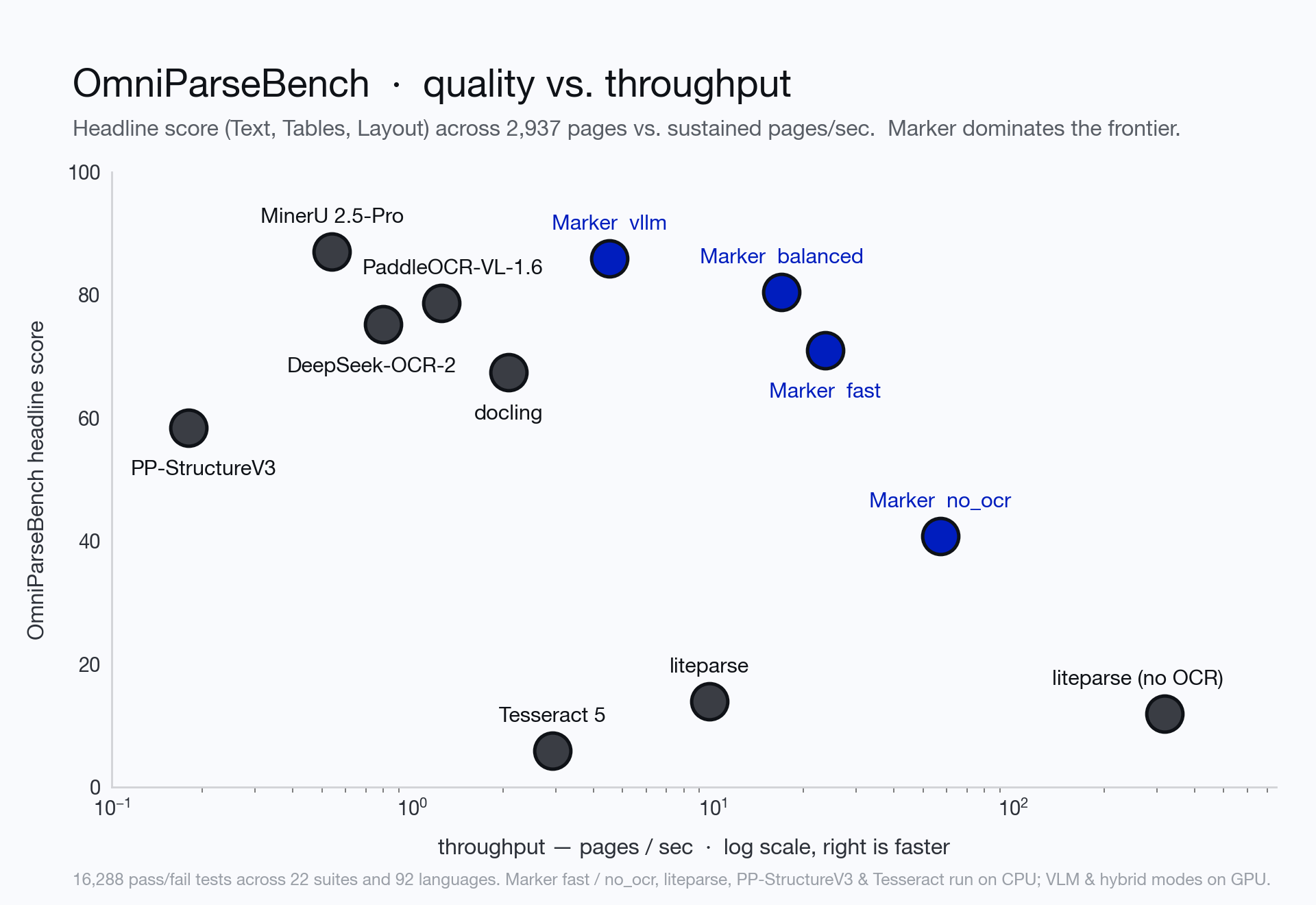
Marker is built around a simple premise: you shouldn't have to choose between VLM-level accuracy and production throughput, or maintain separate tools for GPU and CPU.
On OmniParseBench (GitHub) — 16,288 pass/fail unit tests across 2,937 pages in 92 languages covering text & reading order (8,499 tests), table cell structure (5,386 tests), and block layout (2,403 tests) — as well as olmOCR-bench, Marker defines the Pareto frontier across every hardware tier:
MinerU, docling, PP-StructureV3):Marker balanced (80.5 OmniParseBench, 85.6 on the olmOCR-bench suites, 16.9 pg/s) beats docling (67.5 at 2.1 pg/s) by +13.0 points overall (+34.8 points on text & math) at 8× the speed, and runs 31× faster than MinerU 2.5-Pro (0.54 pg/s).Marker vllm (85.9 OmniParseBench, 83.7 olmOCR-bench, 4.5 pg/s) delivers higher text accuracy (83.8 vs 77.4) and higher layout accuracy (95.7 vs 91.7) than MinerU 2.5-Pro at 8.3× the throughput (4.5 vs 0.54 pg/s).GLM-OCR, LightOnOCR-3-4B, PaddleOCR-VL-1.6, DeepSeek-OCR-2, olmOCR-2):balanced mode keeps clean prose on CPU (pdftext + in-process Indra ONNX layout) and only calls the GPU VLM on equations, complex tables, CJK/non-Latin scripts, and scans — outscoring PaddleOCR-VL-1.6 (78.7) and DeepSeek-OCR-2 (75.2, 3.4B) at 14–21× higher throughput.Marker vllm (powered by the compact 0.69B Surya 2.5 VLM) scores 85.9, beating 1B–8B open VLMs (LightOnOCR-3-4B 82.9, GLM-OCR 81.5, PaddleOCR-VL-1.6 78.7, DeepSeek-OCR-2 75.2, HunyuanOCR-1.5 64.6, olmOCR-2 42.6).fast & no_ocr) — no GPU or server required:Marker fast runs 100% in-process on CPU/MPS (~18 MB Indra ONNX weights) and scores 71.0 at 23.6 pg/s — beating docling (67.5) at 11–17× the speed, beating 1B GPU VLMs like HunyuanOCR-1.5 (64.6), outscoring PaddleOCR PP-StructureV3 (58.4) by +12.6 points at >130× the speed, and delivering 5× higher accuracy at 2.4× the speed of liteparse (14.0 at 9.7 pg/s) and 12× higher accuracy at 8× the speed of Tesseract 5 (5.9 at 2.9 pg/s).Marker no_ocr runs at 57.0 pg/s on CPU with zero OCR calls, combining pdftext with Indra ONNX layout and CPU table reconstruction to score 81–83% on born-digital multi-column and document suites (3.4× higher overall than liteparse --no-ocr at 40.8 vs 12.0).| Mode | Hardware | Throughput | OmniParseBench | Best for |
|---|---|---:|---:|---|
| --mode balanced (GPU default) | GPU + CPU | 16.9 pg/s | 80.5 (85.6 olmOCR suites) | Production mixed workloads (born-digital PDFs, tables, math, CJK, and scans) |
| --mode vllm | GPU | 4.5 pg/s | 85.9 (83.7 olmOCR-bench) | Maximum accuracy on degraded scans, dense equations, handwriting, & complex tables |
| --mode fast (CPU/MPS default) | CPU / MPS only | 23.6 pg/s | 71.0 (71.6 born-digital) | Laptops, CI, serverless/CPU containers, and fast local OCR with zero GPU dependencies |
| --mode no_ocr | CPU only | 57.0 pg/s | 40.8 (82.7 digital docs) | Bulk born-digital PDFs when you want layout, reading order, & tables at maximum speed |
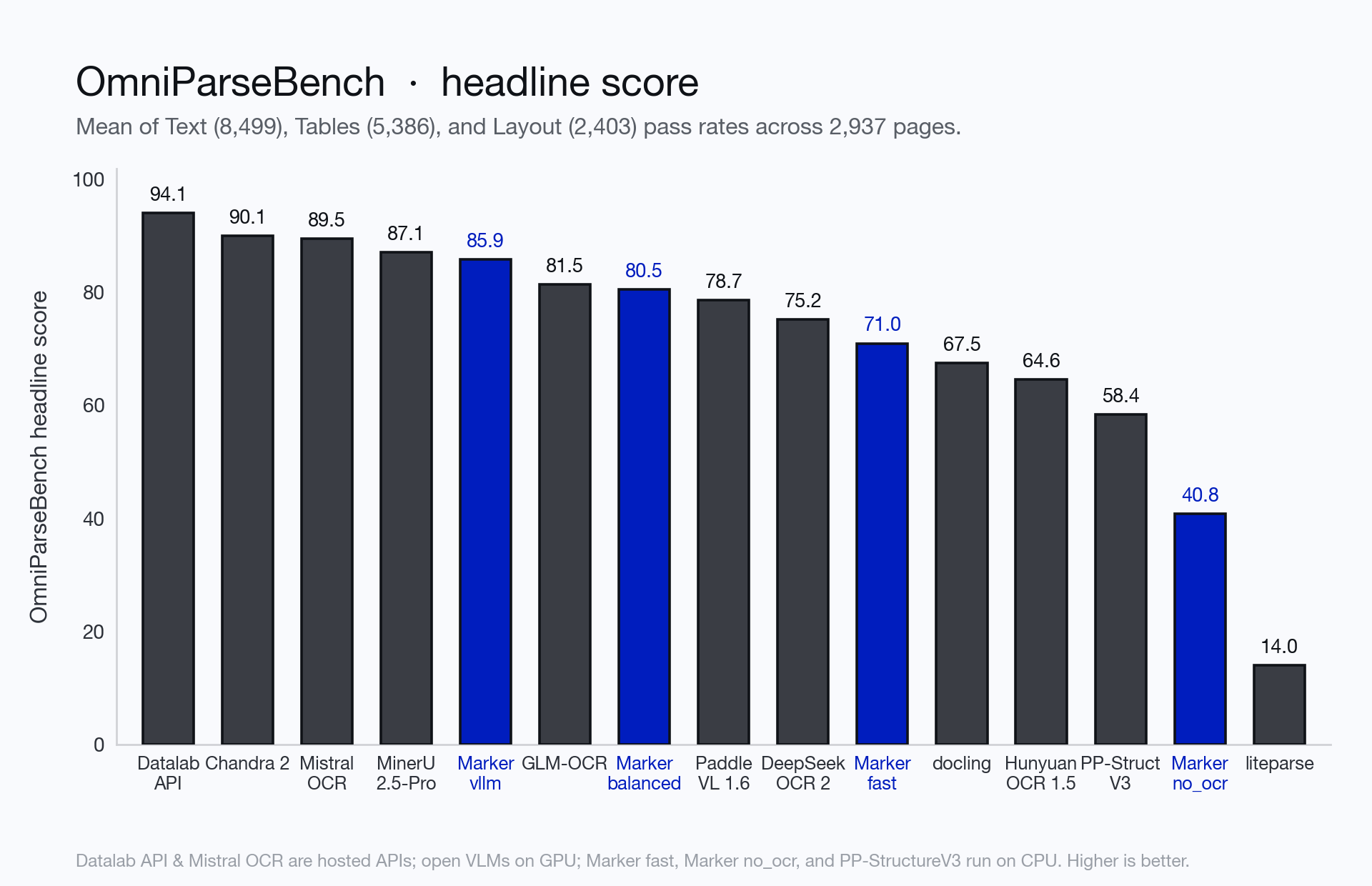
See below for the full OmniParseBench and olmOCR-bench tables, per-suite breakdowns, and instructions on how to run your own benchmarks.
For the highest accuracy, pass the --use_llm flag to use an LLM alongside marker. This will do things like merge tables across pages, handle inline math, format tables properly, and extract values from forms. It works with Gemini, Claude, OpenAI-compatible, Azure, Vertex, OpenRouter, or Ollama models. By default, it uses gemini-3.5-flash. See below for details.
| PDF | File type | Markdown | JSON | |-----|-----------|------------------------------------------------------------------------------------------------------------------------------|--------------------------------------------------------------------------------------------------------| | Think Python | Textbook | View | View | | Switch Transformers | arXiv paper | View | View | | Multi-column CNN | arXiv paper | View | View |
Our code is licensed under Apache 2.0 — free to use, including commercially. Our model weights use a modified AI Pubs Open Rail-M license (free for research, personal use, and startups under $5M funding/revenue). For commercial use of the model weights beyond that, visit our pricing page here.
Discord is where we discuss future development.
You'll need python 3.10+ and PyTorch.
Install with:
pip install marker-pdf
If you want to use marker on documents other than PDFs, you will need to install additional dependencies with:
pip install marker-pdf[full]
Surya auto-spawns the server on first use, and you need vllm (NVIDIA GPU) or llama.cpp (CPU / Apple Silicon):
llama-server binary from llama.cpp: brew install llama.cpp # macOS
# or grab a release from https://github.com/ggml-org/llama.cpp/releases
First, some configuration:
--mode no_ocr|fast|balanced|vllm; defaults by device — balanced on GPU, fast on CPU/MPS):no_ocr (or --disable_ocr) uses the embedded PDF text layer + in-process Indra ONNX layout and reading order on CPU with zero OCR calls (~24–33 pg/s).fast (aliased as indra; default on CPU / Apple Silicon MPS) uses in-process Indra ONNX layout, reading order, and line/page ONNX OCR (~33 pg/s on digital PDFs, ~7.4 pg/s mixed) — no external VLM server required.balanced (default on GPU) uses smart routing: pdftext + Indra ONNX layout on clean Latin prose pages, and routes equations, inline math, complex tables, CJK/non-Latin scripts, and scanned/garbled pages to the Surya 2.5 VLM.vllm (aliased as surya / accurate) runs full-page Surya 2.5 VLM OCR on every page, skipping pdftext and Indra entirely.balanced and vllm modes, Marker runs VLM OCR through a local Surya inference server spawned automatically on first use — vLLM (Docker) on NVIDIA GPUs, llama.cpp elsewhere. You can also point marker at an already-running server with SURYA_INFERENCE_URL=http://host:port/v1.SURYA_INFERENCE_BACKEND (vllm or llamacpp), SURYA_INFERENCE_PARALLEL (concurrent requests — by default this auto-scales to the server's capacity: the GPU's max_num_seqs under vllm, a conservative slot count under llama.cpp; set an int only to override), SURYA_INFERENCE_KEEP_ALIVE (keep the server running between invocations), VLLM_GPUS (GPU indices for the server).--force_ocr to force OCR on all pages, or the strip_existing_ocr to keep all digital text, and strip out any existing OCR text.ocr_inline_math); in fast mode, set --force_ocr or --ocr_inline_math to get the same.Marker includes a built-in interactive web viewer (no extra dependencies required) that lets you drop in PDFs, images, or Office documents and inspect layout blocks, reading order, text lines, stage timings, and rendered Markdown, HTML, Chunks, and JSON page by page across all conversion modes (no_ocr, fast, balanced, vllm). Run it with:
marker_gui --port 8000
Then open http://localhost:8000 in your browser (pass --streamlit if you want the legacy Streamlit UI).
marker_single /path/to/file.pdf
You can pass in PDFs or images.
Options:
--mode [auto|no_ocr|fast|balanced|vllm]: Conversion mode (see above). Defaults by device: balanced on GPU, fast on CPU/MPS.--stdout: Write the converted Markdown/JSON/HTML/Chunks directly to stdout instead of saving to a directory (ideal for shell pipelines and AI agents).--disable_ocr: Never call the VLM - pure text-layer extraction (equations and scanned pages are skipped).--page_range TEXT: Specify which pages to process. Accepts comma-separated page numbers and ranges. Example: --page_range "0,5-10,20" will process pages 0, 5 through 10, and page 20.--output_format [markdown|json|html|chunks]: Specify the format for the output results.--output_dir PATH: Directory where output files will be saved. Defaults to the value specified in settings.OUTPUT_DIR.--paginate_output: Paginates the output, using \n\n{PAGE_NUMBER} followed by - * 48, then \n\n--use_llm: Uses an LLM to improve accuracy. You will need to configure the LLM backend - see below.--force_ocr: Force OCR processing on the entire document, even for pages that might contain extractable text.--block_correction_prompt: if LLM mode is active, an optional prompt that will be used to correct the output of marker. This is useful for custom formatting or logic that you want to apply to the output.--strip_existing_ocr: Remove all existing OCR text in the document and re-OCR with surya.--redo_inline_math: If you want the absolute highest quality inline math conversion, use this along with --use_llm.--disable_image_extraction: Don't extract images from the PDF. If you also specify --use_llm, then images will be replaced with a description.--keep_headers_footers (or --keep_pageheader_in_output / --keep_pagefooter_in_output): Keep running page headers / footers in the output instead of stripping them (they are removed by default).--keep_server: Keep the Surya inference server (vLLM / llama.cpp) running after this command exits so subsequent CLI commands reuse it.--skill / --install_skill PATH: Print the Marker AI coding agent skill (SKILL.md) to stdout or install it into a skills directory (e.g. marker_single --install_skill .agents/skills).--debug: Enable debug mode for additional logging and diagnostic information.--processors TEXT: Override the default processors by providing their full module paths, separated by commas. Example: --processors "module1.processor1,module2.processor2"--config_json PATH: Path to a JSON configuration file containing additional settings.config --help: List all available builders, processors, and converters, and their associated configuration. These values can be used to build a JSON configuration file for additional tweaking of marker defaults.--converter_cls: One of marker.converters.pdf.PdfConverter (default) or marker.converters.table.TableConverter. The PdfConverter will convert the whole PDF, the TableConverter will only extract and convert tables.--llm_service: Which llm service to use if --use_llm is passed. This defaults to marker.services.gemini.GoogleGeminiService.--help: see all of the flags that can be passed into marker. (it supports many more options then are listed above)marker /path/to/input/folder
marker supports all the same options from marker_single above.--workers is the number of conversion workers to run simultaneously. This is automatically set by default, but you can increase it to increase throughput, at the cost of more CPU usage. All workers share a single inference server, which the parent process spawns.SURYA_INFERENCE_PARALLEL yourself only to override.--disable_ocr no inference server is started at all, and the pool is sized purely by CPU cores.--skip_existing skips input files that already have output in --output_dir (resume a run); --max_files N caps how many files are converted.--disable_multiprocessing sets pdftext_workers=1 for PDF text extraction. Batch conversion already applies this setting to avoid nested multiprocessing. Use --workers 1 to run a batch with one conversion worker, or marker_single to convert one file without the batch worker pool.marker /folder --output_dir out — defaults handle it: one vllm server, a CPU-sized worker pool, concurrency budgeted to the GPU. Add --mode fast if you want cheaper/faster conversion for mostly-digital corpora.VLLM_GPUS=0,1,2,3 marker /folder ...marker per node with --num_chunks --chunk_idx . Each node spawns its own server.marker /folder --disable_ocr (pure text-layer extraction; equations and scanned pages are skipped).See the PdfConverter class at marker/converters/pdf.py function for additional arguments that can be passed.
from marker.converters.pdf import PdfConverter
from marker.models import create_model_dict
from marker.output import text_from_rendered
converter = PdfConverter(
    artifact_dict=create_model_dict(),
)
rendered = converter("FILEPATH")
text, _, images = text_from_rendered(rendered)
rendered will be a pydantic basemodel with different properties depending on the output type requested. With markdown output (default), you'll have the properties markdown, metadata, and images. For json output, you'll have children, block_type, and metadata.
You can pass configuration using the ConfigParser. To see all available options, do marker_single --help.
from marker.converters.pdf import PdfConverter
from marker.models import create_model_dict
from marker.config.parser import ConfigParser
config = {
    "output_format": "json",
    "ADDITIONAL_KEY": "VALUE"
}
config_parser = ConfigParser(config)
converter = PdfConverter(
    config=config_parser.generate_config_dict(),
    artifact_dict=create_model_dict(),
    processor_list=config_parser.get_processors(),
    renderer=config_parser.get_renderer(),
    llm_service=config_parser.get_llm_service()
)
rendered = converter("FILEPATH")
Each document consists of one or more pages. Pages contain blocks, which can themselves contain other blocks. It's possible to programmatically manipulate these blocks.
Here's an example of extracting all forms from a document:
from marker.converters.pdf import PdfConverter
from marker.models import create_model_dict
from marker.schema import BlockTypes
converter = PdfConverter(
    artifact_dict=create_model_dict(),
)
document = converter.build_document("FILEPATH")
forms = document.contained_blocks((BlockTypes.Form,))
Look at the processors for more examples of extracting and manipulating blocks.
You can also use other converters that define different conversion pipelines:
The TableConverter will only convert and extract tables:
from marker.converters.table import TableConverter
from marker.models import create_model_dict
from marker.output import text_from_rendered
converter = TableConverter(
    artifact_dict=create_model_dict(),
)
rendered = converter("FILEPATH")
text, _, images = text_from_rendered(rendered)
This takes all the same configuration as the PdfConverter. You can specify the configuration You can also run this via the CLI with
If you only want to run OCR, you can also do that through the converter = OCRConverter(
artifact_dict=create_model_dict(),
)
rendered = converter("FILEPATH")
This takes all the same configuration as the PdfConverter. You can also run this via the CLI with
Markdown output will include:
HTML output is similar to markdown output:
JSON output will be organized in a tree-like structure, with the leaf nodes being blocks. Examples of leaf nodes are a single list item, a paragraph of text, or an image. The output will be a list, with each list item representing a page. Each page is considered a block in the internal marker schema. There are different types of blocks to represent different elements. Pages have the keys:
```json
{
"id": "/page/10/Page/366",
"block_type": "Page",
"html": "force_layout_block=Table to avoid layout detection and instead assume every page is a table. Tables are emitted as HTML () blocks;
output_format=json gives you the table blocks with their page bounding boxes.
marker_single FILENAME --use_llm --force_layout_block Table --converter_cls marker.converters.table.TableConverter --output_format json
OCR Only
OCRConverter. Set --keep_chars to keep individual characters and bounding boxes (digital PDFs only - pages that go through the VLM return block-level HTML without character boxes).from marker.converters.ocr import OCRConverter
from marker.models import create_model_dict
marker_single FILENAME --converter_cls marker.converters.ocr.OCRConverter
Output Formats
Markdown
$$)HTML
img tagspre tagsJSON
The child blocks have two additional keys:
id - unique id for the block.block_type - the type of block. The possible block types can be seen in marker/schema/__init__.py. As of this writing, they are ["Line", "Span", "FigureGroup", "TableGroup", "ListGroup", "PictureGroup", "Page", "Caption", "Code", "Figure", "Footnote", "Form", "Equation", "Handwriting", "TextInlineMath", "ListItem", "PageFooter", "PageHeader", "Picture", "SectionHeader", "Table", "Text", "TableOfContents", "Document"]html - the HTML for the page. Note that this will have recursive references to children. The content-ref tags must be replaced with the child content if you want the full html. You can see an example of this at marker/output.py:json_to_html. That function will take in a single block from the json output, and turn it into HTML.polygon - the 4-corner polygon of the page, in (x1,y1), (x2,y2), (x3, y3), (x4, y4) format. (x1,y1) is the top left, and coordinates go clockwise.children - the child blocks.
Note that child blocks of pages can have their own children as well (a tree structure).
section_hierarchy - indicates the sections that the block is part of. 1 indicates an h1 tag, 2 an h2, and so on.images - base64 encoded images. The key will be the block id, and the data will be the encoded image.GitHub Stars & Activity
41,033Stars0Forks0Open issuesPythonLanguageGitHub Popularity
GitHub stars41,033Forks0Open issues0Primary languagePythonLicense-Stars gained today0Created-Last pushed-Trending History
Trending statusnot on today's boardsRelated AI Projects
1→2 →3
 →4
 →5
 →6
 →7
 →8
 →
More AI Rankings