1
 →
→
Open-source AI coworkers that each get a computer of their own: a browser, files and tools, with every action decided before it happens and recorded after. Bring any AG-UI agent.
CopilotKit/OpenBot is an open-source project on GitHub, mainly written in TypeScript. Open-source AI coworkers that each get a computer of their own: a browser, files and tools, with every action decided before it happens and recorded after. It currently holds 9,111 stars and 1,140 forks with 79 open issues, and was last pushed on 2026-10-31 (repository created 2026-08-17).
AI Homed tracks it on the Today's Trending board, currently at rank #15 with 610 new stars today.
The AI assistant your company can actually own. Same shape as ChatGPT, Claude or Grok, with one difference that matters: it runs on your infrastructure and you can change anything about it. Any agent stack, through AG-UI.
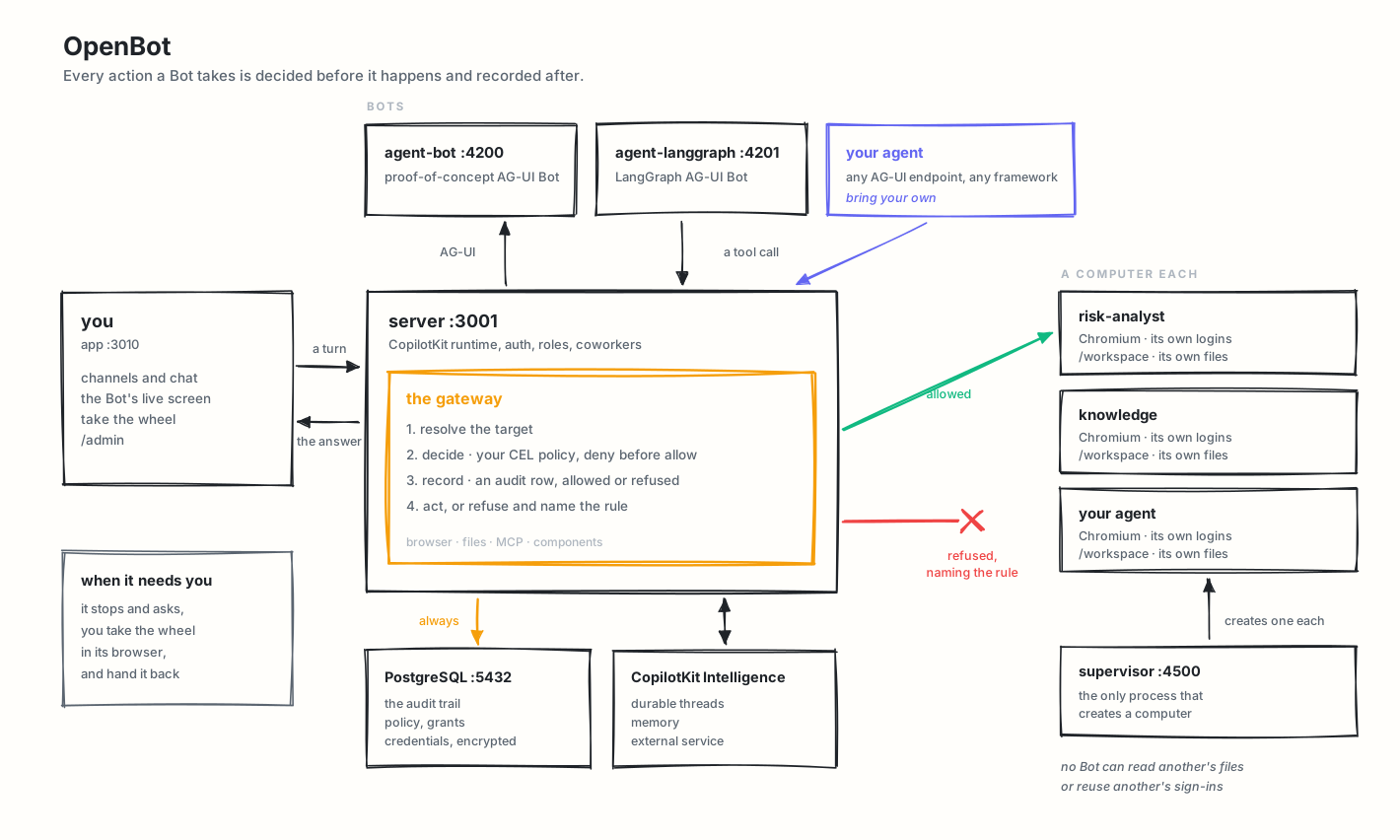
Each coworker gets a real browser with its own logins, its own files, and only the tools you grant. Every action decided before it happens and recorded after.
Talk to an engineer · Have us build it with you · copilotkit.ai/openbot · Quick start · Docs


https://github.com/user-attachments/assets/535ef7ee-1631-4a69-b839-564c56cf90b4
Bring any AG-UI agent, written on a framework or by hand, and it arrives as a coworker with a channel of its own. Watch it work on its own screen, take the wheel when it reaches something it should not do alone, then hand it back. It answers with components rather than only prose, and the whole thing runs on your own machine.
A template, not a product. OpenBot is meant to be cloned and made your own. There is no hosted version to sign up for, and nothing here is published as a package to depend on: every workspace in this repository is private. You take the repository, replace the example tenant package under examples/ with your own coworkers, channels and skills, and run it. Everything below describes a starting point, not a finished thing somebody operates for you.
Beta, and under active development. OpenBot is early. Expect rough edges and bugs, and expect things to move. Issues and pull requests are welcome.
Runs on your machine. Everything below is written for a laptop..env.examplecarriesOPENBOT_SINGLE_USER=true, which admits every request as one administrator, so a fresh clone reaches the product without registering an OAuth client first. Sign-in turns that off, and is required before anybody else can reach the deployment.
We can build this for you, or with you, at your company. Our engineers will stand OpenBot up
inside your infrastructure, customize it into something that looks like your own product, and hand it
back to you to keep changing. Start the conversation.
> In the meantime, run all of it on your laptop, Intelligence included: CopilotKit's free Developer plan
covers running Intelligence locally in Docker on a Mac.
An agent platform that runs inside your own infrastructure. Docker Compose brings up every part of it, the data sits in your PostgreSQL, and the model is yours to choose: no model ships in the box, and an administrator supplies the credential, which is encrypted at rest and never logged.
A deployment starts with two coworkers, and they are configuration rather than code: General Assistant for everyday work and Knowledge for company questions. A Risk Analyst joins them once its endpoint is configured, and ten more wait in examples/fintech/catalog/, each doing one job — reading an expense claim against the policy as written, turning a meeting note into the follow-ups actually in it, drafting release notes from what shipped, triaging a ticket, answering a new starter from the handbook, writing a brief that names what it could not find, writing up an interview, handing an on-call shift over, assembling what is known before a renewal, and grouping customer feedback into themes it can cite. Copy one into examples/fintech/agents/ to add it, write your own there or in agents.yaml, or make one from /bots in the UI.
Anything a Bot does to a computer, a file, an MCP server or a component goes through one gateway that decides and records it. That is the difference between an agent that can use your tools and an agent you can let near them.
More at copilotkit.ai/openbot.
A Bot is any endpoint speaking AG-UI, the open protocol for agent-to-user interaction, so OpenBot is not tied to a framework and neither are you. Agents built with LangGraph, Mastra, CrewAI, Pydantic AI, Google ADK or written by hand all arrive the same way, and the governance rides the protocol rather than the framework.
Setting up with an AI assistant? Paste prompt.txt into it first. It carries the
same steps as below plus the things that are easy to get wrong: which of the blank keys in
.env.example are actually yours to fill (the CopilotKit key and a model key), which the startscript fills for you, and what each start-up refusal means. Every claim in it is checked against
this repository.
1. Create .env:
   cp .env.example .env
   bun install
2. Connect a fresh managed Intelligence project:
   npx --yes copilotkit@latest login
   npx --yes copilotkit@latest project select
   bun scripts/setup-learning.ts
The helper provisions the selected project's runtime key, creates or reuses its
openbot Learning container, then writes both settings to .env. It preserves
custom container assignments and never replaces an existing OpenBot key; with one
set, it only creates openbot in that key's project if it is missing.
For fresh self-hosted setup, set INTELLIGENCE_API_URL to that deployment's
HTTPS API origin (or http://localhost for a local one) and run the helper
without the two npx commands. It opens an isolated Chrome or Edge window for
your usual sign-in and project choice; install either browser first. For CLI-managed
local evaluation installs, it discovers the matching dashboard with the newest installed or
cached CopilotKit CLI and uses that dashboard for login and session requests. Discovery
runs offline with Bun, without downloading the CLI or requiring npx on your PATH.
If no CLI is available, manually hosted deployments use their API origin for sign-in. Complete the local auth
approval shown in the browser when prompted. The runtime API URL stays unchanged. It writes
the API URL, the key and the container, not INTELLIGENCE_GATEWAY_WS_URL, so
set that one to the same deployment yourself. Once openbot exists, the server assigns it
as the default by itself unless Admin → Automatic Learning
has a saved setting.
Managed Intelligence needs no separate licence token.
3. Fill the remaining required values:
OPENAI_API_KEY.env.example unless you run Intelligence yourself. The example KEY_ENCRYPTION_KEY is public and fine locally; generate your own with:
openssl rand -base64 32
4. Run:
bash scripts/start.sh
5. Open .
scripts/start.sh starts Docker services, applies migrations, starts the API server on port 3001, starts the routine worker, starts the app on port 3010, and checks that the services answer their own health routes before printing next steps.
scripts/stop.sh takes the same things down, including each Bot's computer, which compose does not own; --keep-computers leaves the computers running. Nothing is deleted: the database, the Bots' files and their browser profiles are volumes.
To try Intelligence on one Mac instead of the managed service, follow
Evaluate Intelligence locally. The free
Developer plan qualifies. The local licence lasts 30 days and
npx copilotkit@latest local renew renews it as often as you need, while your account is in good
standing. It is a preview for macOS with Docker Desktop,
not a production installation. Run its
npx copilotkit@latest local connect from the OpenBot root, where .env is.
That command writes INTELLIGENCE_API_URL, INTELLIGENCE_GATEWAY_WS_URL and
CPK_INTELLIGENCE_API_KEY to .env. OpenBot reads those settings directly; no key
copying or renaming is needed. INTELLIGENCE_API_KEY remains supported for older
configurations. When both are set, the non-empty CLI key takes precedence so
reconnecting uses the new project's key.
To give the Bots a Learning container on that stack, see Automatic Learning.
One image carries the app, the API, the browser the Bots drive, and optionally PostgreSQL. Same
.env, no Kubernetes.
# The published image. Nothing to clone and nothing to build.
docker run -p 3001:3001 --env-file .env \
  -e EMBEDDED_POSTGRES=on -v openbot-data:/var/lib/postgresql \
  ghcr.io/copilotkit/openbot:latest
Or the tree you have in front of you.
docker build -t openbot .
docker run -p 3001:3001 --env-file .env \
  -e EMBEDDED_POSTGRES=on -v openbot-data:/var/lib/postgresql openbot
Everything is on 3001 here, the app included, rather than the 3010 the clone uses. latest is the
most recent release and a version tag such as :v0.0.9 pins one.
Leave EMBEDDED_POSTGRES off and set DATABASE_URL to point at a database you already run.
docs/deployment.md has the minimum sizes, the platform notes, and how it behaves behind more than one replica.
/bot and ask: Open news.ycombinator.com and tell me the top story./admin/audit./admin/boundaries, add a deny rule or preset, and retry the same browser action./bots, give it a standing role, and start a channel with it.| Route | Purpose |
| --------------------------- | ------------------------------------------------------------------ |
| / | Start and browse channels. |
| /channel/new | Start a conversation; two or more Bots in To: start a group. |
| /channel/:id | Converse with one coworker, watch its screen, and see what it ran. |
| /bot | Direct chat with a Bot; ?agent= selects one. |
| /bots | Every Bot you can reach; create one, and open its page to change it. |
| /bots/:id | One Bot: what it waits on you for, what it is doing, and how it is set up. |
| /bots/:id/responsibilities | Give the Bot a lasting goal, follow its progress, and decide when it should work. |
| /bots/:id/reach | Continue a conversation with the Bot in Slack, Microsoft Teams, or by text message. |
| /bots/:id/memory | Which connected apps feed the Bot facts, and its background research. |
| /bots/:id/approvals | What the Bot may do without asking you first. |
| /connections | Connect your apps so your Bots can work with them. |
| /capabilities/skills | Create and enable personal skills. |
| /capabilities/memory | What your Bots remember about you, and facts you tell them. |
| /routines | See the routines that are standing, and stop one. |
| /settings | User preferences. |
| /settings/passwords | Logins you saved when signing a Bot in to a website. |
| /settings/notifications | Where updates go, your devices, and recent deliveries. |
| /settings/approvals | Whether your Bots ask before acting, and rules for every Bot. |
| /admin/credentials | Store write-only encrypted credentials. |
| /admin/approvals | Team approval settings, team rules, and shared account requests. |
| /admin/computers | View, stop, and reset Bot computers. |
| /admin/boundaries | Configure browser/file/MCP action policy. |
| /admin/components | Publish components and govern which Bots may use them. |
| /admin/playground | Draft and publish sandboxed components in the browser. |
| /admin/plugins | Configure MCP servers and grant their tools to Bots. |
| /admin/skills | Write deployment skills and grant them to Bots. |
| /admin/learning | Assign Learning containers to Bots, or pause Automatic Learning. |
| /admin/people | List, promote, demote, and remove people who have signed in. |
| /admin/identity-providers | Register a company SAML or OIDC provider, routed by email domain. |
| /admin/enterprise | What members may use, how Bot computers reach the network, and what is recorded about it. |
| /admin/audit | Review permitted, refused, and failed actions. |
COMPUTER_RUNTIME=runsc to run them under gVisor where the host supports it.tool.name, intent, bot.id, actor.id, page.url, page.host, element., key, command, file., mcp. and initiator. (what started the run, so a rule can refuse a scheduled routine what it would allow a person). Deny is evaluated before allow, a missing policy permits nothing, and a broken rule refuses rather than opens.computer.help_requested, computer.control_taken and computer.control_released. While a person is driving, Bot actions are refused rather than queued.app/src/components/gallery/, sandboxed ones are authored in /admin/playground and published with no deployment. Every call asks the server whether the component exists, is published, and is not withheld from that Bot. Data functions are granted per component./ in the composer. A Bot granted the shipped skill-creator skill can write one with you in the conversation, and saves it only when you press the button on the card./admin/people lists everybody who has signed in, promotes and demotes them, and removes access, which ends the session they are using and stops the next sign-in. Every change is on the audit trail./admin/audit lists what was permitted, what was refused and what failed, and every refusal carries the rule that caused it./admin/credentials, never returned by an API, and redacted from audit events.127.0.0.1 and require a per-container token, so nothing reaches a logged-in browser by knowing its port. The supervisor binds there too, because it holds the Docker socket and its token is a shared secret rather than a network boundary.scripts/start.sh starts locally; see docs/routines.md.Any AG-UI endpoint can be a Bot.
From /bots, create a Bot with:
MANAGED_AGENT_AG_UI_URL when it is configured, and are refused when it is not.
A private address is refused unless it is listed in AGENT_ENDPOINT_ALLOWED_HOSTS:
AGENT_ENDPOINT_ALLOWED_HOSTS=agents.internal,10.0.0.42:9000
A host on its own covers any port on that host; a host with a port pins that port. Matching is exact: no wildcards, no suffixes. An entry written as a URL, or containing *, stops startup and names that entry.
The list covers agent endpoints only. Browsing is unaffected, the addresses holding a deployment's own cloud credentials are refused whatever is listed, and listing an address permits registering an agent there rather than granting that agent anything.
Tenant package agents are declared in the package's own agents.yaml, in the directory TENANT_PACKAGE_DIR names (examples/fintech by default), or each in a file of its own under that package's agents/ directory, as either:
built-in, with a system prompt; orremote-ag-ui, with an endpoint..env.example is the source template. The API server refuses to start without:
DATABASE_URLKEY_ENCRYPTION_KEYINTELLIGENCE_API_URLINTELLIGENCE_GATEWAY_WS_URLINTELLIGENCE_API_KEYCOPILOTKIT_LICENSE_TOKEN is optional. A self-hosted Intelligence with its own
licence can still set it and it is forwarded to the runtime; managed Intelligence
does not issue one and startup no longer asks for it. A self-hosted Intelligence
also needs the licence on its own deployment, or it refuses memory; OpenBot logs
intelligence-entitlement-not-ready at boot when that is missing.
Settings worth knowing:
| Variable | Use |
| ------------------------------------ | ------------------------------------------------------------------------- |
| OPENBOT_SINGLE_USER | Admits every request as one administrator. Required when no identity provider is configured; .env.example ships it on. |
| OPENAI_BASE_URL | Answers the OpenAI-shaped calls from somewhere else: a gateway, a proxy. |
| ANTHROPIC_BASE_URL, GOOGLE_GENERATIVE_AI_BASE_URL | The same, for those two APIs. |
| COMPUTER_TOKEN | Secret every Bot computer request must present. start.sh falls back to a fixed dev value. |
| SUPERVISOR_TOKEN | Secret the supervisor requires. start.sh falls back to a fixed dev value. |
| AGENT_TOOL_TOKEN | Secret a Bot presents to call a granted tool back. start.sh sets one. Without it no Bot may call tools. |
| COMPUTER_SUPERVISOR_URL | Gives each person a computer of their own instead of one shared computer. |
| COMPUTER_RUNTIME | Set to runsc to run computers under gVisor, where the host has it. |
| COMPUTER_SANDBOX | Set to on for Chromium's own sandbox, where the host permits it. |
| EMBEDDED_POSTGRES | Set to on for a database inside the deployment container
→ →
→ →
→ →
→ →
→ →
→ →
→ →
→