
1
 →
→Cinnamon/kotaemon is an open-source project on GitHub, mainly written in Python. An open-source RAG-based tool for chatting with your documents. It currently holds 25,778 stars and 0 forks with 0 open issues, and was last pushed on an unknown date (repository created unknown).
AI Homed tracks it on the AI Models & LLM Tools board.
An open-source clean & customizable RAG UI for chatting with your documents. Built with both end users and developers in mind.
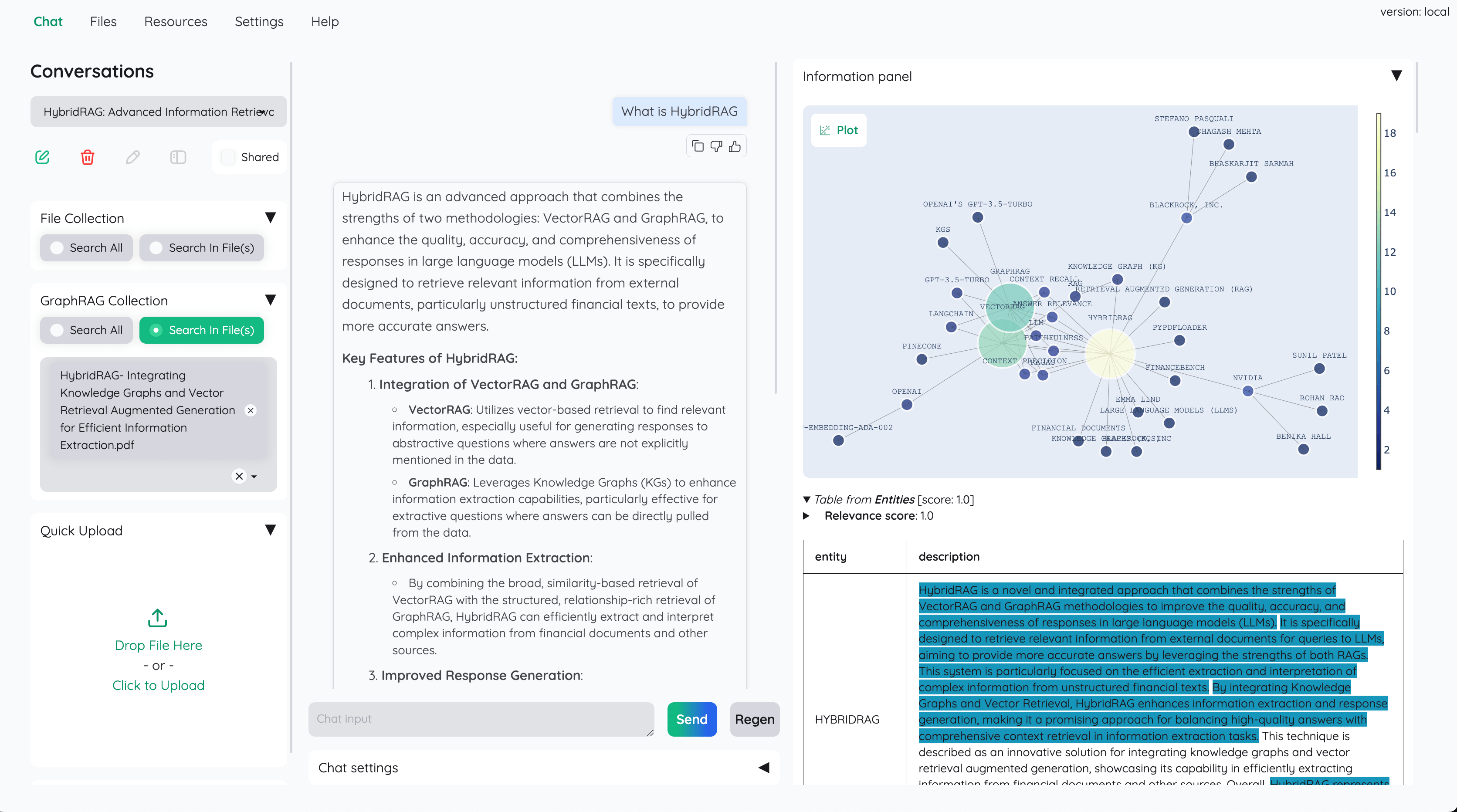
Live Demo #1 | Live Demo #2 | Online Install | Colab Notebook (Local RAG)
User Guide | Developer Guide | Feedback | Contact




This project serves as a functional RAG UI for both end users who want to do QA on their
documents and developers who want to build their own RAG pipeline.
+----------------------------------------------------------------------------+
| End users: Those who use apps built with kotaemon.                       |
| (You use an app like the one in the demo above)                            |
|     +----------------------------------------------------------------+     |
|     | Developers: Those who built with kotaemon.                   |     |
|     | (You have import kotaemon somewhere in your project)         |     |
|     |     +----------------------------------------------------+     |     |
|     |     | Contributors: Those who make kotaemon better.    |     |     |
|     |     | (You make PR to this repo)                         |     |     |
|     |     +----------------------------------------------------+     |     |
|     +----------------------------------------------------------------+     |
+----------------------------------------------------------------------------+
ollama and llama-cpp-python).ReAct, ReWOO and other agents.GraphRAG indexing pipeline is provided as an example.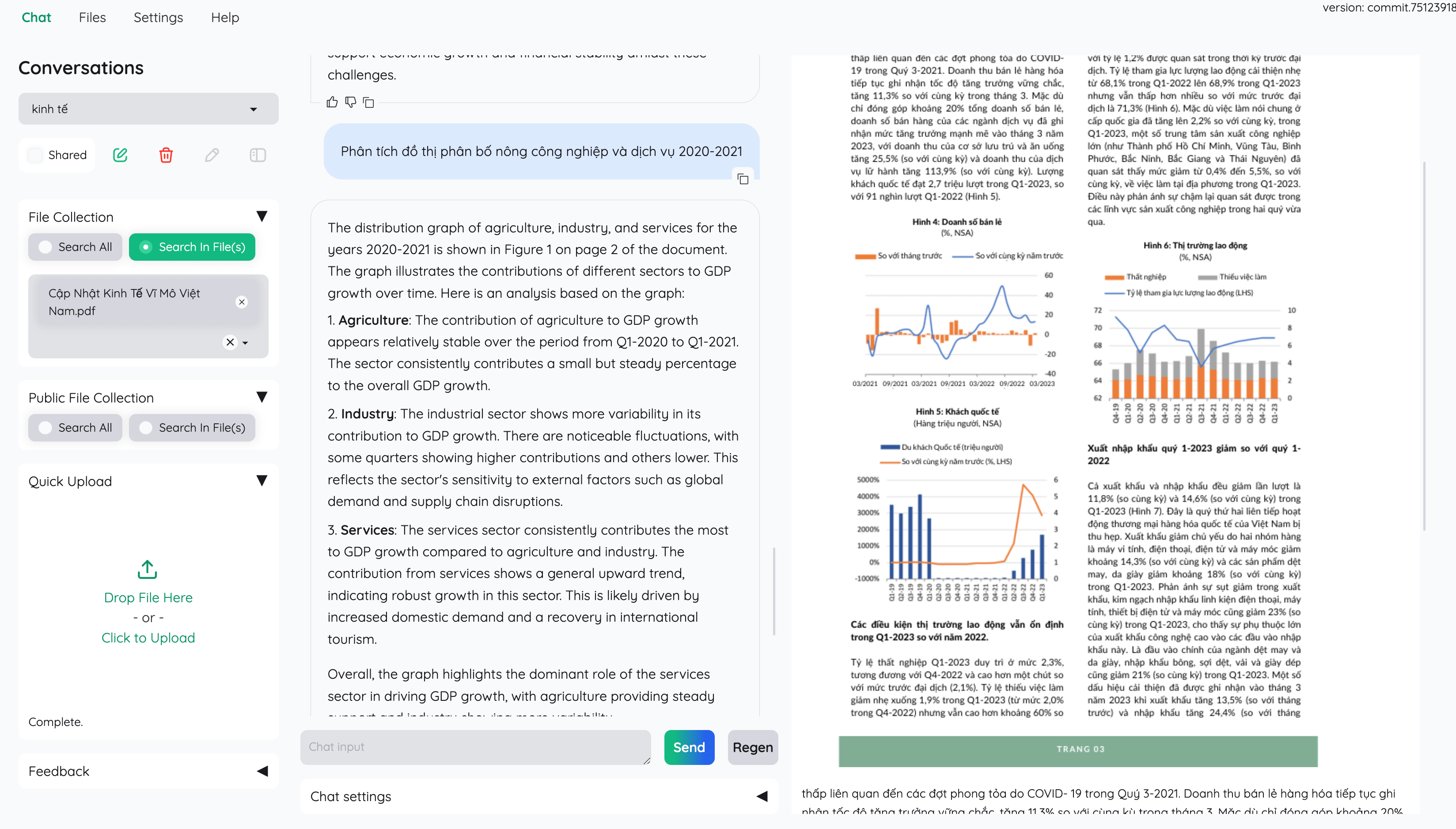
If you are not a developer and just want to use the app, please check out our easy-to-follow User Guide. Download the .zip file from the latest release to get all the newest features and bug fixes.
1. Python >= 3.10
2. Docker: optional, if you install with Docker
3. Unstructured if you want to process files other than .pdf, .html, .mhtml, and .xlsx documents. Installation steps differ depending on your operating system. Please visit the link and follow the specific instructions provided there.
1. We support both lite & full version of Docker images. With full version, the extra packages of unstructured will be installed, which can support additional file types (.doc, .docx, ...) but the cost is larger docker image size. For most users, the lite image should work well in most cases.
full version. docker run \
-e GRADIO_SERVER_NAME=0.0.0.0 \
-e GRADIO_SERVER_PORT=7860 \
-v ./ktem_app_data:/app/ktem_app_data \
-p 7860:7860 -it --rm \
ghcr.io/cinnamon/kotaemon:main-full
full version with bundled Ollama for _local / private RAG_. # change image name to
docker run <...> ghcr.io/cinnamon/kotaemon:main-ollama
lite version. # change image name to
docker run <...> ghcr.io/cinnamon/kotaemon:main-lite
2. We currently support and test two platforms: linux/amd64 and linux/arm64 (for newer Mac). You can specify the platform by passing --platform in the docker run command. For example:
   # To run docker with platform linux/arm64
   docker run \
   -e GRADIO_SERVER_NAME=0.0.0.0 \
   -e GRADIO_SERVER_PORT=7860 \
   -v ./ktem_app_data:/app/ktem_app_data \
   -p 7860:7860 -it --rm \
   --platform linux/arm64 \
   ghcr.io/cinnamon/kotaemon:main-lite
3. Once everything is set up correctly, you can go to http://localhost:7860/ to access the WebUI.
4. We use GHCR to store docker images, all images can be found here.
1. Clone the repository:
   git clone https://github.com/Cinnamon/kotaemon
   cd kotaemon
2. Setup the environment:
  uv sync --python 3.10
  source .venv/bin/activate
  conda create -n kotaemon python=3.10
  conda activate kotaemon
pip install -e "libs/kotaemon[all]"
  pip install -e "libs/ktem"
3. Create a .env file in the root of this project. Use .env.example as a template.
The .env file is there to serve use cases where users want to pre-config the models before starting up the app (e.g. deploy the app on HF hub). The file will only be used to populate the db once upon the first run, it will no longer be used in consequent runs.
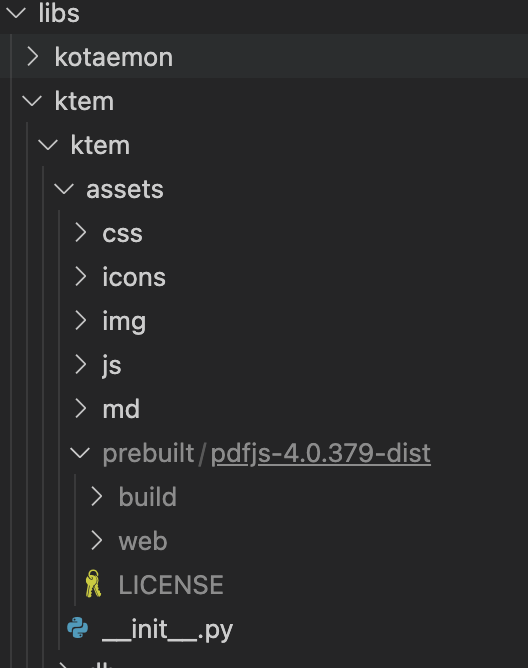
4. (Optional) To enable in-browser PDF_JS viewer, download PDF_JS_DIST then extract it to libs/ktem/ktem/assets/prebuilt.
5. Start the web server:
python app.py
admin. You can set up additional users directly through the UI.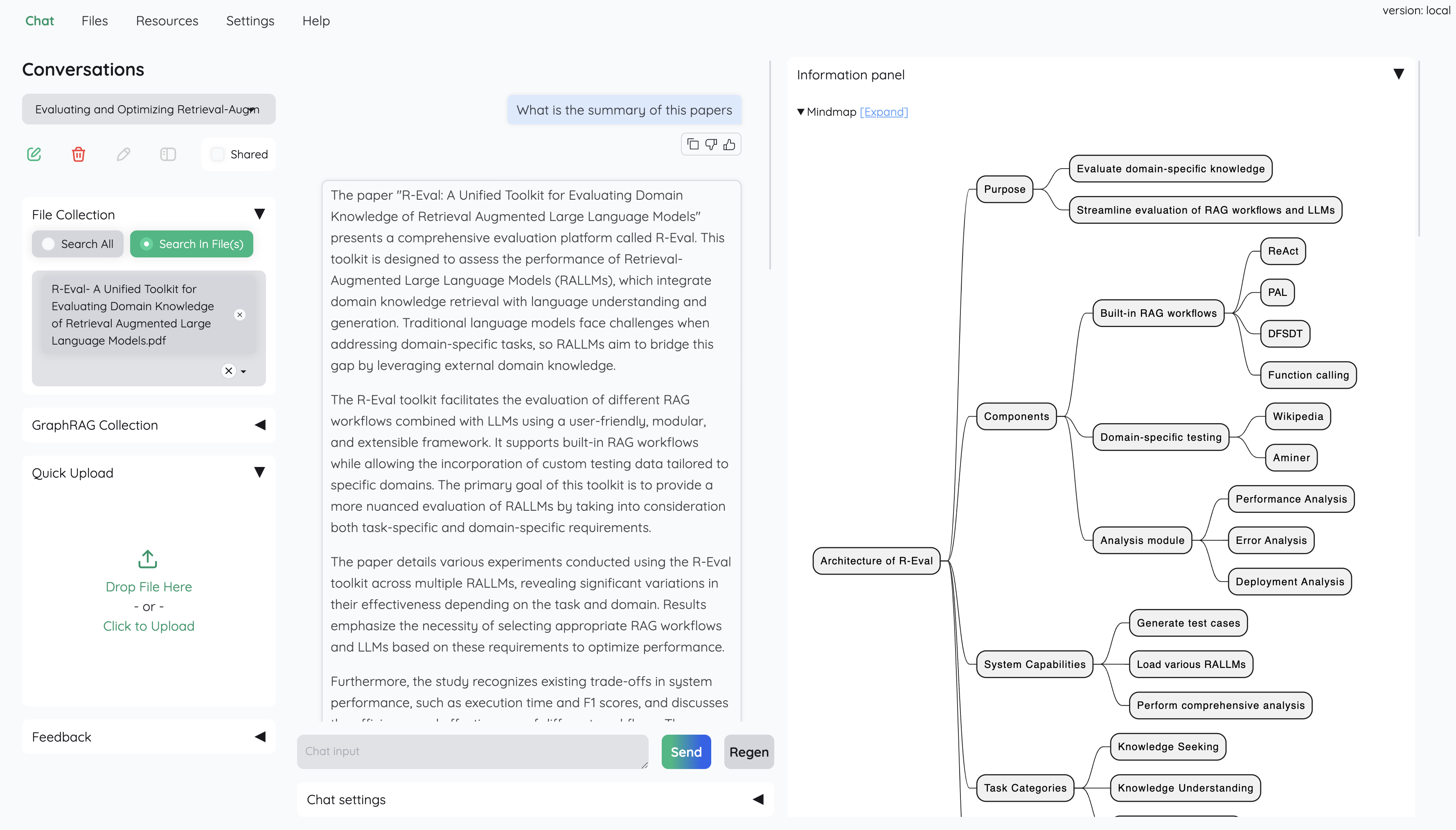
6. Check the Resources tab and LLMs and Embeddings and ensure that your api_key value is set correctly from your .env file. If it is not set, you can set it there.
[!NOTE]
Official MS GraphRAG indexing only works with OpenAI or Ollama API.
We recommend most users to use NanoGraphRAG implementation for straightforward integration with Kotaemon.
Setup Nano GRAPHRAG
pip install nano-graphragnano-graphrag install might introduce version conflicts, see this issuepip uninstall hnswlib chroma-hnswlib && pip install chroma-hnswlibUSE_NANO_GRAPHRAG=true environment variable.Setup LIGHTRAG
pip install git+https://github.com/HKUDS/LightRAG.gitLightRAG install might introduce version conflicts, see this issuepip uninstall hnswlib chroma-hnswlib && pip install chroma-hnswlibUSE_LIGHTRAG=true environment variable.Setup MS GRAPHRAG
pip install "graphrag<=0.3.6" future
GRAPHRAG_API_KEY environment variable. You can do this directly in your environment or by adding it to a .env file.Ollama) or customize the default LLM and other configurations, set the USE_CUSTOMIZED_GRAPHRAG_SETTING environment variable to true. Then, adjust your settings in the settings.yaml.example file.See Local model setup.
These options are available:
Settings -> Retrieval Settings -> File loader
./ktem_app_data folder. You can back up or copy this folder to transfer your installation to a new machine.flowsettings.py.envflowsettings.pyThis file contains the configuration of your application. You can use the example here as the starting point.
Notable settings
# setup your preferred document store (with full-text search capabilities)
KH_DOCSTORE=(Elasticsearch | LanceDB | SimpleFileDocumentStore)
setup your preferred vectorstore (for vector-based search)
KH_VECTORSTORE=(ChromaDB | LanceDB | InMemory | Milvus | Qdrant)
Enable / disable multimodal QA
KH_REASONINGS_USE_MULTIMODAL=True
Setup your new reasoning pipeline or modify existing one.
KH_REASONINGS = [
    "ktem.reasoning.simple.FullQAPipeline",
    "ktem.reasoning.simple.FullDecomposeQAPipeline",
    "ktem.reasoning.react.ReactAgentPipeline",
    "ktem.reasoning.rewoo.RewooAgentPipeline",
]
.envThis file provides another way to configure your models and credentials.
Configure model via the .env file
.env file with the information needed to connect to the LLMs. This file is located in the folder of the application. If you don't see it, you can create one..env file, set the OPENAI_API_KEY variable with your OpenAI API key in order
to enable access to OpenAI's models. There are other variables that can be modified,
please feel free to edit them to fit your case. Otherwise, the default parameter should
work for most people.
    OPENAI_API_BASE=https://api.openai.com/v1
    OPENAI_API_KEY=
    OPENAI_CHAT_MODEL=gpt-3.5-turbo
    OPENAI_EMBEDDINGS_MODEL=text-embedding-ada-002
    AZURE_OPENAI_ENDPOINT=
    AZURE_OPENAI_API_KEY=
    OPENAI_API_VERSION=2024-02-15-preview
    AZURE_OPENAI_CHAT_DEPLOYMENT=gpt-35-turbo
    AZURE_OPENAI_EMBEDDINGS_DEPLOYMENT=text-embedding-ada-002
ollama OpenAI compatible server: ollama pull llama3.1:8b
ollama pull nomic-embed-text
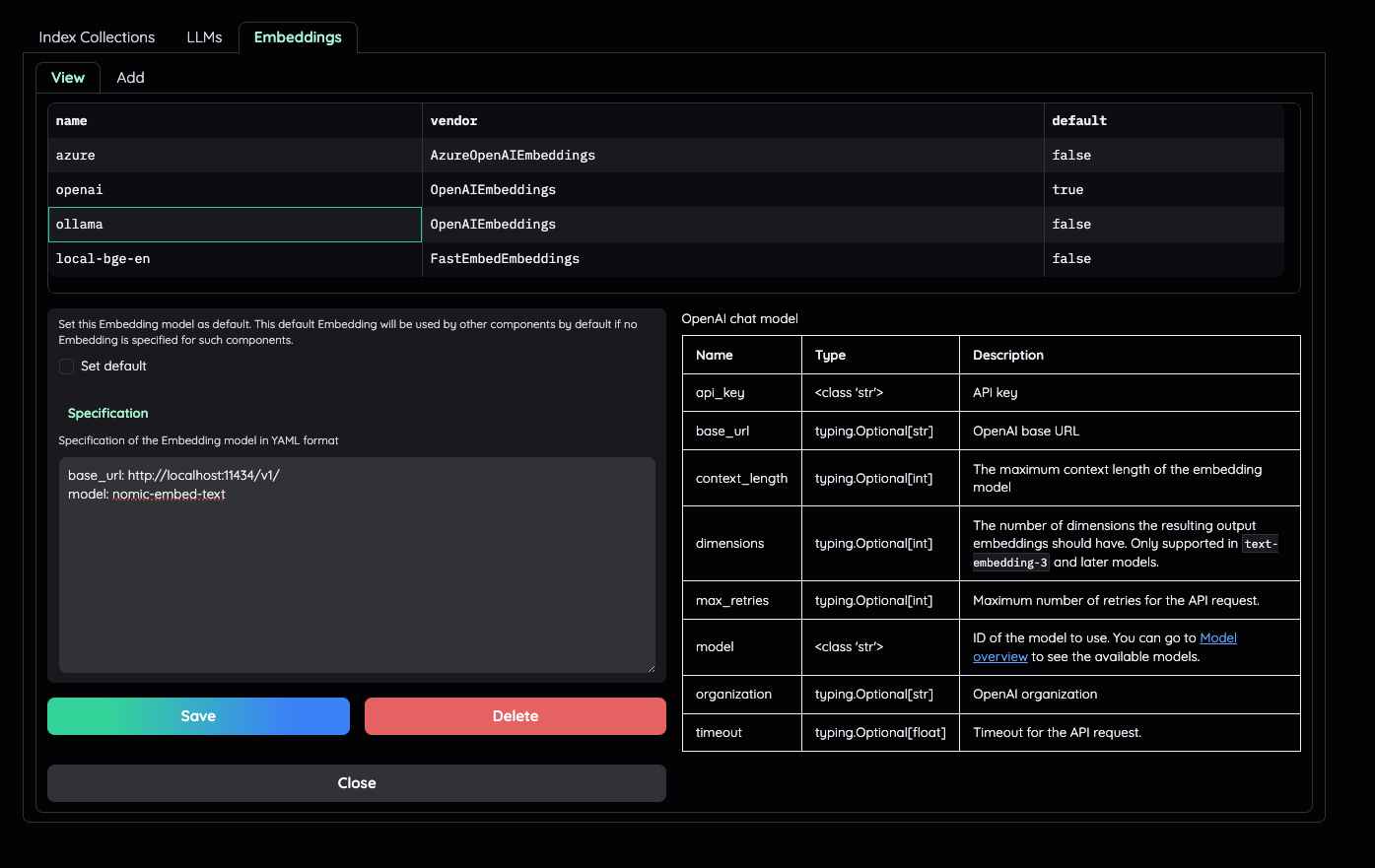
GGUF with llama-cpp-pythonHere are some recommendations and their size in memory:
1. Check the default pipeline implementation in here. You can make quick adjustment to how the default QA pipeline work.
2. Add new .py implementation in libs/ktem/ktem/reasoning/ and later include it in flowssettings to enable it on the UI.
libs/ktem/ktem/index/file/graph(more instruction WIP).
Please cite this project as
@misc{kotaemon2024,
    title = {Kotaemon - An open-source RAG-based tool for chatting with any content.},
    author = {The Kotaemon Team},
    year = {2024},
    howpublished = {\url{https://github.com/Cinnamon/kotaemon}},
}
Since our project is actively being developed, we greatly value your feedback and contributions. Please see our Contributing Guide to get started. Thank you to all our contributors!
→ →
→ →
→ →
→ →
→ →
→ →
→ →
→