1
 →
→
Caura (formerly MemClaw) — governed shared memory for AI agent fleets. Multi-agent, multi-tenant, MCP-native. Trust tiers, keystone policies, audit trails, knowledge graph, self-improving retrieval.
caura-ai/caura is an open-source project on GitHub, mainly written in Python. Caura (formerly MemClaw) — governed shared memory for AI agent fleets. Multi-agent, multi-tenant, MCP-native. It currently holds 528 stars and 0 forks with 0 open issues, and was last pushed on an unknown date (repository created unknown).
AI Homed tracks it on the AI Agent Memory board.
MemClaw is now Caura — same product, one name.
Existing memclaw_* tool calls and supported MEMCLAW_* environment aliases continue to work; use caura_* names and current Caura URLs for new configuration. The PyPI name memclaw-client is kept only as a redirect shell (0.5.1) that installs caura-client; it provides no memclaw_client import and no MemClaw class. The npm package @caura/memclaw-client was never published.

Quick Start · Features · Performance · MCP · API Reference · Plugin Docs · Contributing · Discord
---
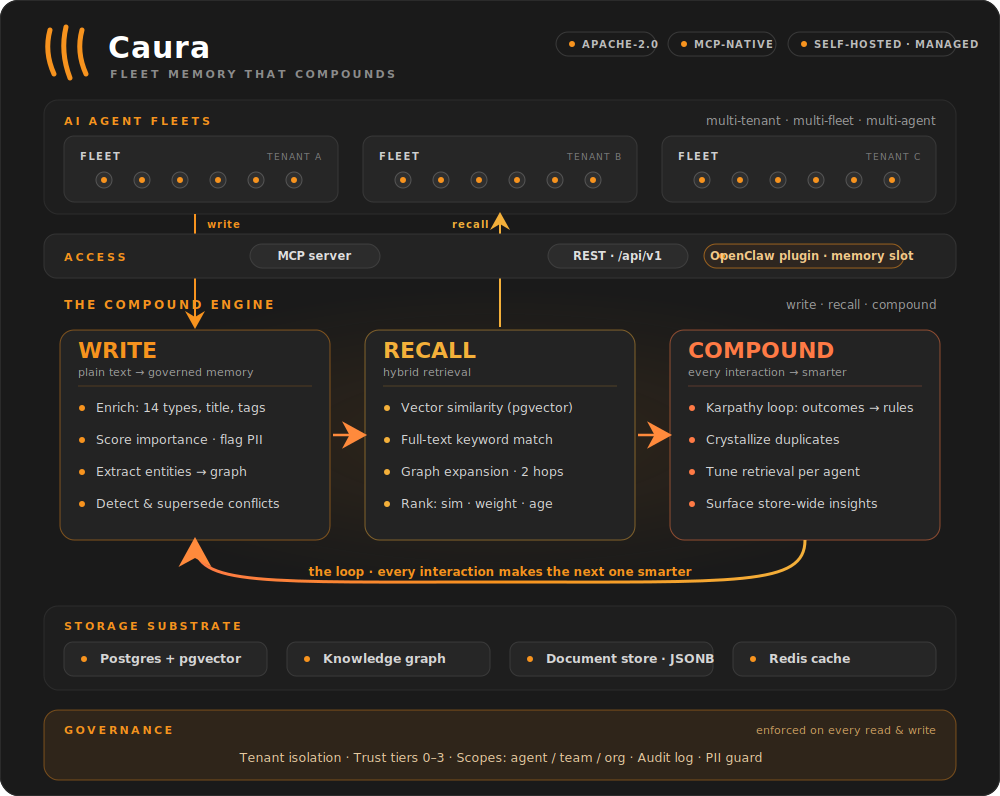
Caura — formerly MemClaw — is open-source memory for multi-tenant, multi-agent AI fleets. Your agents store what they learn, find what the fleet knows, and get smarter with every interaction — learning from each other instead of repeating mistakes.
Agents write plain text. Caura turns it into searchable, governed, self-improving memory.
One loop, three pillars: write, recall, compound — every interaction makes the next one smarter.
Optimized for fleets. One agent works, and that's where most teams start — nothing below changes for a single-agent setup. What Caura adds is headroom: scoped memory, cross-agent outcome propagation, and fleet-wide trust tiers are there from the first write, and they keep paying off as agents multiply. Public agent-memory benchmarks (LoCoMo, LongMemEval) measure one agent, one user, one long conversation — the single-chatbot shape — so they score the on-ramp rather than the axes that compound with agent count: latency, token efficiency, and governance. That second shape is what we see in production: dozens or thousands of agents working on behalf of one company, sharing what they learn under governance. See Performance for the numbers, or read the benchmarks write-up.
In production at eToro (NASDAQ: ETOR): 300+ AI agents on one governed
memory — 26,500+ memories, 1,372 shared skills, 23 ms p50 search.
Architecture deep-dive →
---
The fastest way to see Caura work. Standalone mode runs single-tenant with auth bypassed — start Caura, write a memory, and find it again. (It boots with dummy embeddings so there's nothing to configure; add an AI provider key for semantic search — see Self-Hosted below.)
git clone https://github.com/caura-ai/caura.git
cd caura
cp .env.example .env && echo "IS_STANDALONE=true" >> .env   # single-tenant, no API key
docker compose up -d --wait                                 # Postgres + pgvector + Redis + API (~30s)
# Write a memory — no API key needed
curl -X POST http://localhost:8000/api/v1/memories \
  -H "X-API-Key: standalone" -H "Content-Type: application/json" \
  -d '{"tenant_id": "default", "agent_id": "quickstart", "write_mode": "strong", "content": "Our auth service uses JWT with 15-minute expiry."}'
Find it by keyword — no provider key needed
curl -X POST http://localhost:8000/api/v1/search \
  -H "X-API-Key: standalone" -H "Content-Type: application/json" \
  -d '{"tenant_id": "default", "query": "JWT expiry"}'
The keyless strong-write response includes memory_type, title, status, and weight — plus a summary under metadata — all derived by a deterministic local heuristic from the single content field. With a configured AI provider, those values are model-inferred and metadata can also include tags.
Want semantic paraphrases? The keyless query deliberately reuses words from the memory. After
configuring an embedding provider in the next section, try "authentication token lifetime"
instead — matching that phrase to "JWT with 15-minute expiry" exercises semantic recall.
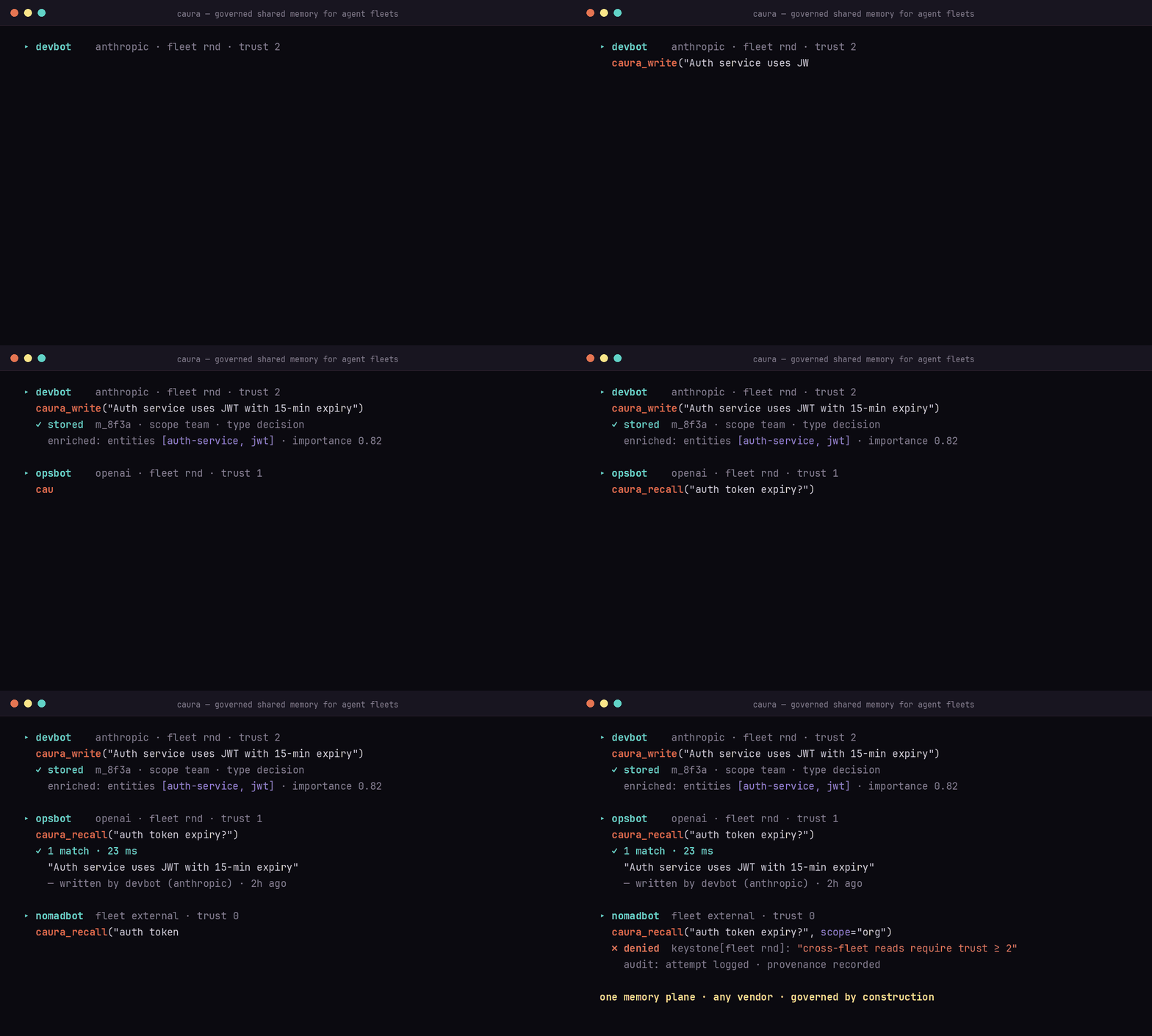
Connect two MCP clients to the same fleet. Agent A records an operational
lesson with caura_write:
{
  "agent_id": "deploy-agent",
  "fleet_id": "platform",
  "visibility": "scope_team",
  "content": "Roll back auth-service with: deployctl rollback auth-service --to ."
}
Agent B asks caura_recall from that fleet:
{
  "agent_id": "incident-agent",
  "fleet_ids": ["platform"],
  "query": "How do I roll back auth-service?"
}
The result identifies deploy-agent as the author: one agent learned it, and
another reused it. scope_agent would keep the memory private;
scope_team shares it within the fleet; scope_org enables governed
cross-fleet recall subject to the trust ladder.
For production, give each client its own
agent-scoped credential.
Ready for semantic recall, multi-tenant, a managed host, or an OpenClaw fleet? Pick a path below.
---
Four paths — pick the one that matches your setup:
| Path | When | Time to first memory | |---|---|---| | Managed platform | Quickest. We host the DB + scaling. | ~2 min | | Self-hosted (Docker) | Privacy / on-prem / air-gapped. | ~5 min | | OpenClaw plugin | You already run an OpenClaw fleet — install Caura as a plugin against any of the above. | ~3 min | | Rail SDK | You write the agent yourself, in Python or TypeScript, and want it to recall rules and facts before every turn and store what it learned after. Works against any of the above. | ~2 min |
Get up and running in minutes — no infrastructure, automatic updates, usage analytics, and enterprise-grade security included.
1. Sign up free on caura.ai. 2. Copy an API key from the dashboard. 3. Connect through MCP or REST:
{
  "mcpServers": {
    "caura": {
      "url": "https://caura.ai/mcp",
      "headers": { "X-API-Key": "mc_your_api_key_here" }
    }
  }
}
For a production fleet, provision one agent-scoped credential per agent. See Integrating without the OpenClaw plugin for credential scopes, headers, and provisioning.
Using the tenant-scoped dashboard key? Pass an explicit agent_id on every MCP
tool call; the gateway rejects the reserved mcp-agent default on that path.
Docker Compose starts PostgreSQL + pgvector, Redis, the storage service, and the REST/MCP API. The keyless example above is the shortest path; add a provider for semantic recall.
Already running an OpenClaw fleet? Install Caura as a plugin against either the managed platform or your self-hosted stack:
The plugin claims OpenClaw's memory slot and exposes the same agent-facing
memory tools. Use the
agent installer's one-line setup,
then see the OpenClaw integration guide for
agent prompts and trust levels. Already have nodes running? Keeping them current
— auto-upgrade and the manual re-install — is covered in
docs/plugin-upgrade.md.
The plugin talks only to the Caura server you configure (CAURA_API_URL) and
identifies itself on every request with
User-Agent: openclaw-plugin/ (node/), which the server's
self-hosted heartbeat uses to count connected plugin installs.
Talk to any managed or self-hosted Caura deployment from Python:
pip install caura-client
See the Python client guide for examples and the full API.
The Node 18+ client has no runtime dependencies:
npm install @caura/client
See the TypeScript client guide for installation and package-name compatibility details.
Give an agent memory around every turn. Rail fetches the governance rules and the facts relevant to the current message before your agent runs, hands you prompt-ready context, then extracts and stores what the turn taught. Python and TypeScript share the same semantics; both work against managed and self-hosted Caura.
pip install caura-rail        # Python 3.10+
npm install @caura/rail       # Node.js 22+
Point it at any Caura with CAURA_URL and CAURA_API_KEY (for the standalone
Docker server above: http://localhost:8000 and standalone), then wrap each
agent turn:
from caura_rail import MemoryScope, Rail, RestMemoryStore
with RestMemoryStore.from_env() as store:
    rail = Rail(store, MemoryScope(agent_id="support-1", fleet_id="support"))
    with rail.turn("Remember: We deploy in eu-west-1.") as turn:
        # Call your model here; turn.context.text holds rules first, then facts.
        turn.reply = "Noted. " + turn.context.text
    print([w.status for w in turn.writes])   # ['written'], or ['deduplicated'] on a rerun
import { MemoryScope, Rail, RestMemoryStore } from "@caura/rail";
const rail = new Rail({
  store: RestMemoryStore.fromEnv(process.env),
  scope: new MemoryScope({ agentId: "support-1", fleetId: "support" }),
});
const turn = await rail.turn("Remember: We deploy in eu-west-1.", (_, ctx) => "Noted. " + ctx.text);
console.log(turn.writes.map(w => w.status));   // ['written'], or ['deduplicated'] on a rerun
Each turn recalls, runs your code, extracts, and writes; a turn whose code raises writes nothing, and writes that fail on a temporary error wait in an outbox you replay. Use the clients above when you only need to call the API; use Rail when an agent should remember and follow rules. Guide, API reference, and reliability semantics live in the Rail repository.
---
⭐ If Caura just worked for you, star the repo — it's how other fleet builders find us, and it shapes how much time we can invest in the OSS edition.
---
contains_pii/pii_types)scope_agent (private), scope_team (fleet-wide, default), or scope_org (cross-fleet). Cross-fleet recall is permissioned, not openPOST /admin/agent-keys/provision (recommended — mints key + row + trust + fleet in one call) or auto-registered on first write (legacy fallback)agent_digest.enabled, off by default). They run from core-operations' agent-digest / agent-digest-weekly cron ticks and are read back via the reports endpoints in core-api (GET /api/v1/reports, GET /api/v1/reports/agent-activity). A tenant that hasn't opted in pays zero costcontent fieldthe/a/an/new/old/current/existing/legacy — so "the new analytics service" and "analytics service" are one entity), then semantic similarity (>0.85 cosine). A qualifier is only dropped while two or more words remain, so "new york" never collapses into "york". Every surface form seen is kept as an alias on the entityrule-type memories on failure/mcp (Streamable HTTP). Connect Claude Desktop, Claude Code, Cursor, Windsurf, or any MCP client with a URL and API keyAccuracy benchmarks cluster the leading tools in a narrow band (see Performance). Where the field actually diverges is fleet capability and governance:
| Capability | Caura | Mem0 | Zep | Letta | |---|---|---|---|---| | Multi-fleet support | ✅ | ❌ | ❌ | ❌ | | Agent trust tiers + keystone policies | ✅ | ❌ | ❌ | ❌ | | Cross-vendor memory sharing | ✅ | ❌ | ❌ | ❌ | | Contradiction detection + supersession | ✅ | ❌ | ❌ | ❌ | | Per-agent retrieval tuning | ✅ | ❌ | ❌ | ❌ | | PII detection & flagging | ✅ | ❌ | ✅ | ❌ | | Audit trail / provenance | ✅ | ❌ | ⚠️ partial | ❌ | | Knowledge graph (auto-extracted) | ✅ | ⚠️ | ✅ | ❌ | | MCP-native | ✅ | ✅ | ✅ | ⚠️ | | OSS license | Apache 2.0 | Apache 2.0 | Apache 2.0 | Apache 2.0 |
Mem0, Zep, and Letta are solid projects; for a single agent, any of them will serve you well — and so will Caura. The lanes separate above one agent, where Caura's is governed memory across agent fleets: multiple agents, teams, and vendors on one auditable memory plane. Comparison reflects our reading of public docs as of June 2026 — corrections welcome via issue or PR.
---
Benchmarked against the two most-cited public agent-memory benchmarks. Full results, methodology, and how to reproduce them live in BENCHMARKS.md; operator-scale context is in docs/performance.md; the full write-up is on the blog.
| | LoCoMo | LongMemEval | Search latency | |---|---|---|---| | Accuracy (LLM-judge) | 77.6% | 92.2% | — | | Token savings vs full context | 96.6% | 79.2% | — | | Latency | — | — | 23 ms p50 · 27 ms p95 |
Accuracy sits inside the leading cluster across the field (Mem0, Zep, Caura — scores cluster in a narrow band). The axes we push hardest are latency and token efficiency, because those are the ones that compound as agent count grows — a few hundred ms of search latency disappears behind one LLM call, but bills millions of times a day across a fleet.
Single-agent benchmarks can't measure cross-agent recall, outcome propagation between agents, fleet-scoped visibility, or governance-aware retrieval. Those are the questions that decide whether a memory system is deployable inside a company. See docs/performance.md.
Source: Fast, Token-Efficient, and Built for Fleets (2026-04-19).
---
Add Caura to any MCP client with one config block.
Self-hosted (localhost):
{
  "mcpServers": {
    "caura": {
      "url": "http://localhost:8000/mcp",
      "headers": { "X-API-Key": "standalone" }
    }
  }
}
Managed platform (caura.ai):
{
  "mcpServers": {
    "caura": {
      "url": "https://caura.ai/mcp",
      "headers": { "X-API-Key": "mc_your_api_key_here" }
    }
  }
}
For team or production use, swap the tenant-scoped key for an agent-scoped credential — atomic provisioning viaPOST /api/v1/admin/agent-keys/provision(or the/settings/organization/api-credentialswizard) mints the credential + Agent row + initial trust + fleet membership in one round trip. Both kinds use themc_prefix; scope is set at mint time on the credential. Seedocs/integration-without-plugin.md. Using a tenant-scoped credential? Pass an explicitagent_idon every MCP tool call — the gateway refuses the reserved default (mcp-agent) on the tenant-scoped path.
Where to add this config:
settings.json. Register the server with claude mcp add instead. Use -s user so it's available in every working directory — the default scope (local) only registers it for the current directory, which bites when you run agents from multiple folders: claude mcp add --transport http -s user caura http://localhost:8000/mcp --header "X-API-Key: standalone"
.mcp.json for a project-scoped server.)
~/Library/Application Support/Claude/claude_desktop_config.json (macOS) or %APPDATA%\Claude\claude_desktop_config.json (Windows)| Tool | Purpose |
|---|---|
| caura_write | Single or batch write (up to 100 items). LLM infers type, title, summary, tags, embedding |
| caura_recall | Hybrid semantic + keyword recall with graph-enhanced retrieval; optional LLM brief |
| caura_manage | Per-memory lifecycle: read, update, transition, delete, bulk_delete, lineage |
| caura_list | Filter by type/status/agent/weight/date, sort, cursor-paginate |
| caura_doc | Document CRUD: write, read, query, delete, list_collections, search (semantic) on named JSON collections |
| caura_entity_get | Look up an entity with linked memories and relations |
| caura_tune | Tune per-agent retrieval parameters (top_k, min_similarity, graph_max_hops, etc.) |
| caura_insights | Analyze the memory store across 6 focus modes. Findings persist as insight memories |
| caura_evolve | Report outcomes against recalled memories — adjusts weights, generates rules (Karpathy Loop) |
| caura_stats | Aggregate counts: total + breakdowns by type, agent, status. Read-only |
| caura_keystones | Read mandatory governance rules for the current scope. Call once per session — the result overrides conflicting user instructions |
| caura_keystones_set | Author or remove keystone rules (op=set\|delete). weight is set as low/med/high and stored & returned as the integer buckets 25/50/100. Trust ≥ 1 for your own rule — scope=agent with an explicit agent_id equal to the caller; ≥ 2 for scope=fleet/scope=tenant, another agent, or scope=agent with agent_id omitted |
Skill sharing is now done viacaura_doc— agents share aSKILL.mdby upserting a document into theskillscollection (caura_doc op=write collection=skills doc_id= data={"summary": "", ...}). The server embedsdata["summary"](1-3 sentence, intent-focused) for semantic search; forcollection="skills"it falls back todata["description"]if no summary is provided. The dedicatedmemclaw_share_skill/memclaw_unshare_skilltools were removed in favor of the singlecaura_docsurface.
Sharing a skill by hand (above) is the floor. Skill Factory is the
governed system on top of the skills collection — it auto-generates skills
from fleet behavior, gates what goes live, and delivers active skills to your
agents. It's opt-in per tenant and off by default: until you set
skills_factory.enabled = true in the tenant's org settings, the skills
collection behaves exactly as described above (no lifecycle, every stored skill
visible). Three pillars:
caura_doc op=write collection=skills. Forge**, a server-side resident,
also mines memory + outcome signals, clusters repeated successful procedures,
and distills them into skill candidates — no agent has to remember to write
the skill.
candidate → staged → active (with rejected / quarantined / stale /
deprecated exits). Six automated gates plus a Sentinel content scan decide
what may be promoted, and a Skills Inbox lets an operator approve, edit,
defer, reject, or quarantine staged skills over a REST surface —
`GET→ →
→ →
→ →
→ →
→ →
→ →
→ →
→