
1
 →
→
Run a 105 GB AI model on a Mac that can't hold it. Qwen3.8-Flash-Next 4-bit, streamed from SSD on 16–64 GB Apple Silicon Macs. Fully native Swift, MLX and Metal. Offline, no Python.
carloslfu/slotstream is an open-source project on GitHub, mainly written in Swift. Run a 105 GB AI model on a Mac that can't hold it. Qwen3.8-Flash-Next 4-bit, streamed from SSD on 16–64 GB Apple Silicon Macs. It currently holds 636 stars and 53 forks with 0 open issues, and was last pushed on an unknown date (repository created unknown).
AI Homed tracks it on the Today's Trending board.
Run a 105 GB AI model on a Mac that can't hold it.
Slotstream is a fully native local AI engine for Apple Silicon Macs, written in Swift on Apple's MLX and Metal. It streams model experts from SSD and keeps the ones it needs in a memory cache, so the model can be much larger than your Mac's RAM. Inference runs on your Mac, offline after the download, with no Python runtime or cloud account.
The released engine runs Qwen3.8-Flash-Next, a 125-billion-parameter open model, on Macs with 16 to 64 GB of memory. Our 48 GB M5 Pro measured 20.91–23.69 tok/s across three workloads in development tests at a 33 GB memory budget, using the original 4-bit model (results and test conditions).
Get started · Model · Speed · Get help
The latest release, v0.2.30, ships the engine and command-line tool. Its default is the original Qwen3.8-Flash-Next 4-bit model. The installer below downloads this release.
Chat with it, ask it about pictures, or code with it: slotstream launch claude
starts Claude Code on the local model, and Codex, Pi, opencode and Hermes work
the same way. Developers can connect their own apps through its Ollama-,
OpenAI- and Anthropic-compatible APIs or its Swift library.
Slotstream focuses on Qwen3.8-Flash-Next 4-bit. The work goes into making this capable model useful on a Mac that cannot hold all its weights in RAM: SSD streaming, memory use, context and tool use.
We maintain one model at a time. A future successor needs evidence from complete tasks on the hardware we support. The model guide records the current checkpoint and defaults.
The Fast and Q2 models and the native Mac app are archived. Their source, licenses, tests and measured results remain available. Current work focuses on the engine, CLI, serving APIs and Swift library.
Slotstream focuses on Macs with 16 to 64 GB of memory, where running the larger model depends on managing what stays in RAM and what comes from SSD. The CLI and APIs connect the model to local chat apps and coding agents. Developers can also embed the engine through its Swift library.
The original model also runs on 96 GB and larger Macs, but those are outside the optimization target: engines that keep it fully resident report faster replies there. See related projects if that is your Mac.
For the released engine and its default model, you need an Apple Silicon Mac with at least 16 GB of memory, macOS 14 or later, and about 110 GB of free SSD space. Open About This Mac from the Apple menu to check your chip and memory. On an 8 GB Mac even the smallest memory plan doesn't fit, so Slotstream refuses to start instead of swapping. Windows, Linux and Intel Macs are not supported. The hardware guide has the tested macOS versions.
These measurements and planning ranges describe the original Qwen3.8-Flash-Next 4-bit model. Every published result links to its method; unsuccessful experiments stay in the measurements.
tok/s means tokens per second; a token is a small piece of text, often part
of a word. These speeds describe reply generation; loading the model and
processing the prompt take additional time.
On October 5, 2026, our 48 GB M5 Pro measured 20.91–23.69 tok/s with the original 4-bit model at a 33 GB memory budget. These historical development tests used the now-archived Mac app's startup settings and automatic memory ceiling:
| Workload | Median generation speed | |---|---:| | Short prompt | 20.91 tok/s | | Longer context | 23.69 tok/s | | Completed coding answer | 21.59 tok/s |
Each workload ran three times without swapping during the measured runs. The first two used fixed-length replies; the coding task ran to completion. These are short controlled tests with an uncontrolled filesystem cache, not a sustained-session guarantee or a measurement of other Macs. The hardware guide gives the build, configuration and recorded evidence.
The larger budget keeps more experts in RAM, reducing weight reads during generation. No new quantization was needed for these results. They do not establish a speedup over an older release at identical settings.
The earlier 0.2.19 release benchmark measured 15.86 tok/s at a 22 GB memory target, on eight prompts the engine was never tuned on. The engine predicts which experts the next layers will need and reads them from the SSD before they are asked for, which changes speed and never the output. The expert lookahead guide has the measurements behind each release. This historical test used smaller prompt passes and disabled prefix caching, leaving more memory for experts. It is not a measurement of today's automatic configuration. The 0.2.23 calibration attempt did not qualify a replacement release benchmark; the newer development tests above use a different budget, workload set and method.
Rough planning ranges for warm replies, from community reports and our own measurements, rounded outward. Faster chips and SSDs sit at the top of each range; other apps and memory pressure pull results down.
| Installed RAM | Estimated warm reply speed | Example automatic context window | |---|---|---| | 8 GB | Unsupported by the current memory plan | Not available | | 16–<24 GB | ~1–6 tok/s | 32,768 tokens | | 24–<48 GB | ~5–16 tok/s | 32,768 through 32 GB; 65,536 at 36 GB | | 48–<96 GB | ~15–27 tok/s | 32,768 at 48 GB; 131,072 at 64 GB | | 96 GB+, the model fits in memory | ~20–32 tok/s | 262,144 tokens, the model's full window |
Context examples use decimal-GB memory simulations. A Mac's marketed capacity, Metal limits and available memory can produce a different plan; `slotstream doctor` shows the actual choice.
The middle rows are anchored on our M5 Pro's measurement; the top ends of the last two rows come from a 128 GB M5 Max with a larger, manually chosen memory target, and the last row is outside Slotstream's target range. These are estimates, not limits. The hardware guide has the basis of each range, every result measured on real Macs with credits and test conditions, and every automatic memory plan.
The changes shipped in 0.2.23 shorten prompt processing and repeated-history work. These measurements use the same 48 GB M5 Pro at a 10 GB target, with three clean pairs per comparison:
| Workload | Matched control | Median times, control → enabled | Median paired time reduction | |---|---|---|---| | 16K inventory prompt, MTP on | Larger-read workspace policy off | 155.22 s → 53.94 s prefill | 65.40% | | 2K prose follow-up, MTP off | Prefix checkpoints disabled | 30.73 s → 4.42 s request | 85.62% |
Both comparisons switch a feature off in the same tested binary. They measure prompt processing or a cached follow-up, not an increase in reply tok/s or a whole-release speedup. Times are arm medians; reductions are medians of paired changes. The hardware guide explains the fixtures and the latest audit's exclusions.
A fresh installed-release study used ordinary caching at the same memory target. These are observed first-read ranges and median exact-repeat request times across the prescribed request order, with capped replies:
| Prompt | Eligible first reads / repeats | First-read prefill range | Median repeated request | |---|---:|---:|---:| | 2K code | 4 / 3 | 13.86–28.11 s | 2.79 s | | 2K prose | 3 / 3 | 14.91–26.51 s | 3.22 s |
The desktop load screen passed for the included observations, but several runs had system swap-ins. Request history changed read batching, so these results do not replace the general speed estimates or decode headline. See the measurement and its limits.
For the original model, Auto mode picks the memory target, cache size,
speculative decoding and context window for your Mac. It takes the largest window in the table above
that still leaves room for speculative decoding and a complete conversation,
given the memory free at startup, without an unmeasured loss of useful
expert cache. slotstream doctor shows the choice and
why, and --max-context 65536 sets a window yourself, up to 262,144 tokens.
Starting a reply takes time. Slotstream first reads your question and the
conversation history, which can take minutes for a long prompt. Follow-up
turns reuse unchanged history, a new conversation reuses the system prompt
earlier ones started with, and serve --prefix-cache-dir keeps long
conversations and shared system prompts on disk so that they survive a
restart. The hardware guide
has the prompt-reading estimates
for each memory size.
To install the released engine, open Terminal and paste this command:
curl -fsSL https://raw.githubusercontent.com/carloslfu/slotstream/main/install.sh | sh
Run the same command to update. If slotstream isn't found afterward, open
a new terminal window.
Check your Mac, then ask for a first reply:
slotstream doctor
slotstream run --prompt "Why is the sky blue?"
doctor checks memory and disk space without loading the model. The first
run asks to download it, then prints a reply. This download can take hours,
but you only need to do it once. Interrupted downloads resume when you try
again. Follow the step-by-step setup for more help.
| What would you like to do? | Guide | |---|---| | Understand the maintained model and defaults | Model | | Chat in Open WebUI or another app | Connect a chat app | | Ask about a picture | Use an image | | Start a coding agent on the model, in one command | Use coding agents | | Code with Claude Code | Use Claude Code | | Code with Codex | Use Codex | | Code with Pi or opencode | Use Pi or opencode | | Work with files and tools through Hermes | Use Hermes | | Code with fx, Vercel Labs' coding agent | Use fx | | Fix a problem, move the model, or uninstall | Troubleshooting |
Install chat apps and agents separately. They provide the interface and tools;
Slotstream runs the model. Keep its server running while a connected app uses it.
slotstream launch claude (or codex, pi, opencode, hermes) starts
that agent already connected, and starts the server in the background first
when none is running.
For developers, the engineering guide links to the OpenAI- and Ollama-compatible API references, Swift library, command options, build instructions, and tests. Release notes show what changed.
The model uses a mixture-of-experts architecture: generating each piece of text uses only a subset of its expert networks. Slotstream keeps shared weights in memory and reads the needed experts from SSD into a cache. Frequently used experts stay in RAM, reducing repeated disk reads.
The whole model stays available even when it doesn't all fit in memory. Slotstream chooses a memory target for your Mac and adjusts its cache as other apps need room. Cache size changes speed without removing experts from the model. The engineering explanation covers the implementation.
Slotstream is fully native. Swift owns the command-line tool, HTTP server, model, memory planner, expert cache and request lifecycle. Apple's MLX and Slotstream's own Metal kernels execute the tensor operations on the GPU. No Python runtime or interpreter sits between a request and the GPU.
That is deliberate. Built around Qwen3.8-Flash-Next on Apple Silicon, each layer is tuned for the one below it: experts are read from SSD into a bounded cache, the memory plan is checked against what the process really uses, and a governor resizes the cache while other apps need room. The engine installs with one command and exposes the same native runtime through its CLI, serving APIs and Swift library. The speed on this page comes from measured mechanisms that this control allows, not from the language itself; every published number has a recorded method in the measurements. The trade is that the engine runs only on Apple Silicon. Windows and Linux are not supported.
Yes, after downloading the model. Inference runs on your Mac. Connected agents may still use internet services for web searches or other tools; their settings determine what those tools send.
--memory-gb 48 is a maximum process budget, not a promise to keep 48 GB
resident. Slotstream allocates the expert cache at load, while conversation
state and temporary work grow only when a request needs them. A short request
can therefore peak well below the target. The startup report shows the budget,
expert cache, runtime allowances and safety headroom separately.
For the released CLI's original model, Auto uses a 33 GB base ceiling, or 34.6 GB with speculative decoding at the 32,768-token window. This measured default leaves memory for other apps. To use more, stop any running server and preview the plan without loading the model:
slotstream doctor --memory-gb 40
If it fits with headroom, slotstream serve --memory-gb 40 uses that budget
with a fixed cache. Use --memory-limit-gb instead to choose an upper limit while the cache adapts
to other apps. Custom limits can exceed the automatic default; the Mac's
supported budget and available memory still bound actual use.
Auto keeps expert cache when a larger automatic context would trade it away
without a measured benefit. Use --max-context N when you explicitly want a
longer window. Leave room for macOS and other apps. See the
memory options for details.
Slotstream is built to make the larger model useful on a Mac that cannot hold it in memory. Speed depends on the model, memory budget, SSD and workload; the measurements above describe the cases tested. On 96 GB and larger Macs, engines that keep the original model resident report faster replies. See Who it's for and related projects.
Swift lets the engine own memory, disk reads and the model lifecycle, and lets other native apps use it directly. MLX and Metal provide the GPU work, without a Python runtime to install. The Python in this repository is development tooling: reference implementations, benchmark drivers and release checks. None of it runs on the engine's inference path. See Built native.
Generation reads the model files without rewriting them. macOS swap adds
writes when memory runs short. Automatic memory sizing helps, but a small
Mac or an oversized manual setting can still swap heavily. Servers that
slotstream launch starts, and serve --prefix-cache-dir, also save each
turn of a longer conversation to a cache folder, and the system prompts
conversations share, within a disk quota.
No. The current engine requires Apple Silicon, MLX and Metal.
Slotstream maintains Qwen3.8-Flash-Next 4-bit and optimizes the whole stack for it. It does not load arbitrary checkpoints. Earlier alternatives are archived experiments. See related projects for runtimes with broader model and hardware support.
I wanted to run this model on my own Mac, but the standard loader exhausted memory before producing a reply. Slotstream grew out of that experiment. The published measurements include that failed load and the experiments that followed.
The project was also discussed on Hacker News. The questions and hardware reports from that discussion help guide the work.
Report a bug if something doesn't work, or share your Mac's results to help others know what to expect. Reports are credited to their authors. Code and documentation contributions are welcome; see Contributing for the workflow.
Slotstream was selected for Guillermo Rauch's personal grants for foundational open-source software. Thank you for supporting its development.
I'm Carlos Galarza. I build local AI and make it run efficiently on the computers people already own. Slotstream is written natively for the Mac and tuned as one system. I also help teams run open models on their own hardware and debug agent workflows. For help or consulting, email me.
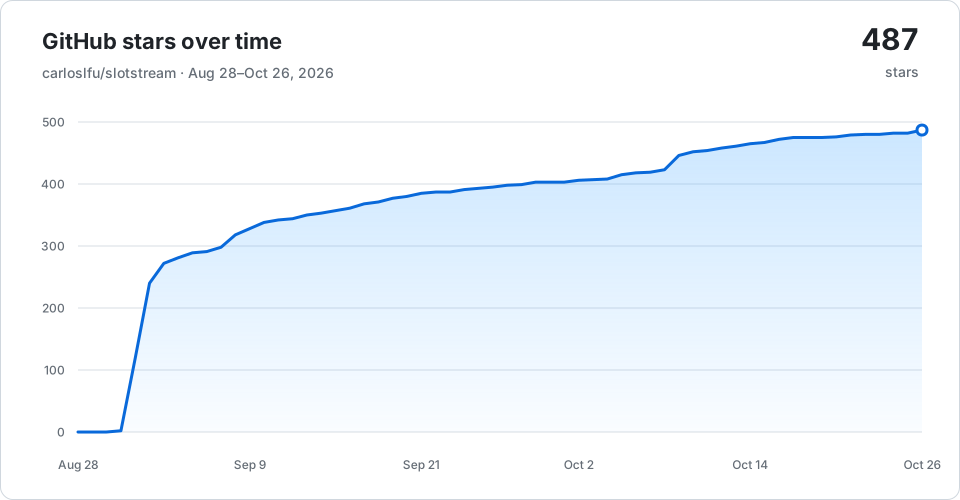
The badge at the top shows the latest star count; this chart is updated weekly.
Slotstream is MIT-licensed. Model weights and included third-party code retain their own licenses. The released model uses the Qwen community license; see third-party notices for the other components. See credits for the model and code this project builds on.
→ →
→ →
→ →
→ →
→ →
→ →
→ →
→