1
 →
→
Offline inference engine for art, real-time voice conversations, LLM powered chatbots and automated workflows
Capsize-Games/airunner is an open-source project on GitHub, mainly written in Python. Offline inference engine for art, real-time voice conversations, LLM powered chatbots and automated workflows It currently holds 1,316 stars and 103 forks with 0 open issues, and was last pushed on an unknown date (repository created unknown).
AI Homed tracks it on the AI Image Projects board and on the AI AI Image Projects list.
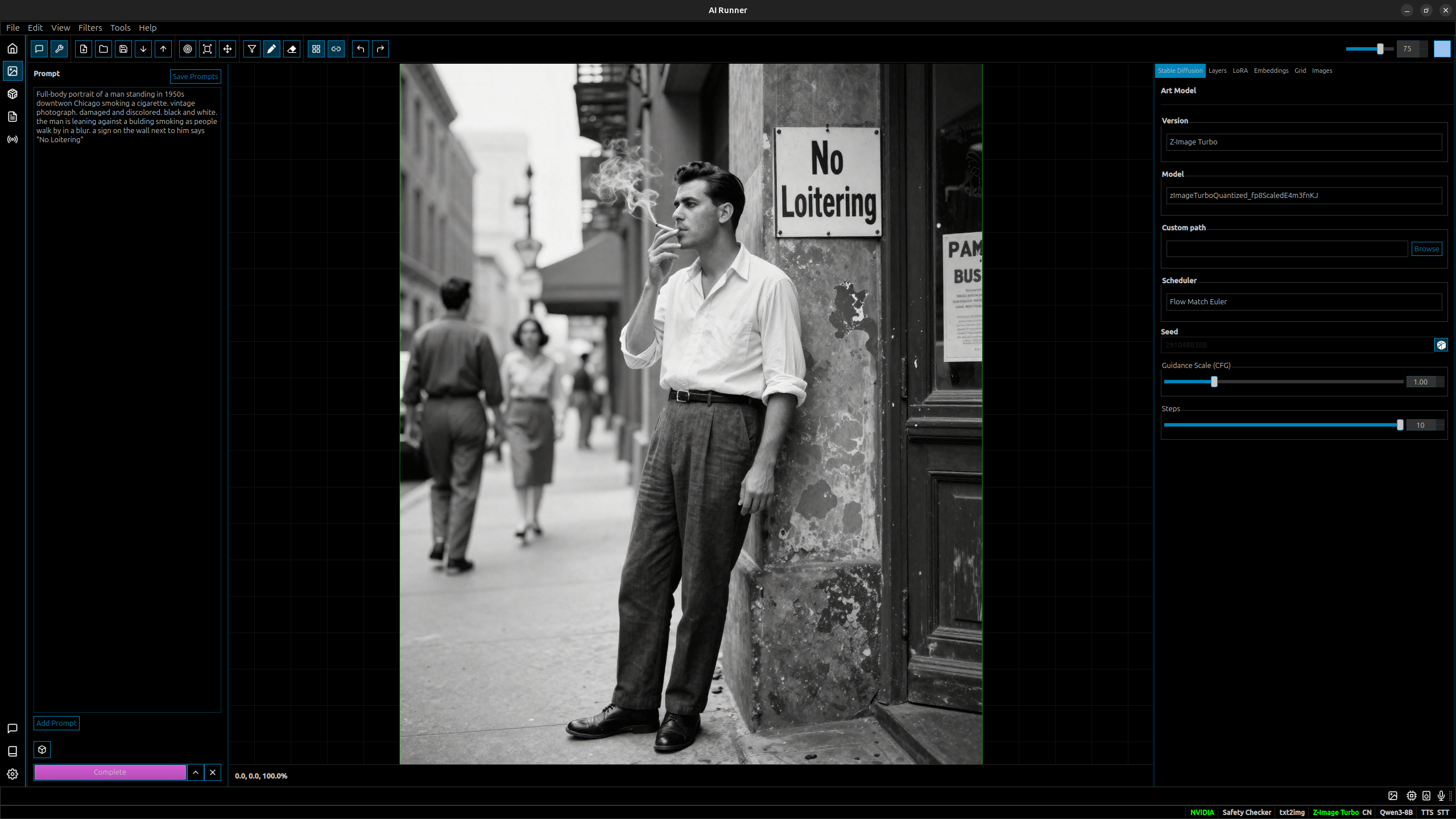
AI Runner is a private AI companion you shape — name, personality, voice, memory — and a layered canvas for AI art generation. Everything runs on your machine by default.





🐞 Report Bug · ✨ Request Feature · 🛡️ Report Vulnerability · 📖 Wiki
| | |
|---|---|
| Desktop download | capsizegames.itch.io/ai-runner — no Python setup required |
| Container | docker pull ghcr.io/capsize-games/airunner:linux-desktop (also linux, linux-headless) |
| Python | pip install airunner (PyPI) |
| On the web | airunner.art |
AI Runner is free and GPL-3.0. If it is useful to you, sponsoring the project is what keeps it maintained — it is built and released by one engineer at Capsize LLC.
---
AI Runner is built around two interlocking experiences.
A companion you shape. Name it, give it a personality, assign it a voice, and let it build memory of who you are over time. Your companion is aware of the time, date, and weather, and its mood shifts naturally through conversation. Everything — the conversations, the memories, the personality — stays on your machine.
A canvas for AI art. A layered drawing and generation surface where you can sketch, paint, generate, and filter. Convert sketches to images, iterate with image-to-image, composite on layers, and apply styles and filters — with your companion present alongside you while you create.
Neither experience requires an internet connection, an API key, or a subscription. Everything runs on your hardware.
| Feature | Description | |---------|-------------| | 🤖 AI Companion | Shape a named, voiced companion with persistent personality, shifting mood, and long-term memory built from your conversations | | 🎨 Layered Canvas | Draw, paint, generate, and filter on a multi-layer canvas — convert sketches to images, composite scenes, and iterate in place | | 🖼️ Image Generation | SDXL and Z-Image Turbo with LoRA, embeddings, image-to-image, inpainting, and post-process filters, background removal | | 🗣️ Voice Conversation | Full TTS and STT — speak to your companion and hear it respond in a voice you choose | | 🧠 Memory & Recall | Companion builds long-term memory of you across sessions with RAG-powered recall | | 🌤️ Environmental Awareness | Companion is aware of time, date, and local weather — grounded in the real moment | | 🔒 Privacy First | Private by default — no telemetry and no data leaves your machine unless you explicitly enable an optional cloud feature | | 🛡️ Safety Filters | Configurable NSFW output filtering and always-on prompt classifier for illegal content | | 📦 Model Management | Built-in HuggingFace and Civitai downloaders with support for multiple local LLMs and image models |
| Language | TTS | LLM | STT | GUI | |----------|-----|-----|-----|-----| | English | ✅ | ✅ | ✅ | ✅ | | Japanese | ✅ | ✅ | ❌ | ✅ | | Spanish/French/Chinese/Korean | ✅ | ✅ | ❌ | ❌ |
flowchart LR
  User[User] --> Native[native/ launcher and bundle helpers]
  Native --> GUI[src/ desktop client]
  Native --> Daemon[services/ headless daemon]
  GUI --> Daemon
  Native --> Sidecars[llama.cpp and whisper.cpp sidecars]
  Daemon --> Sidecars
  GUI --> Scripts[scripts/ tooling]
  Daemon --> Scripts
  GUI --> Data[(AIRUNNER_BASE_PATH)]
  Daemon --> Data
| Package | Role | |---------|------| | src | Desktop GUI client, daemon client bridge, widgets, and application entry points | | services | Headless daemon, FastAPI server, runtime registry, orchestration, downloads, and persistence | | native | Python launcher entry point and runtime layout helpers. Native sidecar (llama.cpp/whisper.cpp) builds live in airunner-native | | scripts | Developer tooling: test runner, UI build, install helpers, and quality reports |
---
| | Minimum | Recommended | |---|---------|-------------| | OS | Ubuntu 22.04, Windows 10 * | Ubuntu 22.04 (Wayland) | | CPU | Ryzen 2700K / i7-8700K | Ryzen 5800X / i7-11700K | | RAM | 16 GB | 32 GB | | GPU | NVIDIA RTX 3060 | NVIDIA RTX 5080 | | Storage | 22 GB - 100 GB+ (actual usage varies, SSD recommended) | 100 GB+ |
\* Windows support is experimental and community-maintained; Linux is the primary supported platform.
---
Current status: AIRunner runs as a Python application with two install paths.
Choose one of the two primary install modes:
| Install mode | Best for | Primary command |
|--------------|----------|-----------------|
| dev | Contributors working from a repo checkout | ./scripts/install.sh |
| distributed | Operators separating daemon and GUI-client installs | ./deployment/install_distributed.sh --role ... |
1. dev for contributors working from this repo checkout.
This reuses ./venv by default, installs the Python packages in editable
mode, and builds the pinned llama.cpp and whisper.cpp sidecars under
build/runtime-sidecars/linux/.
./scripts/install.sh
--refresh-deps when you want a full dependency refresh, and add
--sidecars-cuda when you want CUDA-enabled native sidecars.
2. distributed for operators who want the daemon and GUI client installed
separately, including split-machine setups.
  ./deployment/install_distributed.sh --role daemon
  ./deployment/install_distributed.sh --role gui-client
The manual and Docker paths below are still useful developer/operator installation flows.
GUI Mode:
xhost +local:docker && docker compose run --rm airunner
Headless API Server:
docker compose run --rm --service-ports airunner --headless
Note: --service-ports is required to expose the container's published port (8080), which maps to the headless daemon's HTTP API.
To trim container dependencies for a specific deployment, rebuild with a profile list such as:
docker build \
  --build-arg AIRUNNER_INSTALL_PROFILES=core,llm-native,stt-native \
  -t airunner:headless .
The container publishes the headless daemon's HTTP API on port 8080 with endpoints:
GET /health - Health check and service statusPOST /llm - LLM inferencePOST /art - Image generationUse this path when you want to assemble the environment manually instead of
using ./scripts/install.sh for repo development or
./deployment/install_distributed.sh for managed daemon and GUI-client
installs.
Python 3.13+ required. We recommend using pyenv and venv.
1. Install system dependencies:
   sudo apt update && sudo apt install -y \
     build-essential cmake git curl wget pkg-config \
     nvidia-cuda-toolkit pipewire libportaudio2 libxcb-cursor0 \
     espeak espeak-ng-espeak qt6-qpa-plugins qt6-wayland \
     libsentencepiece-dev \
     mecab libmecab-dev mecab-ipadic-utf8 libxslt-dev mkcert
2. Create data directory:
mkdir -p ~/.local/share/airunner
3. Choose the package profiles you need:
llm-native: local llama.cpp runtime and LLM toolchainstt-native: local STT runtime helpersart-python: Python image-generation runtimestts-python: Python TTS runtimes without MeCab-backed language packsheadless: aggregate of the four runtime extras above (llm-native,stt-native, art-python, tts-python)
development: test, lint, and packaging toolingopenvoice_jp / openvoice_kr: MeCab-backed Japanese and Korean voice packsairunner-services package.
The desktop GUI ships in the root airunner package, which pulls in
airunner-services==6.1.3 automatically (issue #2037). The optional
airunner-native[gui] extra provides the native launcher and bundle
tooling.
4. Install AI Runner:
The published packages are airunner (desktop GUI), airunner-services
(headless daemon, API server, and model runtimes), airunner-native
(optional native launcher), and airunner-common (shared metadata). The
airunner package itself only ships analysis, ml, and development
extras; all model runtimes live in the airunner-services extras (issues
#2039/#2040).
From PyPI (full GUI install):
   # torch family pinned to the CUDA 12.9 wheel line (issues #2036/#2041)
   pip install torch torchvision torchaudio --index-url https://download.pytorch.org/whl/cu129
   # Desktop GUI; pulls in airunner-services==6.1.3 automatically
   pip install "airunner"
   # Model runtimes (LLM, STT, art, TTS); headless aggregates the four extras
   pip install "airunner-services[headless]"
   # Optional: native launcher and bundle tooling (also pulls the GUI)
   pip install "airunner-native[gui]"
For a headless-only install (no GUI), install the services package with the runtimes you need:
pip install "airunner-services[headless]"
From a local clone in editable mode:
   git clone https://github.com/Capsize-Games/airunner.git
   cd airunner
   python -m venv venv
   source venv/bin/activate
   pip install --upgrade pip setuptools wheel
   # The pinned torch line (2.13.0+cu129) requires setuptools>=77.0.3 with no
   # setuptools<82 upper bound, so the latest setuptools is safe for pip check
   # (issue #2057). Older torch wheels (e.g. some 2.11.x) still declare
   # setuptools<82; if you use one, pip install "setuptools<82" first.
   pip install torch torchvision torchaudio --index-url https://download.pytorch.org/whl/cu129
   # airunner-common moved to its own repository and resolves from PyPI
   # now (issue #2197, https://github.com/Capsize-Games/airunner-common)
   # via services/native's own declared dependency -- no local install
   # step needed for it anymore.
   pip install -e "./services[headless,development]"
   pip install -e ./native
   pip install -e .
The base tts-python profile intentionally excludes the MeCab-backed
Japanese and Korean voice packs so a fresh virtual environment can install
without extra native build steps.
To include those language packs after installing the system packages above, use:
pip install -e "./services[openvoice_jp,openvoice_kr]"
5. Install llama-cpp-python with CUDA (Python 3.13, Linux):
  pip install --no-cache-dir \
    --extra-index-url https://abetlen.github.io/llama-cpp-python/whl/cu124 \
    "llama-cpp-python==0.3.21"
Qwen3.5-9B-Q8_0.gguf in this repo.cu124 wheel enables GPU offload on Linux without rebuilding from source.GGML_CUDA_ARCHITECTURES=120. airunner
When you need to run database migrations manually from a local clone, use the repo Alembic config and upgrade all heads:
source venv/bin/activate
alembic -c src/airunner/alembic.ini upgrade heads
If you are targeting a non-default database, set AIRUNNER_DATABASE_URL
before running the command.
For detailed instructions, see the Installation Wiki.
The hybrid-runtime rewrite is being delivered in explicit phases: runtime foundation, LLM cutover, STT isolation, art/TTS isolation, then packaging, bundles, CI, and rollout hardening. The phase order, rollout gates, and full issue-tree checklist live in HYBRID_RUNTIME_MIGRATION.md.
AIRunner ships as a Python application with one primary airunner entry
point.
---
AI Runner downloads essential TTS/STT models automatically. LLM and image models must be configured:
| Category | Model | Size |
|----------|-------|------|
| LLM (default) | Qwen3.5-9B, GGUF Q8_0 | ~12 GB VRAM |
| Image | Stable Diffusion 1.5 | ~2 GB |
| Image | SDXL 1.0 | ~6 GB |
| Image | Z-Image Turbo | ~12 GB |
| TTS | OpenVoice | 654 MB |
| STT | Systran/faster-distil-whisper-large-v3 | — |
Local LLM inference runs GGUF through a llama.cpp sidecar; airunner-hf-download
fetches GGUF by default and --full gets safetensors instead. Ten bundled models
ship a GGUF variant, and "Custom Local Path" points at your own file.
LLM Providers: Local (GGUF / llama.cpp), Ollama, OpenRouter, OpenAI
Art Models: Place your models in ~/.local/share/airunner/art/models/
---
| Command | Description |
|---------|-------------|
| airunner | Launch GUI |
| airunner-headless | Start headless API server |
| airunner-hf-download | Download/manage models from HuggingFace |
| airunner-civitai-download | Download models from CivitAI |
| airunner-build-ui (dev) | Rebuild UI from .ui files (python scripts/build_ui.py) |
| airunner-tests (dev) | Run test suite (python scripts/run_tests.py) |
| airunner-generate-cert | Generate SSL certificate |
Note: To download models, use Tools → Download Models from the main
application menu. The GUI now opens a filtered CivitAI browser for SDXL 1.0
and Z-Image Turbo models and queues downloads through the local daemon. You
can also use airunner-hf-download / airunner-civitai-download from the
command line.
When you change any .ui file in a local clone, rebuild the generated
*_ui.py files from the repo root with:
source venv/bin/activate
python scripts/build_ui.py
If you installed AIRunner's dev console scripts, airunner-build-ui runs the
same rebuild; from a source checkout use python scripts/build_ui.py.
This rebuild also refreshes the Qt resources and generated stylesheet assets.
---
AI Runner can run as a headless HTTP API server, enabling remote access to LLM, image generation, TTS, and STT capabilities. This is useful for:
# Start with defaults (port 8080, LLM only)
airunner-headless
Start with a specific LLM model
airunner-headless --model "/path/to/Qwen2.5-7B-Instruct-4bit"
Run as Ollama replacement for VS Code (port 11434)
airunner-headless --ollama-mode
Don't preload models - load on first request
airunner-headless --no-preload
| Option | Description |
|--------|-------------|
| --host HOST | Host address to bind to (default: 127.0.0.1) |
| --port PORT | Port to listen on (default: 8080, or 11434 in ollama-mode) |
| --ollama-mode | Run as Ollama replacement on port 11434 |
| --insecure-no-auth | Allow binding to non-loopback without AIRUNNER_API_KEY (not recommended) |
| --model, -m PATH | Path to LLM model to load. Also enables the LLM service. Quote paths that contain spaces. |
| --art-model PATH | Path to Stable Diffusion model to load. Also enables the art service. Quote paths that contain spaces. |
| --tts-model PATH | Path to TTS model to load. Also enables the TTS service. Quote paths that contain spaces. |
| --stt-model PATH | Path to STT model to load. Also enables the STT service. Quote paths that contain spaces. |
| --enable-llm | Enable LLM service |
| --enable-art | Enable Stable Diffusion/art service |
| --enable-tts | Enable TTS service |
| --enable-stt | Enable STT service |
| --no-preload | Don't preload models at startup |
| Variable | Description |
|----------|-------------|
| AIRUNNER_LLM_MODEL_PATH | Path to LLM model |
| AIRUNNER_ART_MODEL_PATH | Path to art model |
| AIRUNNER_TTS_MODEL_PATH | Path to TTS model |
| AIRUNNER_STT_MODEL_PATH | Path to STT model |
| AIRUNNER_API_KEY | If set, requires auth for API requests and docs (X-API-Key / Authorization: Bearer) |
| AIRUNNER_INSECURE_NO_AUTH | Set to 1 to allow unauthenticated remote access (not recommended) |
| AIRUNNER_ALLOWED_TENANT_KEYS | Comma-separated allowlist for X-Tenant-Key when API key auth is enabled |
| AIRUNNER_DEBUG | Set to 1 to include exception details in 500s for loopback requests |
| AIRUNNER_NO_PRELOAD | Set to 1 to disable model preloading |
| AIRUNNER_LLM_ON | Enable LLM service (1 or 0) |
| AIRUNNER_SD_ON | Enable Stable Diffusion (1 or 0) |
| AIRUNNER_TTS_ON | Enable TTS service (1 or 0) |
| AIRUNNER_STT_ON | Enable STT service (1 or 0) |
| AIRUNNER_BASE_PATH | Data directory (default: ~/.local/share/airunner) |
| AIRUNNER_DATABASE_URL | Database URL override (default: sqlite:////data/airunner.db, or airunner.dev.db when DEV_ENV=1) |
| AIRUNNER_DB_NAME | Database filename (default: airunner.db, or airunner.dev.db when DEV_ENV=1) |
| AIRUNNER_HEADLESS | Set to 1 to run headless (daemon) mode without the GUI |
| AIRUNNER_DAEMON_CONFIG | Path to a daemon YAML config file to load/override defaults |
| AIRUNNER_HTTP_HOST | Host the headless daemon binds to (default: 127.0.0.1) |
| AIRUNNER_HTTP_PORT | Port the headless API listens on (airunner-headless default: 8080; the daemon-config default is 8188; the container publishes 8080 → daemon) |
| AIRUNNER_LNA_ENABLED | Set to 1 to enable LNA (local network access) mode for the local server |
| DEV_ENV | Set to 1 to load a local .env file and use development defaults (default: 0) |
| AIRUNNER_LOG_LEVEL | Logging level: DEBUG, INFO, WARNING, ERROR, CRITICAL (default: INFO) |
| AIRUNNER_LOG_FILE | Log file path (default: /airunner.log) |
| AIRUNNER_SAVE_LOG_TO_FILE | Set to 1 to write logs to AIRUNNER_LOG_FILE |
| AIRUNNER_DISABLE_SETUP_WIZARD | Set to 1 to skip the first-run setup wizard |
| AIRUNNER_LOCAL_FILES_ONLY | Set to 0 to allow file paths outside the data directory (default: 1) |
| AIRUNNER_ART_ENABLED | Enable the art service (default: 1) |
| AIRUNNER_LLM_USE_WEATHER_PROMPT | Enable weather prompts in LLM context (default: 1) |
| AIRUNNER_LLM_OPENROUTER_MODEL | Default OpenRouter model id (default: mistralai/mistral-7b-instruct:free) |
| AIRUNNER_DISABLE_FACEHUGGERSHIELD | Set to 1 to disable the facehuggershield download guard |
| AIRUNNER_DISABLE_FLASH_ATTENTION | Set to 1 to disable flash attention |
| LOCAL_SERVER_HOST | Host for the local static content server (default: 127.0.0.1) |
| LOCAL_SERVER_PORT | Port for the local static content server (default: 5005) |
| QTWEBENGINE_REMOTE_DEBUGGING | Set to a port (e.g. 9223) to enable QtWebEngine remote debugging |
| Method | Endpoint | Description |
|--------|----------|-------------|
| GET | /health | Health check and service status |
| POST | /llm | LLM text generation (streaming) |
| POST | /llm/generate | LLM text generation |
| POST | /art | Image generation |
| POST | /tts | Text-to-speech |
| POST | /stt | Speech-to-text |
| Method | Endpoint | Description |
|--------|----------|-------------|
| GET | /api/tags | List available models |
| GET | /api/version | Get version info |
| GET | /api/ps | List running models |
| POST | /api/generate | Text generation |
| POST | /api/chat | Chat completion |
| POST | /api/show | Show model info |
| Method | Endpoint | Description |
|--------|----------|-------------|
| GET | /v1/models | List models |
| POST | /v1/chat/completions | Chat completion with tool support |
curl -X POST http://localhost:8080/llm \
  -H "Content-Type: application/json" \
  -d '{
    "prompt": "What is the capital of France?",
    "stream": true,
    "temperature": 0.7,
    "max_tokens": 100
  }'
# Requires: airunner-headless --enable-art
curl -X POST http://localhost:8080/art \
  -H "Content-Type: application/json" \
  -d '{
    "prompt": "A beautiful sunset over mountains",
    "negative_prompt": "blurry, low quality",
    "width": 512,
    "height": 512,
    "steps": 20,
    "seed": 42
  }'
Returns: {"images": ["base64_png_data..."], "count": 1, "seed": 42}
# Requires: airunner-headless --enable-tts
curl -X POST http://localhost:8080/tts \
  -H "Content-Type: application/json" \
  -d '{"text": "Hello, world!"}'
Returns: {"status": "queued", "message": "Text queued for speech synthesis"}
Audio plays through system speakers
# Requires: airunner-headless --enable-stt
Audio must be base64-encoded WAV (16kHz mono recommended)
curl -X POST http://localhost:8080/stt \
  -H "Content-Type: application/json" \
  -d '{"audio": "UklGRi4AAABXQVZFZm10IBAAAAABAAEA..."}'
Returns: {"transcription": "Hello world", "status": "success"}
1. Start the headless server in Ollama mode:
airunner-headless --ollama-mode --model "/path/to/your/model"
If a model path contains spaces, quote it. For example:
airunner-headless --enable-art --art-model "~/.local/share/airunner/art/models/Z-Image Turbo/txt2img/moodyRealMix_zitV3FP8.safetensors"
2. Configure VS Code Continue extension to use
→→ →
→ →
→ →
→ →
→ →
→ →
→