1
 →
→
A robotic harness that gives LLM agents a visual-geometric control panel so that they can directly understand and invoke embodied tasks.
BinceQu/RoboHarness is an open-source project on GitHub, mainly written in Python. A robotic harness that gives LLM agents a visual-geometric control panel so that they can directly understand and invoke embodied tasks. It currently holds 224 stars and 18 forks with 0 open issues, and was last pushed on an unknown date (repository created unknown).
AI Homed tracks it on the Today's Trending board, currently at rank #83 with 0 new stars today.

Project Page · Quick Start · Documentation · 中文
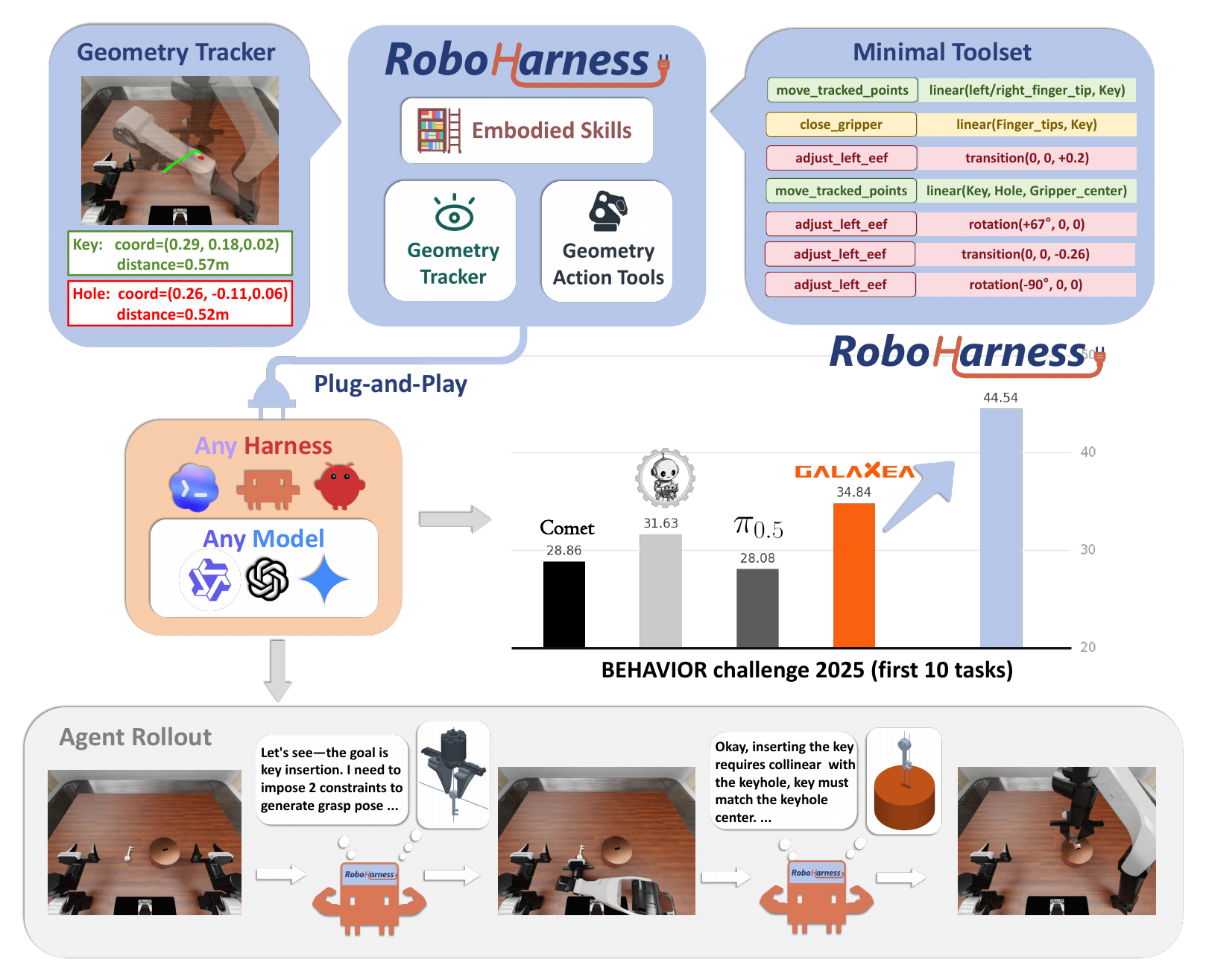
RoboHarness overview: visual keypoints are tracked persistently, converted into geometric constraints, executed, and verified in a closed loop. View original PDF
Without training models, RoboHarness combines visual clicks, keypoint tracking, and geometric constraints to provide an embodied control panel for an LLM agent.
The LLM marks points of interest on a 2D image and continuously receives their positions via optical-flow tracking and depth back-projection; with this information, it composes accurate primitive actions to perform complex manipulation.
The reported BEHAVIOR results use Claude Code 2.1.259 with
Qwen3.8-Flash-Next-FP8 and the R1 Pro robot. A Codex harness is also available.
| Component | Purpose |
| --- | --- |
| BEHAVIOR/ | BEHAVIOR simulator and evaluator, pinned to v3.9.1 |
| interface/ | RGB-D observations, robot control and interactive interface |
| harness/claude_code/ | Claude Code harness |
| harness/codex/ | Codex harness |
| prompt/ | Task-specific instructions for household manipulation |
| tasks/ | Task definitions, evaluation instances and step budgets |
| reference_results/ | Reference evaluator scores |
| roboharness/ | Task runner and evaluation pipeline |
| validation_results/ | Evaluation reports and scores |
Use Linux x86-64, an NVIDIA RTX GPU, Python 3.11 and the CUDA 12.4 toolkit. The validation host has 48 GB VRAM per GPU; this is the tested capacity, not a measured minimum. You also need BEHAVIOR scene data, local cache space and a separately configured model endpoint.
git clone --recurse-submodules https://github.com/BinceQu/RoboHarness.git
cd RoboHarness
./scripts/setup.sh
cp configs/example.json configs/local.json
Follow the installation guide to obtain the licensed datasets,
install Claude Code 2.1.259, and configure the model endpoint and authentication.
Edit configs/local.json for this machine's data and Python paths.
The model server and the evaluation runner are separate processes. Keep your
model server running throughout evaluation. setup.sh installs the simulation
and agent environments; it does not download LLM weights or start a model server.
1. Connect to your model service.
The default Claude Code harness uses an Anthropic-compatible /v1/messages
endpoint with image input, tool calls and streaming. The paper configuration
uses Qwen3.8-Flash-Next-FP8. If your server only provides OpenAI Chat
Completions, follow the bridge setup
first. Codex uses a different Responses configuration.
On the evaluation machine, open a terminal in this repository and replace the host, served model ID and key below with your service's values:
export ROBOHARNESS_MODEL_URL='http://YOUR_MODEL_HOST:31000'
export ROBOHARNESS_MODEL='Qwen3.8-Flash-Next-FP8'
export ANTHROPIC_API_KEY='YOUR_MODEL_SERVER_KEY'
export ANTHROPIC_AUTH_TOKEN="$ANTHROPIC_API_KEY"
Use the origin without /v1 for ROBOHARNESS_MODEL_URL. The model ID must
match the name exposed by your server. For a server with authentication disabled,
use local-no-auth as the key. 127.0.0.1 works only when the model service is
on this evaluation machine, or an SSH tunnel forwards it here.
Send a small request before starting the simulator:
python3 - <<'PY' | curl --fail-with-body --silent --show-error \
  "${ROBOHARNESS_MODEL_URL%/}/v1/messages" \
  -H 'Content-Type: application/json' \
  -H 'anthropic-version: 2023-06-01' \
  -H "x-api-key: $ANTHROPIC_API_KEY" \
  -H "Authorization: Bearer $ANTHROPIC_AUTH_TOKEN" \
  --data-binary @-
import json, os
print(json.dumps({
    "model": os.environ["ROBOHARNESS_MODEL"], "max_tokens": 128,
    "messages": [{"role": "user", "content": "Reply with OK."}]
}))
PY
Expect a Messages response with "type": "message". This checks reachability,
authentication and the model ID; the service must also support the image and
tool features above. Connection errors, HTTP 401/403 and HTTP 404 are covered in
model connection troubleshooting.
2. Save the session configuration.
In the same terminal, copy your installation settings on first use and save the model address and name. Existing session settings are retained:
python3 - <<'PY'
import json, os
from pathlib import Path
path = Path(os.environ.get("ROBOHARNESS_SESSION_CONFIG", ".local/session-config.json"))
source = path if path.exists() else Path("configs/local.json")
config = json.loads(source.read_text())
config.update(model_url=os.environ["ROBOHARNESS_MODEL_URL"],
              model=os.environ["ROBOHARNESS_MODEL"])
path.parent.mkdir(parents=True, exist_ok=True)
path.write_text(json.dumps(config, indent=2) + "\n")
print("Saved", path)
PY
The default session file is .local/session-config.json; set
ROBOHARNESS_SESSION_CONFIG to select another file. Review it: data_path must point to the
BEHAVIOR data root, and interface_python, evaluator_python
and agent_python must point to the installed environments. The example paths
work with setup.sh. Set cache_dir to writable scratch space outside any
Git checkout when needed. Relative paths are resolved from the repository root.
Credentials stay in the shell environment; export them again in each new
terminal. Later configuration edits belong in this session file.
3. Inspect the plan, then launch.
claude --version  # must be 2.1.259 for the paper configuration
./run.sh --list
./scripts/reproduce_task.sh task01 --gpu 0 --dry-run
./scripts/reproduce_task.sh task01 --gpu 0 --run-dir runs/task01-001
In the dry-run output, check model_url, model, gpu, the three ports and
the five instance IDs. Dry-run prints configuration; it does not contact the
model or validate the simulator installation. The final command starts the
interface, evaluator and Claude Code agent and runs all five instances in order.
--gpu 0 selects the simulation GPU; model-serving GPUs are selected when
you start your own model server. Choose resources with enough capacity for both.
Change task01 to another listed task; task04 is not included. Use a new output
directory for every run, or omit --run-dir to generate one automatically.
For a single-instance trial, add --instances 301 and use a separate directory;
the full task mean requires all five instances.
4. Watch the rollout and read the results.
With default ports, task01's interface is http://127.0.0.1:15071 on the
evaluation machine. For a remote machine, run this on your own computer, then
open that address in your browser:
ssh -N -L 15071:127.0.0.1:15071 YOUR_USER@YOUR_EVALUATION_HOST
The launcher prints the HTTP, policy and gate ports. Configure them with
task_ports if needed.
For the command above, outputs are in:
| Path | Contents |
| --- | --- |
| runs/task01-001/summary.json | Completed instance count, scores and current mean Q-score |
| runs/task01-001/output/json/ | Official per-instance evaluator results |
| runs/task01-001/instance_301/ | Prompt, agent output, error log and trajectory for instance 301 |
| runs/task01-001/run.log and runs/task01-001/logs/ | Controller, interface and evaluator logs |
After all five instances finish, generate the comparison report:
python3 scripts/report_validation.py runs/task01-001 \
  --output .local/reports/task01-001 --check-live --require-match
Open .local/reports/task01-001/README.md for the result. --require-match
returns a nonzero exit code for an incomplete or mismatched evaluation.
Both runs/ and .local/ are ignored by Git.
The paper's BEHAVIOR evaluation protocol is:
20260911. Everyq_score.final for each rollout. The task mean is the unweighted average of
all five scores, reported to four decimal places.
The runner defaults to session_timeout_s: 0, so there is no additional
wall-clock limit. Execution time varies with hardware, model serving and
concurrent load; evaluation budgets are measured in simulation control steps.
The report compares each complete task mean with its reference value using a
tolerance of 1e-6. Individual instance scores may differ. --require-match
exits nonzero if a task is incomplete, its mean differs, or the run fails the
evaluation checks. Use --check-live on the evaluation host; omit it when
analyzing copied runs. Add --watch for continuous reporting.
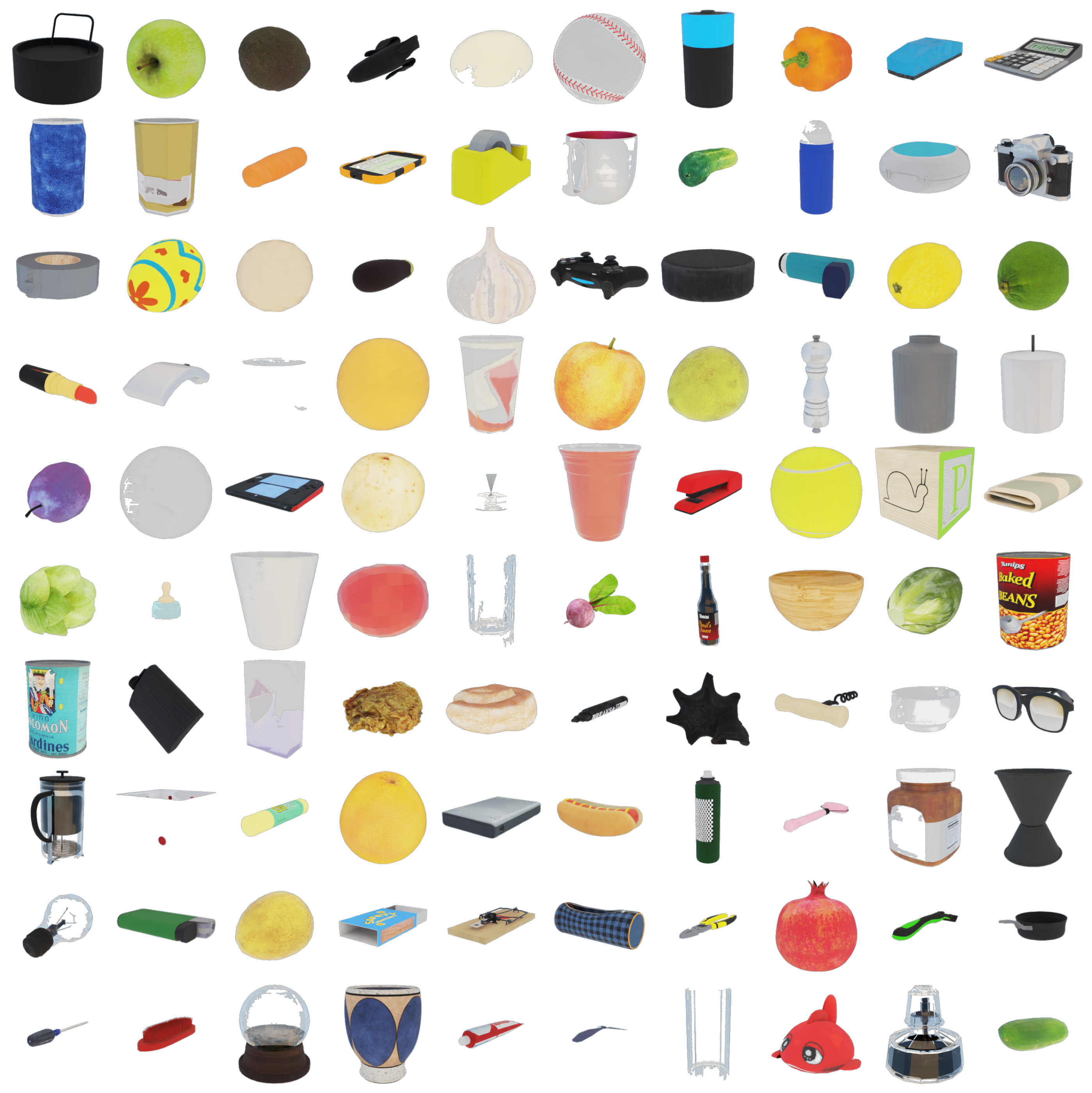
The 100 objects used to evaluate generalization across objects. The catalog is drawn from the BEHAVIOR object library.
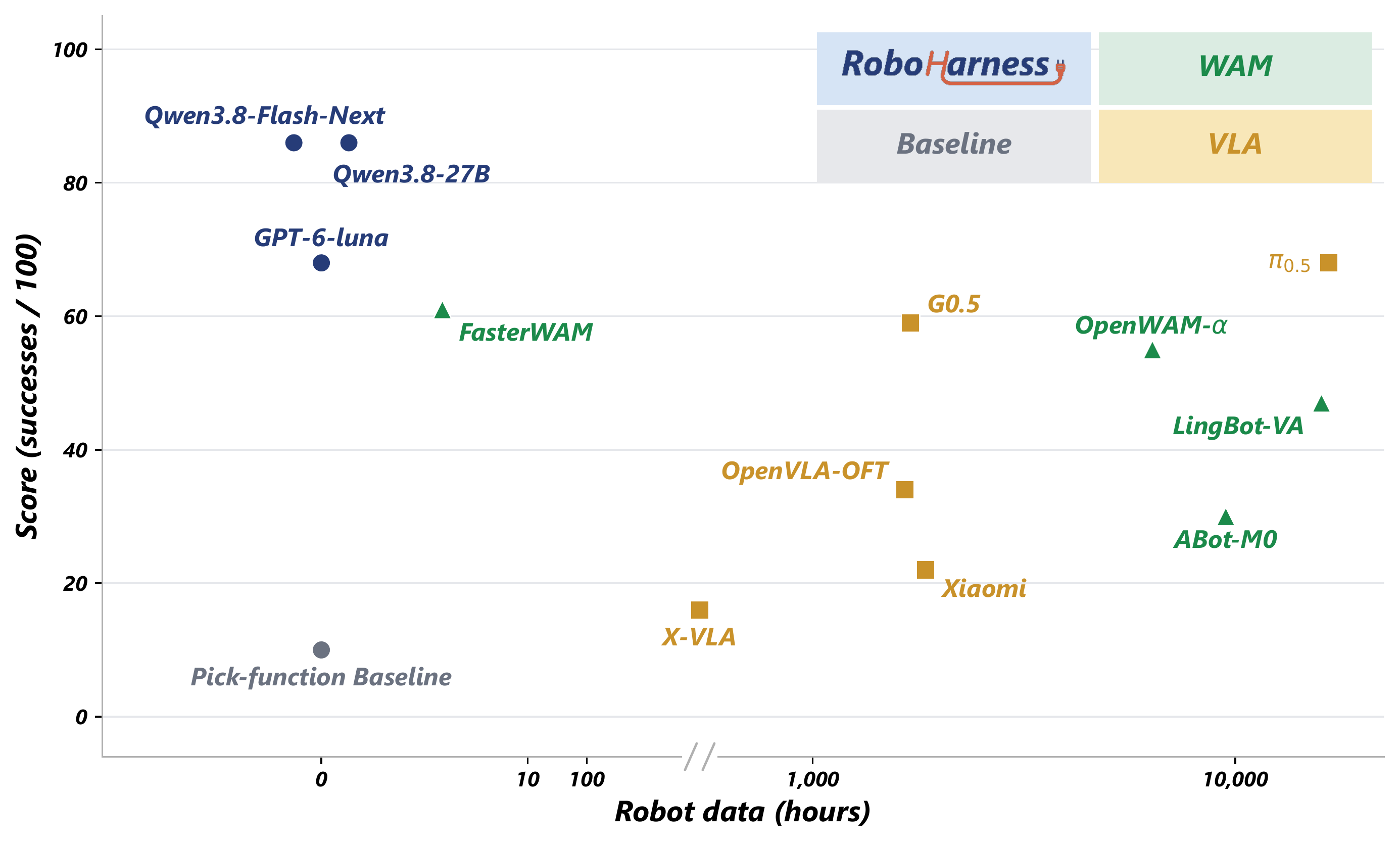
Successes out of 100 objects versus estimated hours of robot data. Colors: VLA (blue), world action model (green), RoboHarness (red), and the ASPIRE-pick baseline (gray).
Contributors: BinceQu and Codex (AI coding agent).
Run the installed environments' CPU checks with ./scripts/check.sh.
See contribution guidelines for focused checks and the
information needed in a reproducibility issue.
Repository code is released under the MIT license, subject to the component-specific third-party notices. BEHAVIOR data, NVIDIA Isaac Sim and model weights have their own access and license terms.
→ →
→ →
→ →
→ →
→ →
→ →
→ →
→