1
 →

The workspace to stay in the loop and on top of agents - shape, decide, plan, annotate, review code, share with team, and send all feedback to agents with one click.
backnotprop/plannotator is an open-source project on GitHub, mainly written in TypeScript. The workspace to stay in the loop and on top of agents - shape, decide, plan, annotate, review code, share with team It currently holds 14,641 stars and 1,424 forks with 211 open issues, and was last pushed on 2026-11-23 (repository created 2025-12-28).
AI Homed tracks it on the Today's Trending board.

Everything you need to annotate and stay in the loop with your agents
Inbox Surface • Artifacts • Code Review
Annotate plans, specs, markdown, HTML, and other interactive artifacts. Review diffs and PRs. Send feedback to your agent.









Plannotator Inbox · Official site · Code Review · Visual HTML Skills · Herdr Annotate · (Legacy) Plan Mode
⭐️ NEW: Plannotator Inbox is the missing review layer between you and multi-agent work. It surfaces decisions, prototypes, variations, plans, and everything you need to stay in the loop. Works with all coding agents and personal assistants.
Plannotator is a local, browser-based review surface for AI coding agents: Claude Code, Codex, Copilot CLI, Gemini CLI, OpenCode, Kiro, Droid, Amp, DeepSeek Harness, and Pi. Plannotator Inbox also works with personal assistants (Grok Bot, Muse, Hermes, OpenClaw).
It plugs directly into your agent through plugins, hooks and commands. When the agent proposes a decision, plan, html, or finishes working, the app opens in your browser and you mark it up, comment, and send feedback directly to the agent for it to act on it.
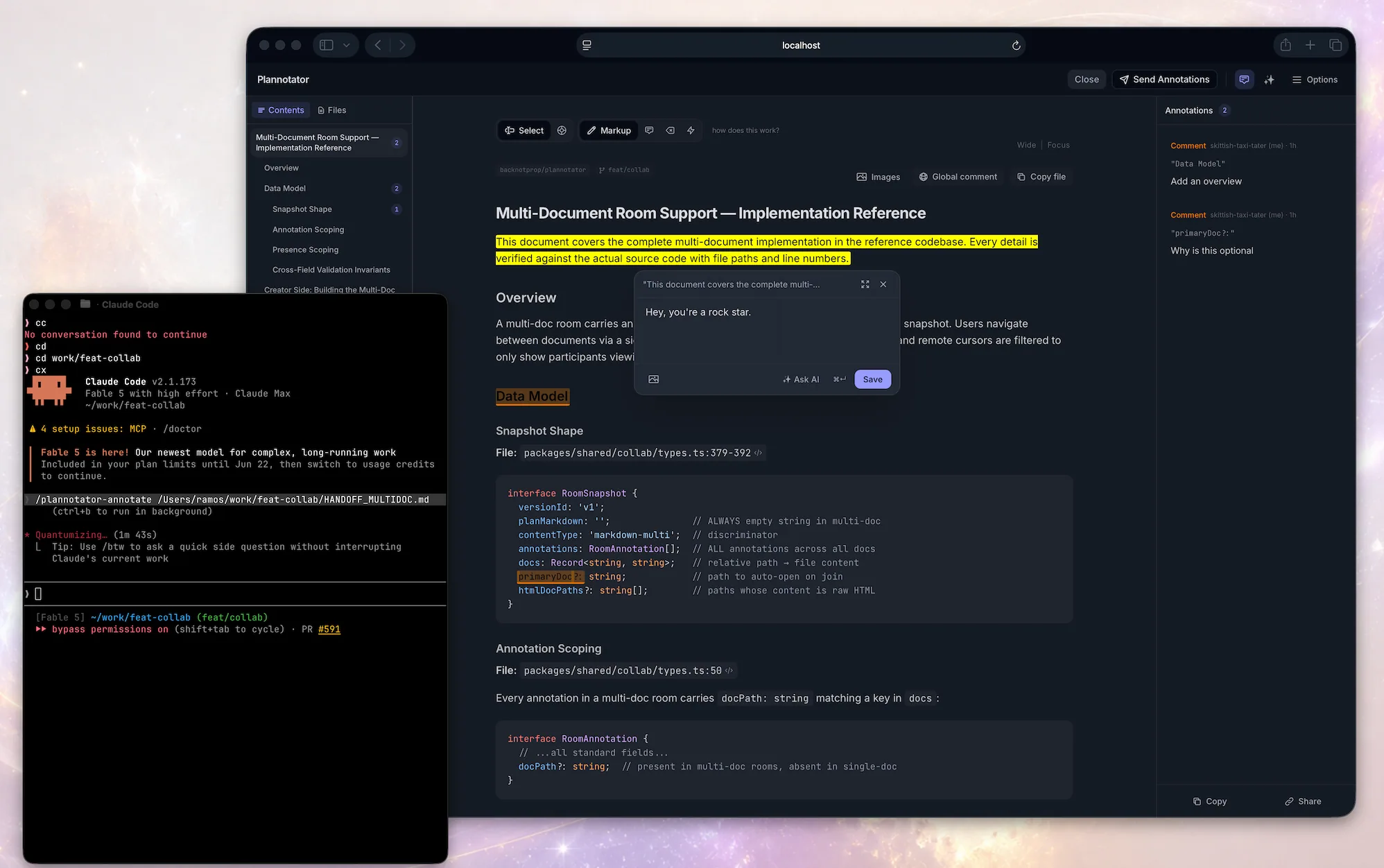
Review documents, plans, and agent messagesAnnotate plans, specs, messages, html, then send the feedback to your agent. |
|
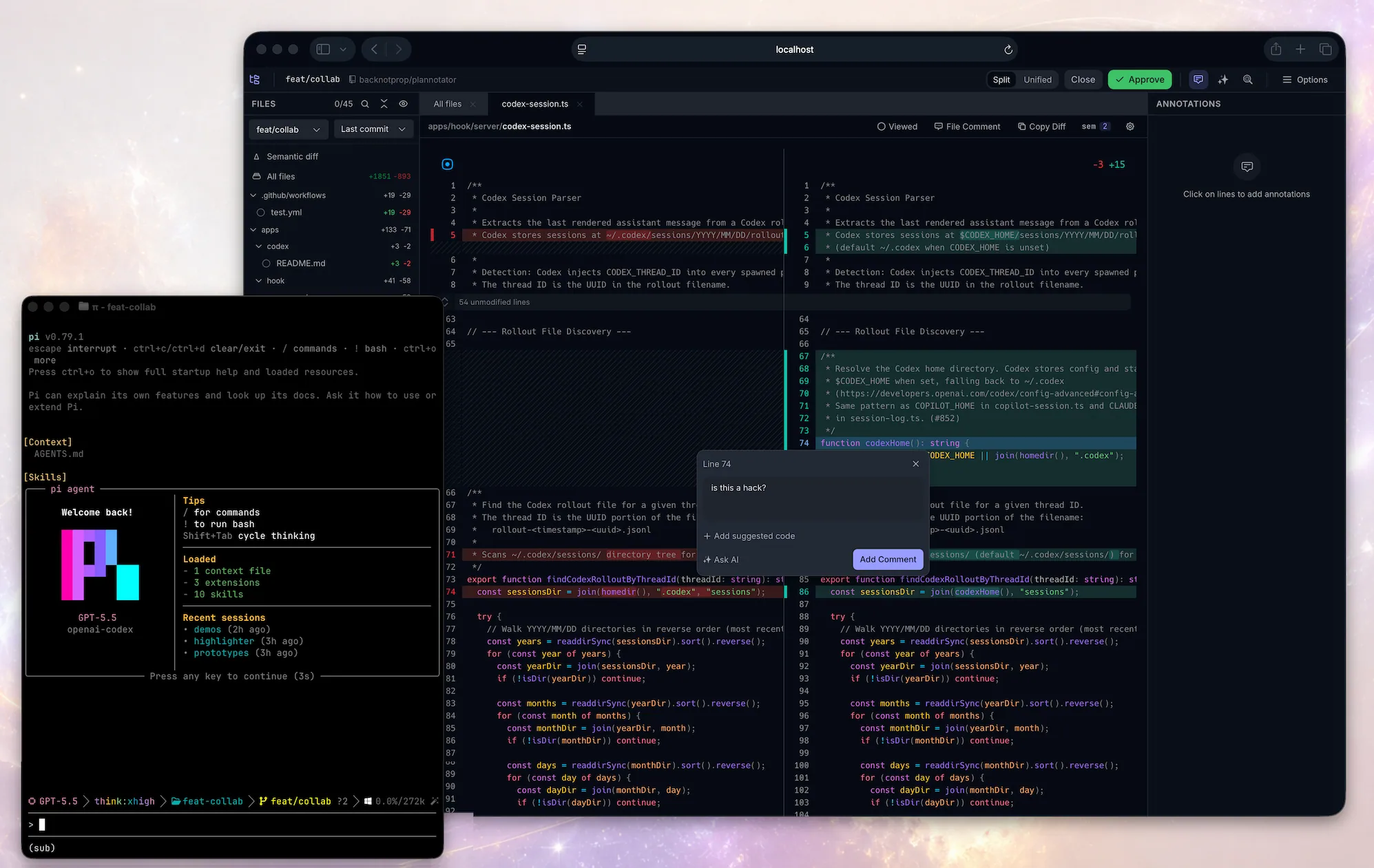
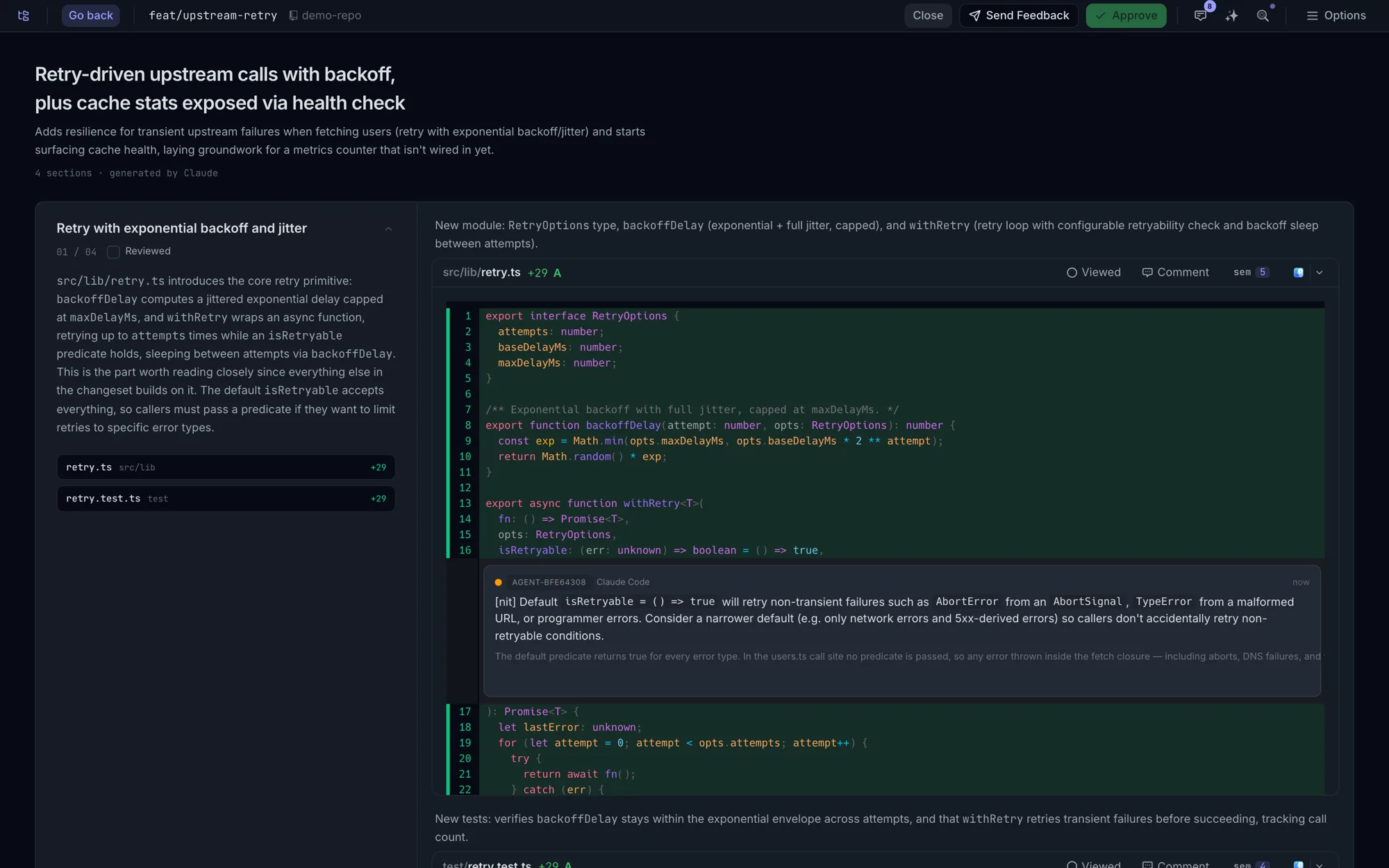
Code ReviewReview local changes or remote PRs. Comment on diffs, suggest code. Your comments go back to the agent. Works with Git, GitButler, Jujutsu ( For a big change, start a guided review: an agent sorts the diff into chapters, the most important first. |
|
Watch the demo · More on the Inbox · Docs
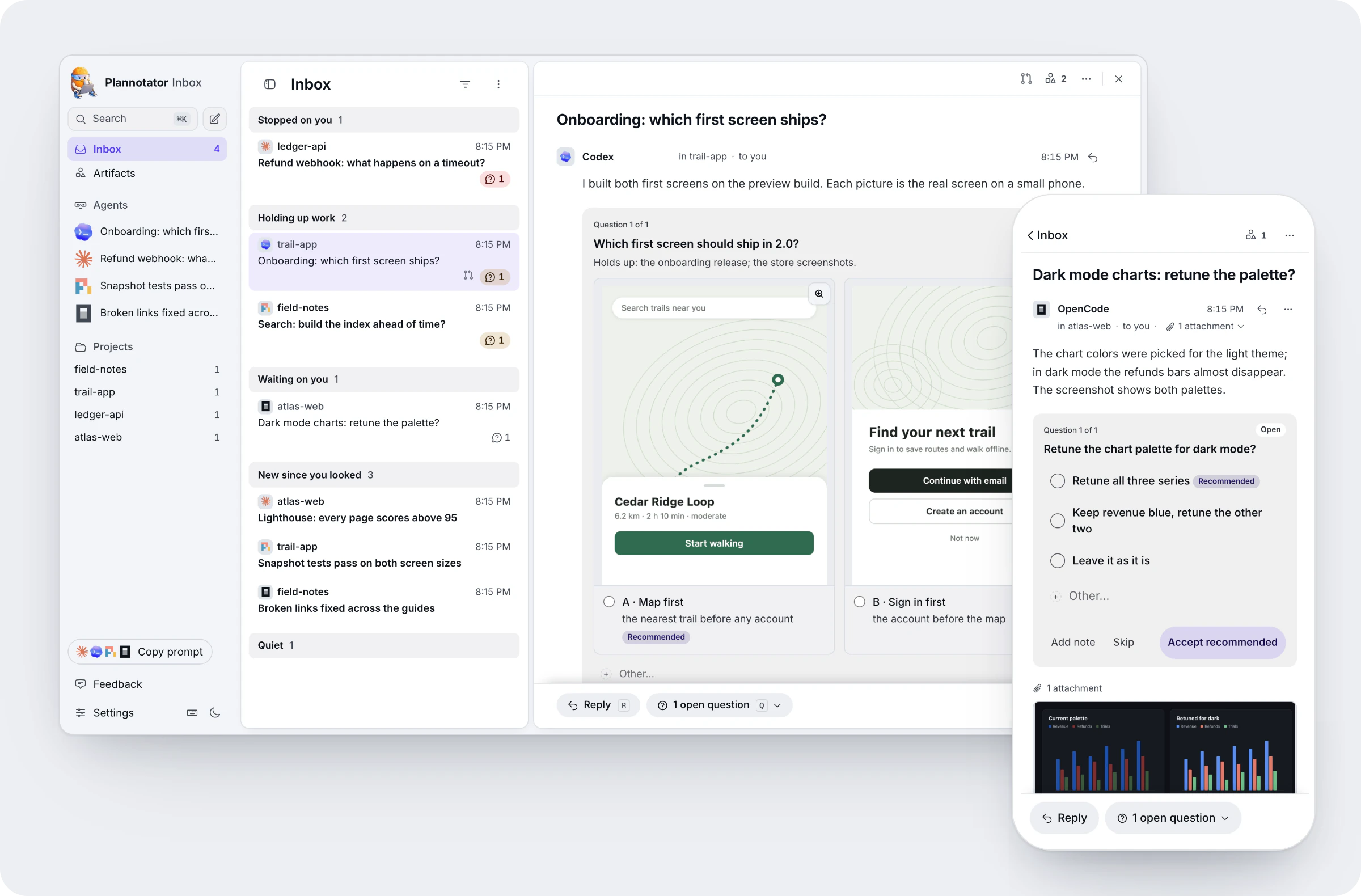
The Plannotator Inbox is one local window where your agents leave you messages, questions, files, and guided reviews while they keep working. Answer a question with a click, annotate a file, and press Send when you can. Nothing holds an agent session open while you do, and your reply goes back to the session that asked.
plannotator inbox
Claude Code, Pi, and OpenCode connect through Plannotator's plugins, and your replies arrive as their next turn. Any other agent reaches it over MCP with plannotator inbox mcp, and plannotator inbox --help is the guide an agent reads.

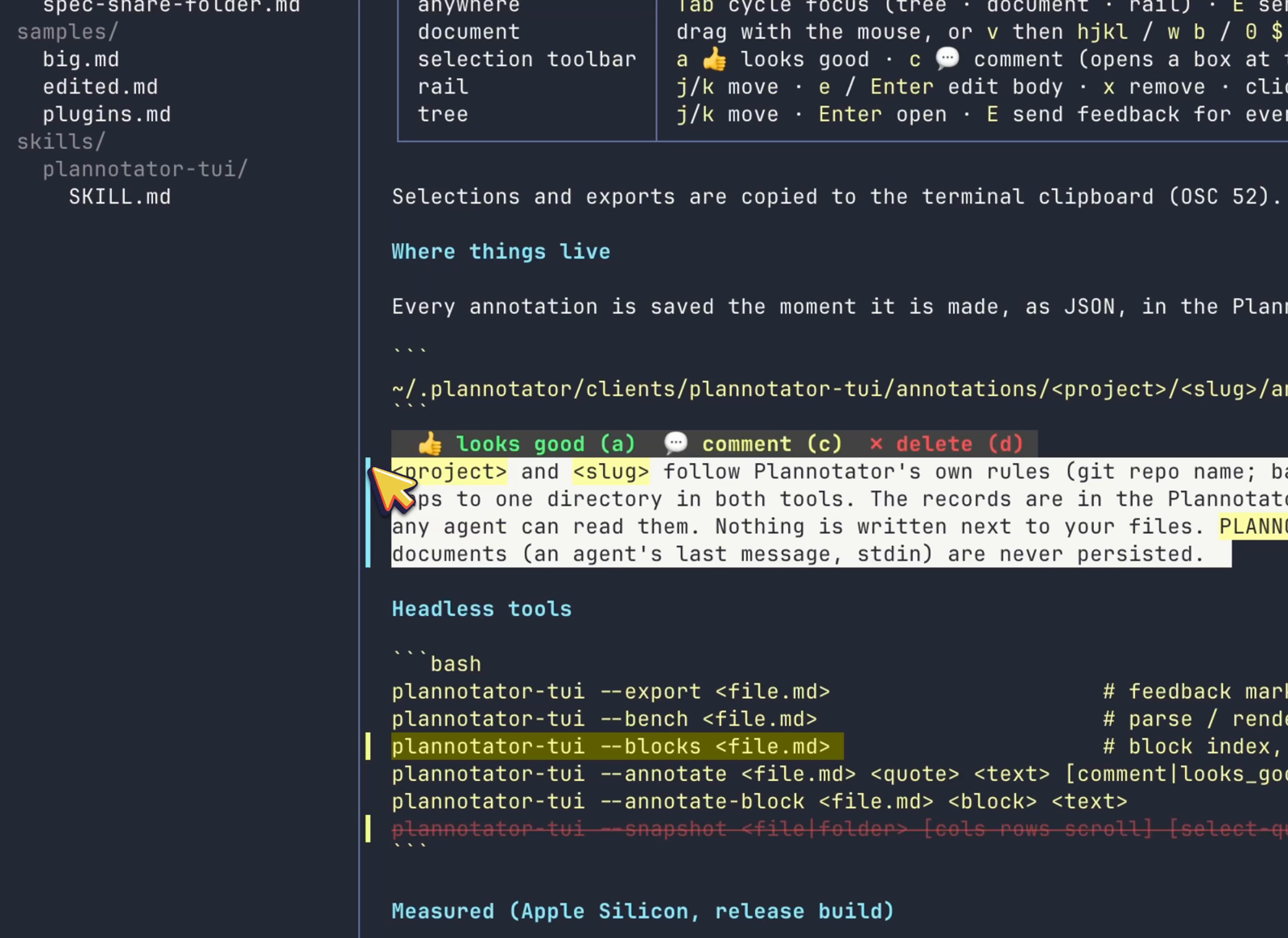
Herdr Annotate brings Plannotator-style review to the terminal: annotate terminal text, review whole Markdown documents and your coding agent's replies inside Herdr, and send the feedback straight back to the agent as its next message. Works with Claude Code, Codex, Pi, Copilot CLI, and Droid replies. Annotations are saved in the Plannotator data directory, so terminal reviews and app reviews compound.
herdr plugin install plannotator/herdr-annotate
Prefer it standalone? Plannotator TUI powers the document review and runs without Herdr: brew install plannotator/tap/plannotator-tui.
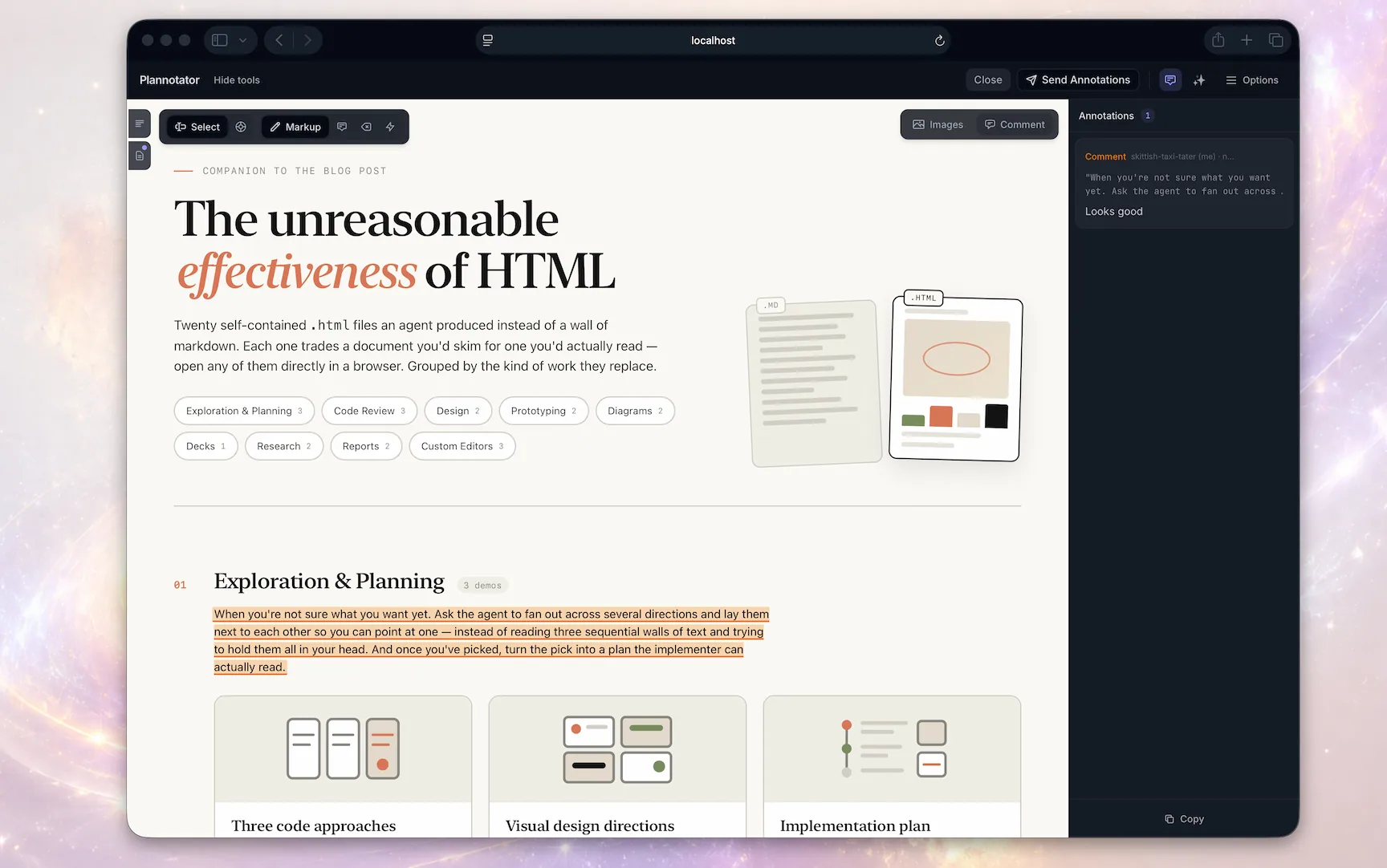
Annotate HTML artifacts and live sitesAnnotate rendered HTML files, or any site running on your machine. A local address opens your app live through a local proxy: you comment on the real page, and hot reload keeps working.
|
|
Guided reviewsIn code review, press Guide (or |
|
---
On Codex, swap the slash commands for !plannotator … (e.g. !plannotator review) or the $plannotator-* skills.
/plannotator-annotate README.md                  # Local markdown file
/plannotator-annotate src/                       # Browse and annotate files in a folder
/plannotator-annotate https://docs.rs/…          # Fetch and annotate any URL
/plannotator-annotate report.html --render-html  # Render HTML as-is instead of converting
/plannotator-last                                # Annotate the agent's last message
Need a realistic document to try? Copy the product requirements document template and filled example as Markdown.
/plannotator-review                    # Review uncommitted changes
/plannotator-review     # Review a GitHub pull request
/plannotator-review     # Review a GitLab merge request
plannotator review --gitbutler         # Review an active GitButler workspace
plannotator review --patch-file reading.diff # Review a static caller-supplied unified diff
GitButler users can review the whole workspace, one stack, or one branch layer. See the GitButler workflow guide.
No command needed. Plan mode is wired in through each harness's hooks. Any time your agent creates a plan, the markdown review surface opens for you.
plannotator sessions                   # List active Plannotator sessions
plannotator sessions --open 1          # Reopen a session in the browser
plannotator archive                    # Browse saved plan decisions read-only
---
Ask AI about anything you're reviewing, or launch AI reviews that post comments to the diff.
---
Send a plan as a link. A teammate annotates it, and you import their feedback for your agent.
Small shares live in the link itself. Large ones are encrypted before upload and expire after 7 days. Anyone with the full link can read it. Turn sharing off with PLANNOTATOR_SHARE=disabled. How sharing works
For teams: join the Workspaces waitlist
---
One installer covers almost every agent. It installs the plannotator binary, auto-detects your installed agents, and configures hooks, skills, and slash commands for each:
# macOS / Linux / WSL
curl -fsSL https://plannotator.ai/install.sh | bash
# Windows PowerShell
irm https://plannotator.ai/install.ps1 | iex
The installer downloads the binary from GitHub Releases. A full install can also contact GitHub for release resolution and agent files, and npm for Pi, selected extra skills, or the managed agent-terminal runtime. Pinning --version skips only GitHub API release resolution, not the release download. See the privacy policy for the complete network boundaries.
Want just the binary and nothing else? Pass --minimal (or export PLANNOTATOR_MINIMAL=1) to install only the plannotator binary to ~/.local/bin, skipping every skill, hook, slash command, and per-agent config:
curl -fsSL https://plannotator.ai/install.sh | bash -s -- --minimal
Then finish the step for your agent:
| Agent | After the installer | Details |
|---|---|---|
| Amp | Copy plannotator.ts into ~/.config/amp/plugins/, then plugins: reload. Workflows live in the command palette. | README |
| Claude Code | /plugin marketplace add backnotprop/plannotator, then /plugin install plannotator@plannotator. Restart Claude Code. | README |
| Codex | Nothing. Plan review is enabled automatically via Codex's experimental Stop hook (macOS/Linux/WSL; on native Windows, Codex hooks are experimental and the installer prints manual setup steps). $plannotator-review, $plannotator-annotate, and $plannotator-last skills included. | README |
| Copilot CLI | /plugin marketplace add backnotprop/plannotator, then /plugin install plannotator-copilot@plannotator. Restart. Plan review activates in plan mode (Shift+Tab). | README |
| DeepSeek Harness | Add @plannotator/dsh on DSH's Plugins page, or run dsh plugin --profile add @plannotator/dsh. Plan review opens on exit_plan_mode. The plugin adds /plannotator-review, /plannotator-annotate and /plannotator-last, which open without blocking the session. | README |
| Droid | droid plugin marketplace add https://github.com/backnotprop/plannotator, then droid plugin install plannotator@plannotator. Commands only, no plan interception yet. | README |
| Gemini CLI | Nothing. The hook, policy, and slash commands are configured automatically. Requires Gemini CLI 0.36.0+. | README |
| Kiro CLI | Nothing. Skills and an example agent are installed automatically. Try kiro-cli chat --agent plannotator. | README |
| OpenCode | Add "plugin": ["@plannotator/opencode@latest"] to opencode.json. Restart OpenCode. | README |
| Pi | Skip the installer. Just pi install npm:@plannotator/pi-extension. Start Pi with --plan, or toggle with /plannotator-plan-mode. | README |
| T3 Code | For Claude threads in T3: run plannotator t3 --help and follow its two steps (sign in to T3 once, add the --t3 MCP entry). Your Inbox replies then arrive in the thread as new turns. | README |
Updating: run the installer again for the binary and slash commands. It also updates an installed Claude Code plugin when the claude command is on your PATH (opt out with --skip-claude-plugin); otherwise run claude plugin marketplace update plannotator, then claude plugin update plannotator@plannotator, then restart Claude Code (refreshing the marketplace alone does not update the plugin). Pi: pi update --extensions (a plain pi update updates only Pi).
On Claude Code 2.1.287 or newer, plan review, code review and annotate don't make Claude wait: Claude ends its turn and your decision arrives later as a message. Set PLANNOTATOR_CLAUDE_MOD=0 to go back to the classic flow.
Full walkthroughs live in the installation docs.
The safe default removes recognized Plannotator-installed components and keeps your local plans, history, drafts, guides, and settings:
plannotator uninstall
Use --purge for a full removal of known local Plannotator data as well:
plannotator uninstall --purge
Purge requires typing purge at the prompt and explains that the data is
local-only: it is not stored on a Plannotator server and cannot be recovered.
For automation, pass --yes (or -y); non-interactive removal refuses to run
without it. Use --dry-run to preview recognized work without making changes.
Host integrations are always part of uninstall. If a broken or unavailable
host prevents safe cleanup, the command names the blocking plugin manager or
configuration, gives exact manual cleanup instructions, and stops before
deleting the binary. Complete that cleanup and rerun uninstall.
It also keeps the binary when an agent's config file can't be read (another
tool's too), or when a hook it did not install still runs Plannotator. The
error names the file, the tool, and what to do. A plannotator-inbox entry
you added yourself, or a Claude Code or Droid plugin installed for one project,
is named with how to remove it and does not keep the binary.
These mechanics keep the ordinary confirmation default-negative, make the
irreversible outcome require a stronger explicit word, and still give package
managers and scripts a conventional non-interactive flag.
The command covers the conventional macOS, Linux, WSL, and Windows binary
locations; the managed sem sidecar and agent-terminal runtime; installer
skills, commands, hooks, policies, caches, and recognizable Amp/Kiro files; and
detected Claude Code, Copilot CLI, Droid, Pi, and VS Code installations through
their host CLIs. Shared JSONC settings are edited surgically, while strict JSON
updates preserve the file's indentation, line endings, and trailing-newline
style. Custom
or unrecognized files, separately installed optional skills, project-local
integrations, external plan-save locations, and invalid configs are preserved
(malformed host config is a fail-safe error). If cleanup reports an error,
the CLI remains available for a safe retry, and its Windows PATH entry is
retained or restored when possible. If PATH restoration itself fails, the
output gives the full CLI path for retry and asks for manual PATH repair.
For safety, purge refuses filesystem roots, the home directory, the shared
temporary directory, symlinked data directories, and non-directory data paths.
Existing paths are compared by filesystem identity, so case aliases, symlinks,
hardlinks, and bind mounts cannot bypass the root/home/ancestor checks.
That identity and every containment guard are revalidated after awaited host
commands, immediately before the synchronous data-removal block; a replaced
data directory is refused without touching either the old or replacement data.
If your dedicated data directory is symlinked, point PLANNOTATOR_DATA_DIR at
its resolved target and retry.
If you installed only the standalone Pi extension and do not have the
plannotator CLI, use pi remove npm:@plannotator/pi-extension.
Add to ~/.claude/settings.json:
{
  "hooks": {
    "PermissionRequest": [
      {
        "matcher": "ExitPlanMode",
        "hooks": [
          {
            "type": "command",
            "command": "plannotator",
            "timeout": 345600
          }
        ]
      }
    ]
  }
}
curl -fsSL https://plannotator.ai/install.sh | bash -s -- --version vX.Y.Z
& ([scriptblock]::Create((irm https://plannotator.ai/install.ps1))) -Version vX.Y.Z
The fastest way to see what Plannotator does is to invoke it yourself, right now, from your agent:
/plannotator-last                   # annotate the agent's last reply
/plannotator-review                 # review your current diff, PR-style
/plannotator-annotate report.html   # annotate any file, folder, or URL
(Slash commands in most agents; $plannotator-* skills in Codex, command palette in Amp.)
Plan review needs no command at all. The next time your agent proposes a plan, it opens in your browser automatically.
---
Agent calls ExitPlanMode
  -> PermissionRequest hook fires
  -> Local server reads plan from hook input
  -> Browser opens with review UI
  -> You annotate and approve/deny
  -> Approve: agent proceeds
  -> Deny: structured feedback sent to agent
  -> Agent revises, plan diff shows what changed
You run /plannotator-review
  -> git diff captures changes (or PR fetched by URL)
  -> Browser opens with diff viewer
  -> Annotate lines, stage/unstage files
  -> Send feedback: returned to agent session
  -> Approve: "LGTM" sent
---
VS Code: Open plans in editor tabs, view diffs inline, add annotations from the editor gutter. Install from the VS Code Marketplace.
Obsidian: Auto-save approved plans to a vault with YAML frontmatter, tags from the plan title, and backlinks for graph connectivity. Configure in Plannotator's Settings panel.
Bear: Save plans as Bear notes with nested tags and project metadata.
Notion: Save plans as Markdown child pages under a shared Notion page. Set NOTION_TOKEN in the environment that starts Plannotator, then configure the parent page in Settings.
GitHub / GitLab: Pass any PR or MR URL to /plannotator-review and review it with the full diff viewer, annotations, and file tree.
---
Plannotator auto-detects SSH sessions and switches to fixed port 19432. For a different port, or in a devcontainer or Docker:
export PLANNOTATOR_REMOTE=1
export PLANNOTATOR_PORT=9999  # forward this port
VS Code devcontainers forward the port automatically (check the Ports tab). For raw SSH, add this to ~/.ssh/config, using your PLANNOTATOR_PORT value if you set one:
Host your-server
    LocalForward 19432 localhost:19432
In remote mode the server listens on every interface (0.0.0.0) with no login, so anyone who can reach the port can use it, even when you use an SSH tunnel. Keep the port closed to networks you don't trust.
---
Every released binary ships with a SHA256 sidecar. SLSA provenance attestations are available from v0.17.2. The current release workflow also attaches a CycloneDX JSON SBOM, evaluates it with a fresh Grype database before anything is attested or published, and creates a GitHub/Sigstore SBOM attestation for the shipped binaries and npm tarballs.
The SBOM is intentionally labeled as a release-wide Syft inventory of the monorepo's locked build inputs and dependencies. It is not an exact per-binary runtime inventory: Bun standalone executables do not expose their bundled JavaScript package metadata to Syft. The canonical installation and verification docs cover the existing installer path; the exact new SBOM commands are included below and must be copied to that Mintlify page before the first SBOM-enabled release.
The release gate rejects scanner-side ignored matches and treats unknown applicability conservatively as runtime when evaluating CISA KEV and fixable Critical findings. Its explicit Grype configuration, complete JSON results, database status, and repository policy decision remain available as workflow evidence.
To verify a released Linux x64 binary, its existing provenance, and the new SBOM evidence directly:
tag=vX.Y.Z
version="${tag#v}"
mkdir -p /tmp/plannotator-release-verify
gh release download "$tag" --repo backnotprop/plannotator \
  --pattern 'plannotator-linux-x64*' \
  --pattern "plannotator-${version}-release-sbom.cdx.json*" \
  --dir /tmp/plannotator-release-verify
(cd /tmp/plannotator-release-verify && sha256sum --check plannotator-linux-x64.sha256)
(cd /tmp/plannotator-release-verify && sha256sum --check "plannotator-${version}-release-sbom.cdx.json.sha256")
gh attestation verify /tmp/plannotator-release-verify/plannotator-linux-x64 \
  --repo backnotprop/plannotator --source-ref "refs/tags/$tag" \
  --signer-workflow backnotprop/plannotator/.github/workflows/release.yml \
  --predicate-type https://slsa.dev/provenance/v1
gh attestation verify /tmp/plannotator-release-verify/plannotator-linux-x64 \
  --repo backnotprop/plannotator --source-ref "refs/tags/$tag" \
  --signer-workflow backnotprop/plannotator/.github/workflows/release.yml \
  --predicate-type https://cyclonedx.org/bom
These are separate claims over the same artifact digest: provenance identifies its builder/source/workflow, while the CycloneDX predicate describes the release-wide inventory. The release runbook also canonicalizes the downloaded SBOM and attested predicate with jq -S and compares them.
To verify on install:
curl -fsSL https://plannotator.ai/install.sh | bash -s -- --verify-attestation
Requires the
→ →
 →
 →
 →
 →
 →
 →