AutocratMinaret/valorant-ai-clip-editor is an open-source project on GitHub, mainly written in Rust. AI Valorant clip editor and montage maker with beat sync and NVENC It currently holds 179 stars and 10 forks with 0 open issues, and was last pushed on 2026-11-09 (repository created 2026-11-08).
AI Homed tracks it on the Today's Trending board, currently at rank #82 with 0 new stars today.
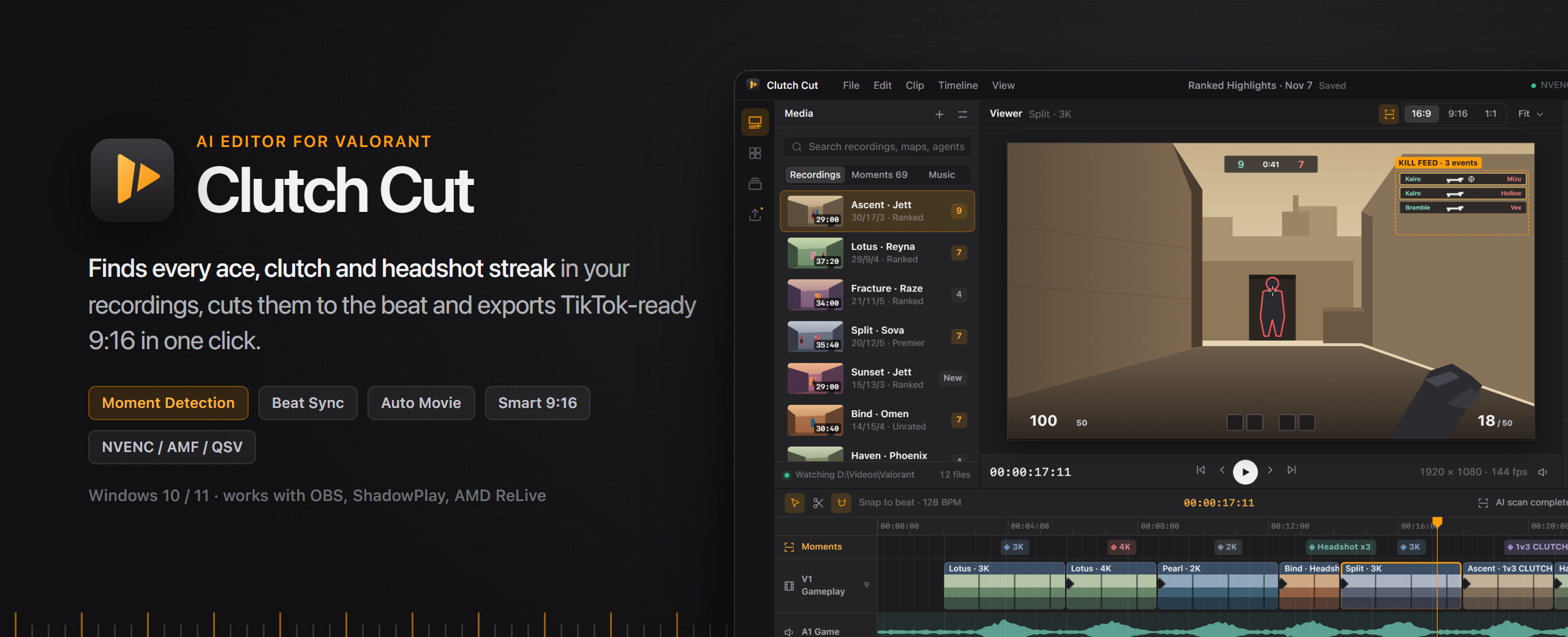
Clutch Cut — AI Valorant Clip Editor & Auto Montage Maker
Clutch Cut is a free AI video editor for Valorant that auto-detects aces, clutches and headshot streaks in your OBS, ShadowPlay and AMD ReLive recordings, cuts them into beat-synced montages and exports TikTok, YouTube Shorts and Reels clips with NVENC hardware encoding.





 Windows 10 / 11 · x64 · v1.0.0 · free
---
Contents
Why Clutch Cut
You played a 26-round Ascent match, hit a 1v3 clutch in round 19 and an ace in round 22 — and now there is a 38-minute ShadowPlay file sitting in
Videos\Valorant. Scrubbing it by hand, trimming clips, lining cuts up with music and re-exporting a vertical version for TikTok takes an evening.
Clutch Cut does it in minutes.
It is a desktop
Valorant clip editor built like a real NLE (media bin, viewer, inspector, multi-track timeline) with an AI layer on top: it reads the
kill feed and the
game audio of your recordings to find highlights, builds an
auto montage whose cuts land exactly on the beat of your music, reframes it to
9:16 for Shorts, TikTok and Reels, and renders everything on your GPU with
NVENC, AMF or Quick Sync. Everything runs locally on Windows — your footage never leaves your PC.
[!NOTE]
Valorant has no official replay system yet. Clutch Cut works on your own recordings (OBS Studio, NVIDIA ShadowPlay / Instant Replay, AMD ReLive, or any .mp4 / .mkv). Replay support is planned for the day Riot ships one.
Features
1. Moment Detection — AI highlight finder
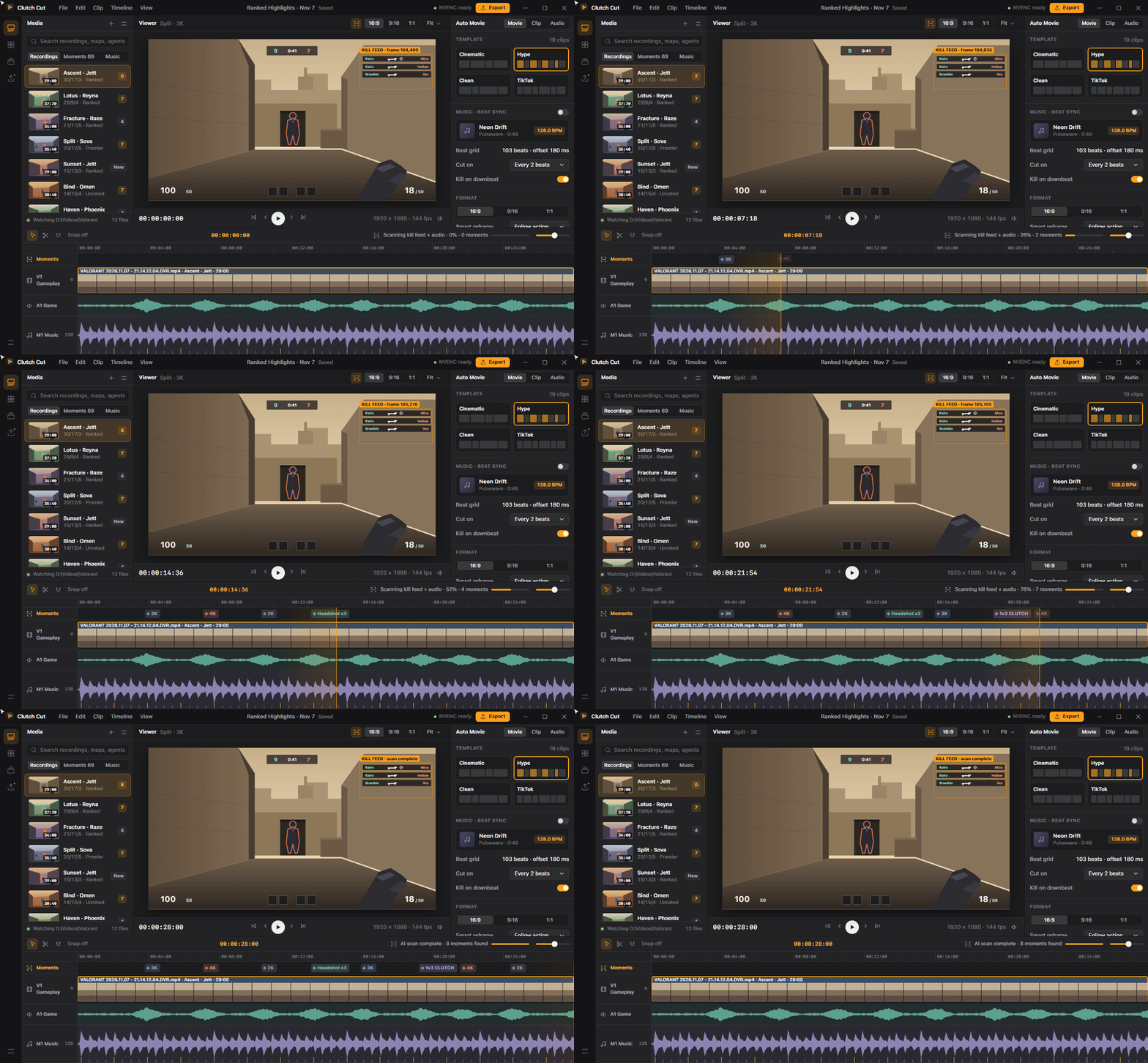
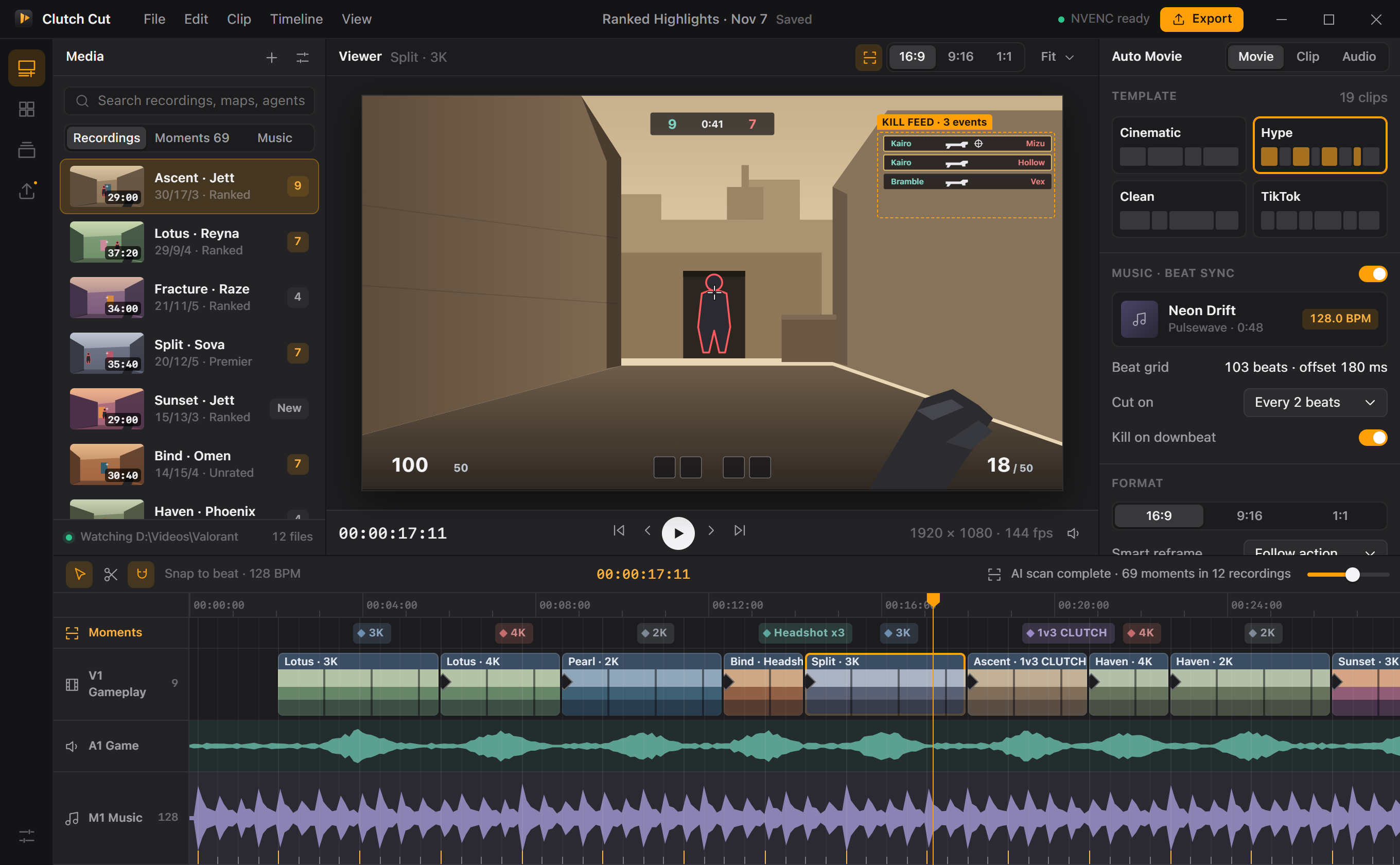
Clutch Cut samples the kill-feed region of every recording 4 times per second, tracks your highlighted kill rows and combines them with audio spikes. A scoring engine groups kills into engagements, respects round boundaries and ranks them:
ACE,
4K,
1v3 CLUTCH,
Headshot x3, 3K, 2K. Every moment lands on the timeline as a colored marker you can jump to.
2. Beat Sync — cuts that hit the drop
Drop in any track and Clutch Cut estimates
BPM and beat phase from the PCM samples (onset envelope + comb-filter tempo search, octave-error check). Every cut snaps to the beat grid, and every kill is placed
exactly on a beat — downbeats for the biggest plays. "Snap to beat" also works for your own manual edits.
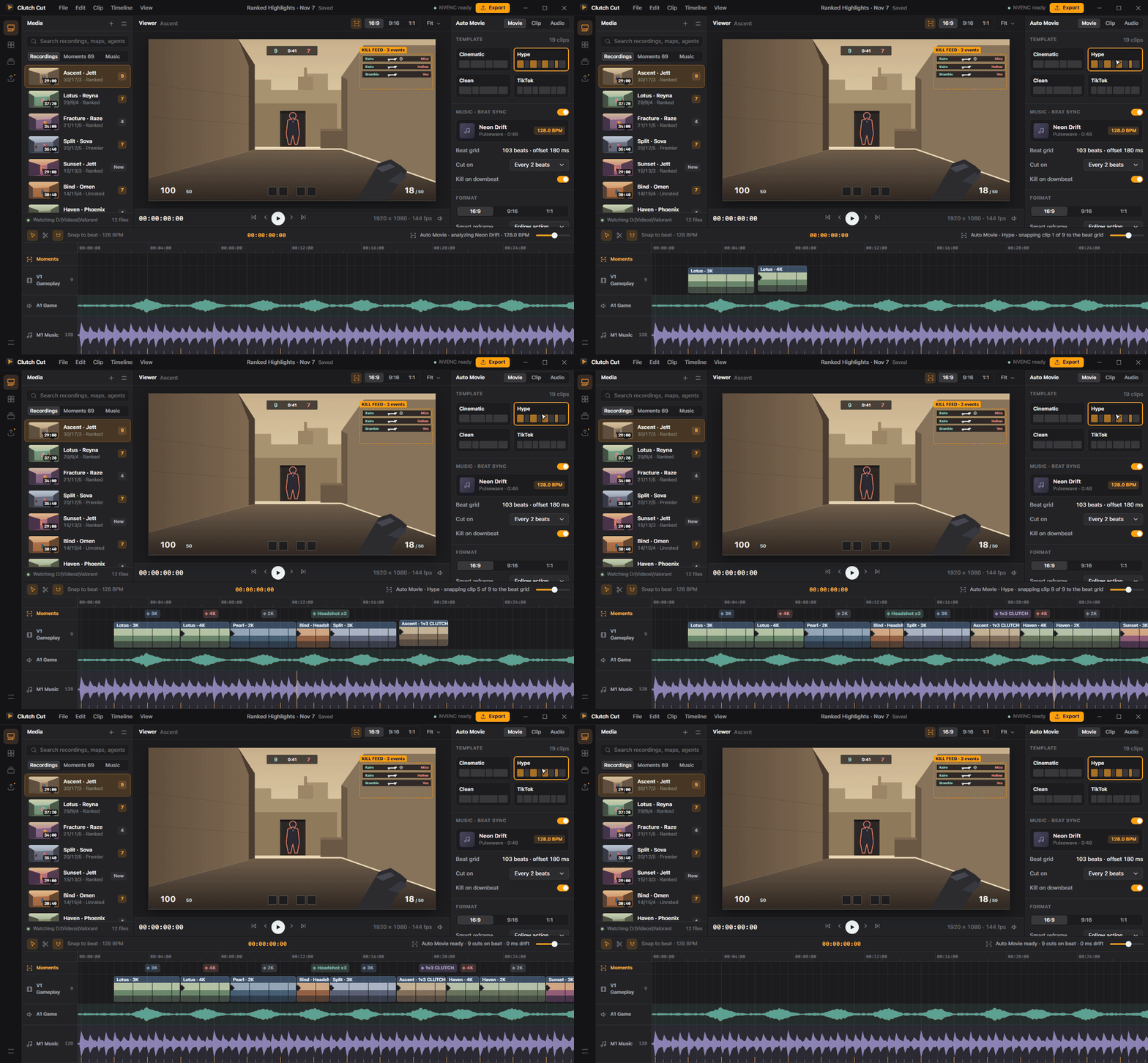
3. Auto Movie — one-click Valorant montage maker
Pick a template and get a finished
Valorant montage with pacing, transitions and order already decided:
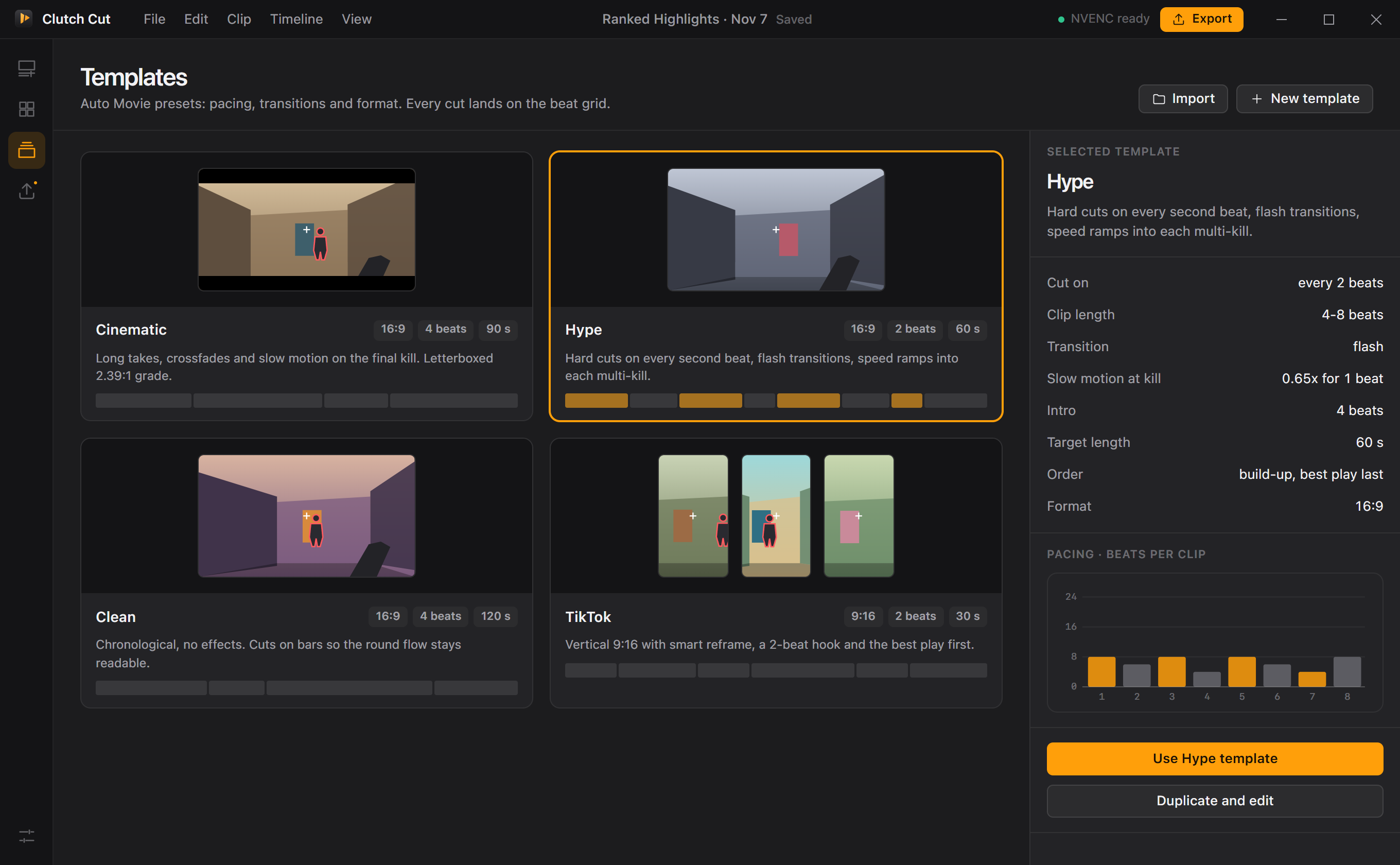
| Template | Cuts on | Clip length | Transition | Format | Feel |
|---|---|---|---|---|---|
|
Cinematic | every 4 beats | 8–16 beats | crossfade, 0.5x slow-mo on the final kill | 16:9, 2.39:1 bars | build-up, best play last |
|
Hype | every 2 beats | 4–8 beats | flash, speed ramps | 16:9 | fast, best play last |
|
Clean | every bar | 8–24 beats | hard cut | 16:9 | chronological, readable |
|
TikTok | every 2 beats | 4–8 beats | whip | 9:16 | hook first, 30 s |
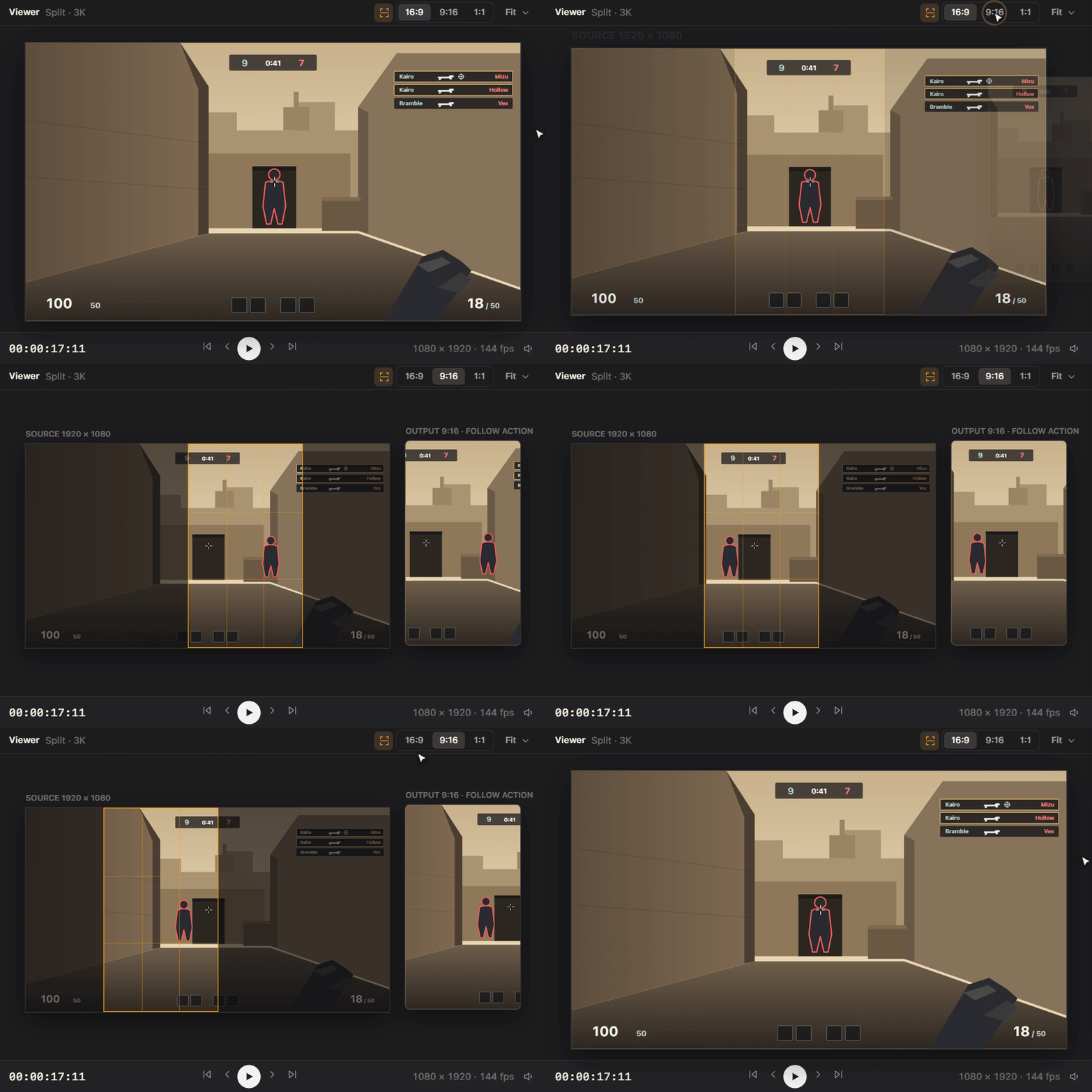
4. Smart 9:16 reframe for TikTok, Shorts and Reels
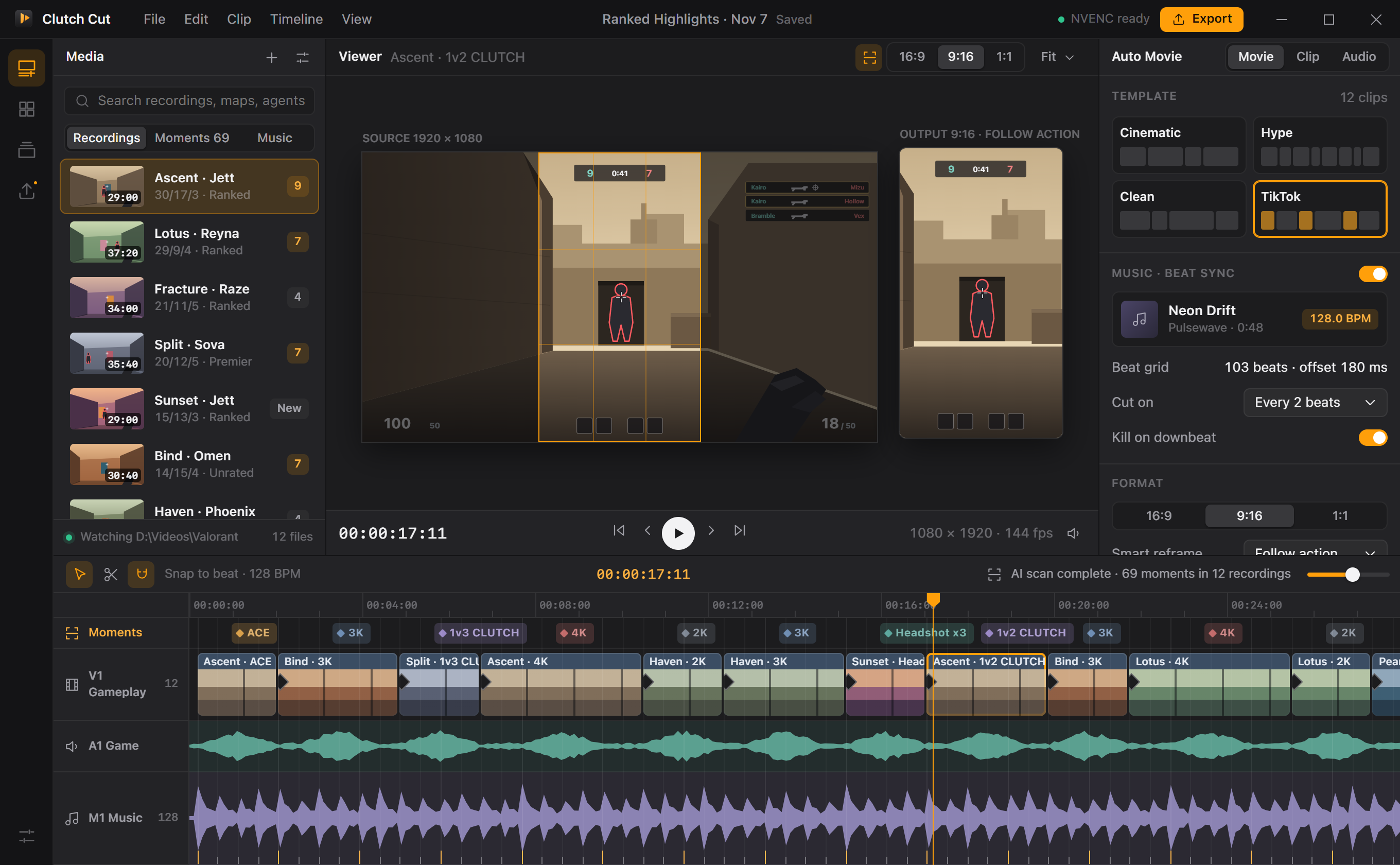
A virtual camera follows the action inside the 16:9 frame with a dead zone and a speed limit, so the vertical crop pans smoothly instead of jittering. The camera path is exported as an ffmpeg
crop expression — no re-encode passes, no manual keyframes. A split layout (gameplay on top, zoomed kill feed below) keeps the kill feed readable on phones.
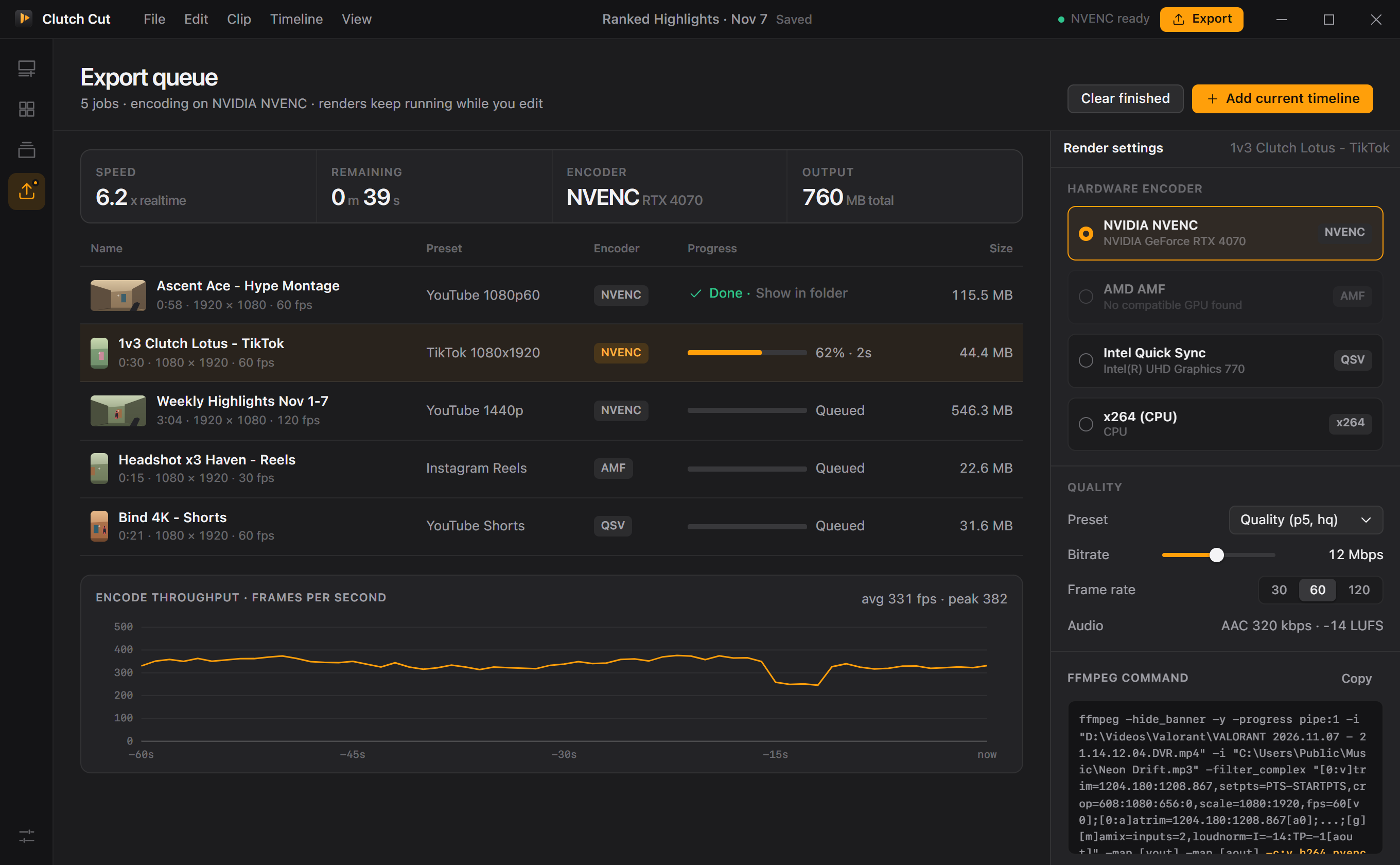
5. Export queue with NVENC, AMF and Quick Sync
Renders keep running in the background while you edit. Clutch Cut detects your GPUs from the Windows registry and offers
NVIDIA NVENC,
AMD AMF,
Intel Quick Sync or
x264 on the CPU, with presets tuned for high-motion FPS footage, loudness normalization to -14 LUFS and the exact ffmpeg command visible in the inspector.
Everything else
- [x] Auto-discovers OBS, ShadowPlay and ReLive folders
- [x] Detection sensitivity slider
- [x] 4 Auto Movie templates
- [x] 16:9, 9:16 and 1:1 output
- [x] NVENC / AMF / QSV / x264
- [x] -14 LUFS loudness normalization
|
- [x] Kill feed + audio spike detection
- [x] BPM + beat phase detection, snap to beat
- [x] Kill peak placed on a downbeat
- [x] Follow-action and split kill-feed reframe
- [x] Background export queue with live progress
- [x] 100% local: no account, no upload
|
Screenshots
|
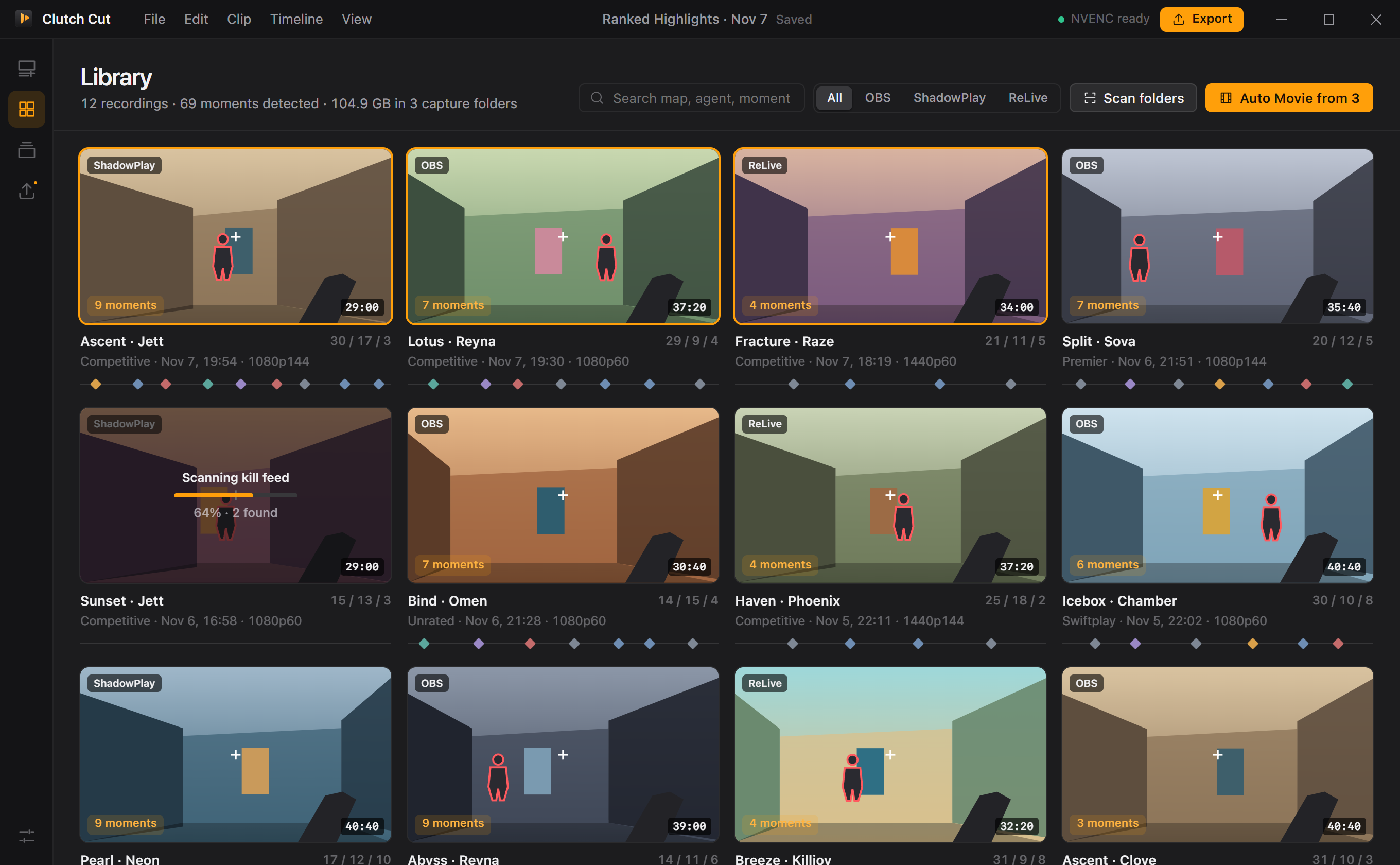 |
| Editor — timeline with moment markers, beat grid and music waveform |
Library — every recording with map, agent, K/D/A and moments |
 |
 |
| Smart reframe — source crop and 9:16 output side by side |
Templates — pacing, transitions and format per style |
Clutch Cut vs. the usual workflow
| | Clutch Cut | Manual editing in a general NLE | Typical online clip tools | Phone editing apps |
|---|:---:|:---:|:---:|:---:|
| Finds aces and clutches automatically | Yes | No, scrub by hand | Partly, generic, not Valorant-aware | No |
| Cuts snapped to music beats | Yes, automatic | Partly, manual markers | Partly, sometimes | Partly, templates only |
| 9:16 reframe that follows the action | Yes | Partly, manual keyframes | Partly, center crop | Partly, center crop |
| GPU encoding (NVENC / AMF / QSV) | Yes | Yes | No, cloud render queue | No |
| Works offline, no upload of your footage | Yes | Yes | No | Partly, transfer to phone |
| Price | Free, MIT | Varies | Subscription / watermark | Varies |
Download and install
1. Download the latest build:
ClutchCut-v1.0.0-win-x64.zip
2. Right-click the zip →
Extract All… to a folder such as
C:\Apps\ClutchCut.
3. Run
ClutchCut.exe (or the included installer for a Start menu entry).
4. If Windows SmartScreen shows "Windows protected your PC", click
More info → Run anyway. The build is unsigned; you can always build it yourself from source.
5. Open
Library → Scan folders. Clutch Cut finds your OBS, ShadowPlay and ReLive folders automatically; add others in Settings.
6. Pick recordings, choose a template and press
Rebuild Auto Movie, then
Export.
[!TIP]
Record Valorant at a constant 60 fps with the default HUD position — the kill feed detector is calibrated for it. For ShadowPlay, enable Instant Replay and save clips with the hotkey after big rounds.
Build from source
Requirements: Windows 10/11 x64, Rust stable with the MSVC toolchain, Visual Studio Build Tools (C++), WebView2 runtime (preinstalled on Windows 11), and
ffmpeg.exe on
PATH for rendering.
```powershell
cargo install tauri-cli --version "^2"
git clone valorant-ai-clip-editor
cd valorant-ai-clip-editor\src-tauri
cargo tauri dev # run with hot reload of the ui\ folder
cargo tauri build # release exe + NSIS installer
cargo test # detection, beat sync, montage, reframe, ffmpeg tests
```
Or build and package the release zip in one step:
```powershell
powershell -ExecutionPolicy Bypass -File scripts\build.ps1
```
The frontend is plain HTML/CSS/JS with no build step; open
ui\index.html in a browser to preview the UI with mock data.
Project structure
```
valorant-ai-clip-editor/
├─ ui/ frontend (index.html, styles.css, app.js)
├─ scripts/build.ps1 release build + zip packaging
└─ src-tauri/
├─ tauri.conf.json window, bundle and NSIS settings
└─ src/
├─ main.rs app builder, tray icon, export worker thread
├─ commands.rs Tauri commands used by the UI
├─ state.rs app state, settings persistence, export queue
├─ models.rs recordings, moments, templates, jobs (serde)
├─ detection.rs frame sampler trait, kill feed detector, audio spikes, scoring engine
├─ beatsync.rs onset envelope, BPM + phase estimation, beat grid snapping
├─ montage.rs Auto Movie templates and beat-aligned edit planner
├─ reframe.rs smart 9:16 camera path and ffmpeg crop expression
├─ ffmpeg.rs command builder, NVENC/AMF/QSV detection, progress parser
└─ library.rs capture folder discovery (OBS/ShadowPlay/ReLive), scanning
```
System requirements
| | Minimum | Recommended |
|---|---|---|
| OS | Windows 10 64-bit (21H2) | Windows 11 64-bit |
| CPU | 4 cores | 8 cores |
| RAM | 8 GB | 16 GB |
| GPU | Any (x264 CPU fallback) | NVIDIA GTX 16 / RTX, AMD RX 5000+, or Intel 11th gen+ |
| Disk | 300 MB + space for exports | SSD for recordings |
| Other | WebView2 runtime, ffmpeg | — |
FAQ
Is Clutch Cut safe for Vanguard? Can it get my Valorant account banned?
Clutch Cut never touches the game. It does not read game memory, inject anything, hook the client or automate input. It only opens video files you already recorded, after the match, like any video editor. It does not even need Valorant to be installed.
How do I make a Valorant montage automatically?
Scan your recordings in Library, select the matches you want, pick the Hype or Cinematic template and a music track, then press Rebuild Auto Movie. Clutch Cut picks the best moments, orders them and cuts them on the beat. Tweak anything on the timeline and export.
Does Valorant have a replay system Clutch Cut can use?
Not yet. Clutch Cut works on recordings from OBS Studio, NVIDIA ShadowPlay / Instant Replay, AMD ReLive or any other recorder. If Riot adds replays, importing them is on the roadmap.
How does the AI detect aces and clutches in Valorant clips?
It samples the kill-feed area of the HUD, tracks rows highlighted for your kills and looks for audio spikes. A scoring engine groups kills into engagements per round and scores them by kill count, headshots, speed and clutch situation, producing labels like ACE, 4K, 1v3 CLUTCH and Headshot x3.
How to turn Valorant clips into TikTok or YouTube Shorts (9:16)?
Switch the format to 9:16 or use the TikTok template. Smart reframe follows the action in the 16:9 frame and renders a 1080x1920 vertical video ready for TikTok, YouTube Shorts and Instagram Reels.
Does Clutch Cut support NVENC, AMD AMF and Intel Quick Sync?
Yes. It detects your graphics adapters and offers NVENC on NVIDIA, AMF on AMD and Quick Sync on Intel, with x264 as a CPU fallback. Hardware encoding renders a 60-second montage many times faster than real time on a modern GPU.
Can I use my own music for beat sync?
Yes, any track you have the rights to use. Clutch Cut estimates the BPM and beat phase automatically; you can also choose to cut every beat, every 2 beats or on bars.
Is Clutch Cut free? Does it add a watermark?
It is free and open source under the MIT license. No watermark, no account, no uploads.
Roadmap
- [x] NLE layout: media bin, viewer, inspector, multi-track timeline
- [x] Scoring engine for ACE / 4K / clutch / headshot streak moments
- [x] BPM + beat phase detection and beat grid snapping
- [x] Auto Movie templates: Cinematic, Hype, Clean, TikTok
- [x] Smart 9:16 reframe camera path + ffmpeg crop expression
- [x] Export queue with NVENC / AMF / QSV / x264
- [ ] ffmpeg-backed frame sampler and live scan progress events
- [ ] Kill feed glyph classifier (weapon, headshot, wallbang, ability kills)
- [ ] Scoreboard OCR for map, agent and K/D/A
- [ ] Speed ramps and motion blur transitions
- [ ] Caption and kill counter overlays for Shorts
- [ ] Valorant replay import (when available)
Keywords
Clutch Cut is a
Valorant clip editor and
Valorant montage maker for Windows: an
AI video editor that finds
auto highlights in your gameplay, makes
Valorant highlights and
TikTok clips with
beat sync, and exports fast with
NVENC, AMF and Quick Sync.
valorant clip editor, valorant montage maker, valorant highlights, auto highlight, ai video editor, ai clip maker, valorant ace clip, valorant clutch clips, auto montage maker, beat sync video editor, beat synced montage, music sync edit, valorant tiktok clips, valorant youtube shorts, valorant reels, 9:16 reframe, vertical video converter, auto reframe gaming clips, nvenc video export, amd amf encoder, intel quick sync export, obs replay editor, shadowplay clip editor, amd relive clip editor, kill feed detection, highlight detection ai, gaming highlight generator, fps montage editor, free montage maker windows, gaming video editor windows, valorant edit, valorant fragmovie, valorant frag movie maker, auto clip creator, automatic video editing, game clip trimmer, valorant headshot montage, valorant 4k clip, valorant ace montage, gaming clips to tiktok, short form gaming content, montage template, cinematic montage, hype edit, tauri video editor
License and disclaimer
Clutch Cut is released under the
MIT License.
Clutch Cut is an independent project and is not affiliated with, endorsed by or sponsored by Riot Games. Valorant and Riot Games are trademarks or registered trademarks of Riot Games, Inc. NVIDIA, NVENC and ShadowPlay are trademarks of NVIDIA Corporation; AMD, Radeon and ReLive are trademarks of Advanced Micro Devices, Inc.; Intel and Quick Sync are trademarks of Intel Corporation; TikTok, YouTube and Instagram are trademarks of their respective owners. All in-app artwork is abstract and drawn from shapes — no game assets are included.
Windows 10 / 11 · x64 · v1.0.0 · free
 →

 →
 →
 →
 →
 →
 →
 →