
1
 →
→algorithmicsuperintelligence/optillm is an open-source project on GitHub, mainly written in Python. Optimizing inference proxy for LLMs It currently holds 4,299 stars and 389 forks with 0 open issues, and was last pushed on an unknown date (repository created unknown).
AI Homed tracks it on the AI Prompt Engineering board.

🚀 2-10x accuracy improvements on reasoning tasks with zero training

🤗 HuggingFace Space • 📓 Colab Demo • 💬 Discussions
---
OptiLLM is an OpenAI API-compatible optimizing inference proxy that implements 20+ state-of-the-art techniques to dramatically improve LLM accuracy and performance on reasoning tasks - without requiring any model training or fine-tuning.
It is possible to beat the frontier models using these techniques across diverse tasks by doing additional compute at inference time. A good example of how to combine such techniques together is the CePO approach from Cerebras.
Get powerful reasoning improvements in 3 simple steps:
# 1. Install OptiLLM
pip install optillm
2. Start the server
export OPENAI_API_KEY="your-key-here"
optillm
3. Use with any OpenAI client - just change the model name!
from openai import OpenAI
client = OpenAI(base_url="http://localhost:8000/v1")
Add 'moa-' prefix for Mixture of Agents optimization
response = client.chat.completions.create(
    model="moa-gpt-4o-mini",  # This gives you GPT-4o performance from GPT-4o-mini!
    messages=[{"role": "user", "content": "Solve: If 2x + 3 = 7, what is x?"}]
)
Before OptiLLM: "x = 1" ❌ After OptiLLM: "Let me work through this step by step: 2x + 3 = 7, so 2x = 4, therefore x = 2" ✅
OptiLLM delivers measurable improvements across diverse benchmarks:
| Technique | Base Model | Improvement | Benchmark | |-----------|------------|-------------|-----------| | MARS | Gemini 2.5 Flash Lite | +30.0 points | AIME 2025 (43.3→73.3) | | CePO | Llama 3.3 70B | +18.6 points | Math-L5 (51.0→69.6) | | AutoThink | DeepSeek-R1-1.5B | +9.34 points | GPQA-Diamond (21.72→31.06) | | LongCePO | Llama 3.3 70B | +13.6 points | InfiniteBench (58.0→71.6) | | MOA | GPT-4o-mini | Matches GPT-4 | Arena-Hard-Auto | | PlanSearch | GPT-4o-mini | +20% pass@5 | LiveCodeBench |
Full benchmark results below ⬇️
pip install optillm
optillm
2024-10-22 07:45:05,612 - INFO - Loaded plugin: privacy
2024-10-22 07:45:06,293 - INFO - Loaded plugin: memory
2024-10-22 07:45:06,293 - INFO - Starting server with approach: auto
docker pull ghcr.io/algorithmicsuperintelligence/optillm:latest
docker run -p 8000:8000 ghcr.io/algorithmicsuperintelligence/optillm:latest
2024-10-22 07:45:05,612 - INFO - Loaded plugin: privacy
2024-10-22 07:45:06,293 - INFO - Loaded plugin: memory
2024-10-22 07:45:06,293 - INFO - Starting server with approach: auto
Available Docker image variants:
latest): Includes all dependencies for local inference and pluginslatest-proxy): Lightweight image without local inference capabilitieslatest-offline): Self-contained image with pre-downloaded models (spaCy) for fully offline operation# Proxy-only (smallest)
docker pull ghcr.io/algorithmicsuperintelligence/optillm:latest-proxy
Offline (largest, includes pre-downloaded models)
docker pull ghcr.io/algorithmicsuperintelligence/optillm:latest-offline
Clone the repository with git and use pip install to setup the dependencies.
git clone https://github.com/algorithmicsuperintelligence/optillm.git
cd optillm
python3 -m venv .venv
source .venv/bin/activate
pip install -r requirements.txt
OptILLM supports SSL certificate verification configuration for working with self-signed certificates or corporate proxies.
Disable SSL verification (development only):
# Command line
optillm --no-ssl-verify
Environment variable
export OPTILLM_SSL_VERIFY=false
optillm
Use custom CA certificate:
# Command line
optillm --ssl-cert-path /path/to/ca-bundle.crt
Environment variable
export OPTILLM_SSL_CERT_PATH=/path/to/ca-bundle.crt
optillm
⚠️ Security Note: Disabling SSL verification is insecure and should only be used in development. For production environments with custom CAs, use --ssl-cert-path instead. See SSL_CONFIGURATION.md for details.
| Approach | Slug | Description |
| ------------------------------------ | ------------------ | ---------------------------------------------------------------------------------------------- |
| MARS (Multi-Agent Reasoning System) | mars | Multi-agent reasoning with diverse temperature exploration, cross-verification, and iterative improvement |
| Cerebras Planning and Optimization | cepo | Combines Best of N, Chain-of-Thought, Self-Reflection, Self-Improvement, and various prompting techniques |
| CoT with Reflection | cot_reflection | Implements chain-of-thought reasoning with \, \ and \ sections |
| PlanSearch | plansearch | Implements a search algorithm over candidate plans for solving a problem in natural language |
| ReRead | re2 | Implements rereading to improve reasoning by processing queries twice |
| Self-Consistency | self_consistency | Implements an advanced self-consistency method |
| Z3 Solver | z3 | Utilizes the Z3 theorem prover for logical reasoning |
| R* Algorithm | rstar | Implements the R* algorithm for problem-solving |
| LEAP | leap | Learns task-specific principles from few shot examples |
| Round Trip Optimization | rto | Optimizes responses through a round-trip process |
| Best of N Sampling | bon | Generates multiple responses and selects the best one |
| Mixture of Agents | moa | Combines responses from multiple critiques |
| Monte Carlo Tree Search | mcts | Uses MCTS for decision-making in chat responses |
| PV Game | pvg | Applies a prover-verifier game approach at inference time |
| Deep Confidence | N/A for proxy | Implements confidence-guided reasoning with multiple intensity levels for enhanced accuracy |
| CoT Decoding | N/A for proxy | Implements chain-of-thought decoding to elicit reasoning without explicit prompting |
| Entropy Decoding | N/A for proxy | Implements adaptive sampling based on the uncertainty of tokens during generation |
| Thinkdeeper | N/A for proxy | Implements the reasoning_effort param from OpenAI for reasoning models like DeepSeek R1 |
| AutoThink | N/A for proxy | Combines query complexity classification with steering vectors to enhance reasoning |
| Plugin | Slug | Description |
| ----------------------- | ------------------ | ---------------------------------------------------------------------------------------------- |
| System Prompt Learning | spl | Implements what Andrej Karpathy called the third paradigm for LLM learning, this enables the model to acquire program solving knowledge and strategies |
| Deep Think | deepthink | Implements a Gemini-like Deep Think approach using inference time scaling for reasoning LLMs |
| Long-Context Cerebras Planning and Optimization | longcepo | Combines planning and divide-and-conquer processing of long documents to enable infinite context |
| Majority Voting | majority_voting | Generates k candidate solutions and selects the most frequent answer through majority voting (default k=6) |
| MCP Client | mcp | Implements the model context protocol (MCP) client, enabling you to use any LLM with any MCP Server |
| Router | router | Uses the optillm-modernbert-large model to route requests to different approaches based on the user prompt |
| Chain-of-Code | coc | Implements a chain of code approach that combines CoT with code execution and LLM based code simulation |
| Memory | memory | Implements a short term memory layer, enables you to use unbounded context length with any LLM. Set OPTILLM_MEMORY_FILE to opt in to file-backed persistence so memories survive across requests |
| Privacy | privacy | Anonymize PII data in request and deanonymize it back to original value in response |
| Read URLs | readurls | Reads all URLs found in the request, fetches the content at the URL and adds it to the context |
| Execute Code | executecode | Enables use of code interpreter to execute python code in requests and LLM generated responses |
| JSON | json | Enables structured outputs using the outlines library, supports pydantic types and JSON schema |
| GenSelect | genselect | Generative Solution Selection - generates multiple candidates and selects the best based on quality criteria |
| Web Search | web_search | Performs Google searches using Chrome automation (Selenium) to gather search results and URLs |
| Deep Research | deep_research | Implements Test-Time Diffusion Deep Researcher (TTD-DR) for comprehensive research reports using iterative refinement |
| Proxy | proxy | Load balancing and failover across multiple LLM providers with health monitoring and round-robin routing |
We support all major LLM providers and models for inference. You need to set the correct environment variable and the proxy will pick the corresponding client.
| Provider | Required Environment Variables | Additional Notes |
|----------|-------------------------------|------------------|
| OptiLLM | OPTILLM_API_KEY | Uses the inbuilt local server for inference, supports logprobs and decoding techniques like cot_decoding & entropy_decoding |
| OpenAI | OPENAI_API_KEY | You can use this with any OpenAI compatible endpoint (e.g. OpenRouter) by setting the base_url |
| Cerebras | CEREBRAS_API_KEY | You can use this for fast inference with supported models, see docs for details |
| Azure OpenAI | AZURE_OPENAI_API_KEYAZURE_API_VERSIONAZURE_API_BASE | - |
| Azure OpenAI (Managed Identity) | AZURE_API_VERSIONAZURE_API_BASE | Login required using az login, see docs for details |
| LiteLLM | depends on the model | See docs for details |
You can then run the optillm proxy as follows.
python optillm.py
2024-09-06 07:57:14,191 - INFO - Starting server with approach: auto
2024-09-06 07:57:14,191 - INFO - Server configuration: {'approach': 'auto', 'mcts_simulations': 2, 'mcts_exploration': 0.2, 'mcts_depth': 1, 'best_of_n': 3, 'model': 'gpt-4o-mini', 'rstar_max_depth': 3, 'rstar_num_rollouts': 5, 'rstar_c': 1.4, 'base_url': '', 'host': '127.0.0.1'}
- Serving Flask app 'optillm'
- Debug mode: off
2024-09-06 07:57:14,212 - INFO - WARNING: This is a development server. Do not use it in a production deployment. Use a production WSGI server instead.
- Running on http://127.0.0.1:8000
2024-09-06 07:57:14,212 - INFO - Press CTRL+C to quit
Security Note: By default, optillm binds to127.0.0.1(localhost only) for security. To allow external connections (e.g., for Docker or remote access), use--host 0.0.0.0. Only do this on trusted networks or with proper authentication configured via--optillm-api-key.
Once the proxy is running, you can use it as a drop in replacement for an OpenAI client by setting the base_url as http://localhost:8000/v1.
import os
from openai import OpenAI
OPENAI_KEY = os.environ.get("OPENAI_API_KEY")
OPENAI_BASE_URL = "http://localhost:8000/v1"
client = OpenAI(api_key=OPENAI_KEY, base_url=OPENAI_BASE_URL)
response = client.chat.completions.create(
  model="moa-gpt-4o",
  messages=[
    {
      "role": "user",
      "content": "Write a Python program to build an RL model to recite text from any position that the user provides, using only numpy."
    }
  ],
  temperature=0.2
)
print(response)
OPENAI_API_KEY env variable with the proper key.
There are multiple ways to control the optimization techniques, they are applied in the follow order of preference:
{slug}-model-name. E.g. in the above code we are using moa or mixture of agents as the optimization approach. In the proxy logs you will see the following showing the moa is been used with the base model as gpt-4o-mini.2024-09-06 08:35:32,597 - INFO - Using approach moa, with gpt-4o-mini
2024-09-06 08:35:35,358 - INFO - HTTP Request: POST https://api.openai.com/v1/chat/completions "HTTP/1.1 200 OK"
2024-09-06 08:35:39,553 - INFO - HTTP Request: POST https://api.openai.com/v1/chat/completions "HTTP/1.1 200 OK"
2024-09-06 08:35:44,795 - INFO - HTTP Request: POST https://api.openai.com/v1/chat/completions "HTTP/1.1 200 OK"
2024-09-06 08:35:44,797 - INFO - 127.0.0.1 - - [06/Sep/2024 08:35:44] "POST /v1/chat/completions HTTP/1.1" 200 -
optillm_approach field in the extra_body.response = client.chat.completions.create(
model="gpt-4o-mini",
messages=[{ "role": "user","content": "" }],
temperature=0.2,
extra_body={"optillm_approach": "bon|moa|mcts"}
)
system or user prompt, within <optillm_approach> </optillm_approach> tags.response = client.chat.completions.create(
model="gpt-4o-mini",
messages=[{ "role": "user","content": "<optillm_approach>re2</optillm_approach> How many r's are there in strawberry?" }],
temperature=0.2
)
[!TIP]
You can also combine different techniques either by using symbols&and|. When you use&the techniques are processed in the order from left to right in a pipeline
with response from previous stage used as request to the next. While, with | we run all the requests in parallel and generate multiple responses that are returned as a list.
Please note that the convention described above works only when the optillm server has been started with inference approach set to auto. Otherwise, the model attribute in the client request must be set with the model name only.
We now support all LLM providers (by wrapping around the LiteLLM sdk). E.g. you can use the Gemini Flash model with moa by setting passing the api key in the environment variable os.environ['GEMINI_API_KEY'] and then calling the model moa-gemini/gemini-1.5-flash-002. In the output you will then see that LiteLLM is being used to call the base model.
9:43:21 - LiteLLM:INFO: utils.py:2952 -
LiteLLM completion() model= gemini-1.5-flash-002; provider = gemini
2024-09-29 19:43:21,011 - INFO -
LiteLLM completion() model= gemini-1.5-flash-002; provider = gemini
2024-09-29 19:43:21,481 - INFO - HTTP Request: POST https://generativelanguage.googleapis.com/v1beta/models/gemini-1.5-flash-002:generateContent?key=[redacted] "HTTP/1.1 200 OK"
19:43:21 - LiteLLM:INFO: utils.py:988 - Wrapper: Completed Call, calling success_handler
2024-09-29 19:43:21,483 - INFO - Wrapper: Completed Call, calling success_handler
19:43:21 - LiteLLM:INFO: utils.py:2952 -
LiteLLM completion() model= gemini-1.5-flash-002; provider = gemini
[!TIP]
optillm is a transparent proxy and will work with any LLM API or provider that has an OpenAI API compatible chat completions endpoint, and in turn, optillm also exposesthe same OpenAI API compatible chat completions endpoint. This should allow you to integrate it into any existing tools or frameworks easily. If the LLM you want to use doesn't have an OpenAI API compatible endpoint (like Google or Anthropic) you can use LiteLLM proxy server that supports most LLMs.
The following sequence diagram illustrates how the request and responses go through optillm.
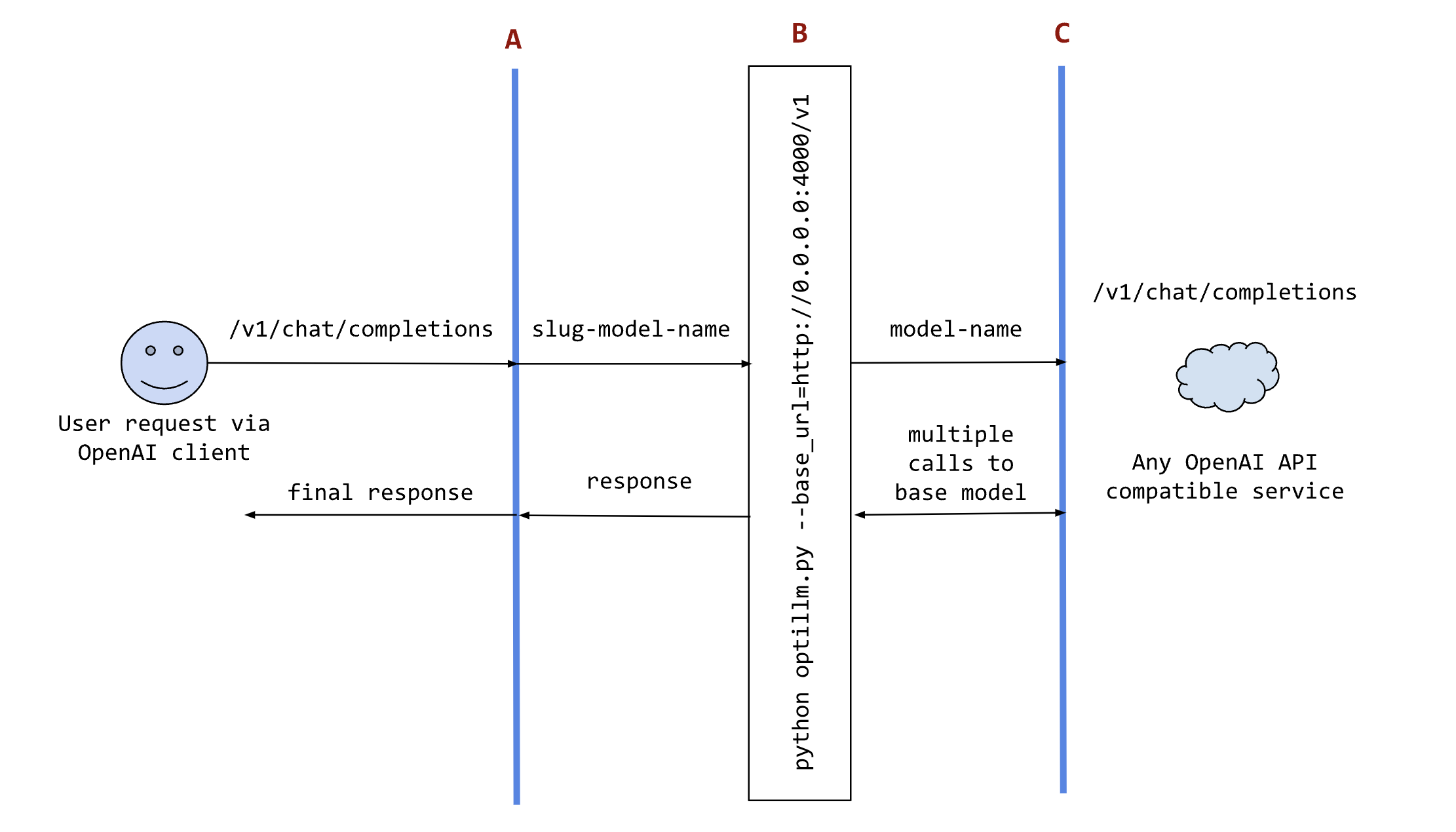
In the diagram:
or your own code where you want to use the results from optillm. You can use it directly using any OpenAI client sdk.B is the optillm service (running directly or in a docker container) that will send requests to the base_url.C is any service providing an OpenAI API compatible chat completions endpoint.We support loading any HuggingFace model or LoRA directly in optillm. To use the built-in inference server set the OPTILLM_API_KEY to any value (e.g. export OPTILLM_API_KEY="optillm")
and then use the same in your OpenAI client. You can pass any HuggingFace model in model field. If it is a private model make sure you set the HF_TOKEN environment variable
with your HuggingFace key. We also support adding any number of LoRAs on top of the model by using the + separator.
E.g. The following code loads the base model meta-llama/Llama-3.2-1B-Instruct and then adds two LoRAs on top - patched-codes/Llama-3.2-1B-FixVulns and patched-codes/Llama-3.2-1B-FastApply.
You can specify which LoRA to use using the active_adapter param in extra_body field of OpenAI SDK client. By default we will load the last specified adapter.
OPENAI_BASE_URL = "http://localhost:8000/v1"
OPENAI_KEY = "optillm"
response = client.chat.completions.create(
  model="meta-llama/Llama-3.2-1B-Instruct+patched-codes/Llama-3.2-1B-FastApply+patched-codes/Llama-3.2-1B-FixVulns",
  messages=messages,
  temperature=0.2,
  logprobs = True,
  top_logprobs = 3,
  extra_body={"active_adapter": "patched-codes/Llama-3.2-1B-FastApply"},
)
You can also use the alternate decoding techniques like cot_decoding and entropy_decoding directly with the local inference server.
response = client.chat.completions.create(
  model="meta-llama/Llama-3.2-1B-Instruct",
  messages=messages,
  temperature=0.2,
  extra_body={
        "decoding": "cot_decoding",  # or "entropy_decoding"
        # CoT specific params
        "k": 10,
        "aggregate_paths": True,
        # OR Entropy specific params
        "top_k": 27,
        "min_p": 0.03,
    }
)
OPENAI_API_KEY env variable to a placeholder valueexport OPENAI_API_KEY="sk-no-key"./llama-server -c 4096 -m path_to_model to start the server with the specified model and a context length of 4096 tokenspython3 optillm.py --base_url base_url to start the proxypython3 optillm.py --base_url http://localhost:8080/v1[!WARNING]
The Anthropic API, llama.cpp-server, and ollama currently do not support sampling multiple responses from a model, which limits the available approaches to the following:
cot_reflection,leap,plansearch,rstar,rto,self_consistency,re2, andz3. For models on HuggingFace, you can use the built-in local inference server as it supports multiple responses.
The Model Context Protocol (MCP) plugin enables OptiLLM to connect with MCP servers, bringing external tools, resources, and prompts into the context of language models. This allows for powerful integrations with filesystem access, database queries, API connections, and more.
OptiLLM supports both local and remote MCP servers through multiple transport methods:
The Model Context Protocol (MCP) is an open protocol standard that allows LLMs to securely access tools and data sources through a standardized interface. MCP servers can provide:
Note on Backwards Compatibility: Existing MCP configurations will continue to work unchanged. The transport field defaults to "stdio" when not specified, maintaining full backwards compatibility with existing setups.
1. Create a configuration file at ~/.optillm/mcp_config.json with the following structure:
**Local Server (stdio) - Tra
→ →
→ →
→ →
→ →
→ →
→ →
→ →
→