1
 →
→
Hundreds of models & providers. One command to find what runs on your hardware.
AlexsJones/llmfit is an open-source project on GitHub, mainly written in Rust. Hundreds of models & providers. One command to find what runs on your hardware. It currently holds 38,505 stars and 2,485 forks with 51 open issues, and was last pushed on 2026-10-30 (repository created 2026-02-15).
AI Homed tracks it on the AI Models & LLM Tools board.




Find out which open-source Large Language Models (LLMs) your hardware can comfortably run. llmfit inspects your CPU, system RAM, GPU(s), VRAM, and accelerator configuration to recommend models across popular quantizations.
📊 New: benchmark & share — real numbers from your machine, better estimates for everyone. Download a model, serve it, and measure real tok/s on your hardware — then contribute the results back to the project as a PR, straight from the TUI. No gh CLI, no third-party account. Every run is saved locally first, your own measurements replace estimates in the fit table, and each merged submission ships in the next release: anyone on identical hardware gets measured ✓ numbers before they ever run a benchmark. Follow the step-by-step benchmarking guide →
/api/v1/system, /api/v1/models) for integration into orchestrators, dashboards, and automated deployment pipelines.Ships with an interactive TUI (default) and a classic CLI mode. Supports multi-GPU setups, MoE architectures, dynamic quantization selection, speed estimation, and local runtime providers (Ollama, llama.cpp, MLX, Docker Model Runner, LM Studio).
---
| | | |---|---| | Get started | Install · Usage · How it works | | Guides | TUI guide · Benchmarking step-by-step · CLI & automation · Runtime providers · OpenClaw integration | | Reference | How it works (full) · Platform & GPU support · Custom models · Development | | Project | Contributing · Alternatives · Code signing · License |
---
winget install --exact --id AlexsJones.llmfit
scoop install llmfit
If Scoop is not installed, follow the Scoop installation guide.
Prebuilt binary (recommended, works on all macOS/Linux versions):
brew install AlexsJones/llmfit/llmfit
Or from the homebrew-core formula, which builds from source on macOS versions without a bottle:
brew install llmfit
port install llmfit
curl -fsSL https://llmfit.axjns.dev/install.sh | sh
Downloads the latest release binary from GitHub and installs it to /usr/local/bin (or ~/.local/bin if no sudo).
Install to ~/.local/bin without sudo:
curl -fsSL https://llmfit.axjns.dev/install.sh | sh -s -- --local
uv tool install -U llmfit
To run without installing:
uvx llmfit
You can also install llmfit as a Python package in the normal way with tools such as pip or uv.
Download release binaries for Linux, macOS, and Windows directly from the GitHub Releases page. Windows binaries are only published once that release's sign-windows job has signed, repackaged, and re-checksummed them; if signing is skipped or fails, the Windows assets are held back and attached by a re-run of the release workflow (with its fresh signing requests approved) rather than shipped unsigned. Releases before v1.1.19 did not have this guard, so verify the executable signature on older versions if you require a signed binary.
---
llmfit provides a multi-architecture Docker image (ghcr.io/alexsjones/llmfit) supporting both interactive CLI/TUI and headless Web UI / API server modes.
To launch the interactive TUI instead, pass the global --tui flag:
docker run -it --rm ghcr.io/alexsjones/llmfit --tui
This prints JSON from llmfit recommend command.
docker run ghcr.io/alexsjones/llmfit
This prints JSON from llmfit recommend command. The JSON could be further queried with jq.
podman run ghcr.io/alexsjones/llmfit recommend --use-case coding | jq '.models[].name'
--tui flag:
docker run --rm -it ghcr.io/alexsjones/llmfit --tui
git clone https://github.com/AlexsJones/llmfit.git
cd llmfit
cargo build --release
binary is at target/release/llmfit
---
Launch llmfit in your terminal without flags to start the interactive browser:
llmfit # interactive TUI: your hardware, every model, ranked
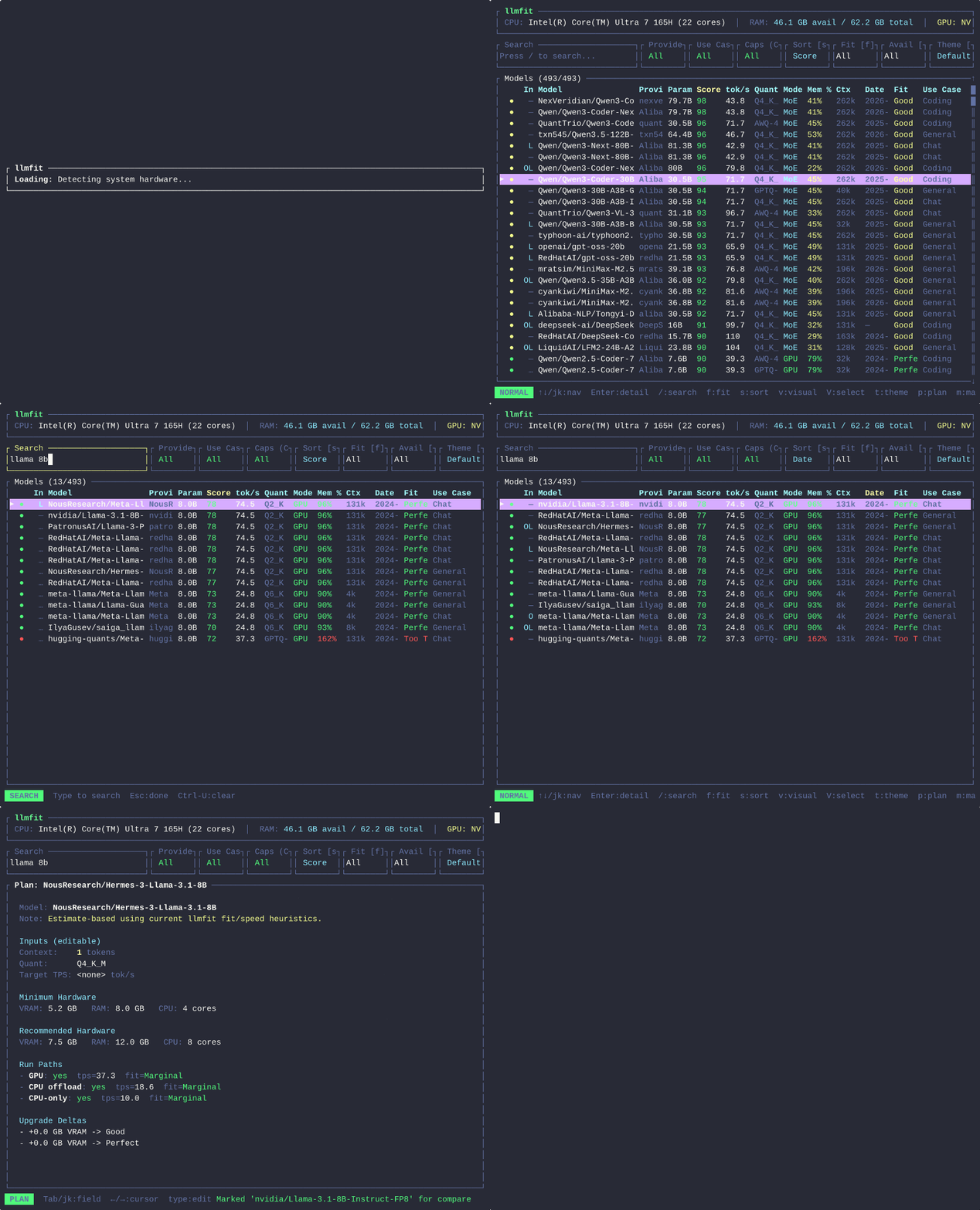
The TUI shows your detected specs at the top and every model scored for fit, speed, quality, and context. See the TUI guide for navigation, planning, simulation, downloads, the community leaderboard, and benchmarking.
Keybindings inside the TUI:
b: Open community benchmarks; I: Open live inference benchmarksh: Show help and keybindings↑ / ↓ or k / j: Navigate list items/: Filter models by name, family, or quantizationEsc: Clear search / Back# Print hardware telemetry and recommended models to standard output
llmfit recommend
Output system profile and recommendations in raw JSON format
llmfit recommend --json
Estimate SSD capacity for keeping three runnable models
llmfit storage --keep 3 --selection largest --json
Start the native HTTP API server
llmfit serve --host 0.0.0.0 --port 8787
See model library storage for selection, OS reserve, download scratch, free-space headroom, and hardware simulation.
docker run -d -p 8787:8787 ghcr.io/alexsjones/llmfit serve
---
services:
llmfit:
image: ghcr.io/alexsjones/llmfit:latest
container_name: llmfit
restart: unless-stopped
command: ["serve", "--host", "0.0.0.0", "--port", "8787"]
ports:
- "8787:8787"
healthcheck:
test: ["CMD", "curl", "-f", "http://localhost:8787/health"]
interval: 15s
timeout: 5s
retries: 3
start_period: 10s
For scripts, agents, and classic terminal output:
llmfit fit                    # table of all models ranked by fit
llmfit fit --show-incompatible # also show backend-incompatible models as non-runnable
llmfit recommend --json       # top picks as JSON (agent/script consumption)
llmfit info ""         # one model: fit analysis, estimate basis, verify commands
llmfit bench                  # measure real tok/s/TTFT against your running provider
llmfit doctor                 # hardware detection report for bug reports
llmfit serve                  # start the api and web user interface
Full reference: CLI & automation.
---
llmfit includes hardware detection and performance benchmarks contributed by the community. You can share your hardware benchmark results using:
llmfit bench --share
---
llmfit detects your hardware (RAM, CPU, GPU/VRAM, backend), then scores every model in its catalog across four dimensions: memory fit, estimated speed, quality, and context. Speed estimates come from a memory-bandwidth model grounded in runtime sampling and real community measurements — and every estimate ships its inputs, so llmfit info shows exactly what a number assumes and how to verify it on your machine.
Full detail, including the estimation formulas and the model database: How llmfit works.
---
Contributions are welcome, especially new models.
Please run cargo fmt before pushing your changes. Most CI check failures are caused by unformatted code:
cargo fmt
Guides for adding models — locally (no rebuild) or to the built-in catalog: Custom models.
---
If you're looking for a different approach, check out llm-checker -- a Node.js CLI tool with Ollama integration that can pull and benchmark models directly. It takes a more hands-on approach by actually running models on your hardware via Ollama, rather than estimating from specs. Good if you already have Ollama installed and want to test real-world performance. Note that it doesn't support MoE (Mixture-of-Experts) architectures -- all models are treated as dense, so memory estimates for models like Mixtral or DeepSeek-V3 will reflect total parameter count rather than the smaller active subset.
---
llmfit's Windows release binaries are intended to be digitally signed (Authenticode) via SignPath.io, with a free code signing certificate provided by the SignPath Foundation. The release workflow only attaches Windows assets after the sign-windows job has signed, repackaged, and re-checksummed them; when signing is skipped or fails, the Windows zips (and the PyPI Windows wheels built from them) are held back until the workflow is re-run against the tag and the new signing requests that re-run submits are approved. Releases before v1.1.19 could publish an unsigned Windows artifact, so verify the executable signature on those before relying on it.
Signing happens automatically in the release pipeline: only artifacts built by GitHub Actions from this repository are submitted for signing, and signing requests are approved by the project maintainer (@AlexsJones).
Code signing policy: see the SignPath Foundation code signing policy and terms.
Privacy: this program will not transfer any information to other networked systems unless specifically requested by the user or the person installing or operating it. llmfit only contacts external services when you explicitly use the corresponding feature (e.g. model downloads, runtime provider queries, or the community leaderboard).
---
MIT
→ →
→ →
→ →
→ →
→ →
→ →
→ →
→