AlexeyAB/darknet
YOLOv4 / Scaled-YOLOv4 / YOLO - Neural Networks for Object Detection (Windows and Linux version of Darknet )
About AlexeyAB/darknet
AlexeyAB/darknet is an open-source project on GitHub, mainly written in C. YOLOv4 / Scaled-YOLOv4 / YOLO - Neural Networks for Object Detection (Windows and Linux version of Darknet ) It currently holds 22,146 stars and 0 forks with 0 open issues, and was last pushed on an unknown date (repository created unknown).
Project Overview
AI Homed tracks it on the AI Image Projects board and on the AI AI Image Projects list.
GitHub Repository Details
README
Yolo v4, v3 and v2 for Windows and Linux
- Read the FAQ: https://www.ccoderun.ca/programming/darknet_faq/
- Join the Darknet/YOLO Discord: https://discord.gg/zSq8rtW
- Recommended GitHub repo for Darknet/YOLO: https://github.com/hank-ai/darknetcv/
- Hank.ai and Darknet/YOLO: https://hank.ai/darknet-welcomes-hank-ai-as-official-sponsor-and-commercial-entity/
(neural networks for object detection)
- Paper YOLOv7: https://arxiv.org/abs/2207.02696
- source code YOLOv7 - Pytorch (use to reproduce results): https://github.com/WongKinYiu/yolov7
- Paper YOLOv4: https://arxiv.org/abs/2004.10934
- source code YOLOv4 - Darknet (use to reproduce results): https://github.com/AlexeyAB/darknet
- Paper Scaled-YOLOv4 (CVPR 2021): https://openaccess.thecvf.com/content/CVPR2021/html/Wang_Scaled-YOLOv4_Scaling_Cross_Stage_Partial_Network_CVPR_2021_paper.html
- source code Scaled-YOLOv4 - Pytorch (use to reproduce results): https://github.com/WongKinYiu/ScaledYOLOv4
YOLOv7: Trainable bag-of-freebies sets new state-of-the-art for real-time object detectors
- Paper: https://arxiv.org/abs/2207.02696
- source code - Pytorch (use to reproduce results): https://github.com/WongKinYiu/yolov7
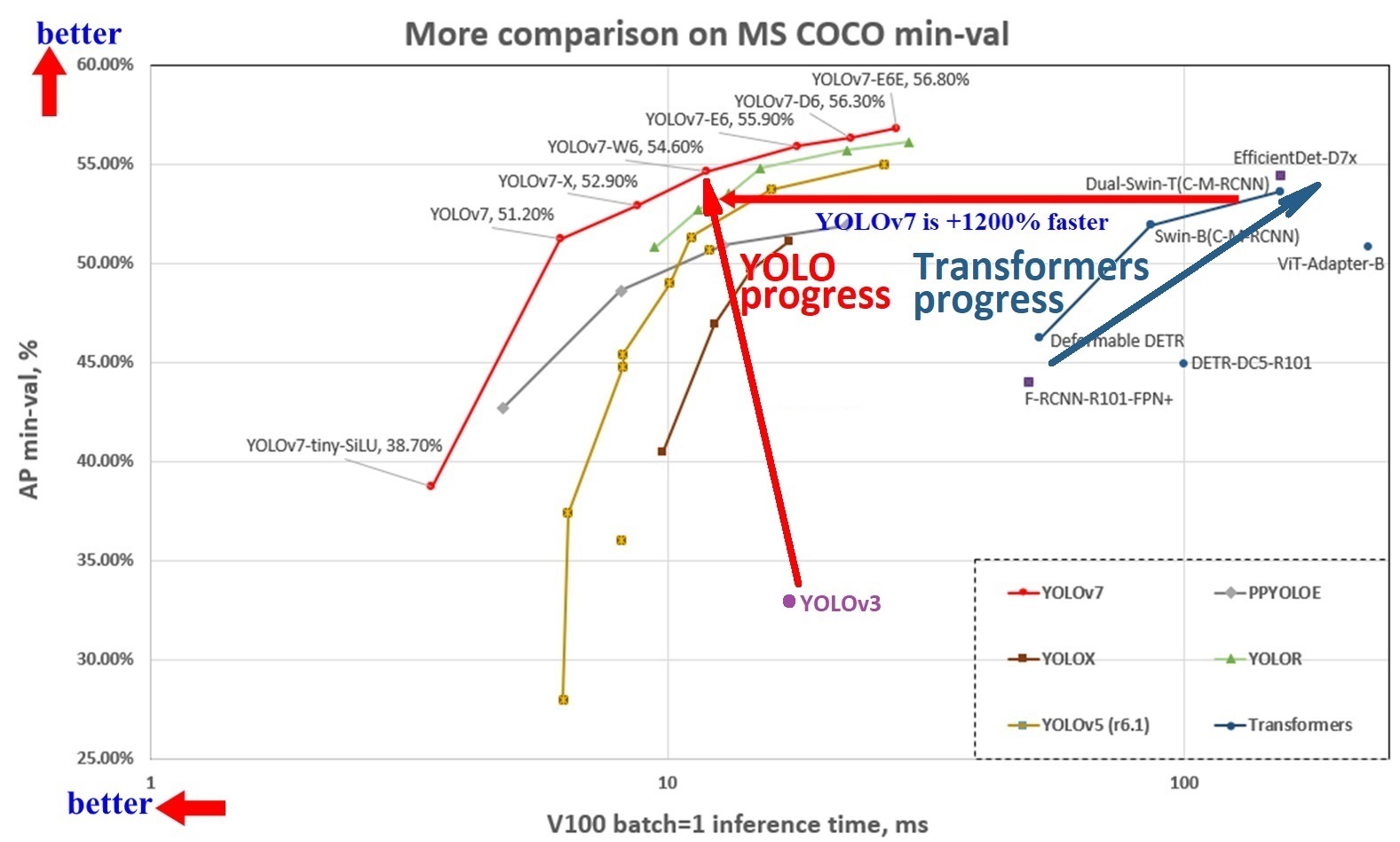
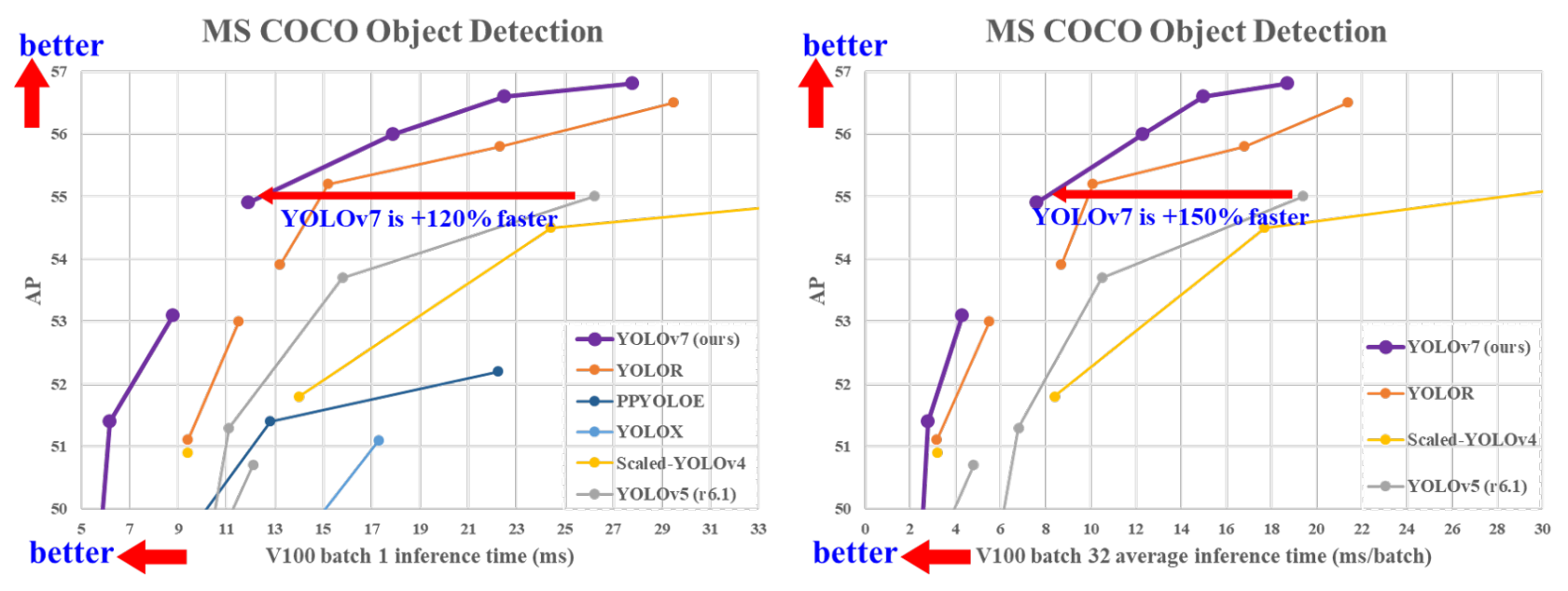
YOLOv7 is more accurate and faster than YOLOv5 by 120% FPS, than YOLOX by 180% FPS, than Dual-Swin-T by 1200% FPS, than ConvNext by 550% FPS, than SWIN-L by 500% FPS, than PPYOLOE-X by 150% FPS.
YOLOv7 surpasses all known object detectors in both speed and accuracy in the range from 5 FPS to 160 FPS and has the highest accuracy 56.8% AP among all known real-time object detectors with 30 FPS or higher on GPU V100, batch=1.
- YOLOv7-e6 (55.9% AP, 56 FPS V100 b=1) by
+500%FPS faster than SWIN-L C-M-RCNN (53.9% AP, 9.2 FPS A100 b=1) - YOLOv7-e6 (55.9% AP, 56 FPS V100 b=1) by
+550%FPS faster than ConvNeXt-XL C-M-RCNN (55.2% AP, 8.6 FPS A100 b=1) - YOLOv7-w6 (54.6% AP, 84 FPS V100 b=1) by
+120%FPS faster than YOLOv5-X6-r6.1 (55.0% AP, 38 FPS V100 b=1) - YOLOv7-w6 (54.6% AP, 84 FPS V100 b=1) by
+1200%FPS faster than Dual-Swin-T C-M-RCNN (53.6% AP, 6.5 FPS V100 b=1) - YOLOv7x (52.9% AP, 114 FPS V100 b=1) by
+150%FPS faster than PPYOLOE-X (51.9% AP, 45 FPS V100 b=1) - YOLOv7 (51.2% AP, 161 FPS V100 b=1) by
+180%FPS faster than YOLOX-X (51.1% AP, 58 FPS V100 b=1)
----
----
----
More details in articles on medium:
Manual: https://github.com/AlexeyAB/darknet/wikiDiscussion:
About Darknet framework: http://pjreddie.com/darknet/- YOLOv4 model zoo

- Requirements (and how to install dependencies)
- Pre-trained models
- FAQ - frequently asked questions
- Explanations in issues
- Yolo v4 in other frameworks (TensorRT, TensorFlow, PyTorch, OpenVINO, OpenCV-dnn, TVM,...)
- Datasets
- Yolo v4, v3 and v2 for Windows and Linux
- (neural networks for object detection)
- GeForce RTX 2080 Ti
- Youtube video of results
- How to evaluate AP of YOLOv4 on the MS COCO evaluation server
- How to evaluate FPS of YOLOv4 on GPU
- Pre-trained models
- Requirements for Windows, Linux and macOS
- Yolo v4 in other frameworks
- Datasets
- Improvements in this repository
- How to use on the command line
- For using network video-camera mjpeg-stream with any Android smartphone
- How to compile on Linux/macOS (using
CMake) - Using also PowerShell
- How to compile on Linux (using
make) - How to compile on Windows (using
CMake) - How to compile on Windows (using
vcpkg) - How to train with multi-GPU
- How to train (to detect your custom objects)
- How to train tiny-yolo (to detect your custom objects)
- When should I stop training
- Custom object detection
- How to improve object detection
- How to mark bounded boxes of objects and create annotation files
- How to use Yolo as DLL and SO libraries
- Citation
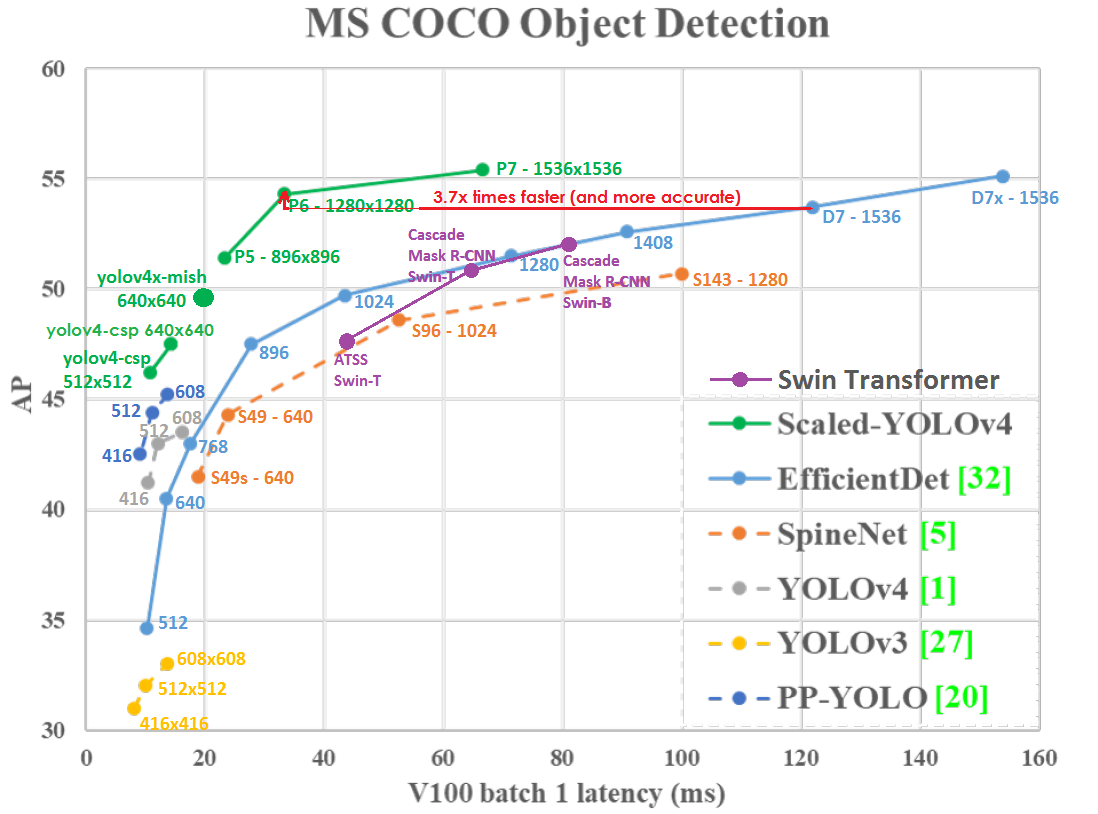
AP50:95 - FPS (Tesla V100) Paper: https://arxiv.org/abs/2011.08036
----
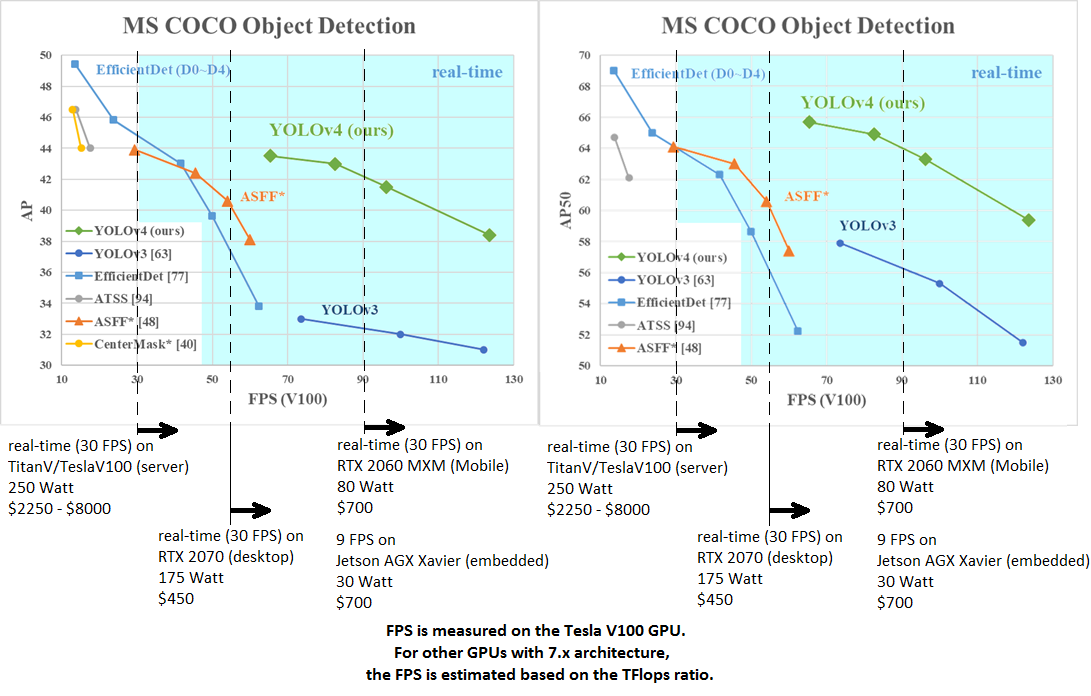
AP50:95 / AP50 - FPS (Tesla V100) Paper: https://arxiv.org/abs/2004.10934
tkDNN-TensorRT accelerates YOLOv4 ~2x times for batch=1 and 3x-4x times for batch=4.
- tkDNN: https://github.com/ceccocats/tkDNN
- OpenCV: https://gist.github.com/YashasSamaga/48bdb167303e10f4d07b754888ddbdcf
GeForce RTX 2080 Ti
| Network Size | Darknet, FPS (avg) | tkDNN TensorRT FP32, FPS | tkDNN TensorRT FP16, FPS | OpenCV FP16, FPS | tkDNN TensorRT FP16 batch=4, FPS | OpenCV FP16 batch=4, FPS | tkDNN Speedup | |:--------------------------:|:------------------:|-------------------------:|-------------------------:|-----------------:|---------------------------------:|-------------------------:|--------------:| |320 | 100 | 116 | 202 | 183 | 423 | 430 | 4.3x | |416 | 82 | 103 | 162 | 159 | 284 | 294 | 3.6x | |512 | 69 | 91 | 134 | 138 | 206 | 216 | 3.1x | |608 | 53 | 62 | 103 | 115 | 150 | 150 | 2.8x | |Tiny 416 | 443 | 609 | 790 | 773 | 1774 | 1353 | 3.5x | |Tiny 416 CPU Core i7 7700HQ | 3.4 | - | - | 42 | - | 39 | 12x |
- Yolo v4 Full comparison: map_fps
- Yolo v4 tiny comparison: tiny_fps
- CSPNet: paper and map_fps comparison: https://github.com/WongKinYiu/CrossStagePartialNetworks
- Yolo v3 on MS COCO: Speed / Accuracy (mAP@0.5) chart
- Yolo v3 on MS COCO (Yolo v3 vs RetinaNet) - Figure 3: https://arxiv.org/pdf/1804.02767v1.pdf
- Yolo v2 on Pascal VOC 2007: https://hsto.org/files/a24/21e/068/a2421e0689fb43f08584de9d44c2215f.jpg
- Yolo v2 on Pascal VOC 2012 (comp4): https://hsto.org/files/3a6/fdf/b53/3a6fdfb533f34cee9b52bdd9bb0b19d9.jpg
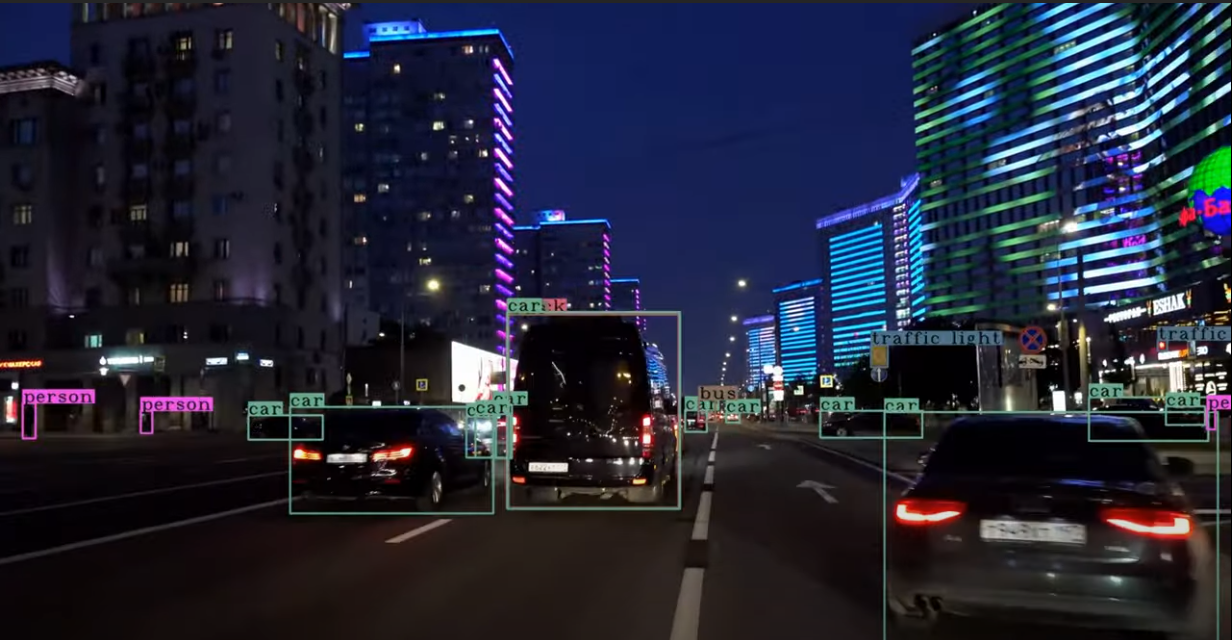
Youtube video of results
| [
](https://youtu.be/1_SiUOYUoOI "Yolo v4") | [
](https://youtu.be/YDFf-TqJOFE "Scaled Yolo v4") |
|---|---|
Others: https://www.youtube.com/user/pjreddie/videos
How to evaluate AP of YOLOv4 on the MS COCO evaluation server
1. Download and unzip test-dev2017 dataset from MS COCO server: http://images.cocodataset.org/zips/test2017.zip
2. Download list of images for Detection tasks and replace the paths with yours: https://raw.githubusercontent.com/AlexeyAB/darknet/master/scripts/testdev2017.txt
3. Download yolov4.weights file 245 MB: yolov4.weights (Google-drive mirror yolov4.weights )
4. Content of the file cfg/coco.data should be
classes= 80
train = /trainvalno5k.txt
valid = /testdev2017.txt
names = data/coco.names
backup = backup
eval=coco
5. Create /results/ folder near with ./darknet executable file
6. Run validation: ./darknet detector valid cfg/coco.data cfg/yolov4.cfg yolov4.weights
7. Rename the file /results/coco_results.json to detections_test-dev2017_yolov4_results.json and compress it to detections_test-dev2017_yolov4_results.zip
8. Submit file detections_test-dev2017_yolov4_results.zip to the MS COCO evaluation server for the test-dev2019 (bbox)
How to evaluate FPS of YOLOv4 on GPU
1. Compile Darknet with GPU=1 CUDNN=1 CUDNN_HALF=1 OPENCV=1 in the Makefile
2. Download yolov4.weights file 245 MB: yolov4.weights (Google-drive mirror yolov4.weights )
3. Get any .avi/.mp4 video file (preferably not more than 1920x1080 to avoid bottlenecks in CPU performance)
4. Run one of two commands and look at the AVG FPS:
- include video_capturing + NMS + drawing_bboxes:
./darknet detector demo cfg/coco.data cfg/yolov4.cfg yolov4.weights test.mp4 -dont_show -ext_output
- exclude video_capturing + NMS + drawing_bboxes:
./darknet detector demo cfg/coco.data cfg/yolov4.cfg yolov4.weights test.mp4 -benchmark
Pre-trained models
There are weights-file for different cfg-files (trained for MS COCO dataset):
FPS on RTX 2070 (R) and Tesla V100 (V):
- yolov4-p6.cfg - 1280x1280 - 72.1% mAP@0.5 (54.0% AP@0.5:0.95) - 32(V) FPS - xxx BFlops (xxx FMA) - 487 MB: yolov4-p6.weights
- pre-trained weights for training: https://github.com/AlexeyAB/darknet/releases/download/darknet_yolo_v4_pre/yolov4-p6.conv.289
- yolov4-p5.cfg - 896x896 - 70.0% mAP@0.5 (51.6% AP@0.5:0.95) - 43(V) FPS - xxx BFlops (xxx FMA) - 271 MB: yolov4-p5.weights
- pre-trained weights for training: https://github.com/AlexeyAB/darknet/releases/download/darknet_yolo_v4_pre/yolov4-p5.conv.232
- yolov4-csp-x-swish.cfg - 640x640 - 69.9% mAP@0.5 (51.5% AP@0.5:0.95) - 23(R) FPS / 50(V) FPS - 221 BFlops (110 FMA) - 381 MB: yolov4-csp-x-swish.weights
- pre-trained weights for training: https://github.com/AlexeyAB/darknet/releases/download/darknet_yolo_v4_pre/yolov4-csp-x-swish.conv.192
- yolov4-csp-swish.cfg - 640x640 - 68.7% mAP@0.5 (50.0% AP@0.5:0.95) - 70(V) FPS - 120 (60 FMA) - 202 MB: yolov4-csp-swish.weights
- pre-trained weights for training: https://github.com/AlexeyAB/darknet/releases/download/darknet_yolo_v4_pre/yolov4-csp-swish.conv.164
- yolov4x-mish.cfg - 640x640 - 68.5% mAP@0.5 (50.1% AP@0.5:0.95) - 23(R) FPS / 50(V) FPS - 221 BFlops (110 FMA) - 381 MB: yolov4x-mish.weights
- pre-trained weights for training: https://github.com/AlexeyAB/darknet/releases/download/darknet_yolo_v4_pre/yolov4x-mish.conv.166
- yolov4-csp.cfg - 202 MB: yolov4-csp.weights paper Scaled Yolo v4
width= and height= parameters in yolov4-csp.cfg file and use the same yolov4-csp.weights file for all cases:
width=640 height=640in cfg: 67.4% mAP@0.5 (48.7% AP@0.5:0.95) - 70(V) FPS - 120 (60 FMA) BFlopswidth=512 height=512in cfg: 64.8% mAP@0.5 (46.2% AP@0.5:0.95) - 93(V) FPS - 77 (39 FMA) BFlops- pre-trained weights for training: https://github.com/AlexeyAB/darknet/releases/download/darknet_yolo_v4_pre/yolov4-csp.conv.142
- yolov4.cfg - 245 MB: yolov4.weights (Google-drive mirror yolov4.weights ) paper Yolo v4
width= and height= parameters in yolov4.cfg file and use the same yolov4.weights file for all cases:
width=608 height=608in cfg: 65.7% mAP@0.5 (43.5% AP@0.5:0.95) - 34(R) FPS / 62(V) FPS - 128.5 BFlopswidth=512 height=512in cfg: 64.9% mAP@0.5 (43.0% AP@0.5:0.95) - 45(R) FPS / 83(V) FPS - 91.1 BFlopswidth=416 height=416in cfg: 62.8% mAP@0.5 (41.2% AP@0.5:0.95) - 55(R) FPS / 96(V) FPS - 60.1 BFlopswidth=320 height=320in cfg: 60% mAP@0.5 ( 38% AP@0.5:0.95) - 63(R) FPS / 123(V) FPS - 35.5 BFlops- yolov4-tiny.cfg - 40.2% mAP@0.5 - 371(1080Ti) FPS / 330(RTX2070) FPS - 6.9 BFlops - 23.1 MB: yolov4-tiny.weights
- enet-coco.cfg (EfficientNetB0-Yolov3) - 45.5% mAP@0.5 - 55(R) FPS - 3.7 BFlops - 18.3 MB: enetb0-coco_final.weights
- yolov3-openimages.cfg - 247 MB - 18(R) FPS - OpenImages dataset: yolov3-openimages.weights
CLICK ME - Yolo v3 models
- csresnext50-panet-spp-original-optimal.cfg - 65.4% mAP@0.5 (43.2% AP@0.5:0.95) - 32(R) FPS - 100.5 BFlops - 217 MB: csresnext50-panet-spp-original-optimal_final.weights
- yolov3-spp.cfg - 60.6% mAP@0.5 - 38(R) FPS - 141.5 BFlops - 240 MB: yolov3-spp.weights
- csresnext50-panet-spp.cfg - 60.0% mAP@0.5 - 44 FPS - 71.3 BFlops - 217 MB: csresnext50-panet-spp_final.weights
- yolov3.cfg - 55.3% mAP@0.5 - 66(R) FPS - 65.9 BFlops - 236 MB: yolov3.weights
- yolov3-tiny.cfg - 33.1% mAP@0.5 - 345(R) FPS - 5.6 BFlops - 33.7 MB: yolov3-tiny.weights
- yolov3-tiny-prn.cfg - 33.1% mAP@0.5 - 370(R) FPS - 3.5 BFlops - 18.8 MB: yolov3-tiny-prn.weights
CLICK ME - Yolo v2 models
yolov2.cfg(194 MB COCO Yolo v2) - requires 4 GB GPU-RAM: https://pjreddie.com/media/files/yolov2.weightsyolo-voc.cfg(194 MB VOC Yolo v2) - requires 4 GB GPU-RAM: http://pjreddie.com/media/files/yolo-voc.weightsyolov2-tiny.cfg(43 MB COCO Yolo v2) - requires 1 GB GPU-RAM: https://pjreddie.com/media/files/yolov2-tiny.weightsyolov2-tiny-voc.cfg(60 MB VOC Yolo v2) - requires 1 GB GPU-RAM: http://pjreddie.com/media/files/yolov2-tiny-voc.weightsyolo9000.cfg(186 MB Yolo9000-model) - requires 4 GB GPU-RAM: http://pjreddie.com/media/files/yolo9000.weights
Put it near compiled: darknet.exe
You can get cfg-files by path: darknet/cfg/
Requirements for Windows, Linux and macOS
- CMake >= 3.18: https://cmake.org/download/
- Powershell (already installed on windows): https://docs.microsoft.com/en-us/powershell/scripting/install/installing-powershell
- CUDA >= 10.2: https://developer.nvidia.com/cuda-toolkit-archive (on Linux do Post-installation Actions)
- OpenCV >= 2.4: use your preferred package manager (brew, apt), build from source using vcpkg or download from OpenCV official site (on Windows set system variable
OpenCV_DIR=C:\opencv\build- where are theincludeandx64folders image) - cuDNN >= 8.0.2 https://developer.nvidia.com/rdp/cudnn-archive (on Linux follow steps described here https://docs.nvidia.com/deeplearning/sdk/cudnn-install/index.html#installlinux-tar , on Windows follow steps described here https://docs.nvidia.com/deeplearning/sdk/cudnn-install/index.html#installwindows)
- GPU with CC >= 3.0: https://en.wikipedia.org/wiki/CUDA#GPUs_supported
Yolo v4 in other frameworks
- Pytorch - Scaled-YOLOv4: https://github.com/WongKinYiu/ScaledYOLOv4
- TensorFlow:
pip install yolov4YOLOv4 on TensorFlow 2.0 / TFlite / Android: https://github.com/hunglc007/tensorflow-yolov4-tflite
yolov4.weights/cfg files to yolov4.pb by using TNTWEN project, and to yolov4.tflite TensorFlow-lite
- OpenCV the fastest implementation of YOLOv4 for CPU (x86/ARM-Android), OpenCV can be compiled with OpenVINO-backend for running on (Myriad X / USB Neural Compute Stick / Arria FPGA), use
yolov4.weights/cfgwith: C++ example or Python example - Intel OpenVINO 2021.2: supports YOLOv4 (NPU Myriad X / USB Neural Compute Stick / Arria FPGA): https://devmesh.intel.com/projects/openvino-yolov4-49c756 read this manual (old manual ) (for Scaled-YOLOv4 models use https://github.com/Chen-MingChang/pytorch_YOLO_OpenVINO_demo )
- PyTorch > ONNX:
- WongKinYiu/PyTorch_YOLOv4
- maudzung/3D-YOLOv4
- Tianxiaomo/pytorch-YOLOv4
- YOLOv5
- ONNX on Jetson for YOLOv4: https://developer.nvidia.com/blog/announcing-onnx-runtime-for-jetson/ and https://github.com/ttanzhiqiang/onnx_tensorrt_project
- nVidia Transfer Learning Toolkit (TLT>=3.0) Training and Detection https://