1
 →
→
Python SDK for AI agent monitoring, LLM cost tracking, benchmarking, and more. Integrates with most LLMs and agent frameworks including CrewAI, Agno, OpenAI Agents SDK, Langchain, Autogen, AG2
AgentOps-AI/agentops is an open-source project on GitHub, mainly written in Python. Python SDK for AI agent monitoring, LLM cost tracking, benchmarking, and more. Integrates with most LLMs and agent frameworks including CrewAI, Agno It currently holds 5,833 stars and 625 forks with 0 open issues, and was last pushed on an unknown date (repository created unknown).
AI Homed tracks it on the Local & On-Device AI board.




AgentOps helps developers build, evaluate, and monitor AI agents. From prototype to production.
The AgentOps app is open source under the MIT license. Explore the code in our app directory.






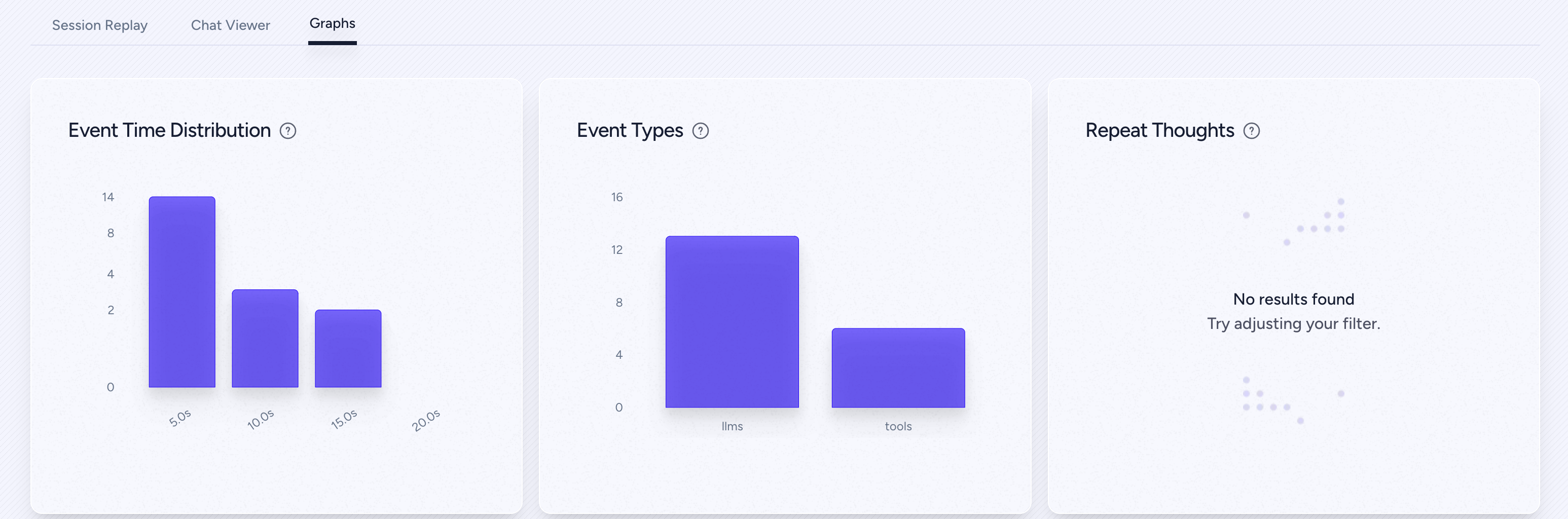
| | | | ------------------------------------- | ------------------------------------------------------------- | | 📊 Replay Analytics and Debugging | Step-by-step agent execution graphs | | 💸 LLM Cost Management | Track spend with LLM foundation model providers | | 🤝 Framework Integrations | Native Integrations with CrewAI, AG2 (AutoGen), Agno, LangGraph, & more | | ⚒️ Self-Host | Want to run AgentOps on your own cloud? You're covered |
pip install agentops
Initialize the AgentOps client and automatically get analytics on all your LLM calls.
import agentops
Beginning of your program (i.e. main.py, __init__.py)
agentops.init( < INSERT YOUR API KEY HERE >)
...
End of program
agentops.end_session('Success')
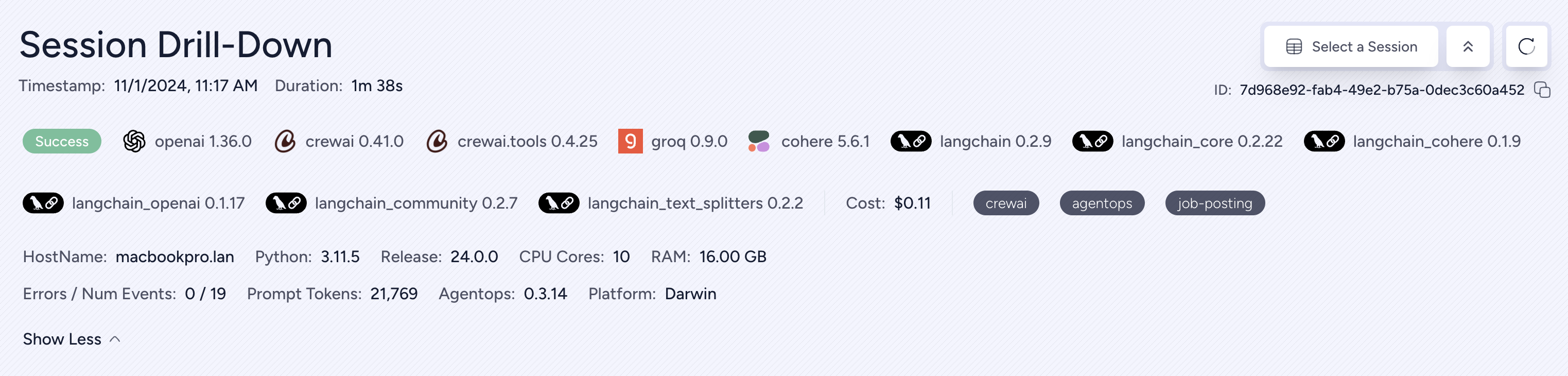
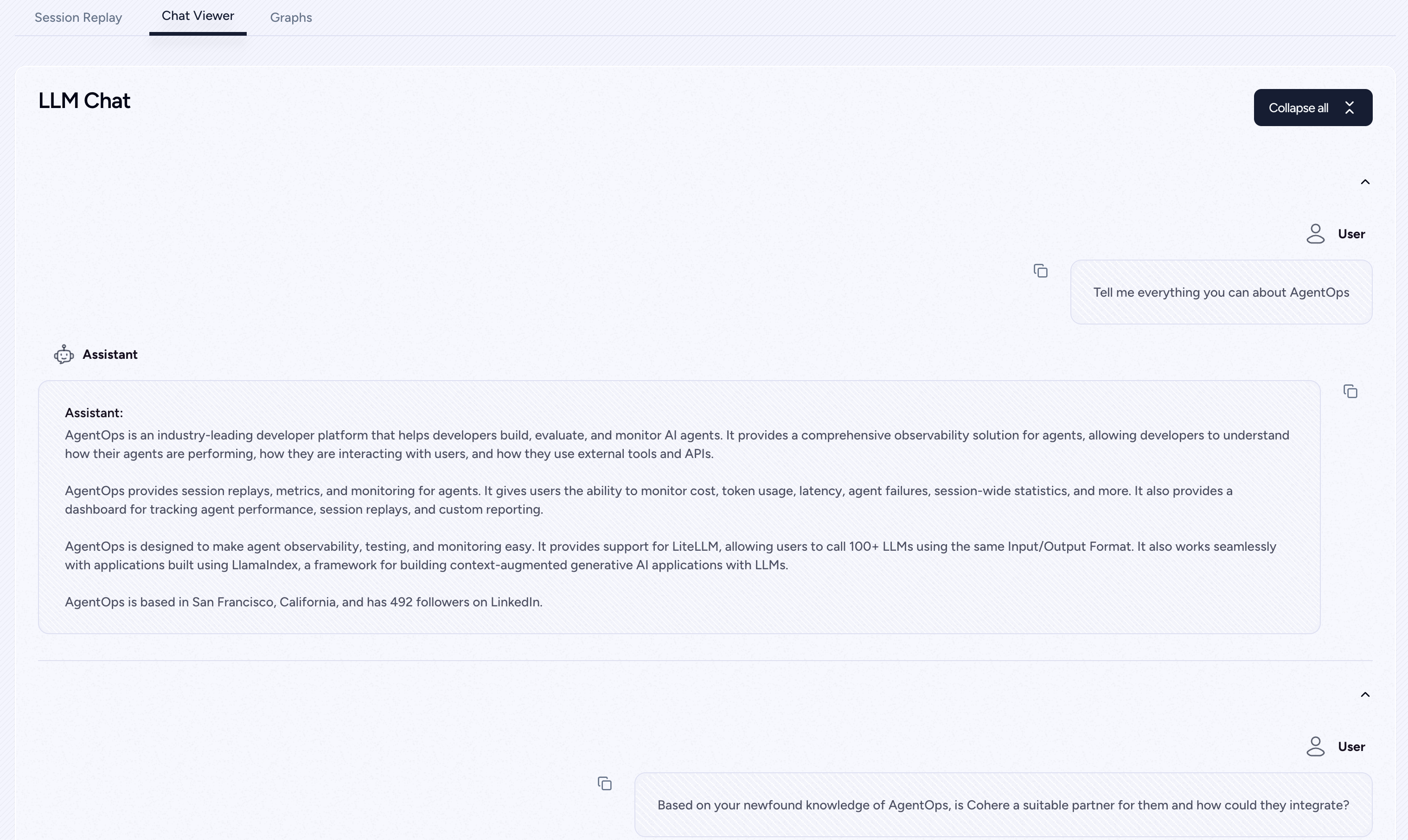
All your sessions can be viewed on the AgentOps dashboard
Looking to run the full AgentOps app (Dashboard + API backend) on your machine? Follow the setup guide in app/README.md:
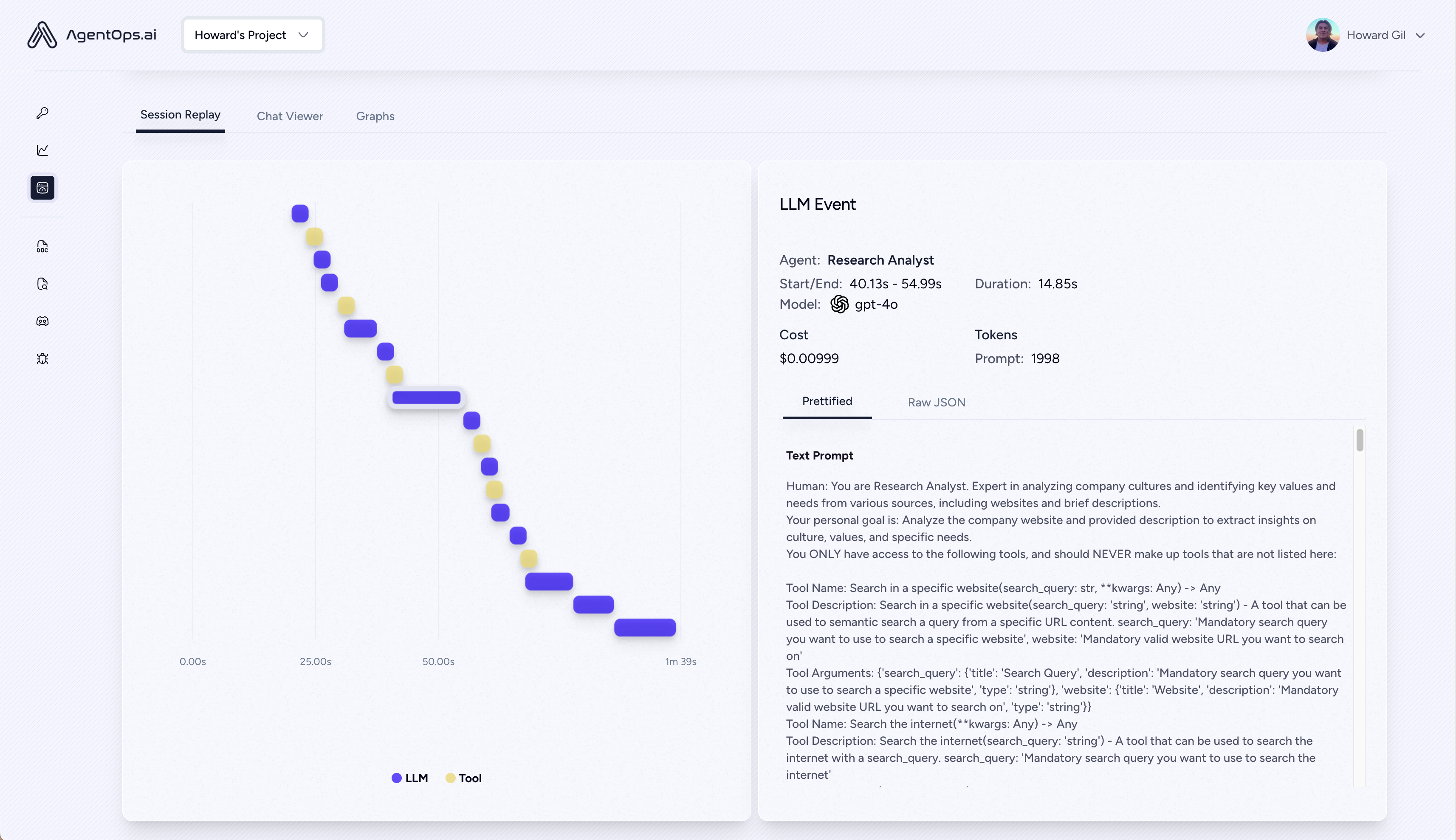
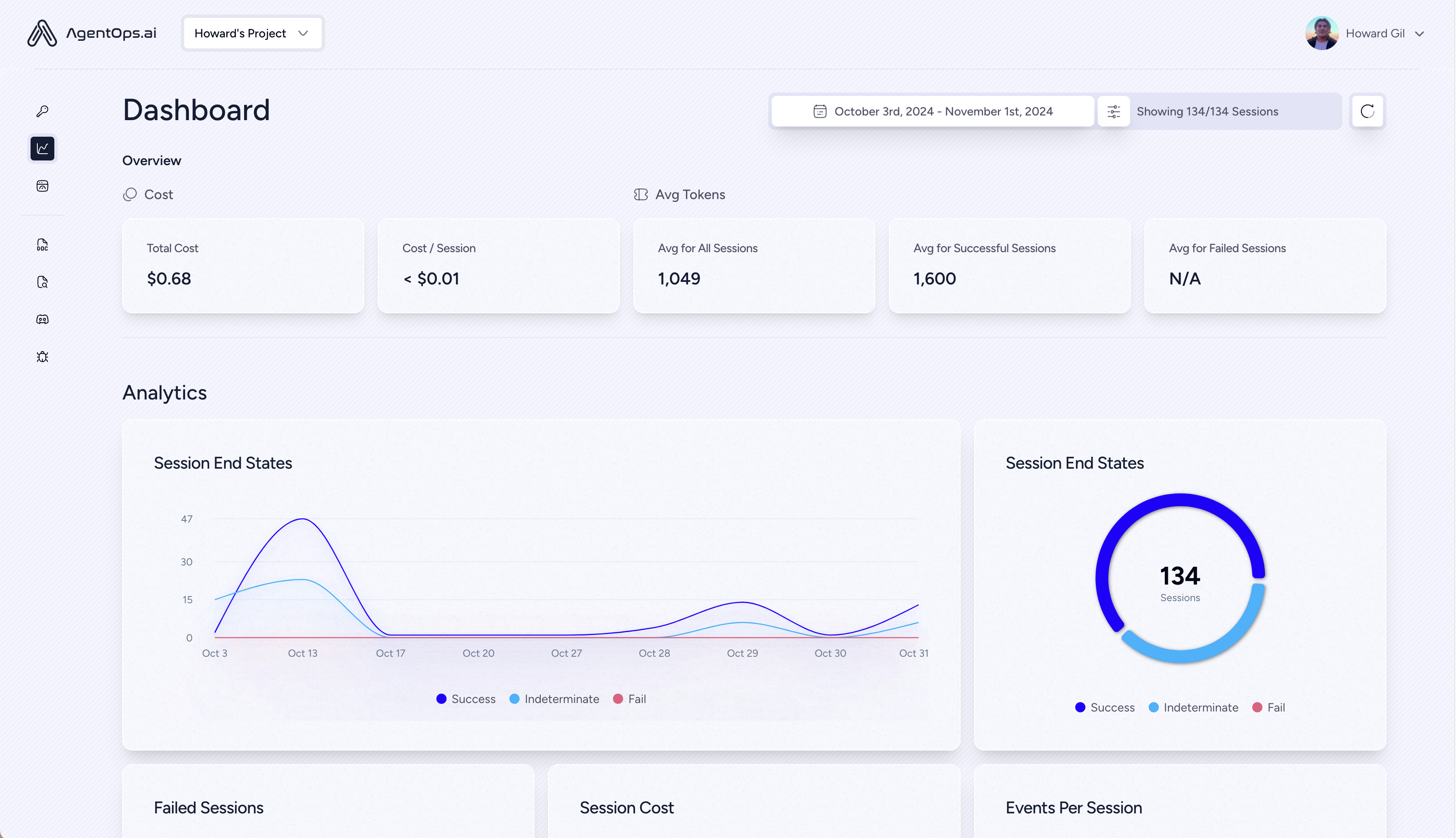
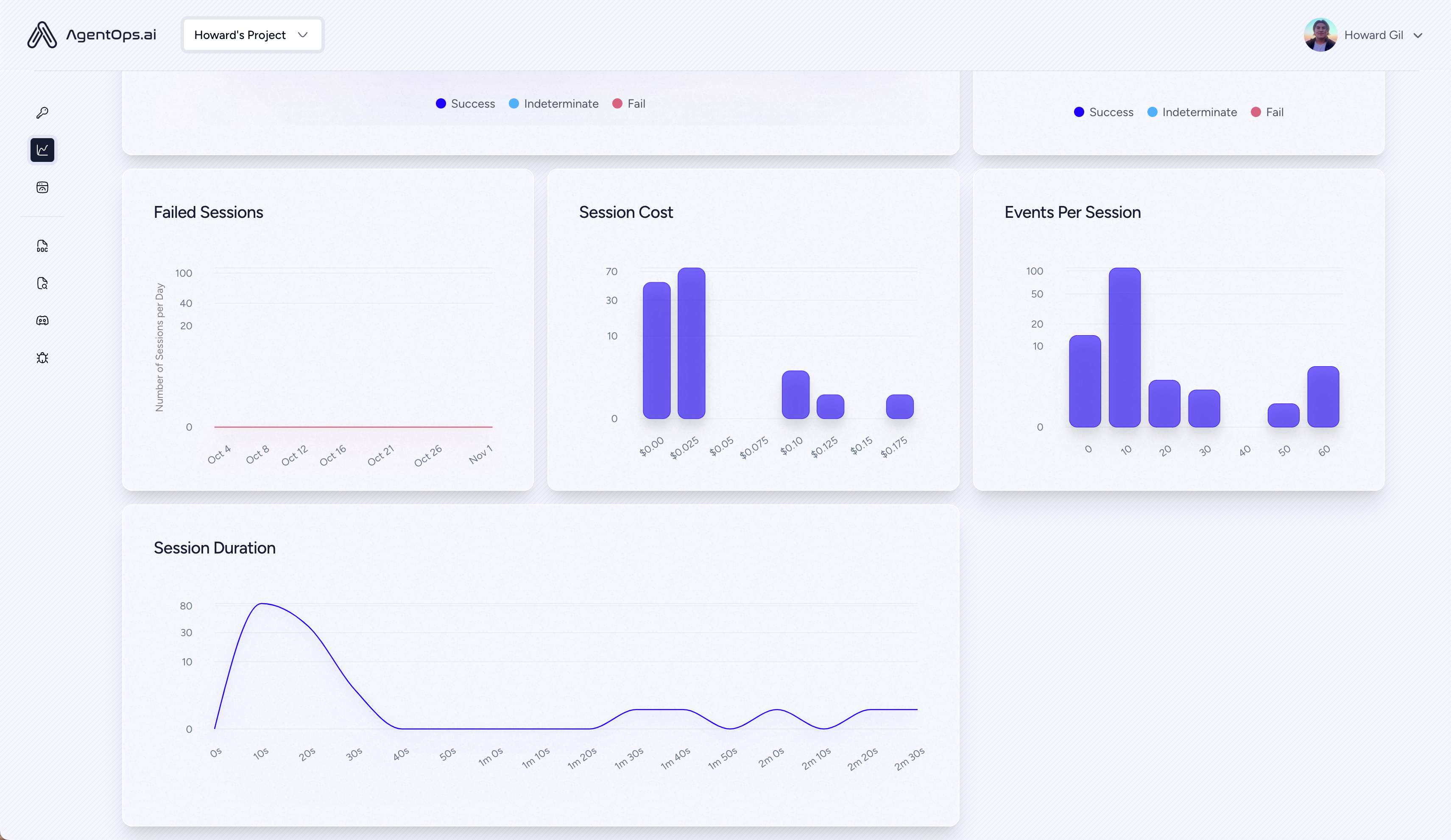
# Create a session span (root for all other spans)
from agentops.sdk.decorators import session
@session
def my_workflow():
    # Your session code here
    return result
# Create an agent span for tracking agent operations
from agentops.sdk.decorators import agent
@agent
class MyAgent:
    def __init__(self, name):
        self.name = name

    # Agent methods here
# Create operation/task spans for tracking specific operations
from agentops.sdk.decorators import operation, task
@operation  # or @task
def process_data(data):
    # Process the data
    return result
# Create workflow spans for tracking multi-operation workflows
from agentops.sdk.decorators import workflow
@workflow
def my_workflow(data):
    # Workflow implementation
    return result
# Nest decorators for proper span hierarchy
from agentops.sdk.decorators import session, agent, operation
@agent
class MyAgent:
    @operation
    def nested_operation(self, message):
        return f"Processed: {message}"

    @operation
    def main_operation(self):
        result = self.nested_operation("test message")
        return result
@session
def my_session():
    agent = MyAgent()
    return agent.main_operation()
All decorators support:
Build multi-agent systems with tools, handoffs, and guardrails. AgentOps natively integrates with the OpenAI Agents SDKs for both Python and TypeScript.
pip install openai-agents
npm install agentops @openai/agents
Build Crew agents with observability in just 2 lines of code. Simply set an AGENTOPS_API_KEY in your environment, and your crews will get automatic monitoring on the AgentOps dashboard.
pip install 'crewai[agentops]'
AGENTOPS_API_KEY in your environment and call agentops.init()
Track and analyze CAMEL agents with full observability. Set an AGENTOPS_API_KEY in your environment and initialize AgentOps to get started.
pip install "camel-ai[all]==0.2.11"
pip install agentops
import os
import agentops
from camel.agents import ChatAgent
from camel.messages import BaseMessage
from camel.models import ModelFactory
from camel.types import ModelPlatformType, ModelType
Initialize AgentOps
agentops.init(os.getenv("AGENTOPS_API_KEY"), tags=["CAMEL Example"])
Import toolkits after AgentOps init for tracking
from camel.toolkits import SearchToolkit
Set up the agent with search tools
sys_msg = BaseMessage.make_assistant_message(
    role_name='Tools calling operator',
    content='You are a helpful assistant'
)
Configure tools and model
tools = [*SearchToolkit().get_tools()]
model = ModelFactory.create(
    model_platform=ModelPlatformType.OPENAI,
    model_type=ModelType.GPT_4O_MINI,
)
Create and run the agent
camel_agent = ChatAgent(
    system_message=sys_msg,
    model=model,
    tools=tools,
)
response = camel_agent.step("What is AgentOps?")
print(response)
agentops.end_session("Success")
Check out our Camel integration guide for more examples including multi-agent scenarios.
AgentOps works seamlessly with applications built using Langchain. To use the handler, install Langchain as an optional dependency:
pip install agentops[langchain]
To use the handler, import and set
import os
from langchain.chat_models import ChatOpenAI
from langchain.agents import initialize_agent, AgentType
from agentops.integration.callbacks.langchain import LangchainCallbackHandler
AGENTOPS_API_KEY = os.environ['AGENTOPS_API_KEY']
handler = LangchainCallbackHandler(api_key=AGENTOPS_API_KEY, tags=['Langchain Example'])
llm = ChatOpenAI(openai_api_key=OPENAI_API_KEY,
                 callbacks=[handler],
                 model='gpt-3.5-turbo')
agent = initialize_agent(tools,
                         llm,
                         agent=AgentType.CHAT_ZERO_SHOT_REACT_DESCRIPTION,
                         verbose=True,
                         callbacks=[handler], # You must pass in a callback handler to record your agent
                         handle_parsing_errors=True)
Check out the Langchain Examples Notebook for more details including Async handlers.
First class support for Cohere(>=5.4.0). This is a living integration, should you need any added functionality please message us on Discord!
pip install cohere
```python python import cohere import agentops
chat = co.chat( message="Is it pronounced ceaux-hear or co-hehray?" )
print(chat)
agentops.end_session('Success')
co = cohere.Client()
stream = co.chat_stream( message="Write me a haiku about the synergies between Cohere and AgentOps" )
for event in stream: if event.event_type == "text-generation": print(event.text, end='')
agentops.end_session('Success')
Track agents built with the Anthropic Python SDK (>=0.32.0).
client = anthropic.Anthropic( # This is the default and can be omitted api_key=os.environ.get("ANTHROPIC_API_KEY"), )
message = client.messages.create( max_tokens=1024, messages=[ { "role": "user", "content": "Tell me a cool fact about AgentOps", } ], model="claude-3-opus-20240229", ) print(message.content)
agentops.end_session('Success')
Streaming
client = anthropic.Anthropic( # This is the default and can be omitted api_key=os.environ.get("ANTHROPIC_API_KEY"), )
stream = client.messages.create( max_tokens=1024, model="claude-3-opus-20240229", messages=[ { "role": "user", "content": "Tell me something cool about streaming agents", } ], stream=True, )
response = "" for event in stream: if event.type == "content_block_delta": response += event.delta.text elif event.type == "message_stop": print("\n") print(response) print("\n")
Async
client = AsyncAnthropic( # This is the default and can be omitted api_key=os.environ.get("ANTHROPIC_API_KEY"), )
async def main() -> None: message = await client.messages.create( max_tokens=1024, messages=[ { "role": "user", "content": "Tell me something interesting about async agents", } ], model="claude-3-opus-20240229", ) print(message.content)
await main()
Track agents built with the Mistral Python SDK (>=0.32.0).
Sync
client = Mistral( # This is the default and can be omitted api_key=os.environ.get("MISTRAL_API_KEY"), )
message = client.chat.complete( messages=[ { "role": "user", "content": "Tell me a cool fact about AgentOps", } ], model="open-mistral-nemo", ) print(message.choices[0].message.content)
agentops.end_session('Success')
Streaming
client = Mistral( # This is the default and can be omitted api_key=os.environ.get("MISTRAL_API_KEY"), )
message = client.chat.stream( messages=[ { "role": "user", "content": "Tell me something cool about streaming agents", } ], model="open-mistral-nemo", )
response = "" for event in message: if event.data.choices[0].finish_reason == "stop": print("\n") print(response) print("\n") else: response += event.text
agentops.end_session('Success')
Async
client = Mistral( # This is the default and can be omitted api_key=os.environ.get("MISTRAL_API_KEY"), )
async def main() -> None: message = await client.chat.complete_async( messages=[ { "role": "user", "content": "Tell me something interesting about async agents", } ], model="open-mistral-nemo", ) print(message.choices[0].message.content)
await main()
Async Streaming
client = Mistral( # This is the default and can be omitted api_key=os.environ.get("MISTRAL_API_KEY"), )
async def main() -> None: message = await client.chat.stream_async( messages=[ { "role": "user", "content": "Tell me something interesting about async streaming agents", } ], model="open-mistral-nemo", )
response = "" async for event in message: if event.data.choices[0].finish_reason == "stop": print("\n") print(response) print("\n") else: response += event.text
await main()
Track agents built with the CamelAI Python SDK (>=0.32.0).
You can find usage examples here!.
AgentOps provides support for LiteLLM(>=1.3.1), allowing you to call 100+ LLMs using the same Input/Output Format.
AgentOps works seamlessly with applications built using LlamaIndex, a framework for building context-augmented generative AI applications with LLMs.
To use the handler, import and set
set_global_handler("agentops")
Check out the LlamaIndex docs for more details.
AgentOps provides support for Llama Stack Python Client(>=0.0.53), allowing you to monitor your Agentic applications.
Track and analyze SwarmZero agents with full observability. Set an AGENTOPS_API_KEY in your environment and initialize AgentOps to get started.
bash pip install swarmzero pip install agentops
import agentops agentops.init()
from swarmzero import Agent, Swarm
| Platform | Dashboard | Evals | | ---------------------------------------------------------------------------- | ------------------------------------------ | -------------------------------------- | | ✅ Python SDK | ✅ Multi-session and Cross-session metrics | ✅ Custom eval metrics | | 🚧 Evaluation builder API | ✅ Custom event tag tracking | 🔜 Agent scorecards | | 🚧 Javascript/Typescript SDK (Alpha) | ✅ Session replays | 🔜 Evaluation playground + leaderboard |
| Performance testing | Environments | LLM Testing | Reasoning and execution testing | | ----------------------------------------- | ----------------------------------------------------------------------------------- | ------------------------------------------- | ---------------
→ →
→ →
→ →
→ →
→ →
→ →
→ →
→