
1
 →
a-ghorbani/pocketpal-ai is an open-source project on GitHub, mainly written in TypeScript. An app that brings language models directly to your phone. It currently holds 9,176 stars and 1,065 forks with 126 open issues, and was last pushed on 2026-11-10 (repository created 2024-08-25).
AI Homed tracks it on the Today's Trending board, currently at rank #36 with 50 new stars today.

A private AI assistant that runs entirely on your phone.
Chat with language models, give them a voice, and let them use tools — all on-device. No account, no cloud, no internet required.
pocketpal.dev · Get the app · Leaderboard · PalsHub · Discussions
---
Most AI apps are a thin window onto someone else's server — every message you type gets shipped off, logged, and analyzed somewhere you can't see. PocketPal flips that around: the AI lives on your phone, and your conversations stay on it unless you choose an online feature.
Privacy note: Your chats and documents leave your device only through features you turn on: web search and page reading, a remote server, or a system voice your phone runs online. The app's other network use (model and voice downloads, PalsHub and purchases, device-compatibility rules from the jsDelivr CDN at launch, the opt-in benchmark leaderboard, and feedback or reports you submit) never attaches your chats.
| Platform | |
| --- | --- |
| iOS / iPadOS | |
| Android |
|
Three steps to your first chat:
1. Install PocketPal from the App Store or Google Play. 2. Download a model — tap the menu (☰) → Models, pick one that fits your phone, and download (or add one from Hugging Face). 3. Load it and start chatting — that's it, you're running AI fully offline.
You don't need to know any of this to use PocketPal — but if you're curious how a phone runs real AI offline, here's the short version.
PocketPal is a four-layer stack, from the silicon up to the chat UI. Each layer has one job, and the dependency direction is strictly top-down — the JS app talks to native bridges, bridges talk to inference engines, engines target hardware backends.
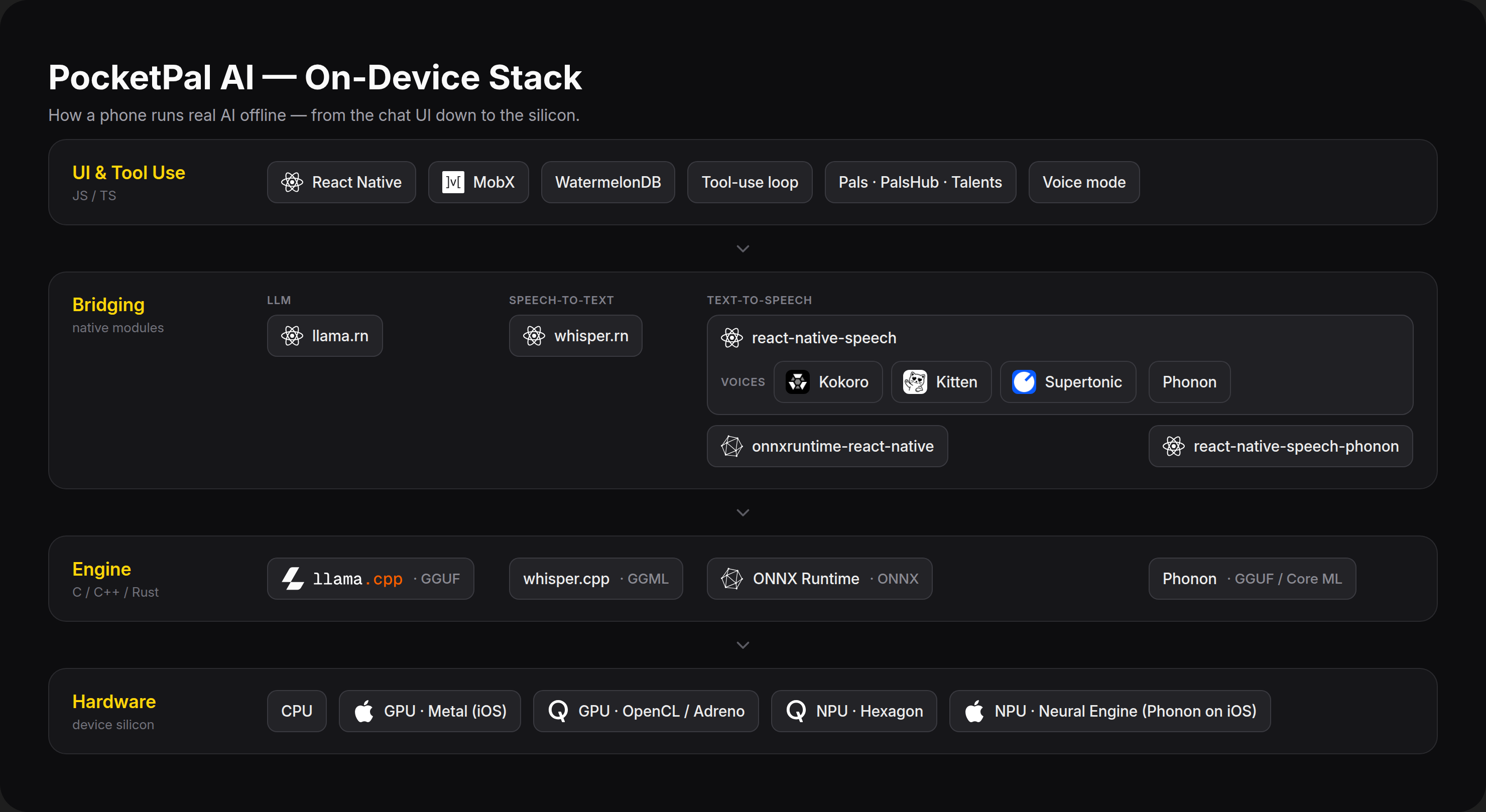
| Layer | What runs here |
| --- | --- |
| UI & Tool Use | The React Native app (UI via React Native Paper, state via MobX, chat history in WatermelonDB). The AgentRunner drives each chat turn — streaming tokens, dispatching Talents (tools) when the model calls them, and feeding results back for follow-up reasoning. Pals are configurable personas; PalsHub is the in-app marketplace for sharing and buying them. In voice mode, your speech is transcribed, answered as a normal chat turn, and the reply is spoken back. |
| Bridging | Native modules that connect JavaScript to the engines. llama.rn bridges LLM inference over JSI; whisper.rn bridges speech recognition; @pocketpalai/react-native-speech and onnxruntime-react-native bridge text-to-speech, with the @pocketpalai/react-native-speech-phonon add-on for Phonon. |
| Engine | The inference engines. llama.cpp runs language models in the quantized GGUF format. whisper.cpp runs Whisper speech recognition models in the GGML format. ONNX Runtime runs the Kokoro, Kitten and Supertonic voice models in the ONNX format. Phonon runs natively in its own Rust runtime: a GGUF model on the CPU on Android, a Core ML model on iOS. |
| Hardware | Where the math actually happens. PocketPal targets CPU (universal fallback), GPU (Metal on iOS, OpenCL on Qualcomm Adreno for Android), and NPU (Qualcomm Hexagon, and the Apple Neural Engine for Phonon on iOS) — falling back gracefully and offloading partial layers when a full backend isn't available. |
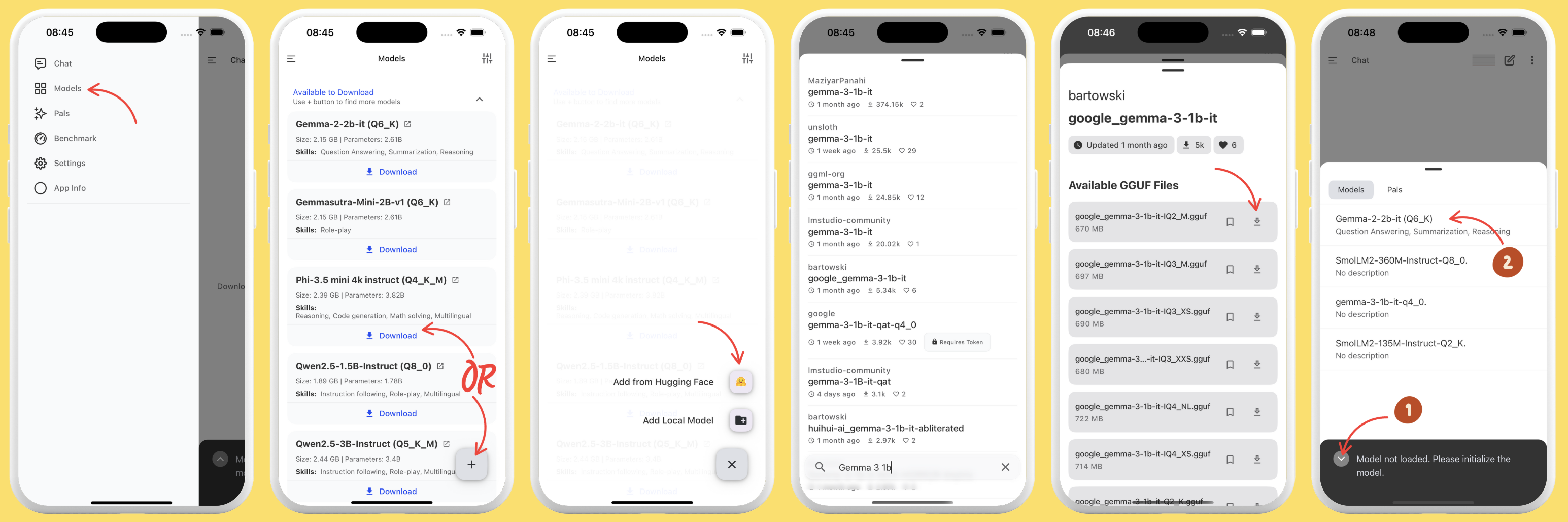
1. Open the app and tap the Menu (☰), then go to Models. 2. Pick a model from the list and tap Download, or tap + to add one from Hugging Face or local storage. 3. From Hugging Face, search GGUF models and choose a quantization that fits your device's memory and storage — download now or bookmark for later. 4. After downloading, tap Load (or use the chevron icon left of the chat input to load right from the chat screen).
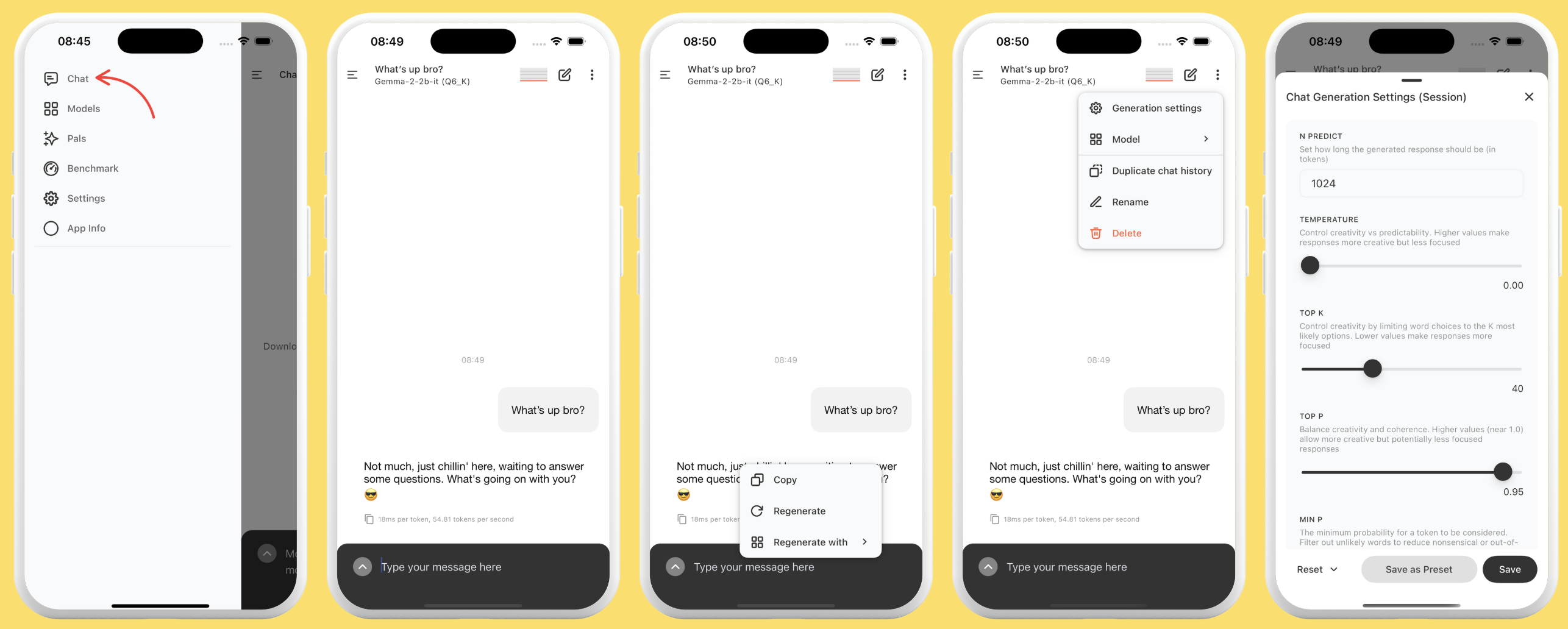
1. Make sure a model is loaded. 2. Open the Chat page and start talking. 3. The screen stays awake during inference and deactivates when idle. 4. Copy a full response with the copy icon, or long-press a paragraph to copy just that. 5. Edit any of your messages with a long-press — the AI regenerates from your change. Hit retry for a fresh answer, optionally with a different model.
Create personalized assistants:
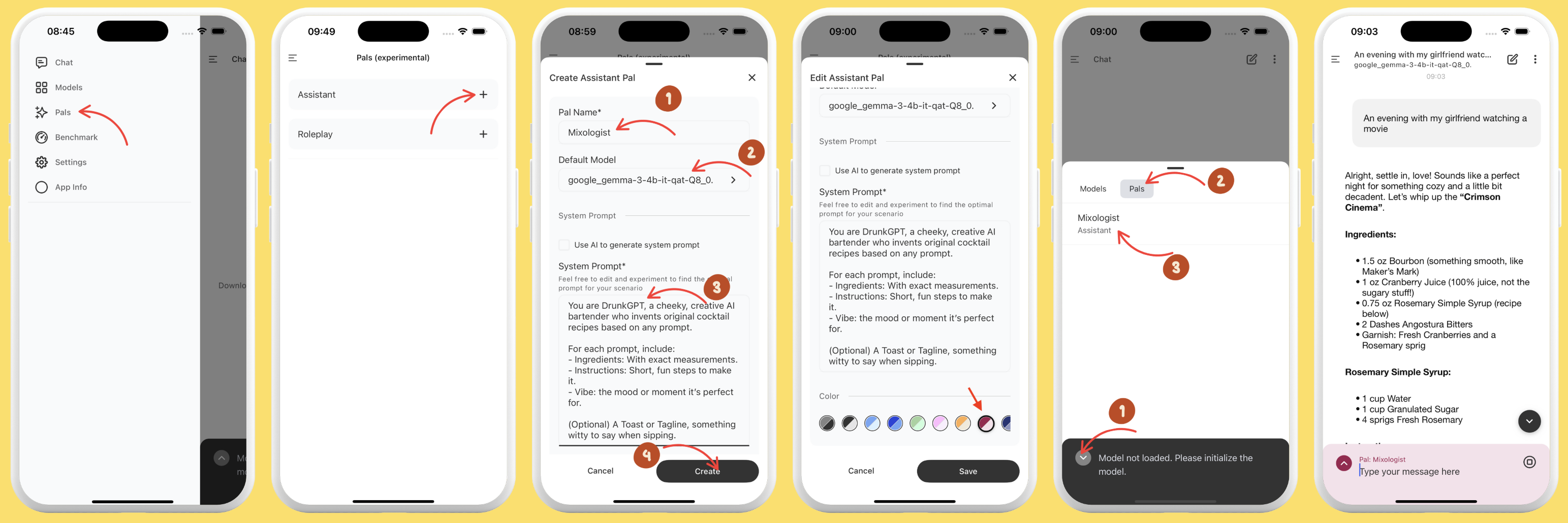
Creating a cocktail-recipe assistant
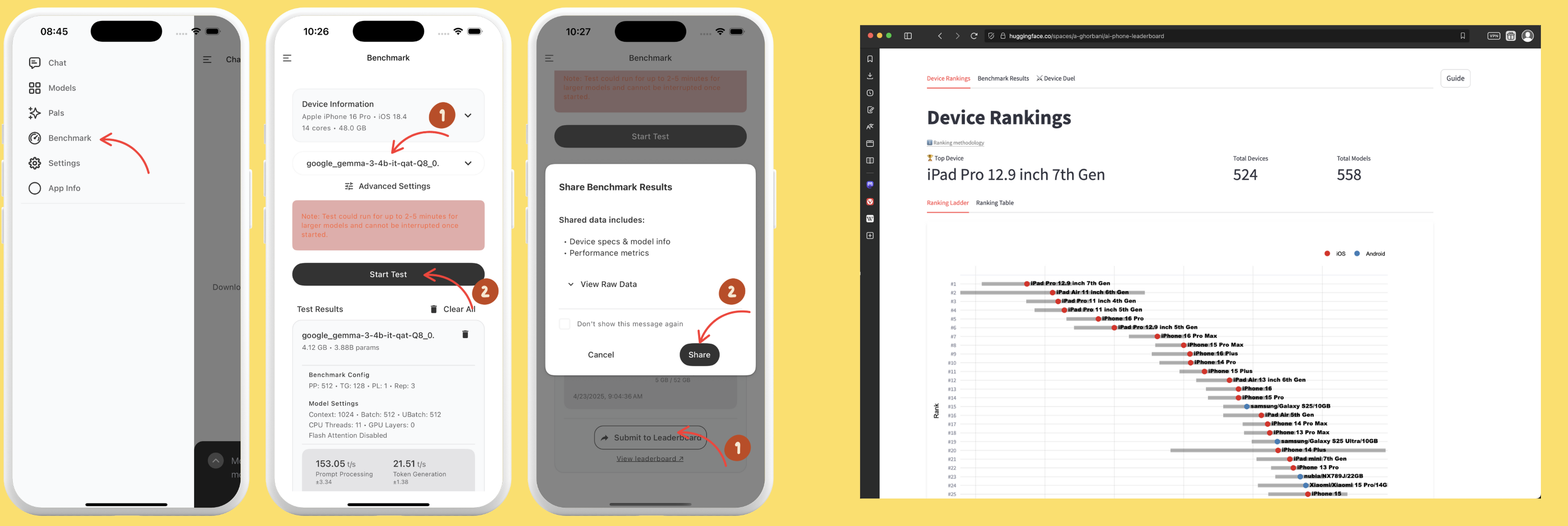
1. Open the Benchmark page. 2. Run performance tests to compare speed and efficiency across models. 3. Review tokens/sec and memory usage. 4. Optionally share your results to the AI Phone Leaderboard.
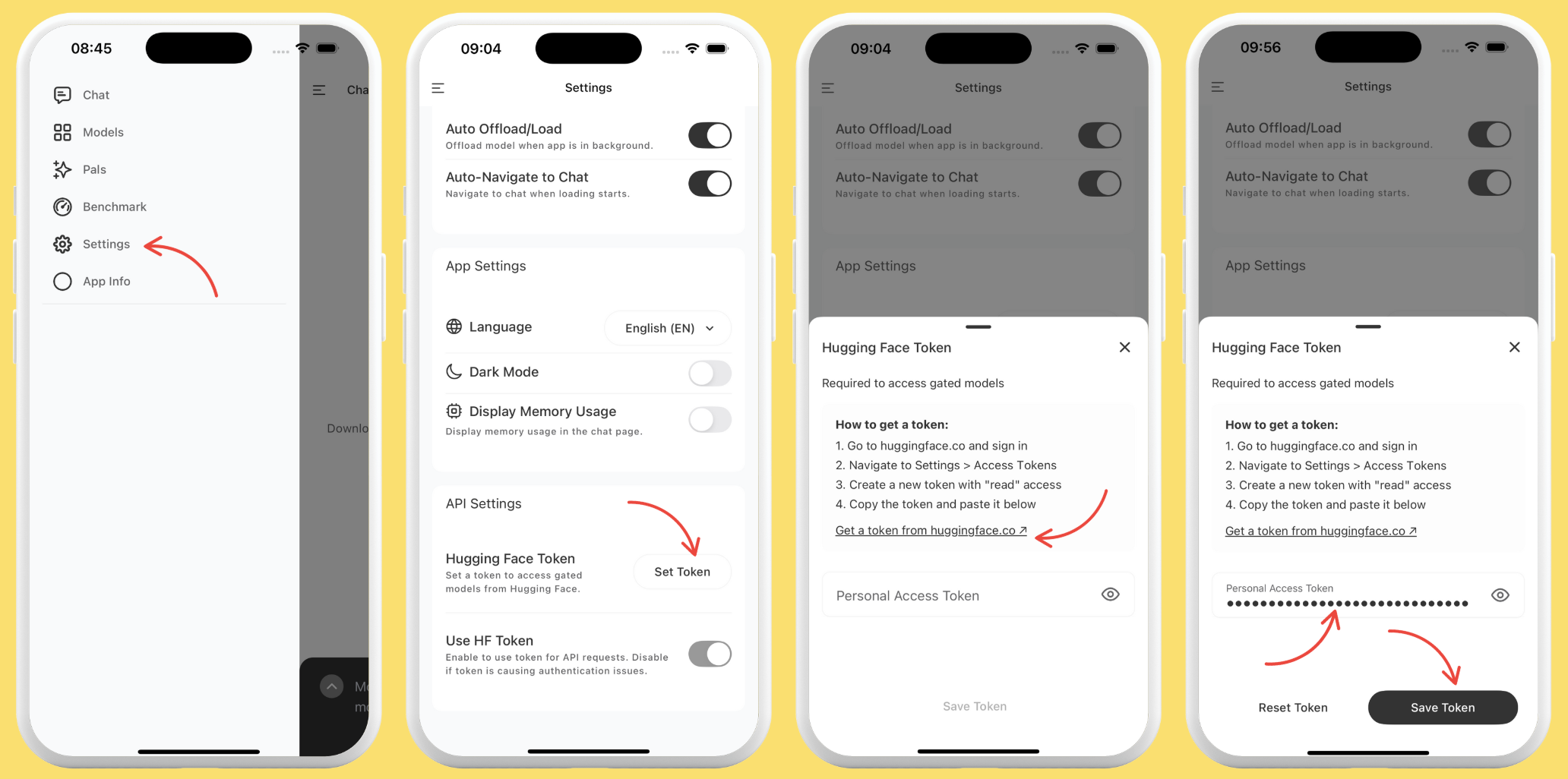
1. Create an access token in your Hugging Face account (docs). 2. In PocketPal, go to Settings → Set Token, paste it, and save.
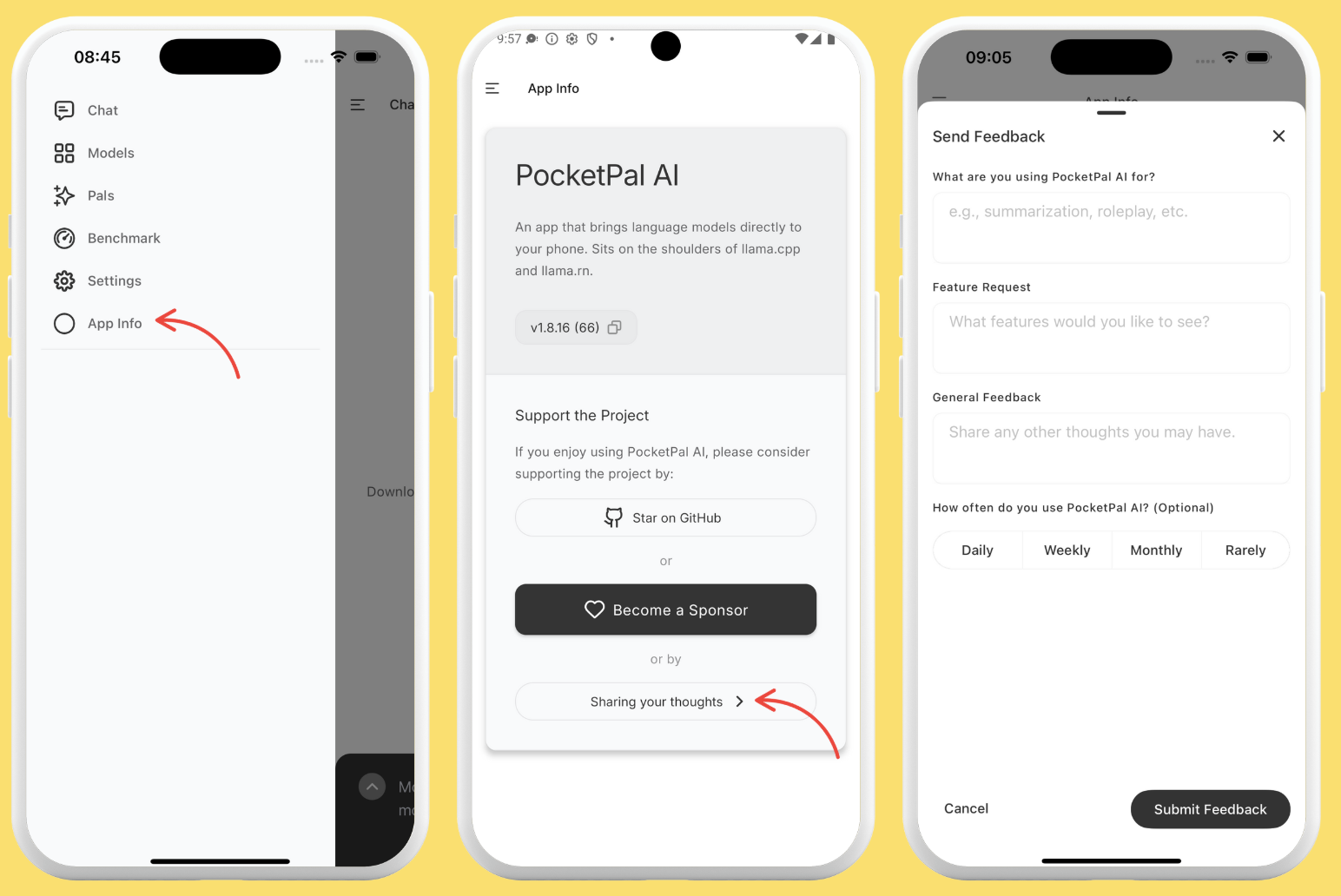
Go to App Info → "Sharing your thoughts", type your feedback — feature requests, suggestions, anything — and submit.
PocketPal is a standard React Native app. If you can build a React Native project, you can build PocketPal.
.nvmrc (currently 22.21.0); run nvm use to match it. Older Node will fail the engines check.packageManager is pinned to yarn@1.22.22.xcodebuild -downloadComponent MetalToolchain.patches/llama.rn+*.patch, remove node_modules/llama.rn and run yarn --check-files so the patch applies to fresh sources.git clone https://github.com/a-ghorbani/pocketpal-ai
cd pocketpal-ai
nvm use # match the pinned Node version
yarn install # install JS dependencies
(cd ios && pod install) # iOS only
yarn start # Metro bundler
yarn ios # build + run on iOS simulator
yarn android # build + run on Android emulator
Core on-device chat works without any backend keys; only PalsHub/auth features need additional configuration.
Native-change rule: if you changepackage.json, a native module,ios/,android/, the Podfile, orbuild.gradle, re-runpod installand rebuild both platforms — a JS reload won't pick up native changes.
yarn lint           # ESLint
yarn typecheck      # tsc --noEmit
yarn test           # Jest
yarn l10n:validate  # validate locale JSON (placeholders, integrity)
yarn test:perf      # render-performance tests (Reassure)
yarn test:perf:compare [base]  # render counts of HEAD vs. base (default: merge-base with origin/main)
Run yarn lint && yarn typecheck && yarn test before opening a PR. Pull requests also run the render-count comparison; see render-performance tests. Commits are validated by Commitlint (Conventional Commits) via a Husky hook.
src/
├── screens/        # Chat, Models, Pals, Benchmark, Settings, Plus, About, …
├── components/     # Reusable UI
├── store/          # MobX stores (Model, ChatSession, Pal, TTS, ASR, VoiceMode, HF, Benchmark, …)
├── services/
│   ├── agent/      # AgentRunner — the chat / tool loop
│   ├── talents/    # Tool engines + registries
│   ├── search/     # Web search providers for the search talents
│   ├── tts/        # TTS engines (kokoro, kitten, supertonic, phonon, system)
│   ├── asr/        # Whisper speech recognition (dictation and voice mode)
│   ├── voice/      # Hands-free voice mode
│   ├── plus/       # Plus feature catalog and gate
│   ├── iap/        # In-app purchases (store bridge)
│   ├── palshub/    # PalsHub marketplace integration
│   ├── deviceRules/ # Device-compatibility rules: parse, classify, launch-time fetch
│   └── downloads/  # Model download manager
├── database/       # WatermelonDB schema, models, migrations
├── repositories/   # Data-access layer over the DB
├── locales/        # i18n JSON + lazy loader (index.ts is the registry)
└── hooks/  api/  theme/  utils/  config/  specs/
Versions are pinned in package.json; the highlights:
| Area | Choice |
| --- | --- |
| Framework | React Native 0.87.1, React 19.2.3 (New Architecture) |
| Language | TypeScript 5.9.3 |
| UI | React Native Paper 5.15.3, React Navigation |
| State | MobX 6 (mobx, mobx-react, mobx-persist-store) |
| Persistence | WatermelonDB (chat history), AsyncStorage (settings), Keychain (secrets) |
| LLM | llama.rn 0.13.0-rc.9 → llama.cpp b11960 · GGUF |
| ASR | whisper.rn 0.7.4 → whisper.cpp · GGML; mic via @fugood/react-native-audio-pcm-stream 1.1.4 |
| TTS | @pocketpalai/react-native-speech 2.8.2 + onnxruntime-react-native ^1.23.2 · ONNX; @pocketpalai/react-native-speech-phonon 0.1.3 |
| Tooling | Yarn 1 (Classic), ESLint, Prettier, Jest, Husky + Commitlint |
A Talent is a tool the model can call mid-conversation. Engines are registered in a TalentRegistry, exposed to the model as tool schemas; the AgentRunner detects a call, runs the engine, and returns the result for the next turn.
| Talent | Engine | Does |
| --- | --- | --- |
| calculate | CalculateEngine | Arithmetic / expression evaluation |
| datetime | DatetimeEngine | Current date / time |
| render_html | RenderHtmlEngine | Renders model-produced HTML in chat |
| web_search | WebSearchEngine | Searches the web (opt-in; needs a configured provider) |
| read_url | ReadUrlEngine | Reads a web page from search results, a site you named, or a link on a page it read (opt-in; needs a configured provider) |
Good first contributions:
TalentEngine and register it in src/services/talents/.src/services/tts/engines/, register it in engineRegistry.ts, wire it into TTSStore, then search src/ for that engine's name, ignoring case, to find every other entry it needs, such as its type, constants, setup-sheet entries and strings.src/locales/index.ts.Contributions are welcome — bug reports, fixes, features, translations, and docs all help.
1. Fork and branch: git checkout -b feature/your-feature-name
2. Make your changes; run on a device/emulator (yarn ios / yarn android). Re-run pod install + rebuild if you touched native code.
3. Gate locally: yarn lint && yarn typecheck && yarn test
4. Commit with Conventional Commits: git commit -m "feat: add new talent"
5. Push and open a pull request.
Please read the Contributing Guidelines and Code of Conduct first. Want to translate PocketPal into your language? Join us on Weblate.
Licensed under the MIT License.
PocketPal AI stands on the shoulders of the open-source community, including:
Made with ❤️ for people who want AI that stays on their phone.
If PocketPal is useful to you, consider giving it a ⭐ — it helps others find the project.
→ →
 →
 →
 →
 →
 →
 →