1
 →
→
You're the boss, agents are your team. They handle tasks on their own, message each other, and review each other's work. You just watch the kanban board and give high-level commands.
777genius/agent-teams-ai is an open-source project on GitHub, mainly written in TypeScript. You're the boss, agents are your team. They handle tasks on their own, message each other, and review each other's work. It currently holds 2,149 stars and 364 forks with 0 open issues, and was last pushed on an unknown date (repository created unknown).
AI Homed tracks it on the AI Coding Agents board.
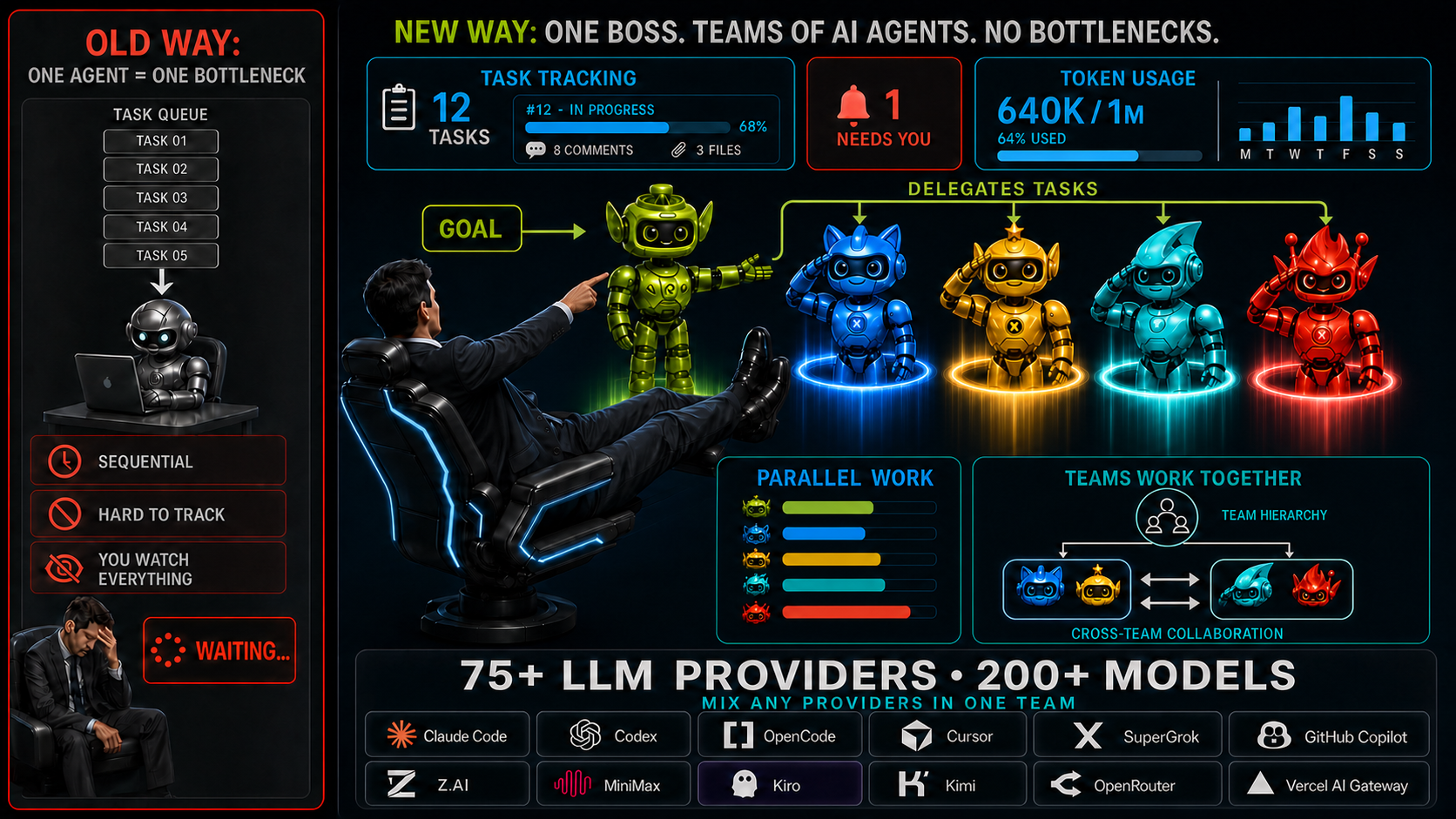

Free desktop app for AI agent teams. Start with a free model with no auth - no signup, API key, or card - or connect Claude Code, Codex, OpenCode, Cursor, SuperGrok, GitHub Copilot, Z.AI, MiniMax, Kiro, and many more. For coding and broader project work.

|

|

|

|

|

|

|

|

|

|

|

|
No prerequisites - the app can detect installed Claude Code, Codex, and OpenCode runtimes. You can also connect Cursor, SuperGrok, GitHub Copilot, Z.AI, MiniMax, and Kiro from the UI.
|
|
May trigger SmartScreen - click "More info" -> "Run anyway" Run normally. Administrator mode may be needed only if the app reports a specific OpenCode symlink or permission error. |
|
An orchestration layer for AI agent teams across Claude Code, Codex, OpenCode, Cursor, SuperGrok, GitHub Copilot, Z.AI, MiniMax, and Kiro.
#task-id, or refer to another team with @team-name in your messages.mcp-server (see mcp-server folder) for integrating external tools and extensible agent plugins out of the box| Feature | Agent Teams | Gas Town | Paperclip | Cursor | Claude Code CLI |
| ----------------------------------- | ------------------------------------------------------------------------------------------------------- | -------------------------------------------------------------------- | ---------------------------------------------------------------------- | -------------------------------------------------------------- | ------------------------------------------------------------ |
| Live team collaboration | ✅ █████████░ 9/10 · Agents plan, delegate, work, and review together | ✅ ████████░░ 8/10 · Persistent teams with coordination and recovery | ⚠️ ███████░░░ 7/10 · Durable scheduled agents, less live peer teamwork | ⚠️ ██████░░░░ 6/10 · Parallel agents + subagents, no peer team | ⚠️ ███████░░░ 7/10 · Experimental teams + cross-session messaging; recovery limits |
| Human control and approvals | ✅ Per-action approvals, roles, and notifications | ✅ Gates, roles, escalation, recovery | ✅ Board approvals, roles, pause, stop | ⚠️ Command controls and admin policies | ✅ Permissions + hooks |
| Visual team progress | ✅ Teammates, tasks, blockers, handoffs, activity, logs | ⚠️ Agent tree + feed panels | ⚠️ Org chart and run status, not a task/log map | ⚠️ Agents Window, no shared peer-team map | ⚠️ Terminal team panel, no graphical UI |
| Team workspace | ✅ Tasks, code, terminal, review, and teammates in one app | ⚠️ Mail/feed/dashboard across tools | ⚠️ Board + task chats, less live teammate view | ⚠️ Agents Window, no peer team workspace | ❌ No desktop UI |
| Easy setup | ✅ Start free, no signup or API key | ❌ Manual CLI stack | ⚠️ npx onboarding + browser app | ⚠️ App install + account | ⚠️ CLI + env flag |
| Agent readiness and recovery | ✅ Clear ready/stuck status with launch diagnostics | ✅ Working/stalled/failed health with recovery controls | ⚠️ Run status and orphan recovery | ⚠️ Agent status in Agents Window | ⚠️ Statuses in terminal, no graphical UI |
| Kanban board | ✅ 5 columns, real-time | ❌ Dashboard, not Kanban | ✅ 7 columns, drag-and-drop | ❌ | ❌ |
| Code review | ✅ Agent review plus accept, reject, and comment in the app | ⚠️ Merge queue, no diff UI | ⚠️ Review gates, not inline code review | ✅ Local Agent Review + PR Bugbot | ⚠️ Agent review, no review UI |
| Cross-team communication | ✅ Direct agent messages and shared task links across teams | ⚠️ Mailboxes + handoffs | ⚠️ Comments + @mentions | N/A | ⚠️ Cross-session messaging, no shared cross-team task graph |
| Linked tasks | ✅ Tasks can link to and block each other | ✅ Task deps + grouped work | ✅ Goals, parent tasks, blockers | ❌ | ✅ Shared task list |
| Agent activity and history | ✅ Messages, tool calls, timeline, token use, and cost | ⚠️ Session recall, feed, metrics | ⚠️ Run transcripts + cost audit | ⚠️ Agent chat + terminal | ⚠️ CLI transcripts + background logs |
| Organizations & global overview | ✅ Nested groups, live team/task status, relations, cross-team activity | ⚠️ Coordination hierarchy, no editable org map | ✅ Org chart + board governance | ⚠️ Team admin, no live org map | ❌ |
| Mixed AI teammates | ✅ Claude Code, Codex, OpenCode, Cursor, SuperGrok, GitHub Copilot, Z.AI, MiniMax, and Kiro in one team | ✅ Many providers, terminal-first | ✅ Bring your own agents/runtimes | ⚠️ Multi-model parent + subagents, no peer team | ⚠️ Claude-only experimental teams |
| Budget controls | ✅ Budget alerts + hard caps for scheduled runs | ⚠️ Cost tiers + digest, no hard caps | ✅ Per-agent budgets + hard stops | ⚠️ Usage + cloud spend limits | ⚠️ Usage/org limits + print-mode hard cap |
| Separate agent workspaces | ✅ Optional workspace per teammate | ✅ Core primitive | ✅ Worktrees / branches | ✅ Agents Window worktrees | ✅ Built-in for sessions and subagents |
| Terminal | ✅ Built-in visual terminal for team and local commands | ⚠️ Terminal-based workflow, no built-in terminal | ⚠️ Runs commands, no interactive terminal | ✅ Built-in IDE terminal | ⚠️ Runs in your terminal |
| Built-in code editor | ✅ With Git support | ❌ | ❌ Control plane, not editor | ✅ Full IDE | ❌ |
| Task attachments | ✅ Auto-attach, agents read & attach files | ❌ Not task-level | ✅ Docs, attachments, work products | ⚠️ Prompt context, not task attachments | ⚠️ Prompt files/images, not task attachments |
| Price | Free OSS UI + free model with no auth, paid providers optional | Free OSS, runtime plans needed | Free OSS, self-hosted + infra | Free + paid usage | Claude plan or API usage |
_Live collaboration scores are qualitative editorial assessments of documented communication, task ownership and dependencies, completion, and review capabilities; they are not benchmark results._
Product evidence was checked on August 27, 2026. Live collaboration scores are qualitative editorial assessments, not benchmark results.
→ →
→ →
→ →
→ →
→ →
→ →
→ →
→