
1
 →
→
Give your AI agent a brain that remembers. Local memory system for Claude Code — 100% private, GPU-accelerated, zero cloud dependency.
24kchengYe/MemoMind is an open-source project on GitHub, mainly written in Python. Give your AI agent a brain that remembers. Local memory system for Claude Code — 100% private, GPU-accelerated, zero cloud dependency. It currently holds 611 stars and 0 forks with 0 open issues, and was last pushed on an unknown date (repository created unknown).
AI Homed tracks it on the AI Agent Memory board.
Give your AI agent a brain that remembers.
A fully local, GPU-accelerated memory system for AI coding agents. Start building your digital twin's memory today — portable, evolving, and ready to migrate when a better system comes along.
---
AI memory has two audiences — the machine and the human. Most tools only address one:
| | For the AI (what it knows) | For the Human (what you can review) | |---|---|---| | Goal | AI remembers preferences, decisions, context across sessions | You browse, search, and manage conversation history | | Problem solved | "Why does it keep forgetting my coding style?" | "What did we discuss last Tuesday?" |
MemoMind handles the AI side — it gives your coding agent persistent, structured, intelligent memory. For the human side, see Recall (our companion project for conversation history management).
Use both together for the complete experience.
---
You've spent thousands of hours with AI — but it remembers nothing.
What if your AI could remember everything? Not just this session — but every conversation you've ever had, every decision you've made, every day you've lived?
Claude Code already has CLAUDE.md and MEMORY.md. But they have fundamental limitations:
| | Claude Code Built-in | MemoMind |
|---|---|---|
| Storage | Plain Markdown files | PostgreSQL + pgvector + knowledge graph |
| Extraction | Manual — you write rules yourself | Automatic — LLM extracts facts from conversations |
| Retrieval | Full file loaded into context every time (wastes tokens) | 4-way hybrid search, only relevant memories recalled |
| Cross-session | Static rules; append-only notes | Dynamic knowledge graph with entity linking + temporal relationships |
| Reasoning | No — just loads text | reflect synthesizes insights across all memories |
| Scalability | Breaks down at ~200 lines (context bloat) | Handles thousands of memories efficiently |
They're complementary, not competing. CLAUDE.md is great for static project rules ("use tabs, not spaces"). MemoMind handles the dynamic knowledge that accumulates over time ("user tried Redis caching last week but switched to Memcached due to memory constraints").
MemoMind gives your AI a persistent, local, intelligent brain. Not a chat log — a living knowledge graph that grows with every interaction, every imported conversation, every day of your life.
| | Without MemoMind | With MemoMind |
|---|---|---|
| Session start | Blank slate, zero context | Recalls your preferences, past decisions, project context |
| 500 ChatGPT conversations | Scattered across browser tabs, unsearchable | Unified knowledge graph, every fact extracted and linked |
| 3 years of daily activities | Trapped in your planner app | Searchable timeline — AI knows your patterns and history |
| Cross-AI knowledge | ChatGPT doesn't know what you told Gemini | All conversations merged into one memory |
| Decision tracking | Lost when chat window closes | Stored as structured facts with source tracing |
| Cross-session reasoning | Impossible | reflect synthesizes insights across all memories |
| Privacy | Cloud-based, fragmented | 100% local — nothing leaves your machine |
You: "Let's use FastAPI instead of Express for this project"
Claude Code internally:
  → retain("Project migrating from Express to FastAPI")  # auto-stores
Next week, new session:
  → recall("project tech stack")                          # auto-retrieves
  → "Based on your previous decision, I'll use FastAPI..."
You don't do anything — the AI handles it all.
| Metric | Value | |--------|-------| | Memory nodes | 50,100+ | | Knowledge links | 2,900,000+ | | Named entities | 4,600+ | | Time span | 2017 – present (9 years) | | AI chats imported | 541 (ChatGPT + Gemini) | | Life events imported | 5,500+ (2,400+ days) | | Knowledge Vault docs | 13,400+ (NoteDiscovery) | | Database size | ~500 MB | | Keyword search | 20–33ms | | Semantic recall | 235–430ms | | Daily LLM cost | < $0.01 |
---
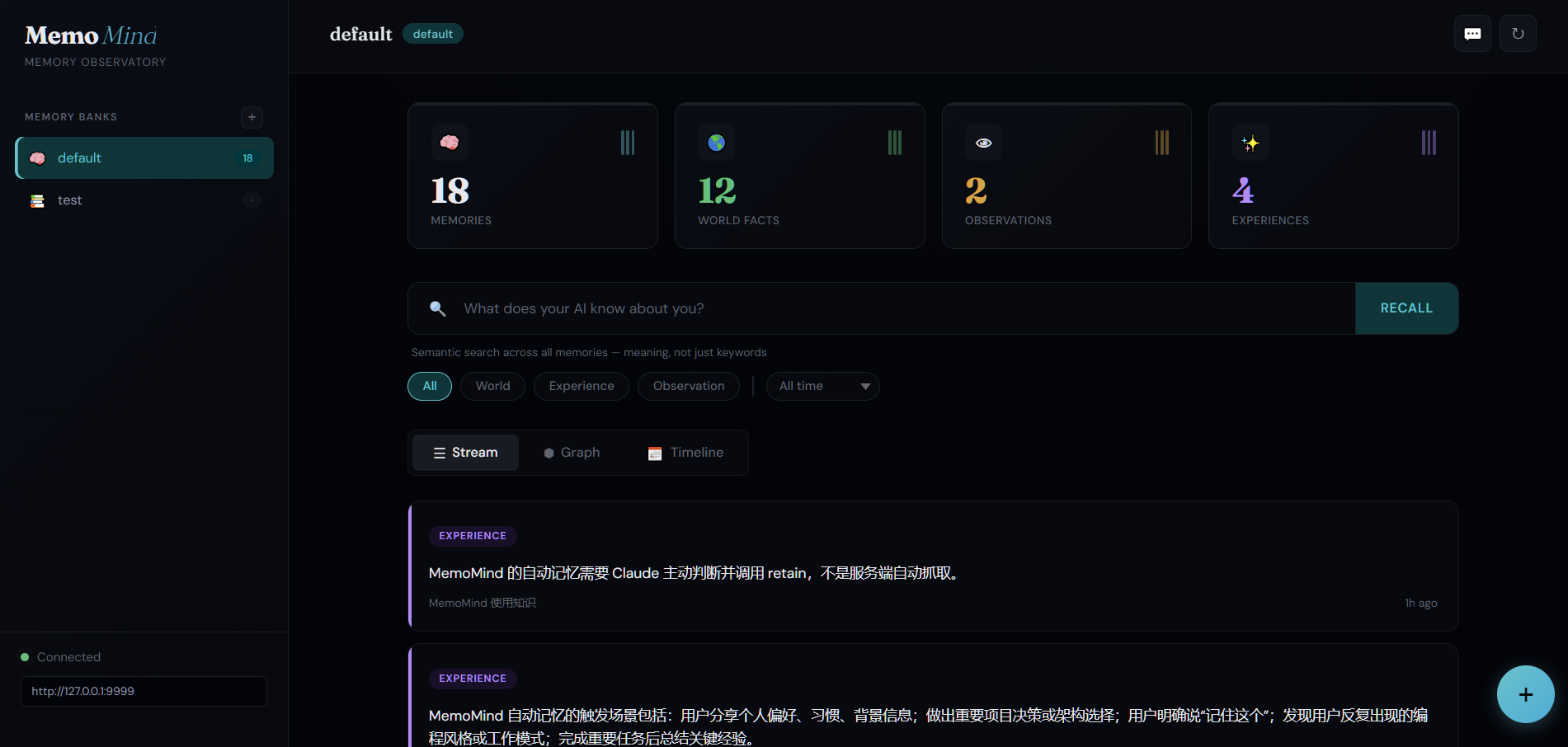
| Knowledge Graph | Timeline View |
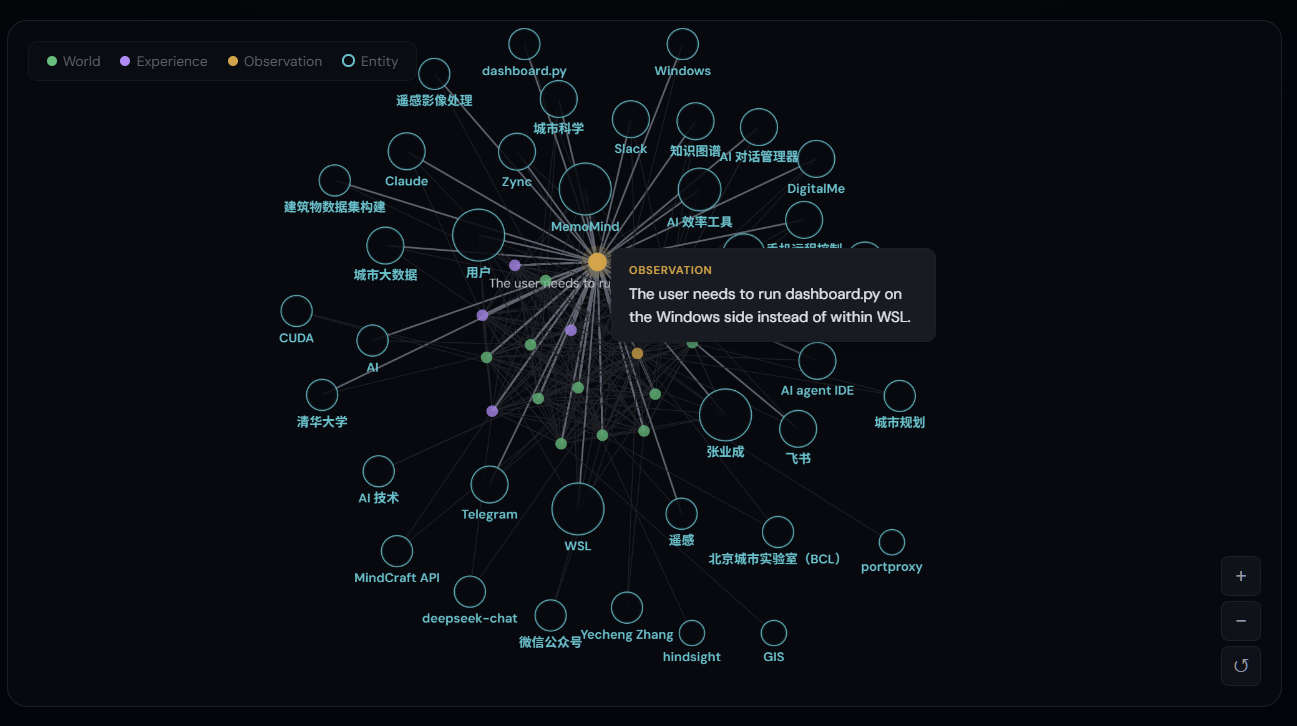 |
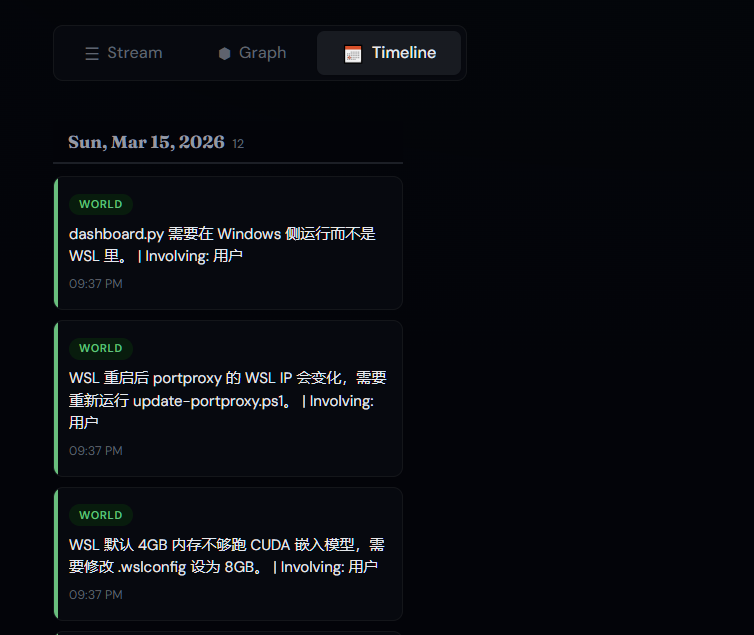 |
| Type Filters | Add Memory |
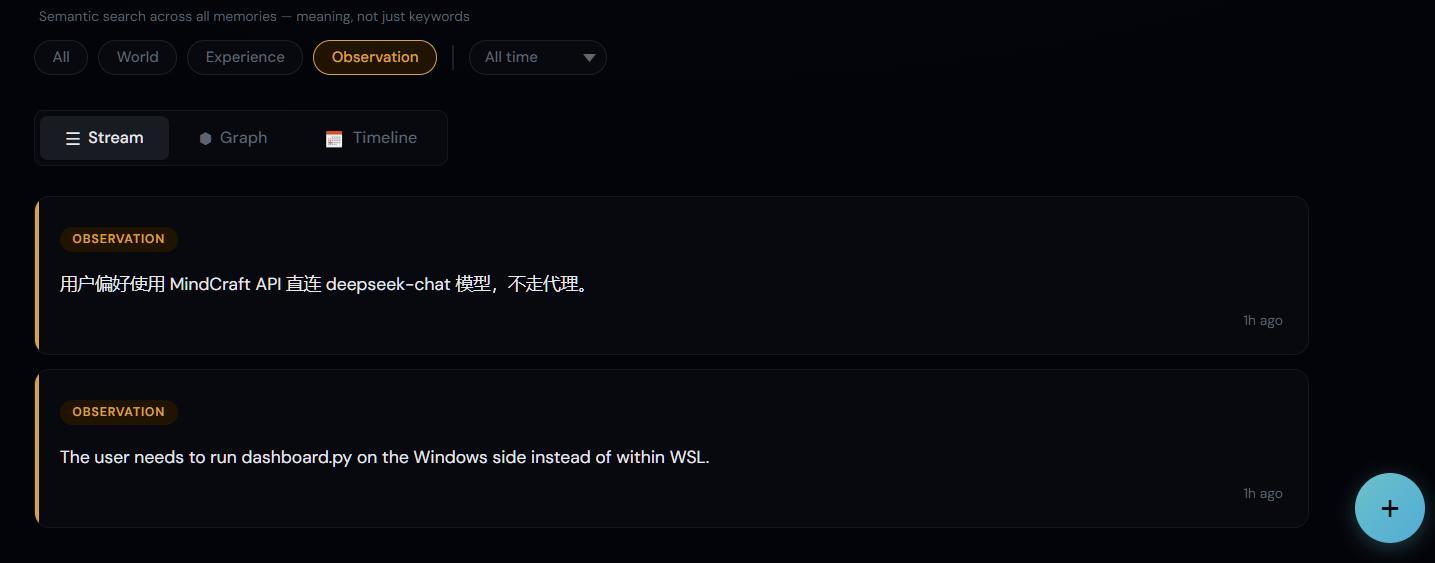 |
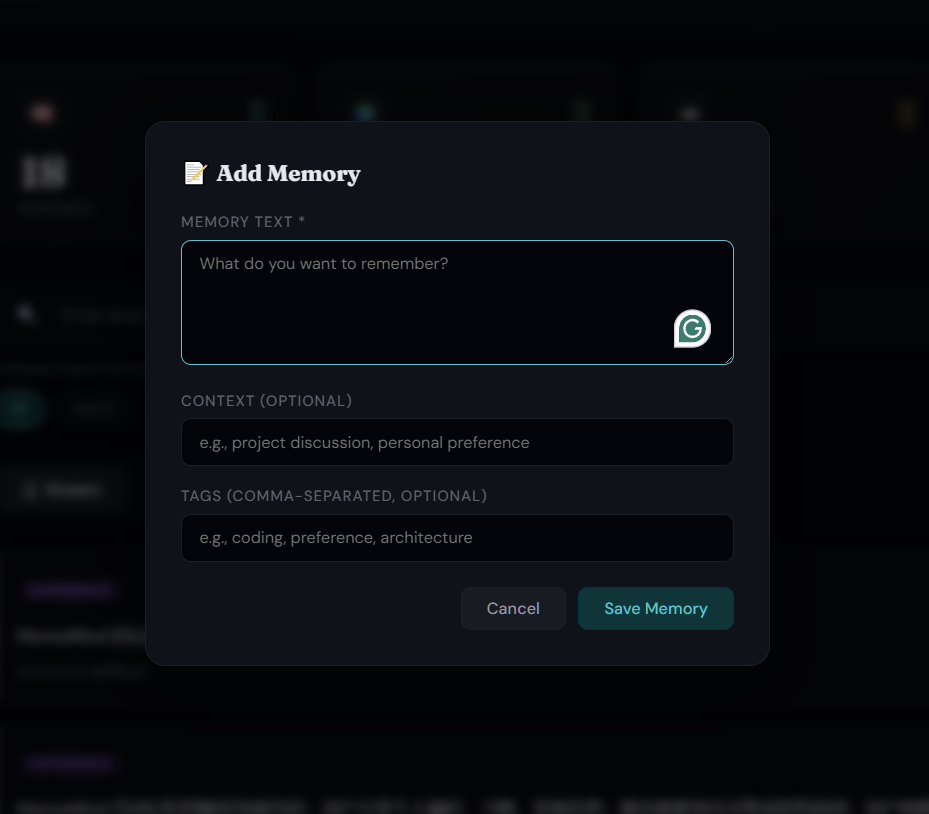 |
---
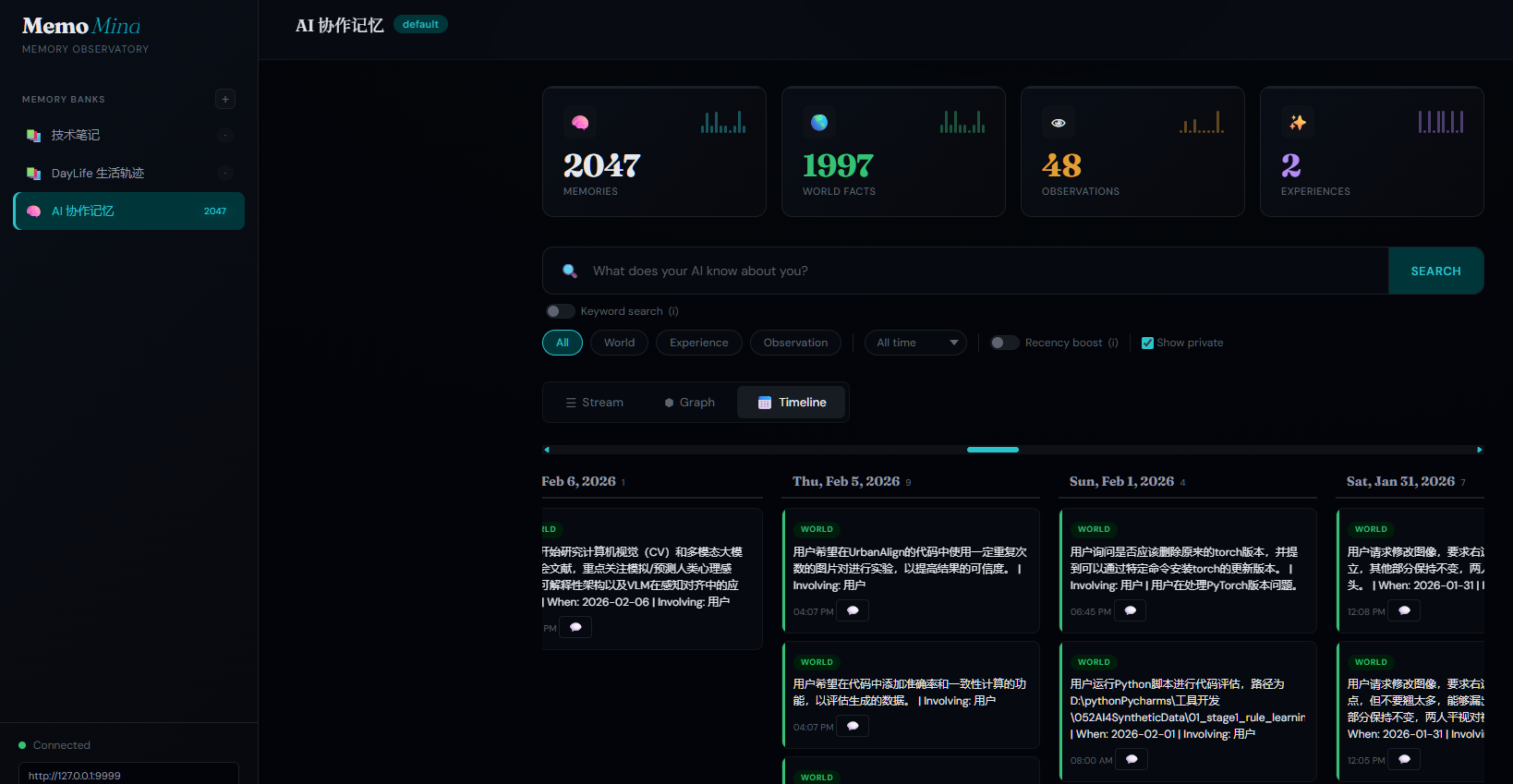
One-click import your ChatGPT and Gemini conversation history into the knowledge graph — then trace any memory back to the original conversation.
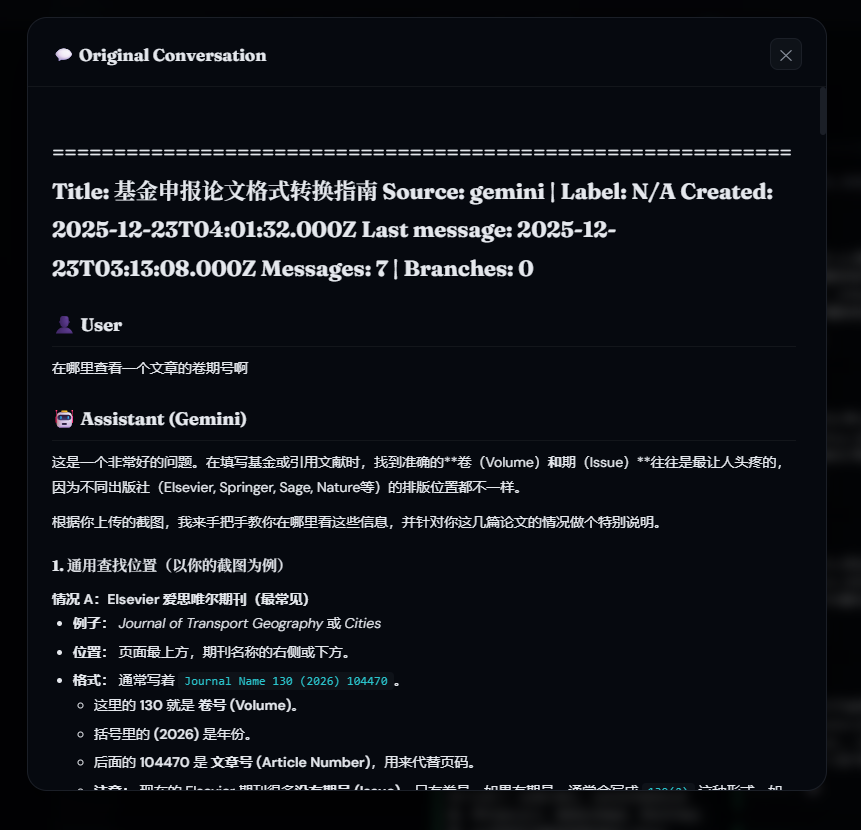
Export your conversations using our companion tools, then import them into MemoMind. Every extracted memory links back to its source — click the 💬 icon on any memory card to view the full original conversation.
| AI Memory Timeline (2,000+ memories) | Original Conversation Tracing |
 |
 |
Companion tools for conversation export:
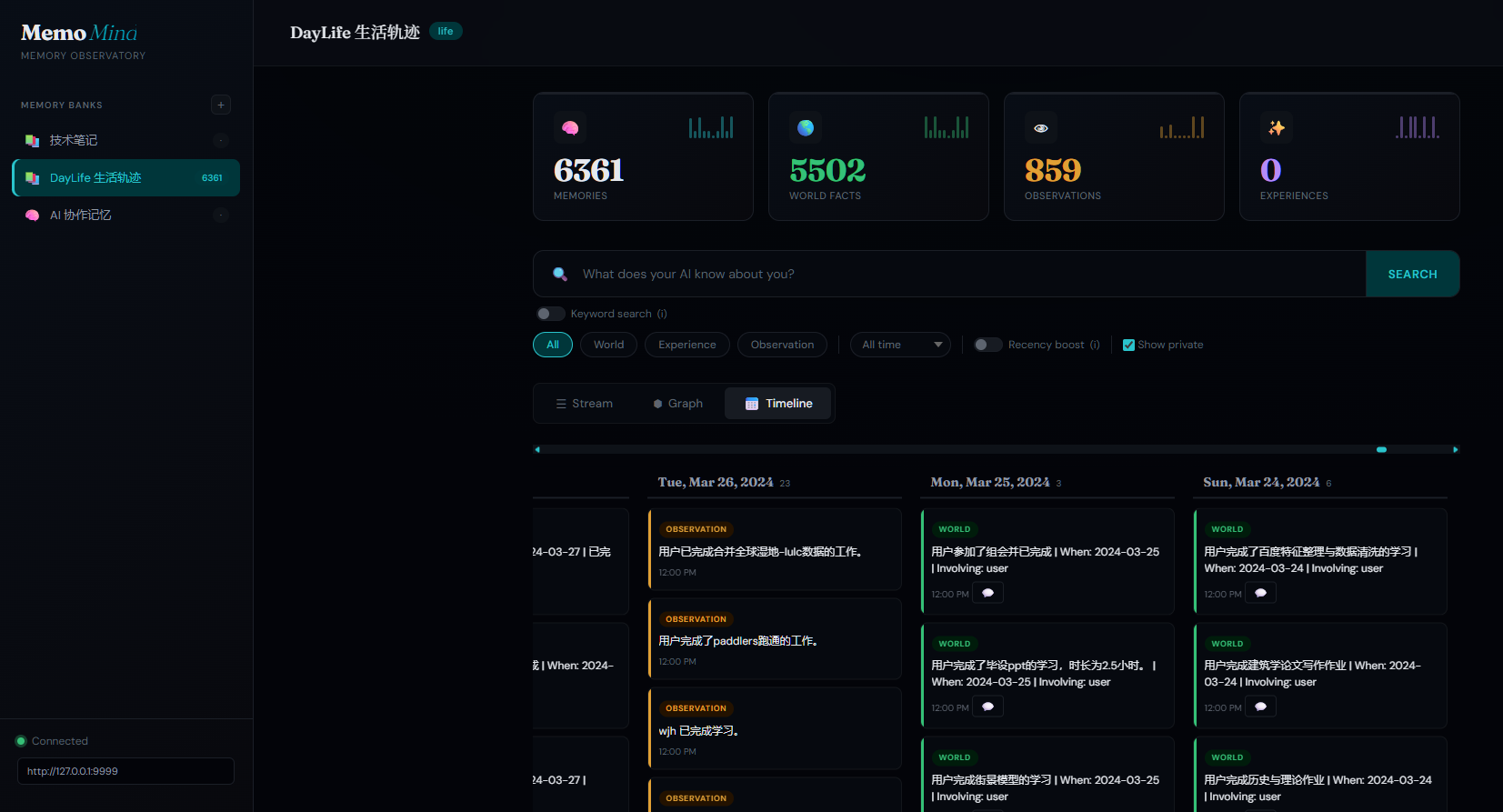
Import your daily activities from DayLife — every event becomes a searchable, AI-analyzable memory. Smart daily sync catches up automatically even if your computer was off for days.
| Life Timeline in MemoMind (6,000+ events) | DayLife App — Your Daily Planner |
 |
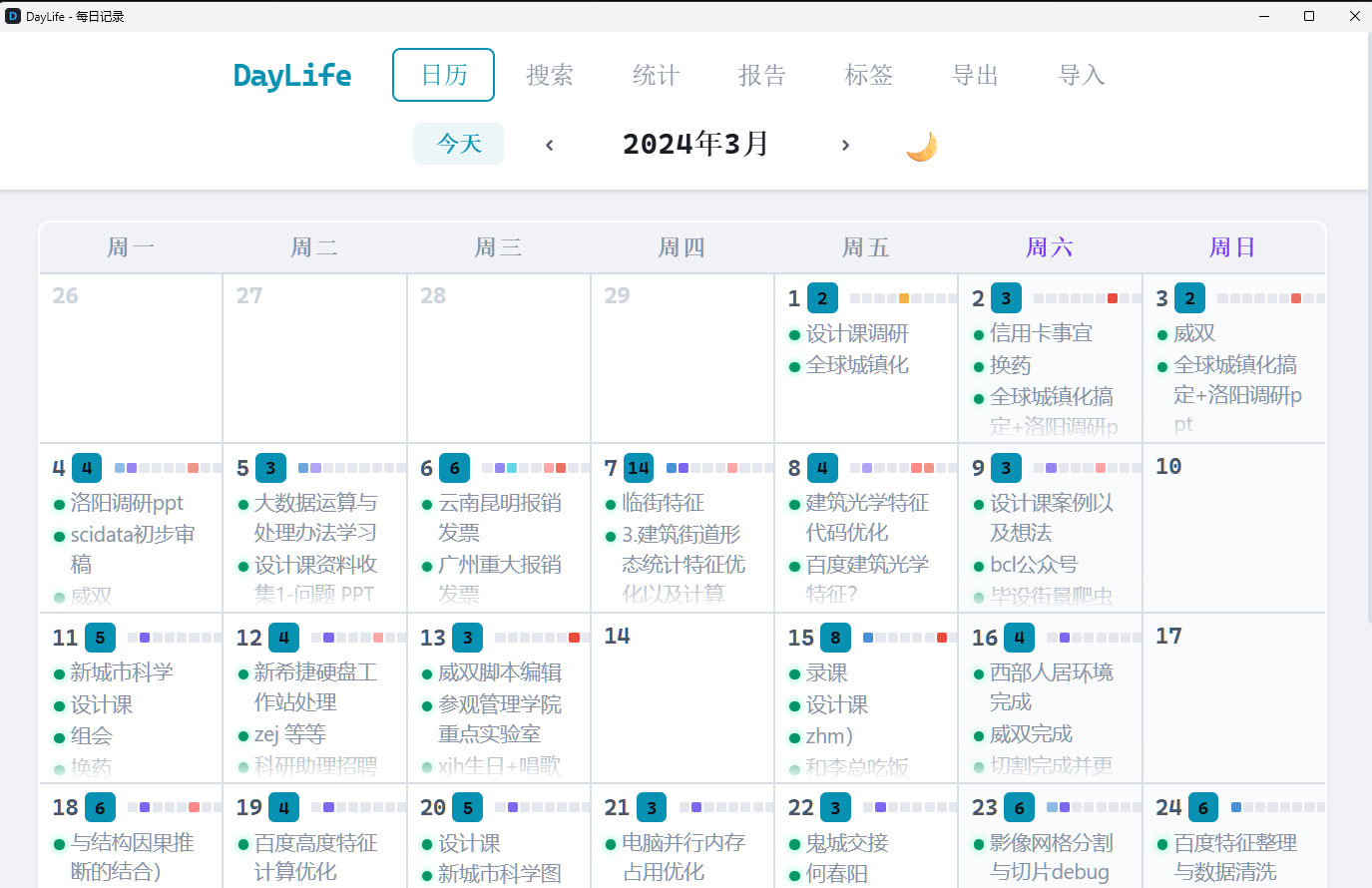 |
Import once with import_daylife.py, then the daily sync keeps it updated forever. Combined with DayLife's CSV import feature, you can one-click visualize your entire life history — every plan, every achievement, every habit pattern — all searchable by AI.
---
| Feature | MemoMind | Mem0 | Graphiti/Zep | Letta | Cognee | Hindsight | |---------|----------|------|--------------|-------|--------|-----------| | GitHub Stars | — | 51K | 24K / 4K | 22K | 15K | 7K | | Funding | Self-funded | $24M (YC) | — | $10M | $7.5M | $3.5M | | Architecture | KG + pgvector | Vector + Graph | Temporal KG | Agent OS | ECL + KG | 4-network | | Retrieval | 4-way hybrid | Semantic + graph | Sem+BM25+graph | Agent-driven | 14 modes | 4 parallel | | Knowledge Graph | Built-in (pgvector) | Pro only ($249/mo) | Core (Neo4j) | No | Yes | Yes | | Temporal | Native | No | Bi-temporal | No | Partial | Yes | | Privacy | 100% local | Cloud default | Cloud/BYOC | Self-host opt | Local/Cloud | Local | | GPU Accel | Local CUDA | No | No | No | No | No | | LongMemEval | — | 49% | — | — | — | 91.4% | | Cost | $0.30/mo | Free–$249/mo | Free–$475/mo | Free–$200/mo | Free–$200/mo | Free (OSS) |
MemoMind vs MemOS: MemOS is a general-purpose memory operating system for LLM agents, with multi-modal support (text + images + tool traces) and OpenClaw/MoltBot plugin integration. MemoMind is purpose-built for MCP-based coding agents with deeper retrieval (4-way hybrid vs 2-way), built-in reasoning (reflect), and zero-infrastructure GPU-accelerated local embeddings. Choose based on your agent ecosystem: MCP agents → MemoMind, OpenClaw/general agents → MemOS.
---
http://127.0.0.1:9999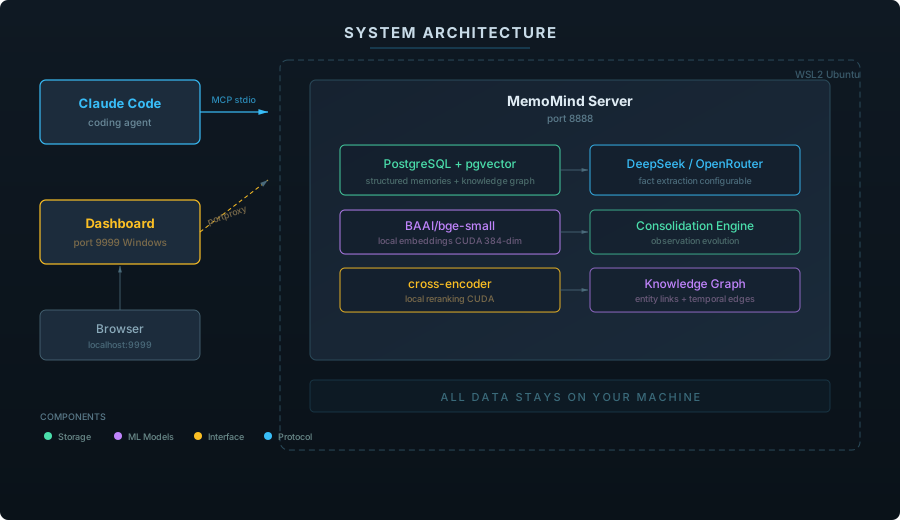
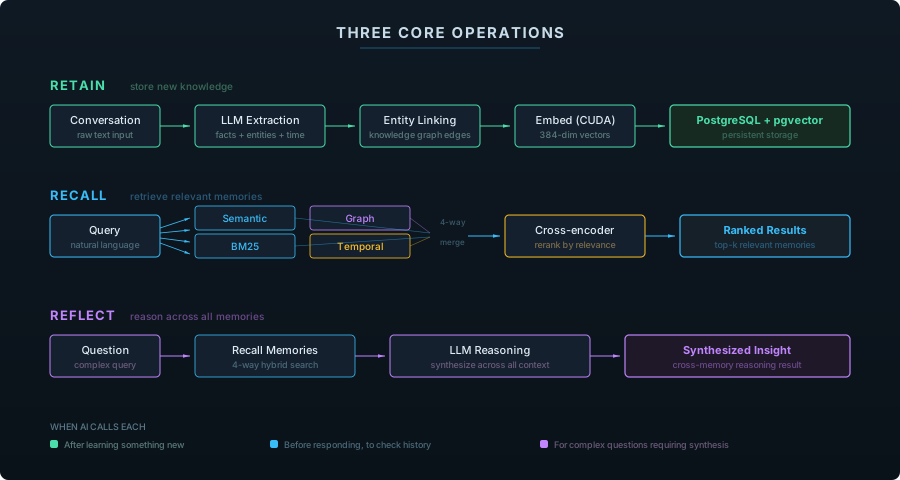
| Operation | What It Does | When AI Calls It | |-----------|-------------|------------------| | retain | Extract facts from conversation, store in vector DB | After learning something new about you | | recall | 4-way hybrid search (semantic + BM25 + graph + temporal) | Before responding, to check relevant history | | reflect | Deep reasoning across all memories | For complex questions requiring synthesis |
MemoMind organizes knowledge into four biomimetic memory pathways — modeled after how human memory actually works:
| Type | What It Captures | Example | How It's Used | |------|-----------------|---------|---------------| | World | Objective facts about the user and environment | "User prefers Python over R" | Shapes recommendations and defaults | | Experience | Events the agent participated in | "Last session we debugged the auth module" | Provides continuity across sessions | | Observation | Patterns auto-synthesized from behavior | "User consistently uses functional style" | Refines understanding over time | | Mental Model | Learned understanding of complex topics | "This codebase follows hexagonal architecture with ports and adapters" | Enables deeper reasoning about project context |
Unlike flat key-value stores, these types form a knowledge graph — entities are linked by relationships, creating retrieval pathways that go far beyond simple keyword matching.
Observations don't just accumulate — they evolve. The consolidation engine automatically merges, updates, and refines observations as new facts arrive:
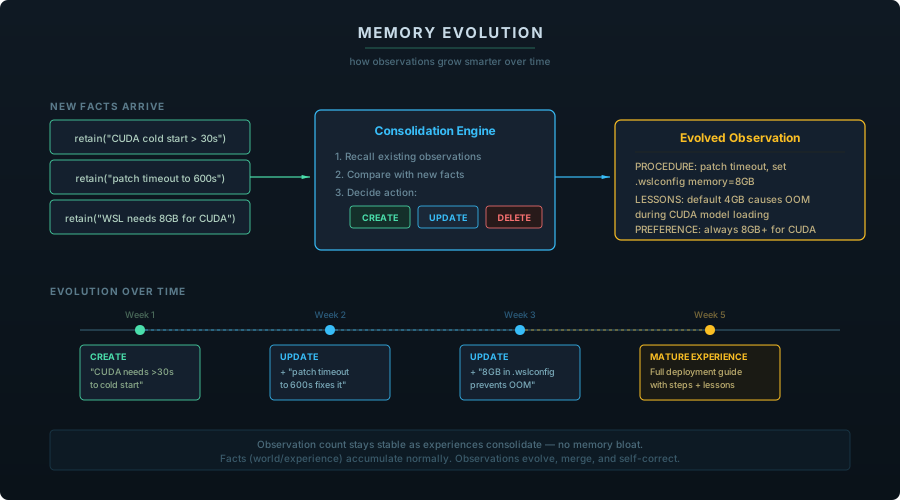
Each memory bank has a configurable mission that controls how the consolidation engine synthesizes observations — from simple detail tracking to structured task-level experience records with procedures, lessons learned, and user preferences.
---
Runs entirely on Windows — no WSL, no virtual machines. Most stable option.
Step 1 — Clone and set up Python venv
git clone https://github.com/24kchengYe/MemoMind.git
python -m venv D:\pythonPycharms\memomind-env
Step 2 — Install dependencies
# Install hindsight-api (skip uvloop — Windows doesn't support it)
pip install hindsight-api-slim --no-deps
pip install pg0-embedded sentence-transformers torch --index-url https://download.pytorch.org/whl/cu124
Install remaining deps (see requirements-win.txt or install all from hindsight-api-slim metadata)
Step 3 — Set up PostgreSQL 17 + pgvector
# Download PG 17 portable: https://www.enterprisedb.com/download-postgresql-binaries
Extract to e.g. D:\memomind-pg\pgsql\
Initialize and start:
pg_ctl initdb -D D:\memomind-pg\data -U hindsight -A trust
pg_ctl start -D D:\memomind-pg\data -o "-p 5433"
Build and install pgvector (requires Visual Studio Build Tools):
git clone https://github.com/pgvector/pgvector.git
In VS Developer Command Prompt:
set PGROOT=D:\memomind-pg\pgsql
nmake /F Makefile.win && nmake /F Makefile.win install
Create database with vector extension:
createdb -h localhost -p 5433 -U hindsight hindsight
psql -h localhost -p 5433 -U hindsight -d hindsight -c "CREATE EXTENSION vector;"
Step 4 — Configure and start
# Edit serve.py — set LLM_API_KEY, LLM_BASE_URL, LLM_MODEL
Apply patches:
python patch_hindsight.py
Start the server:
python serve.py          # API at http://localhost:19999
pythonw dashboard.py     # Dashboard at http://localhost:9999
Step 5 — Register MCP in Claude Code
claude mcp add --scope user --transport stdio memomind \
  -- D:\memomind-env\Scripts\python.exe D:\memomind-env\mcp_stdio.py
Step 6 — (Optional) Auto-start on boot
# Create a Windows Scheduled Task, or copy to Startup:
copy start-memomind.vbs "%APPDATA%\Microsoft\Windows\Start Menu\Programs\Startup\"
Uses WSL2 on Windows or runs natively on Linux. Leverages systemd for service management.
Step 1 — Clone and install
git clone https://github.com/24kchengYe/MemoMind.git
On Linux or inside WSL:
cd MemoMind
sudo bash install.sh
Step 2 — Configure your LLM API key
sudo nano /opt/memomind-env/serve.py
Set LLM_API_KEY, LLM_BASE_URL, LLM_MODEL (see "Supported LLM Providers" below)
Step 3 — Start the service
sudo systemctl start memomind
Step 4 — Register MCP in Claude Code
# From Windows (if using WSL):
claude mcp add --scope user --transport stdio memomind \
  -- wsl -d Ubuntu -u memomind -e //opt/memomind-env/mcp-entry.sh
From Linux (native):
claude mcp add --scope user --transport stdio memomind \
  -- /opt/memomind-env/bin/python3 /opt/memomind-env/mcp_stdio.py
Step 5 — (Optional) Auto-start & Dashboard
# WSL auto-start (run from Windows):
copy keep-wsl-alive.vbs "%APPDATA%\Microsoft\Windows\Start Menu\Programs\Startup\"
Dashboard (run from Windows, or Linux with GUI):
pythonw dashboard.py  # Opens at http://localhost:9999
curl http://localhost:19999/health
→ {"status":"healthy","database":"connected"}
The LLM is only used for fact extraction (not for chatting). MemoMind supports any OpenAI-compatible API. Two deployment modes:
Use a domestic OpenAI-compatible API gateway. No VPN, no proxy, no extra configuration:
| Provider | Base URL | Recommended Model | Notes |
|----------|---------|-------------------|-------|
| MindCraft | https://api.mindcraft.com.cn/v1 | deepseek-chat, qwen-flash | 200+ models, pay-per-use |
| DeepSeek | https://api.deepseek.com/v1 | deepseek-chat | Official DeepSeek API |
| SiliconFlow | https://api.siliconflow.cn/v1 | Various open-source models | Free tier available |
# In serve.py — just set these three lines:
LLM_API_KEY = "your-api-key"
LLM_BASE_URL = "https://api.mindcraft.com.cn/v1"
LLM_MODEL = "deepseek-chat"
NEEDS_PROXY = False  # No proxy needed
For OpenRouter, OpenAI, Anthropic, etc. Requires a proxy bridge (proxy-bridge.py) to route WSL traffic through your Windows proxy:
| Provider | Base URL | Recommended Model |
|----------|---------|-------------------|
| OpenRouter | https://openrouter.ai/api/v1 | qwen/qwen3.5-9b ($0.05/1M tokens) |
| OpenAI | https://api.openai.com/v1 | gpt-4.1-nano |
| Groq | https://api.groq.com/openai/v1 | llama-3.3-70b-versatile (ultra-fast) |
# In serve.py:
LLM_API_KEY = "sk-..."
LLM_BASE_URL = "https://openrouter.ai/api/v1"
LLM_MODEL = "qwen/qwen3.5-9b"
NEEDS_PROXY = True  # Routes through proxy-bridge.py → Clash
MemoMind includes proxy-bridge.py — a lightweight TCP forwarder that runs on Windows and bridges WSL to your local proxy (e.g., Clash):
# Start the bridge (binds 0.0.0.0:12080 → 127.0.0.1:2080)
pythonw proxy-bridge.py
WSL can now reach your proxy via {Windows_IP}:12080
This is automatically configured in serve.py when NEEDS_PROXY = True
To auto-start, uncomment the proxy-bridge line in keep-wsl-alive.vbs.
Ollama (fully local, no API key needed), Groq, LM Studio, and more. For non-OpenAI-compatible providers (Anthropic, Gemini), set llm_provider in serve.py to "anthropic" or "gemini".
MemoMind can be integrated in multiple ways beyond MCP:
Zero-code setup — Claude Code automatically calls retain / recall / reflect via MCP protocol. See Quick Start above.
pip install hindsight-client # Install the client library
from hindsight_client import HindsightClient
client = HindsightClient(base_url="http://localhost:8888")
Store a memory
client.retain("default", "User prefers FastAPI over Express for new projects")
Recall relevant memories
results = client.recall("default", "What framework should I use?")
for memory in results:
    print(memory.text, memory.relevance_score)
Deep reflection across all memories
insight = client.reflect("default", "What patterns do you see in my tech choices?")
print(insight)
# Health check
curl http://localhost:8888/health
List memories
curl http://localhost:8888/v1/default/banks/default/memories/list
Recall (semantic search)
curl -X POST http://localhost:8888/v1/default/banks/default/memories/recall \
  -H "Content-Type: application/json" \
  -d '{"query": "user preferences", "max_tokens": 4096}'
Reflect
curl -X POST http://localhost:8888/v1/default/banks/default/reflect \
  -H "Content-Type: application/json" \
  -d '{"query": "Summarize what you know about this user"}'
Use separate memory banks to isolate memories per user, project, or context:
# Create a bank per user
client.create_bank("user-alice", name="Alice's Memories")
client.create_bank("user-bob", name="Bob's Memories")
Each user's memories are completely isolated
client.retain("user-alice", "Alice prefers dark mode and Vim keybindings")
client.retain("user-bob", "Bob uses VS Code with default settings")
Recall only searches within the specified bank
alice_prefs = client.recall("user-alice", "editor preferences")
→ Only returns Alice's preferences, not Bob's
AI memory systems will keep evolving — today it's MemoMind, tomorrow it could be something better from OpenAI, Anthropic, or
→ →
→ →
→ →
→ →
→ →
→ →
→ →
→